
aonus A9 Pro
Aonus A9 Pro Cordless Stick Vacuum Cleaner User Manual
Модели: A9 Pro
Brand: Aonus
1. Киришүү
Welcome to the Aonus A9 Pro Cordless Stick Vacuum Cleaner user manual. This guide provides essential information for the safe and efficient operation, maintenance, and troubleshooting of your new vacuum cleaner. Please read this manual thoroughly before first use and keep it for future reference.
2. Продукт бүтүп калдыview
2.1. Компоненттер камтылган
The Aonus A9 Pro package includes the following components:
- Main Motor Unit (with dustbin and LED display)
- Бүктөлүүчү узартуучу түтүк
- Motorized Brush Head (with LED lights)
- Алынуучу Батарея Топтому
- Дубалга орнотулган док
- Кубат адаптери/заряддагыч
- Жарака куралы
- 2-бирде чаң тазалоочу щетка
- Cleaning Tool (for brush head and filter)
- Запастык чыпка

Figure 2.1: Aonus A9 Pro Cordless Vacuum Cleaner and its included accessories.
3. Орнотуу
3.1. Ассамблея
- Insert the foldable extension tube into the main motor unit until it clicks securely into place.
- Attach the motorized brush head to the other end of the extension tube, ensuring it clicks firmly.
- For handheld use, attach desired accessories (crevice tool, dusting brush) directly to the main motor unit.
3.2. Батареяны заряддоо
Биринчи колдонуудан мурун, батареяны толук заряддаңыз. Батареяны вакуумга тиркелген учурда же өзүнчө заряддоого болот.
- Connect the power adapter to the charging port on the main unit or directly to the battery pack.
- Адаптерди розеткага сайыңыз.
- The LED display will indicate charging status. A full charge typically takes 4-5 hours.

Figure 3.2: The removable battery pack and its charging indicators.
4. Иштөө нускамалары
4.1. Күйгүзүү/өчүрүү жана соргуч режимдери
Press the power button to turn the vacuum on or off. Use the mode button on the LED display to switch between suction modes:
- Төмөн соргуч: For light dust and extended runtime (up to 60 minutes).
- Орто соруу: For general cleaning.
- High Suction: For deep cleaning and stubborn dirt (up to 42KPa / 500W).
- Автоматтык режим: The vacuum intelligently detects dust concentration and adjusts suction power accordingly.

Figure 4.1.1: Intelligent LED control screen displaying battery life and suction mode.

Figure 4.1.2: Automatic dust detection adjusts suction for efficient cleaning.

Figure 4.1.3: Demonstration of the vacuum's powerful 42KPa suction.
4.2. Special Features and Usage
- Бүктөлүүчү Дизайн: The extension tube can be folded 180 degrees, allowing easy access under low furniture like beds and sofas without bending over.
- Чаташканга каршы щетка: The motorized brush head is designed to prevent hair entanglement, ensuring smooth operation and effective cleaning on various floor types including carpets, wood, marble, and tile.
- LED фаралар: The brush head features LED lights to illuminate dust and debris in dark areas, ensuring no spot is missed.
- Ар тараптуу аксессуарлар: Use the crevice tool for narrow gaps and corners, and the 2-in-1 dusting brush for upholstery, keyboards, and delicate surfaces.
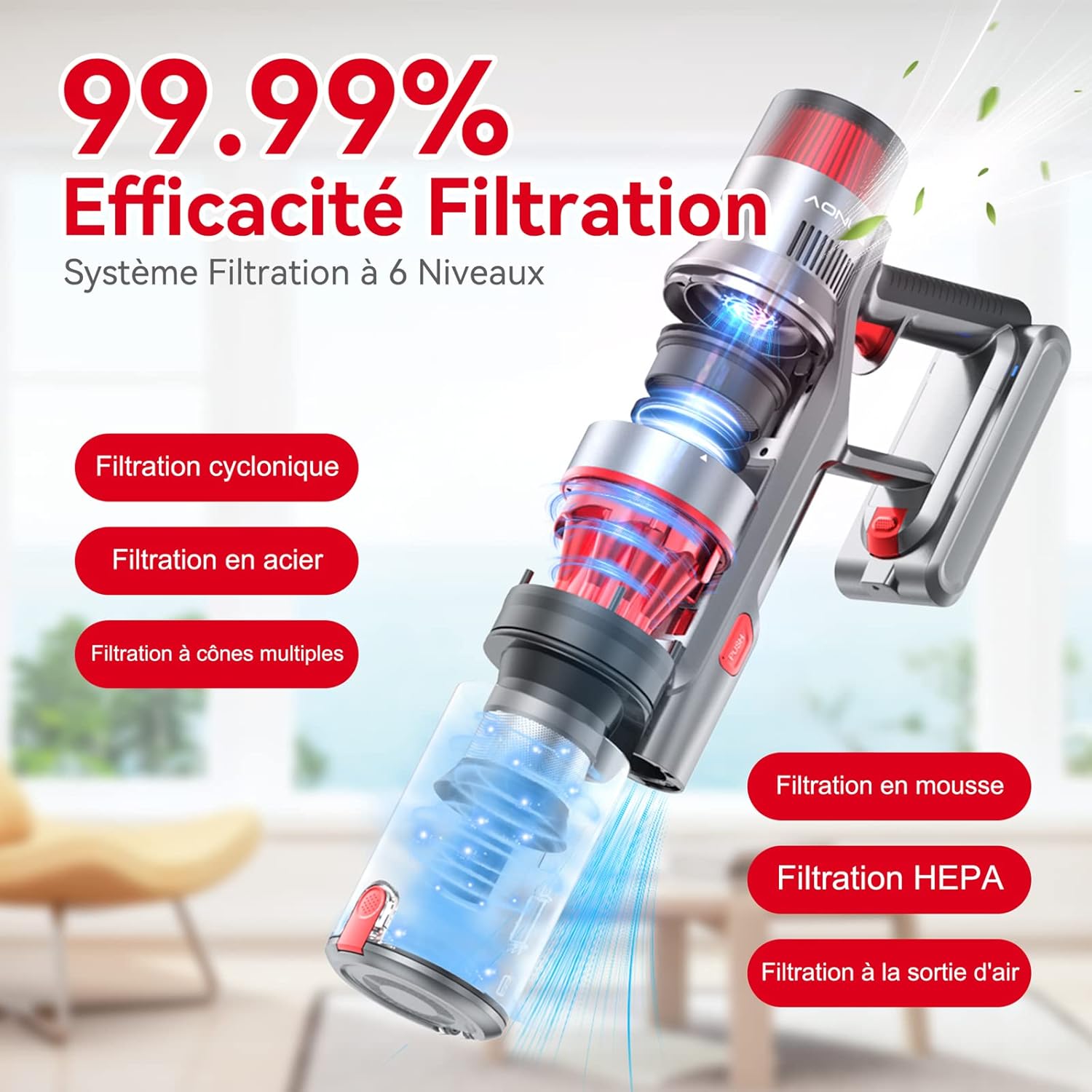
Figure 4.2.1: The 180-degree foldable design allows easy cleaning under low furniture.
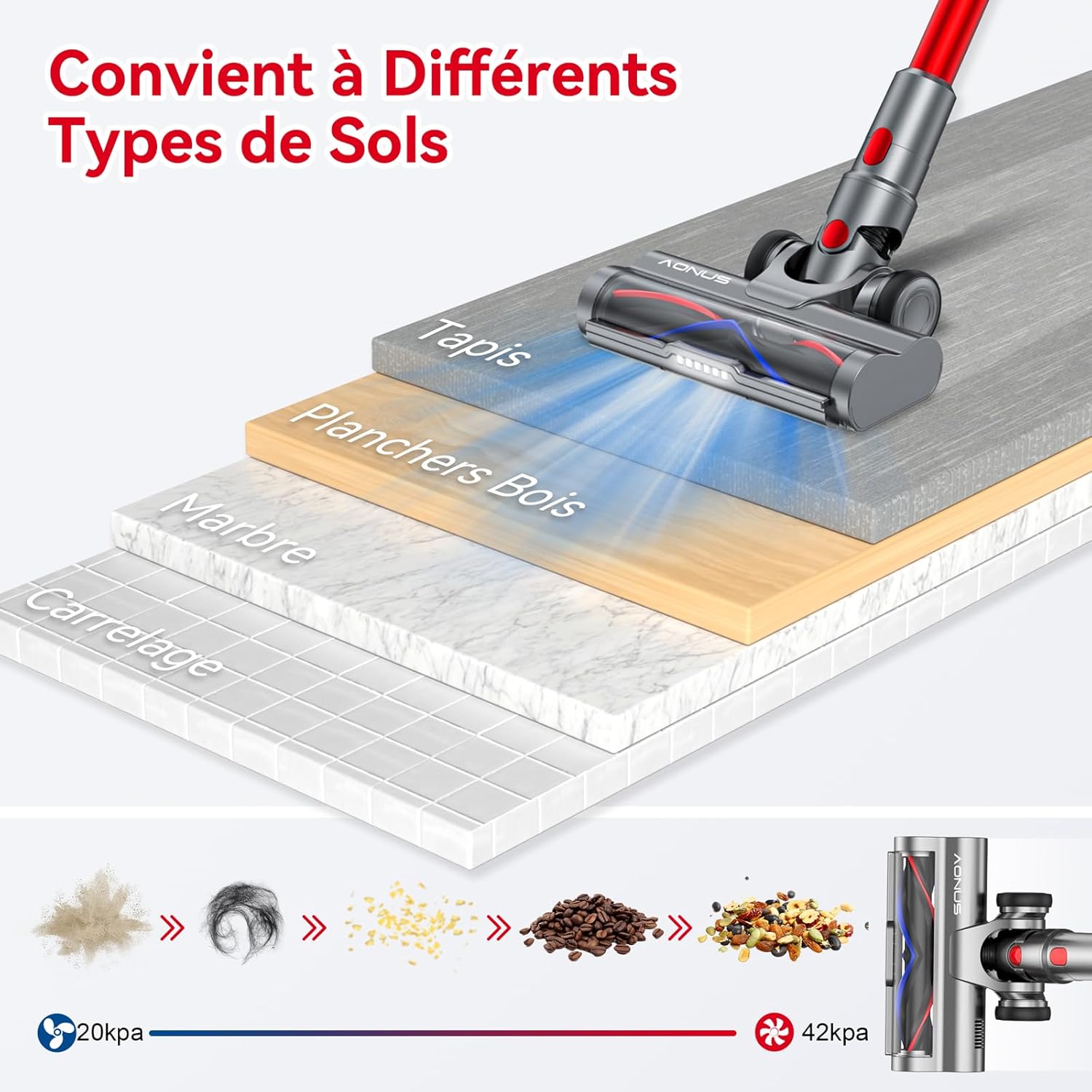
Figure 4.2.2: The vacuum is effective on various floor types including carpet, wood, marble, and tile.

Figure 4.2.3: The vacuum comes with multiple functional accessories for different cleaning scenarios.
5. Техникалык тейлөө
Regular maintenance ensures optimal performance and extends the lifespan of your Aonus A9 Pro vacuum cleaner.
5.1. Таштанды кутусун бошотуу
Empty the dustbin after each use or when the MAX line is reached.
- Негизги блокту таштанды челектин үстүнө кармаңыз.
- Press the dustbin release button (usually marked "PUSH" or with a trash can icon) to open the bottom flap and release debris.
- Капкакты бошоткондон кийин бекем жабыңыз.

Figure 5.1: One-click dust removal for quick and easy emptying.
5.2. Чыпкаларды тазалоо
The Aonus A9 Pro features a 6-level filtration system, including washable HEPA and metal filters. Clean filters regularly (e.g., monthly, depending on usage) to maintain suction power and prevent secondary pollution.
- Twist and pull to remove the dustbin and filter assembly from the main unit.
- Separate the HEPA filter, metal filter, and foam filter.
- Rinse all washable filter components under cold running water until the water runs clear.
- Allow all filter components to air dry completely for at least 24 hours before reassembling and placing back into the vacuum. Do not use a dryer or direct heat.

Figure 5.2: Diagram illustrating the 6-level filtration system, including cyclonic, steel, multi-cone, foam, and HEPA filters.
5.3. Cleaning the Brush Head
Periodically check the brush head for tangled hair or debris. While designed to be anti-tangle, some accumulation may occur.
- Чаң соргучту өчүрүп, щетка башын ажыратыңыз.
- Use the provided cleaning tool to cut and remove any tangled hair or fibers from the brush roller.
- Ensure the roller spins freely before reattaching.
6. Кыйынчылыктарды
Жалпы маселелер жана аларды чечүү үчүн төмөнкү таблицага кайрылыңыз.
| Көйгөй | Мүмкүн себеп | Чечим |
|---|---|---|
| Вакуум күйбөйт. | Батарея түгөнүп калган же туура орнотулган эмес. | Батареяны толугу менен кубаттаңыз. Батарея топтому ордуна бекем орнотулганын текшериңиз. |
| Соруу күчү төмөн. | Dustbin is full, filters are clogged, or there's a blockage. | Empty the dustbin. Clean all filters thoroughly. Check the extension tube and brush head for blockages. |
| Щетканын башы айланууну токтотот. | Hair or debris tangled in the brush roller, or a blockage in the brush head. | Turn off the vacuum and remove any tangled hair or debris from the brush roller. Clear any blockages in the brush head assembly. |
| Батареянын кыска иштөө убактысы. | Operating in High Suction mode frequently, or battery degradation. | Use Automatic or Low Suction mode for longer runtime. Ensure battery is fully charged before use. If battery life significantly decreases over time, consider battery replacement. |
7. Техникалык шарттар
| Өзгөчөлүк | Спецификация |
|---|---|
| Бренд | Aonus |
| Модель номери | A9 Pro |
| Түс | Кызыл |
| Продукциянын өлчөмдөрү (L x W x Y) | 12.7 x 7.62 x 12.7 см |
| Элемент Салмагы | 2.8 килограмм |
| Таштанды кутусунун сыйымдуулугу | 1 литр |
| Күч | 500 Ватт |
| Максималдуу соргуч | 33000Па |
| Материал | Алюминий, Пластик |
| Runtime | 60 мүнөткө чейин |
| Ызы-чуу деңгээли | 60 дБ |
| Өзгөчөлүктөр | Washable Filter, HEPA, Portable, Cordless, Bagless, Foldable Design, LED Display, Automatic Dust Detection |
| Чыпка түрү | Картридж (HEPA) |
| Сунушталган Колдонуулар | Car, Pet Hair, Floors |
8. Кепилдик жана колдоо
8.1. Кепилдик маалыматы
The Aonus A9 Pro Cordless Stick Vacuum Cleaner typically comes with a 2-year manufacturer's warranty. Please refer to the warranty card included in your product packaging for specific terms and conditions. Keep your proof of purchase for warranty claims.
8.2. Кардарларды колдоо кызматы
For any questions, technical assistance, or warranty claims, please contact Aonus customer support through the retailer where you purchased the product or visit the official Aonus webбайланыш маалыматы үчүн сайт.
Ask a question about this manual
Ask about setup, troubleshooting, compatibility, parts, safety, or missing instructions. Manuals+ will review the question and use this page’s manual context to help answer it.