
ALLIMITY RC43157
ALLIMITY RC43157 Replacement Remote Control User Manual
Model: RC43157 | Brand: ALLIMITY
1. Киришүү
The ALLIMITY RC43157 is a replacement remote control designed to operate various Westwood and EDENWOOD television models. This remote control is ready to use without any programming required; simply insert the batteries, and it will function immediately, replicating all the essential functions of your original remote.
2. Орнотуу жана Батареяны орнотуу
Follow these simple steps to begin using your ALLIMITY RC43157 replacement remote control:
- Батарея бөлүмүн ачуу: Locate the battery compartment cover on the back of the remote control. Slide or press the latch to open it.
- Батареяларды салыңыз: Insert two new AAA alkaline batteries (not included) into the compartment. Ensure the positive (+) and negative (-) terminals of the batteries match the markings inside the compartment.
- Бөлүктү жабуу: Батарея уясынын капкагын ордуна коюңуз, анын ордуна бекем чыкылдатыңыз.
- Пультту текшерүү: Point the remote control towards your compatible Westwood or EDENWOOD TV and press the Power button. The TV should respond. No additional programming is required.

Сүрөт 1: Алдыңкы view of the ALLIMITY RC43157 remote control. This image displays the full layout of buttons, including number keys, navigation, volume, channel, and dedicated app buttons.
3. Operating Instructions (Button Functions)
The ALLIMITY RC43157 remote control features a standard layout for easy operation of your television. Below is a description of the main button functions:
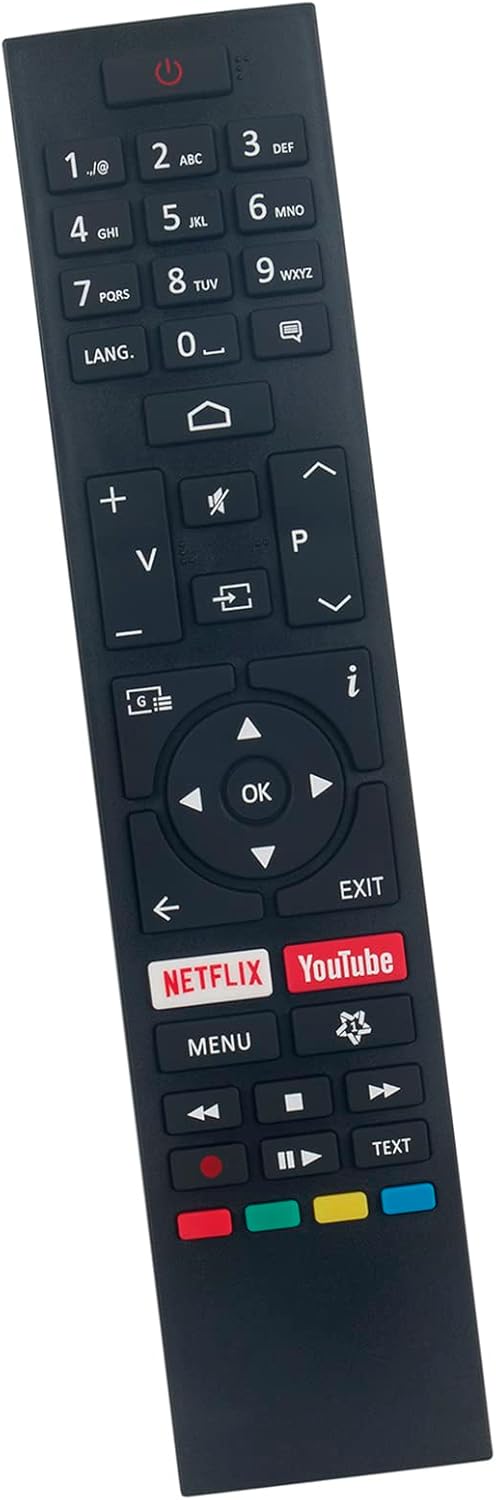
Сүрөт 2: Бурчтуу view of the ALLIMITY RC43157 remote control, highlighting the ergonomic design and button placement.
- ⏻ Power: Телевизорду күйгүзөт же өчүрөт.
- Сан баскычтары (0-9): Selects channels directly or enters numerical input.
- LANG: Аудио тилин же субтитр параметрлерин өзгөртөт.
- ⌂ Home: Сыналгынын негизги менюсуна же акылдуу сыналгы интерфейсине кирет.
- V+/V- (Volume Up/Down): Үндүн үнүн тууралайт.
- 🔇 Mute: Телевизордун үнүн өчүрөт же өчүрөт.
- ⎌ Input/Source: Киргизүү булагын (HDMI, AV ж.б.) тандайт.
- P+/P- (Channel Up/Down): Телеканалдарды өзгөртөт.
- мен (Маалымат): Учурдагы программа тууралуу маалыматты көрсөтөт.
- ◀ ▶ ▲ ▼ (Navigation Arrows): Менюлар жана параметрлер боюнча чабыттайт.
- OK: Менюлардагы тандоолорду ырастайт.
- ЧЫГУУ: Учурдагы менюдан же функциядан чыгат.
- NETFLIX: Netflix колдонмосуна түздөн-түз жетүү.
- YouTube: YouTube колдонмосуна түз кирүү.
- МЕНЮ: Телевизордун негизги жөндөөлөр менюсун ачат.
- ⏪, ⏸, ⏹, ⏩ (Playback Controls): Controls media playback (Rewind, Play/Pause, Stop, Fast Forward).
- Түс баскычтары (кызыл, жашыл, сары, көк): Functions vary depending on the TV model and current on-screen prompts.
- ТЕКСТ: Accesses teletext services (if supported by TV).
4. Туура келген сыналгы моделдери
The ALLIMITY RC43157 remote control is compatible with the following Westwood and EDENWOOD television models:
- EDENWOOD ED32C01HD-VE
- EDENWOOD ED50C02UHD-VE
- EDENWOOD ED43C00UHD-VE
- EDENWOOD ED43C01UHD-VE
- EDENWOOD ED50C00UHD-VE
- EDENWOOD ED50C01UHD-VE
- EDENWOOD ED55C00UHD-VE
- EDENWOOD ED55C01UHD-VE
- EDENWOOD ED65C01UHD-VE
- Westwood WTA55UHD20B
- Westwood WTA58UHD20B
This remote is designed to replace your original remote for these specific models without the need for complex setup procedures.
5. Кыйынчылыктарды
If you experience issues with your remote control, please refer to the following common troubleshooting steps:
- Алыстан жооп бербейт:
- Батареялар туура полярдуулук менен (+/-) туура салынганын текшериңиз.
- Эски батарейкаларды жаңы AAA щелочтуу батарейкаларына алмаштырыңыз.
- Пульт менен телевизордун инфракызыл сенсорунун ортосундагы тоскоолдуктарды текшериңиз.
- Ensure you are within the effective operating range (up to 10 meters) and pointing the remote directly at the TV.
- Атайын баскычтар иштебейт:
- Press the button firmly. Sometimes, debris can get under the button.
- Remove and reinsert the batteries to reset the remote.
- If only one or a few buttons are consistently unresponsive, the remote may be faulty.
- Үзгүлтүктүү функция:
- This can often be caused by low battery power. Replace the batteries.
- Инфракызыл сигналга тоскоол болгон күчтүү жарык булактарынын (мисалы, түз күн нуру же жаркыраган флуоресценттик чырактар) жоктугун текшериңиз.
Эгерде бул кадамдарды жасагандан кийин көйгөй чечилбесе, кошумча жардам алуу үчүн сатуучуга кайрылыңыз.
6. Продукттун спецификациялары
| Бренд | АЛЛИМ |
| Модель аты | RC43157 |
| Өзгөчө өзгөчөлүк | Эч кандай программалоо талап кылынбайт |
| Түс | Кара |
| Байланыш технологиясы | Инфракызыл |
| Максималдуу диапазон | 10 метр |
| Батарея түрү | Alkaline (AAA, not included) |
| Smart Home шайкештиги | Акылдуу үй системалары менен шайкеш келбейт |
| Келип чыккан өлкө | Кытай |
7. Кепилдик жана колдоо
This product is covered by a standard manufacturer's warranty. For specific warranty details, duration, and terms, please refer to the information provided at the time of purchase or contact the seller directly.
For technical support, troubleshooting assistance beyond what is provided in this manual, or inquiries regarding product defects, please reach out to the ALLIMITY customer support or the retailer from whom you purchased the remote control. Please have your purchase details and model number (RC43157) ready when contacting support.
Ask a question about this manual
Ask about setup, troubleshooting, compatibility, parts, safety, or missing instructions. Manuals+ will review the question and use this page’s manual context to help answer it.