
Uten Weight Scales
Uten Digital Body Fat Bathroom Scale User Manual
Model: Weight Scales
Introduction
The Uten Digital Body Fat Bathroom Scale is designed to provide high-precision weight measurements and Body Mass Index (BMI) readings. Featuring a large LCD display with 5 color backlights, step-on technology, and a durable 6mm tempered glass platform, this smart scale offers a comprehensive overview of your body metrics. It is equipped with four high-accuracy sensors to ensure reliable results.

Figure 1: Uten Digital Body Fat Bathroom Scale, Gray model.
Кутуда эмне бар
Upon unboxing your Uten Digital Body Fat Bathroom Scale, you will find the following items:
- Transparent Scale (batteries included)
- Колдонуучунун инструкциясы
- Кепилдик картасы

Figure 2: Packaging and included items for the Uten Digital Body Fat Bathroom Scale.
Жайгашуу
1. Батареяны орнотуу
The scale comes with batteries pre-installed. If you need to replace them in the future, locate the battery compartment on the underside of the scale. Insert 2 x AAA batteries, ensuring correct polarity.
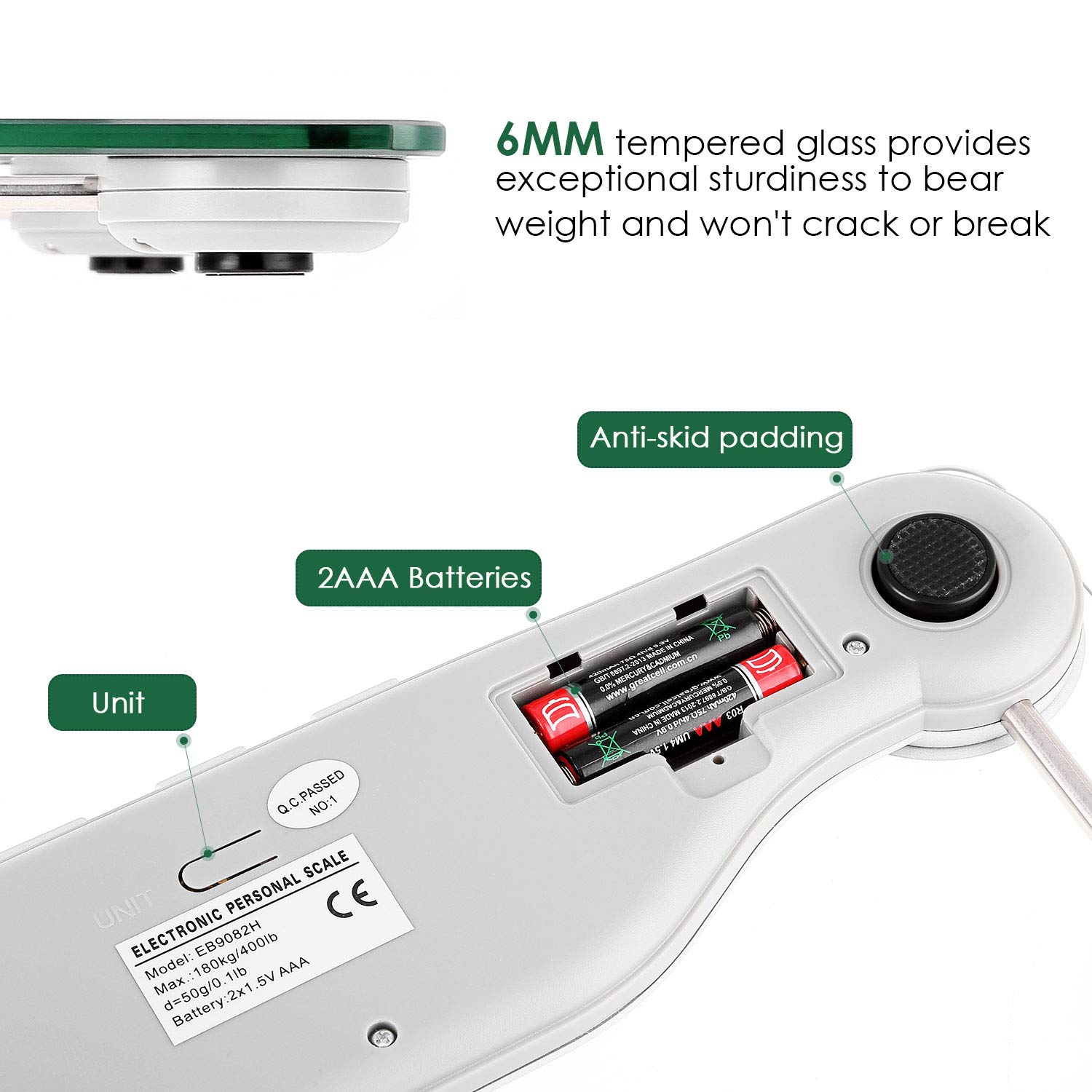
3-сүрөт: View of the scale's underside, highlighting the battery compartment and unit switch.
2. Unit Conversion (Kg/Lb)
To switch between kilograms (kg) and pounds (lb), locate the "UNIT" switch button on the back of the scale, near the battery compartment. Press this button to toggle between the desired units.
Video 1: Demonstrates how to install batteries and switch between kilogram and pound units using the button on the back of the scale.
Иштөө нускамалары
1. Setting Height for BMI Function
For accurate BMI readings, it is essential to set your height. For first-time use or after resetting the scale, press the "SET" button located on the top of the scale, between the up and down arrow buttons. Use the arrow buttons to adjust the height value to your personal height. This step ensures the scale can correctly calculate your BMI.

Figure 4: Close-up of the LCD display, showing the "SET" button and BMI color indicators.
2. Ченөө алуу
Place the scale on a hard, flat surface. Avoid carpets or soft surfaces, as this can affect accuracy. Step onto the scale with bare feet. The scale features step-on technology and will automatically turn on and display your weight. After a few seconds, it will then display your BMI value.

Figure 5: Demonstrates the step-on technology for immediate weight readings.
3. Understanding BMI Color Display
The LCD display features 5 colors to indicate your BMI category:
- Сары: Indicates "Thin"
- Жашыл: Indicates "Normal"
- Ачык күрөң: Indicates "Heavy"
- Кызыл: Indicates "Overweight"

Figure 6: Visual representation of the 5-color LCD display for BMI interpretation.
Техникалык тейлөө
Тазалоо
Таразаны жарнама менен тазалаңызamp cloth. Avoid water getting inside the scale. Do not use abrasive cleaners.
Кайра калибрлөө
To avoid inaccurate weight results, recalibrate the scale after physically moving or shifting it, or when replacing the batteries. To calibrate, apply weight on the scale, then step off and wait 10-15 seconds for the LCD screen to display "0.0". Then, step back on the scale to weigh.
Проблемаларды чечүү
- Масштаб күйбөйт: Check if the batteries are installed correctly or if battery power is low. Insert or replace with new batteries (2 x AAA).
- Туура эмес окуулар: Ensure the scale is placed on a hard, flat surface. Avoid carpets or soft flooring. Recalibrate the scale as described in the Maintenance section.
- Дисплей "Lo" көрсөтөт: This indicates low battery. Replace the batteries.
- Дисплей "Err" көрсөтөт: This indicates an overload. The maximum weight capacity is 400 lb / 180 kg.
- BMI function not working: Ensure you have set your height value using the "SET" button. This is crucial for BMI calculation.
Техникалык шарттар
| Өзгөчөлүк | Деталь |
|---|---|
| Салмак сыйымдуулугу | 400 фунт / 180 кг |
| Бүтүрүү | 0.1 фунт / 50 гр |
| Салмак бирдиктери | Kg / Lb |
| Платформа материалы | 6 mm Tempered Glass |
| Дисплей түрү | Арткы жарыгы бар түстүү LCD |
| BMI Display Colors | White (Weight), Yellow (Thin), Green (Normal), Orange (Heavy), Red (Overweight) |
| Power Source | 2 x AAA батареялары |
| Өлчөмдөр | 13.77 x 12.9 x 1.96 дюйм |
| Өзгөчөлүктөр | Step-On Technology, Auto On/Off, Re-test, Low Battery/Overload Indication |
Кепилдик жана колдоо
For warranty information or technical support, please refer to the warranty card included in your product packaging or visit the official Uten Store on Amazon:
For further assistance, you may also contact Uten customer service directly through the contact information provided on the warranty card or their official webсайт.
Ask a question about this manual
Ask about setup, troubleshooting, compatibility, parts, safety, or missing instructions. Manuals+ will review the question and use this page’s manual context to help answer it.