
1. Киришүү
The SONICAKE EQ Equalizer is a professional 10-band graphic equalizer pedal designed with an analog circuit. It features ten carefully selected frequency bands, allowing musicians to precisely and quickly shape their instrument's tone. This pedal is suitable for a variety of instruments and is built with a true bypass circuit to maintain signal integrity.
This manual provides detailed instructions for the setup, operation, and maintenance of your EQ Equalizer pedal to ensure you achieve the best possible sound.
2. Продукциянын өзгөчөлүктөрү
- 100% Analog 10-Band Equalizer: Based on classic EQ effect pedal frequency bands.
- Adjustable Gain Range: ±15dB adjustable gain range for each band, suitable for various instruments.
- Precise Tone Shaping: 11 high-quality sliders for quick and accurate parameter control.
- True Bypass Circuit: Ensures a clean signal path when the effect is disengaged.
- Туруктуу курулуш: Aluminium-alloy casing for lightweight yet robust performance.
3. Башкаруу элементтери жана функциялар
Familiarize yourself with the controls of your SONICAKE EQ Equalizer pedal:

Сүрөт: алдыңкы view of the SONICAKE EQ Equalizer pedal with numbered control labels.
- Input Jack (1/4 inch): Connect your instrument or the output of a preceding effect pedal here.
- DC 9V кубат киргизүү: Connect a standard 9V DC center-negative power supply (not included).
- Output Jack (1/4 inch): Connect this to your ampкөтөргүч же чынжырыңыздагы кийинки эффект педалынын киргизүүсү.
- Frequency Band Sliders (31.25Hz to 16kHz): Ten individual sliders to boost or cut specific frequency ranges by ±15dB. Adjust these to shape your tone.
- Деңгээл жылдыргычы: Controls the overall output volume of the pedal. Use this to match the volume when the effect is engaged or disengaged.
- Бут өчүргүч: Engages or disengages the equalizer effect. This pedal features true bypass, ensuring your signal remains unaffected when the pedal is off. The LED indicator above the footswitch illuminates when the effect is active.

Сүрөт: жогорудан төмөнгө view of the SONICAKE EQ Equalizer pedal, showing all sliders and the footswitch.

Image: A hand demonstrating the adjustment of the frequency sliders on the EQ Equalizer pedal.
4. Орнотуу
Follow these steps to set up your EQ Equalizer pedal:
- Кубат туташуу: Connect a standard 9V DC center-negative power supply (not included) to the DC 9V input jack (2). Ensure the power supply meets the specified voltage жана полярдуулук талаптары.
- Аспап киргизүү: Connect your instrument (e.g., guitar) or the output of a previous effect pedal to the Input Jack (1) on the right side of the pedal.
- Чыгуу туташуу: Connect the Output Jack (3) on the left side of the pedal to your amplifier's input or the input of the next effect pedal in your signal chain.
- Күйгүзүү: Бардык байланыштар коопсуз болгондон кийин, күйгүзүңүз ampкөтөргүч жана башка жабдуулар.

Сүрөт: бурчтуу view of the EQ Equalizer pedal, highlighting the DC 9V power input and its central negative polarity requirement.
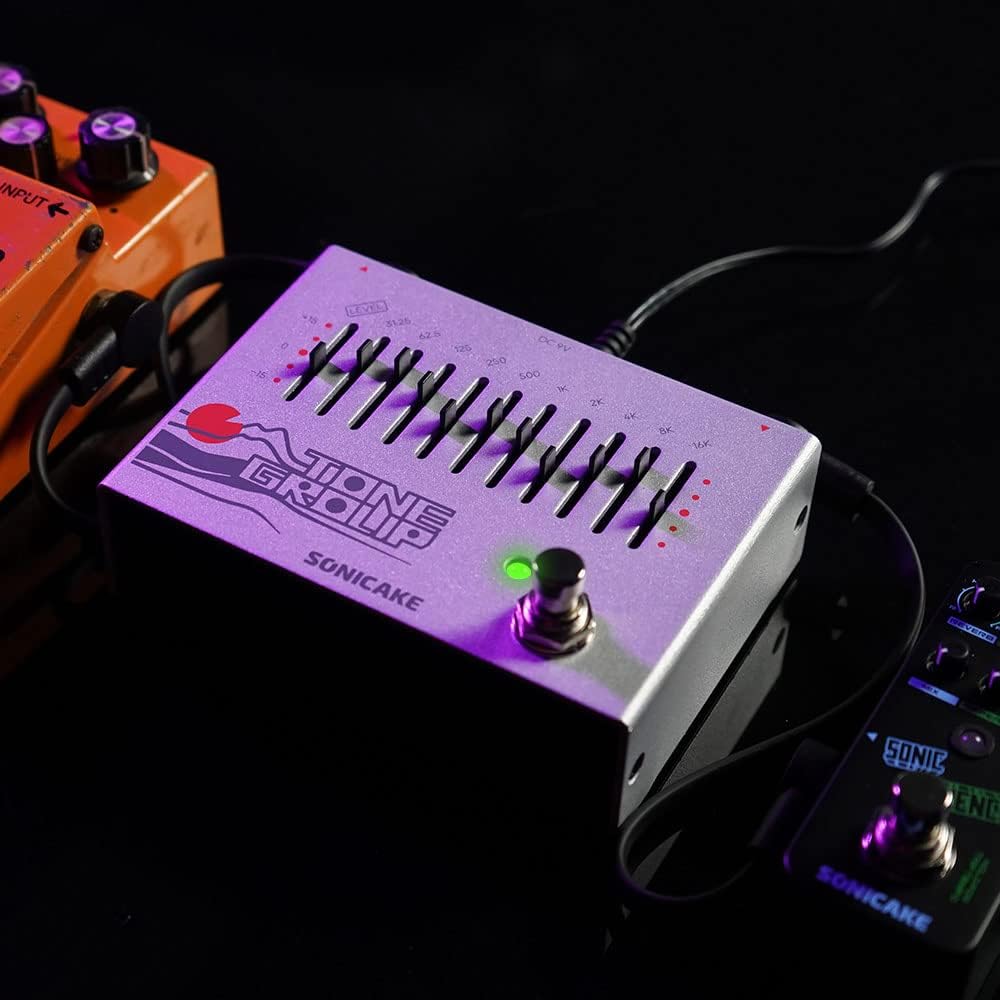
Image: The EQ Equalizer pedal integrated into a pedalboard setup, demonstrating typical connections.
5. Иштөө нускамалары
To operate your SONICAKE EQ Equalizer pedal:
- Engage/Disengage Effect: Press the footswitch (6) to toggle the equalizer effect on or off. The LED indicator will light up when the effect is active.
- Adjusting Frequency Bands: Use the ten frequency band sliders (4) to boost or cut specific frequencies. Moving a slider up boosts that frequency, while moving it down cuts it. Experiment with different settings to find your desired tone.
- Adjusting Overall Level: Use the Level slider (5) to control the overall output volume of the pedal. This is useful for compensating for volume changes introduced by EQ adjustments or for matching the volume with other pedals in your chain.
- Tone Shaping Tips:
- Төмөнкү жыштыктар (31.25Гц - 125Гц): Affect bass and sub-bass. Boosting can add warmth and fullness; cutting can reduce muddiness.
- Орто жыштыктар (250Гц - 2кГц): Crucial for presence and clarity. Boosting around 500Hz-1kHz can add body; cutting can reduce harshness. Boosting 2kHz can add bite.
- Жогорку жыштыктар (4 кГц - 16 кГц): Control treble and brilliance. Boosting can add sparkle and air; cutting can reduce hiss or harshness.

Сүрөт: Жакын план view of the footswitch on the EQ Equalizer pedal, illustrating its true bypass functionality.
6. Техникалык тейлөө
To ensure the longevity and optimal performance of your pedal:
- Тазалоо: Педалдын сыртын тазалоо үчүн жумшак, кургак чүпүрөктү колдонуңуз. Абразивдүү тазалагычтардан же эриткичтерден качыңыз.
- Сактагыч: Store the pedal in a dry environment, away from extreme temperatures, humidity, and direct sunlight.
- Электр камсыздоо: Always use a regulated 9V DC center-negative power supply. Incorrect power can damage the unit.
- Байланыштары: Periodically check all cable connections for wear and tear.
7. Кыйынчылыктарды
If you encounter issues with your EQ Equalizer pedal, consider the following:
- Үн жок:
- Электр кубаты туура туташтырылганын жана иштешин текшериңиз.
- Бардык аспап кабелдеринин туура туташуусун жана иштешин текшериңиз.
- экендигин текшериңиз amplifier is on and its volume is up.
- Ensure the pedal's Level slider is not set to minimum.
- Алсыз же бурмаланган үн:
- Check the power supply; insufficient power can cause distortion.
- Ensure instrument cables are not faulty.
- Adjust the Level slider to prevent signal clipping.
- Керексиз ызы-чуу:
- Use a high-quality, regulated power supply.
- Бардык кабелдер туура корголгондугун жана туташтырылганын текшериңиз.
- Try isolating the pedal from other power sources or noisy equipment.
8. Техникалык шарттар
| Модель номери | QDS |
| Элемент Салмагы | 12.7 унция (0.36 килограмм) |
| Продукциянын өлчөмдөрү | 3.54"L x 2.16"W x 4.88"H (9 x 5.5 x 12.4 см) |
| Power Source | DC Power Supply (9V Center Negative, not included) |
| Тtage | 9 вольт |
| Сигнал форматы | Аналог |
| Туташтыргыч түрү | 1/4 дюймдук аудио уяча |
| Аппараттык интерфейс | 1/4 дюймдук аудио |
9. Кепилдик жана колдоо
For warranty information, technical support, or service inquiries regarding your SONICAKE EQ Equalizer pedal, please refer to the documentation included with your purchase or visit the official SONICAKE webсайт. Ар кандай кепилдик дооматтары үчүн сатып алганыңыздын далилин сактаңыз.