
1. Киришүү
ShanWan Q13 мобилдик оюн контроллерин тандаганыңыз үчүн рахмат. Бул түзмөк ар кандай оюндар жана платформалар үчүн консоль сыяктуу башкаруу схемасын камсыз кылуу менен мобилдик оюн тажрыйбаңызды жакшыртуу үчүн иштелип чыккан. Ал эргономикалык дизайнды, жөнгө салынуучу функцияларды жана iOS жана Android түзмөктөрү үчүн кеңири шайкештикти сунуштайт.
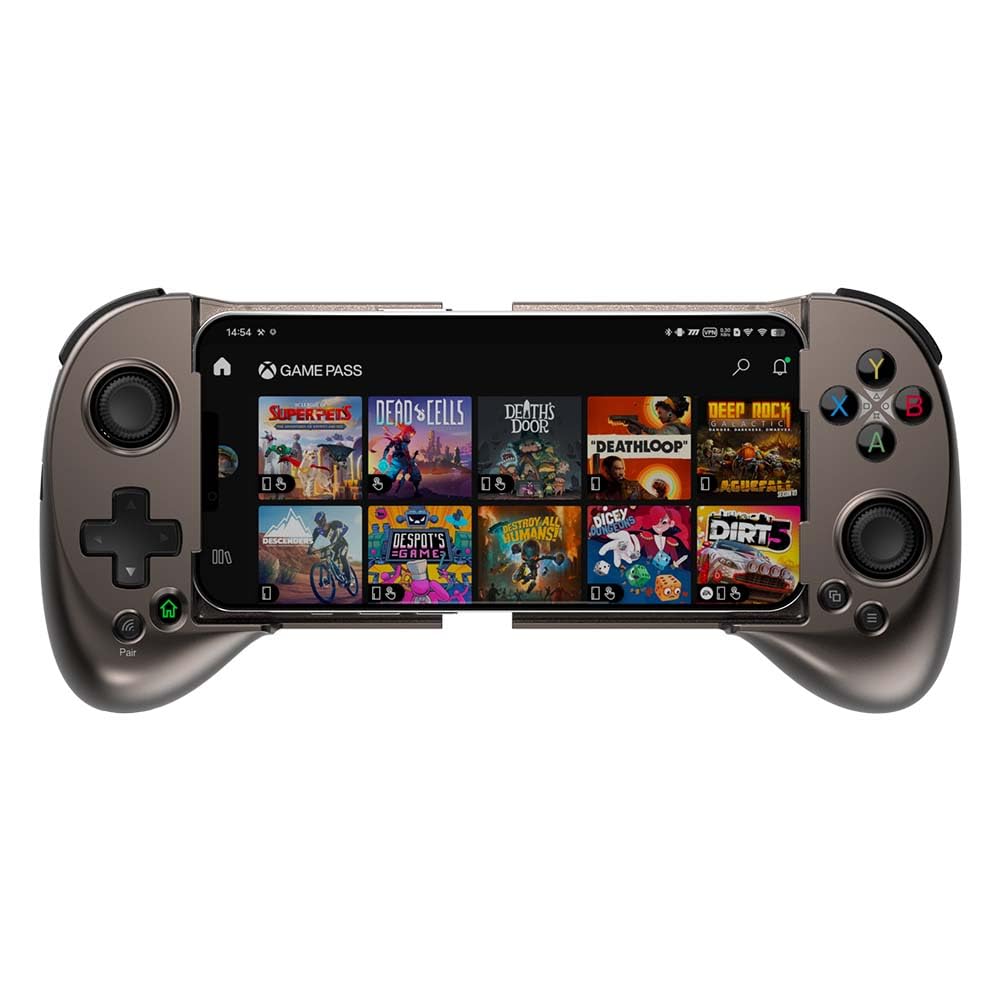
Сүрөт: Оюнга даяр, бекем орнотулган смартфону бар ShanWan Q13 мобилдик оюн контроллери.
2. Пакеттин мазмуну
Төмөндө тизмеленген нерселердин баары пакетиңизге камтылганын текшериңиз:
- 1 x ShanWan Q13 мобилдик оюн контроллери
- 1 х USB-C кубаттоо кабели
- 1 х Колдонуучунун колдонмосу (бул документ)
- 2 x Джойстик кармагыч капкактары (мисалы, таман изи менен жасалган дизайн)
- 1 x Lightning Port адаптери (iPhone'ду өткөрмө кубаттоо үчүн)
- 1 x USB-C порт адаптери (Android аркылуу өткөрмө кубаттоо үчүн)
3. Продукт бүтүп калдыview
ShanWan Q13 контроллери колго кармалуучу оюндарды ойноо үчүн эргономикалык жана ийкемдүү дизайнга ээ. Ал өлчөмү жөнгө салынуучу смартфондорду жайгаштыруу үчүн иштелип чыккан.
Негизги өзгөчөлүктөрү:
- Эргономикалык дизайн: Узак убакытка созулган оюн сессияларында колго кармоо үчүн ыңгайлуу ийкемдүү дизайн.
- Жөнгө салынуучу дизайн: Узундугу 5.079 дюймдан 7.007 дюймга чейинки смартфондорго туура келиши мүмкүн.
- Конфигурациялануучу баскычтар: Арткы бетинде M баскычы жана ыңгайлаштырылган макростор үчүн 4 программалануучу баскыч бар.
- Bluetooth зымсыз туташуусу: Кечигүүсүз оюн режимин камсыз кылат.
- Кеңири шайкештик: iOS MFi/Apple Arcade, PS Remote Play, Xbox Game Pass Ultimate, Steam Link жана GeForce NOW менен шайкеш келет.
- Жөнгө салынуучу джойстиктер: Джойстиктерди айландырып, каалаган бийиктикти тандоого жана өзгөртүүгө болот (минималдуу 3.8 ммден максимум 6.3 ммге чейин).
- Сызыктуу триггер баскычтары: Көп функциялууларды камсыз кылыңызtagоюндарда так башкаруу үчүн электрондук аткаруу.
- Ишке ылайыктуу дизайн: Сол жагында телефон камераларын жана корпустарын жайгаштыруу үчүн чөккөн дизайн бар.
- Батареянын узак иштөө мөөнөтү: Орнотулган кайра заряддалуучу батарея бир заряд менен болжол менен 25 саат ойноо мүмкүнчүлүгүн берет.

Сүрөт: Контроллердин булут жана мобилдик оюн кызматтары менен кеңири шайкештиги.
4. Орнотуу
4.1. Контроллерди заряддоо
- Контроллердеги USB-C кубаттоо портун табыңыз (көбүнчө туткалардын бирине жашыруун жайгаштырылат).
- Берилген USB-C кубаттоо кабелин контроллерге жана шайкеш келген USB кубат булагына туташтырыңыз.
- LED индикатору кубаттоо абалын көрсөтөт. Толук кубаттоо, адатта, 2 сааттан аз убакытты алат жана 25 сааттан ашык оюн ойноону камсыздайт.

Сүрөт: Контроллердин батареясы узакка жетет, 25 сааттан ашык оюн ойноо мүмкүнчүлүгүн берет.
4.2. Смартфонуңузду киргизүү
- Смартфонуңуз үчүн орун бошотуу үчүн контроллердин капталдарын акырындык менен жайыңыз.
- Смартфонуңузду борбордук уячага этияттык менен салып, үстүнкү жана астыңкы резина кармагычтар менен бекем кармалып турганын текшериңиз. Контроллердин дизайны кутуга ыңгайлуу, бул көпчүлүк телефондорду кутучаларын чечпестен эле батыра алат.
- Телефондун камера аймагынын таза экенин жана контроллердин дизайны менен тосулуп калбаганын текшериңиз.

Сүрөт: Жөнгө салынуучу дизайн ар кандай өлчөмдөгү телефондорго ылайыкташтырылган жана кутуга салып жүрүүгө ыңгайлуу кылып иштелип чыккан.
4.3. Bluetooth Жупташтыруу
- Биринчи жолу колдонуу үчүн: басып, кармап туруңуз Жуп күйгүзүү жана жупташтыруу режимине өтүү үчүн баскычын 1 секунд басып туруңуз. LED индикатору тез күйүп-өчөт.
- Андан кийин колдонуу үчүн: басып, кармап туруңуз Үй Акыркы жупташтырылган түзмөккө кайра туташуу жана күйгүзүү үчүн баскычын 1 секунд басып туруңуз.
- Смартфонуңуздан бул жакка өтүңүз Орнотуулар > Bluetooth.
- Жеткиликтүү түзмөктөрдүн тизмесинен "DUALSHOCK 4 зымсыз контроллери" же ушул сыяктуу аталышты издеп, жупташтыруу үчүн аны тандаңыз.
- Ийгиликтүү жупташтырылгандан кийин, контроллердеги LED индикатору бекем болуп калат.

Сүрөт: Кубат жана үй баскычтарын колдонуп, баштапкы жупташтыруу жана андан кийинки туташуулар боюнча нускамалар.
5. Иштөө нускамалары
5.1. Жалпы оюн процесси
Смартфонуңуз бекем орнотулуп, контроллер жупташтырылгандан кийин, каалаган оюнуңузду иштетиңиз. Контроллердин баскычтары жана джойстиктери оюн тажрыйбасын жакшыртуу үчүн так киргизүүнү камсыз кылат.

Сүрөт: Мобилдик оюн түзүлүшүнө интеграцияланган контроллер.
5.2. Жөнгө салынуучу джойстиктер
ShanWan Q13 контроллериндеги джойстиктерди жөнгө салууга болот. Сиз джойстиктин капкактарын буруп, өзүңүзгө жаккан бийиктикти тандай аласыз, эң аз дегенде 3.8 ммден эң көп дегенде 6.3 ммге чейин. Бул жекелештирилген ыңгайлуулукту жана башкаруунун тактыгын камсыз кылат.

Сүрөт: Жойстиктин бийиктигин жөнгө салуунун визуалдык чагылдырылышы.
5.3. Конфигурациялануучу M1-M4 баскычтары
Контроллердин арткы бетинде төрт конфигурациялануучу M1-M4 баскычтары бар. Бул баскычтарга оюн ичиндеги татаал макросторду дайындоого болот, бул бир басуу менен бир нече аракеттерди тез аткарууга мүмкүндүк берет. Карта түзүү боюнча толук көрсөтмөлөрдү оюн ичиндеги жөндөөлөрдөн же ShanWan Controller колдонмосунан (эгер бар болсо) караңыз.

Сүрөт: Өркүндөтүлгөн оюн үчүн арткы конфигурациялануучу баскычтар.
5.4. Заряддоо
Үзгүлтүксүз оюн ойноону камсыз кылуу үчүн, контроллер смартфонуңузду өткөрмө кубаттоону колдойт. Телефонуңузду контроллерге орнотулган учурда кубат булагына туташтыруу үчүн берилген Lightning же USB-C адаптерин колдонуңуз. Бул сизге ойноо менен бир убакта телефонуңузду кубаттоого мүмкүндүк берет.
5.5. Шайкештиктин жогору болушуview
ShanWan Q13 ар кандай оюн платформаларында кеңири шайкештик үчүн иштелип чыккан:
- Булут оюндары: PS Remote Play, Xbox Game Pass Ultimate, Steam Link, GeForce NOW.
- Мобилдик оюн: MFi Arcade оюндары жана Fortnite, Minecraft, Genshin Impact, Brawlhalla, Asphalt 9: Legends, Cyberpunk 2077, Destiny 2, Gear 5 жана Halo Collection эмуляторлору сыяктуу жүздөгөн популярдуу мобилдик оюндар.
Видео: ShanWan мобилдик оюн контроллеринин Xbox, PS Remote жана Steam Link сыяктуу ар кандай платформалар менен шайкештигинин расмий демонстрациясы.
6. Техникалык тейлөө
- Тазалоо: Контроллерди тазалоо үчүн жумшак, кургак чүпүрөктү колдонуңуз. Катуу химиялык заттарды же абразивдүү материалдарды колдонуудан алыс болуңуз.
- Сактагыч: Контроллерди түз күн нурунан жана экстремалдык температурадан алыс салкын, кургак жерде сактаңыз.
- Батареяга кам көрүү: Батареянын иштөө мөөнөтүн узартуу үчүн, контроллерди тез-тез толук зарядсыздандырбаңыз. Аны үзгүлтүксүз кубаттап туруңуз, көпкө колдонулбаса дагы. Контроллер энергияны үнөмдөө үчүн 15 мүнөт иштебей тургандан кийин автоматтык түрдө өчөт.
7. Кыйынчылыктарды
| Көйгөй | Мүмкүн себеп | Чечим |
|---|---|---|
| Контроллер күйбөйт. | Батарея аз. | Берилген USB-C кабелин колдонуп, контроллерди кубаттаңыз. |
| Bluetooth аркылуу жупташтыруу мүмкүн эмес. | Контроллер жупташтыруу режиминде эмес; телефондо Bluetooth өчүк; тоскоолдук бар. | Башкаргыч жупташтыруу режиминде экенин текшериңиз (LED тез күйүп-өчүп турат). Телефондун Bluetooth жөндөөлөрүн текшериңиз. Телефонго жакыныраак жана башка зымсыз түзмөктөрдөн алысыраак жылыңыз. |
| Баскычтар/джойстиктер оюнда жооп бербей жатат. | Оюн контроллерлерди колдобойт; туура эмес карта түзүү; туташуу көйгөйү. | Оюн тышкы контроллерлерди колдой турганын текшериңиз. Карталарды көрсөтүү үчүн оюн ичиндеги контроллердин жөндөөлөрүн текшериңиз. Контроллерди кайра жупташтырыңыз. |
| Телефон өткөрмө аркылуу кубатталбай жатат. | Туура эмес адаптер; бош туташуу; кубат булагындагы көйгөй. | Туура Lightning/USB-C адаптери колдонулганын жана бекем туташтырылганын текшериңиз. Кубат булагынын иштеп турганын текшериңиз. |
8. Техникалык шарттар
- Модел: Q13
- Бренд: ШанВан
- Байланыш: Bluetooth 5.0
- Шайкештик: iOS (MFi/Apple Arcade), Android (Булут/Эмуляторлор)
- Жөнгө салынуучу телефондун өлчөмү: 5.079ден 7.007 дюймга чейин
- Джойстиктин бийиктиги: 3.8ммден 6.3ммге чейин жөнгө салынат
- Батареянын иштөө мөөнөтү: Болжол менен 25+ саат (кадимки колдонууда)
- Заряддоо убактысы: 2 сааттан аз
- Заряддоо порту: USB-C
- Продукциянын өлчөмдөрү: 9.4 x 5.4 x 2.3 дюйм
- Элемент Салмагы: 10.55 унция
9. Кепилдик жана колдоо
Кепилдик жөнүндө маалымат жана техникалык колдоо алуу үчүн, сатып алууңузга тиркелген документтерди караңыз же расмий ShanWan дүкөнүнө баш багыңыз. webсайт. Ар кандай кепилдик дооматтары үчүн сатып алганыңыздын далилин сактаңыз.
Өндүрүүчү: ШанВан