
PPLEE CR1002M
PPLEE 5-in-1 White Noise Machine User Manual
Model: CR1002M
Продукт бүттүview
The PPLEE 5-in-1 White Noise Machine is a versatile device designed to enhance sleep, relaxation, and daily routines. It integrates a white noise machine, Bluetooth speaker, dual alarm clock, night light, and USB charging station into a single compact unit. With a wide array of soothing sounds, customizable light settings, and convenient charging options, it provides a comprehensive solution for various environments, from nurseries to offices.

Сүрөт: алдыңкы view of the PPLEE 5-in-1 White Noise Machine, showcasing its digital clock, control buttons, and illuminated top surface.

Image: Visual representation highlighting the five core functions of the device: Dual Alarm Clock, Bluetooth Speaker, White Noise Machine, USB & Type-C Charging, and Night Light/Ambient Light.
Коопсуздук маалыматы
Please read and understand all safety instructions before using the device to prevent injury or damage.
- This product is battery powered. Ensure the correct type and age of battery are used.
- Балдарга батарейкалар менен иштөөгө уруксат бербеңиз.
- This device is not a toy; do not allow children to play with it.
- Keep the Bluetooth speaker away from water and extreme temperatures.
- Do not look directly into the night light, especially for children, as it may cause eye strain.
Кутуда эмне бар
Бардык буюмдар кутудан чыгарылганда бар экенин текшериңиз:
- 1x Bluetooth Noise Machine Alarm Clock
- 1x 5V 2A Power Adapter and cord
- 1x Колдонуучунун колдонмосу
Орнотуу колдонмосу
1. Баштапкы кубаттоо жана заряддоо
Unpack the white noise machine. Connect the provided 5V 2A power adapter and cord to the device and a power outlet. The device is designed to be plug-in powered with a battery backup (CR2032 included) to retain settings during power outages.

Image: Illustration of the device operating via outlet power with an internal battery backup for memory retention.
2. Setting Time and Alarms
Refer to the physical user manual for detailed instructions on setting the current time and configuring the dual alarm clocks. The device features two separate digital alarms, each with 9 different wake-up sounds to choose from. A snooze function is also available.
3. USB заряддоо порттору
The device includes dual USB charging ports and a Type-C charging port. These ports allow you to charge your phone, tablet, or other compatible devices simultaneously, reducing clutter and saving space.

Image: The device demonstrating its capability to charge a smartphone and tablet simultaneously via its integrated USB and Type-C charging ports.
Иштөө нускамалары
1. White Noise and Soothing Sounds
The machine offers 42 high-quality soothing sounds, including white noise, fan sounds, lullabies, and various nature sounds (rain, ocean wave, bird, forest, etc.).
- Press the "Sound Mode" button to cycle through different sound categories.
- Use the "Prev" and "Next" buttons to select specific sounds within a category.
- Adjust the volume using the dedicated volume buttons (16 levels available).
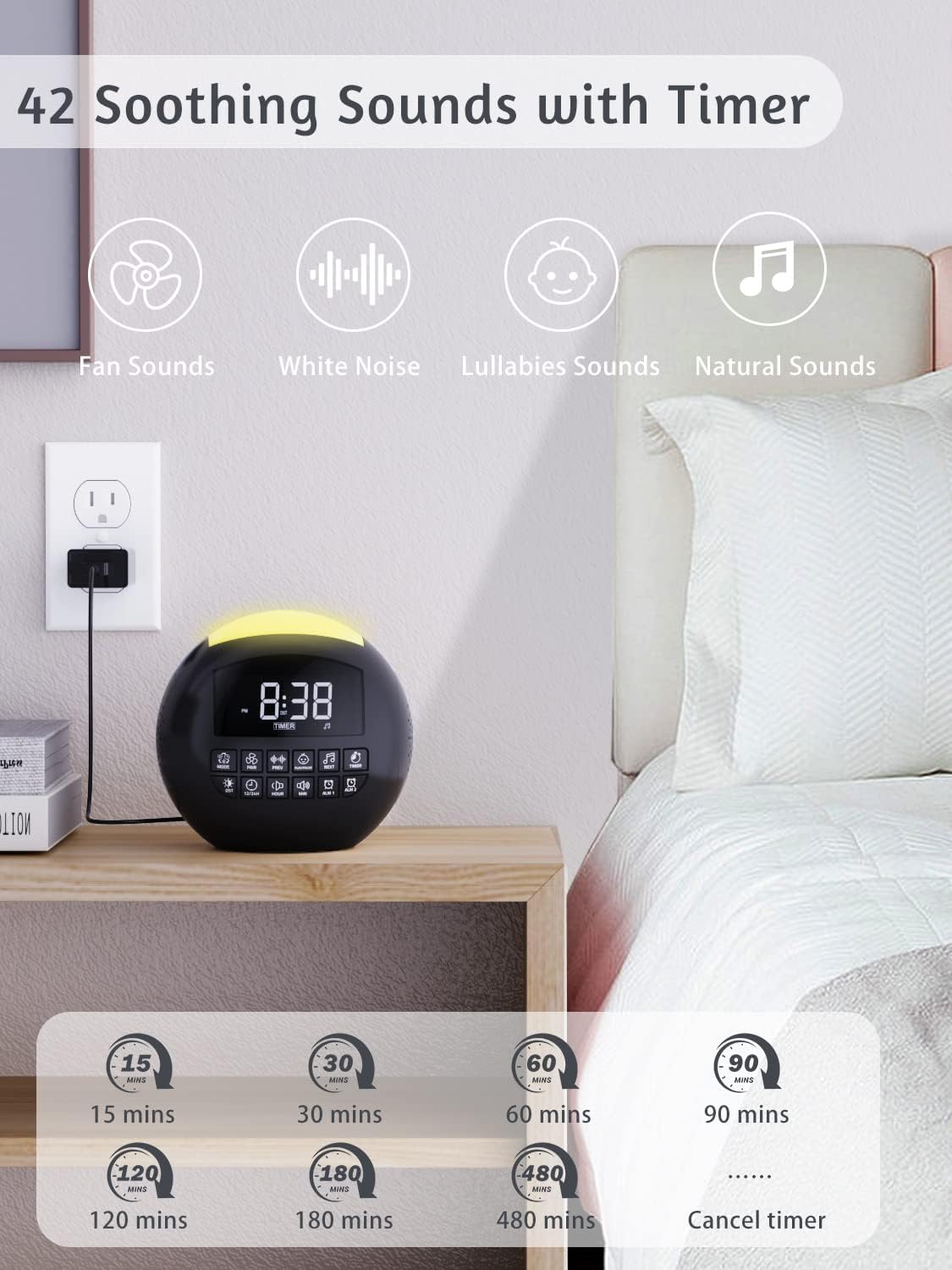
Image: The device positioned on a nightstand, illustrating its 42 soothing sound options and various timer settings for sleep.

Image: A collage visually representing various soothing sleep sounds available, including white noise, ocean waves, lullabies, thunder rain, fan sounds, and forest ambiance.
2. Sleep Timers
The device features 8 automatic sleep timer options: 15, 30, 60, 90, 120, 180, or 480 minutes, or continuous play. Press the "Timer" button to cycle through the desired duration.
3. Bluetooth Speaker Functionality
The built-in Bluetooth 5.0 speaker allows you to stream audio wirelessly from your smartphone or tablet.
- Press the "Mode" button until the Bluetooth icon appears on the display.
- On your device, search for "PPLEE" in the Bluetooth settings and pair.
- Once connected, you can play music or other audio through the machine's speaker.

Image: The device functioning as a high-fidelity Bluetooth speaker, wirelessly connected to a smartphone, with a couple enjoying music in a relaxed setting.

Сүрөт: деталдуу view emphasizing the Bluetooth 5.0 High Fidelity Speaker feature, indicating its suitability for various environments like office, party, dinner, campже саякат.
4. Dual Alarm Clock
Set two independent alarms for different wake-up times. Choose from 9 distinct alarm sounds to avoid monotony. The snooze function provides extra minutes of sleep.

Image: A woman stretching in bed, illustrating the dual alarm clock feature with options for 9 wake-up sounds, 16 volume levels, and 5 adjustable brightness settings.

Image: A visual emphasizing the loud alarm clock feature with 9 alarm sounds, designed to assist heavy sleepers in waking up effectively, highlighting the large snooze button.
5. Түнкү жарыктын иштеши
The integrated night light offers 7 colors and 8 color choices (Gradient, Blue, Ice Blue, Green, White, Yellow, Red, Purple). It has 2 modes: solid color and changing color.
- Press the "Light" button to turn on/off the night light and cycle through colors/modes.
- Adjust the display brightness (5 levels available) to suit your preference, ensuring it doesn't interfere with sleep.

Image: The device displaying its 7-color night light options in both solid and changing color modes, along with the 9-minute snooze feature.

Image: A man in bed observing the device, which showcases its 7-color night light feature, allowing users to select their preferred ambiance.
Техникалык тейлөө
To ensure the longevity and optimal performance of your PPLEE White Noise Machine, follow these maintenance guidelines:
- Тазалоо: Gently wipe the exterior of the device with a soft, dry cloth. Do not use abrasive cleaners, waxes, or solvents as they may damage the finish. Ensure the device is unplugged before cleaning.
- Сактагыч: Узак мөөнөткө колдонулбаганда, аспапты салкын, кургак жерде, тике күн нурунан жана экстремалдык температурадан алыс сактаңыз.
- Батареяны алмаштыруу: If the memory function (retaining time/settings during power outages) begins to fail, the internal CR2032 battery may need replacement. Refer to the physical user manual for instructions on how to safely replace the battery.
- Вентиляция: Ensure the speaker grilles and any ventilation openings are free from dust and debris to maintain sound quality and prevent overheating.
Проблемаларды чечүү
If you encounter any issues with your PPLEE White Noise Machine, please refer to the following common troubleshooting steps:
| Көйгөй | Мүмкүн себеп | Чечим |
|---|---|---|
| Түзмөк күйбөйт. | Not plugged in correctly; power adapter issue. | Кубат адаптери түзмөккө да, иштеп жаткан розеткага да бекем туташтырылганын текшериңиз. Башка розетканы колдонуп көрүңүз. |
| Динамиктен үн жок. | Volume too low; incorrect mode; Bluetooth not connected. | Increase volume. Ensure the correct sound mode (white noise or Bluetooth) is selected. If using Bluetooth, verify it's paired and connected to your device. |
| Bluetooth жупташуу көйгөйлөрү. | Device not in pairing mode; too far from source; interference. | Ensure the machine is in Bluetooth pairing mode. Move your source device closer. Turn off other Bluetooth devices nearby to reduce interference. |
| Ойготкуч угулбайт. | Ойготкуч коюлган эмес; сигналдын көлөмү өтө төмөн; сигнал өчүрүлгөн. | Verify alarm settings and ensure it is enabled. Increase alarm volume. |
| Түнкү жарык иштебейт. | Жарык функциясы өчүрүлгөн. | Түнкү жарыкты иштетүү үчүн "Жарык" баскычын басыңыз. |
If the problem persists after attempting these solutions, please contact PPLEE customer support for further assistance.
Техникалык шарттар
| Өзгөчөлүк | Деталь |
|---|---|
| Продукциянын өлчөмдөрү | 5.32 x 5.95 x 6.1 дюйм |
| Элемент Салмагы | 1.43 фунт |
| Модель номери | CR1002M |
| Батареялар | 1 CR2032 батарейкасы талап кылынат (кошулган) |
| Бренд | PPLEE |
| Материал | Акрилонитрил бутадиен стирол (ABS) |
| Power Source | Battery Powered (with AC adapter for primary power) |
| Үн параметрлери | 42 Soothing Sounds (White Noise, Fan, Lullabies, Nature) |
| Ойготкуч сааттар | Dual Alarms with 9 Wake-up Sounds |
| Night Light | 7 Colors, 8 Options (Gradient, Blue, Ice Blue, Green, White, Yellow, Red, Purple) |
| Үн деңгээли | 16 деңгээл |
| Жарыктык деңгээли | 5 жөнгө салынуучу деңгээл |
| Уйку таймерлери | 15, 30, 60, 90, 120, 180, 480 minutes, or Continuous Play |
| Заряддоо порттору | Dual USB, 1 Type-C |
Кепилдик жана колдоо
For warranty information or technical support, please refer to the official PPLEE website or contact their customer service directly. The full user manual in PDF format is available for download at https://manuals.plus/m/f23b430e063d58de8cd25ce8d0ed17a6ff4bc5a117e3aca8867779d575e1b4e3.
Ask a question about this manual
Ask about setup, troubleshooting, compatibility, parts, safety, or missing instructions. Manuals+ will review the question and use this page’s manual context to help answer it.