
1. Киришүү
This manual provides detailed instructions for the installation, operation, and maintenance of your TP-Link Deco X50-Outdoor AX3000 Whole Home Mesh WiFi 6 Unit. The Deco X50-Outdoor is designed to extend your mesh WiFi network to outdoor and indoor spaces, providing robust and stable wireless connectivity. Please read this manual thoroughly before using the device to ensure proper setup and optimal performance.
2. Коопсуздук маалыматы
Өрт, электр тогуна урунуу жана жаракат алуу коркунучун азайтуу үчүн ар дайым төмөнкү негизги коопсуздук чараларын аткарыңыз:
- Бул шайманды сууга же нымга дуушар кылбаңыз.
- Аппаратты ажыратууга, оңдоого же өзгөртүүгө аракет кылбаңыз.
- Аппарат менен кошо берилген кубат адаптерин гана колдонуңуз.
- Ensure the device is installed in a stable location to prevent it from falling.
- Аппаратты жылуулук булактарынан жана түз күн нурунан алыс кармаңыз.
- For outdoor installation, ensure all cable connections are properly sealed to prevent water ingress.
3. Пакеттин мазмуну
Пакетиңизде төмөнкү заттар бар экенин текшериңиз:
- 1 x TP-Link Deco X50-Outdoor Unit
- 1 х кубат адаптери
- 1 х Ethernet кабели
- Mounting Kit (includes mounting bracket, screws, and wall plugs)
- Ыкчам орнотуу колдонмосу

Image: The retail packaging for the TP-Link Deco X50-Outdoor unit, showing the device and its key features.
4. Продукт бүтүп калдыview
The Deco X50-Outdoor is a cylindrical, white unit designed for both outdoor and indoor use. It features an IP65 rating for waterproof and dustproof protection, making it suitable for various weather conditions.
4.1 Түзмөктүн жайгашуусу

Сүрөт: алдыңкы view of the TP-Link Deco X50-Outdoor unit, showcasing its sleek, cylindrical design and 'deco outdoor' branding.

Image: The bottom of the Deco X50-Outdoor unit, revealing the port cover and the attachment point for the mounting bracket.
4.2 Порттор жана баскычтар
Under the protective cover at the bottom of the unit, you will find the following:
- PoE порту: Used for Power over Ethernet (PoE) connection, providing both power and data through a single Ethernet cable.
- LAN Ports (2): For connecting wired devices or for backhaul connection to other Deco units.
- Электр порту: For connecting the included power adapter when not using PoE.
- Калыбына келтирүү баскычы: A small button to reset the device to factory settings.

Сүрөт: жакын план view of the PoE and AC power supply ports located at the base of the Deco X50-Outdoor unit, with labels indicating their functions.
5. Орнотуу
Follow these steps to set up your Deco X50-Outdoor unit. It is recommended to use the TP-Link Deco app for a guided setup process.
5.1 Download the Deco App
- Scan the QR code in the Quick Installation Guide or search for "TP-Link Deco" in the App Store or Google Play.
- Смартфонуңузга же планшетиңизге Deco колдонмосун жүктөп алып, орнотуңуз.
5.2 Физикалык орнотуу
The Deco X50-Outdoor can be mounted on a pole, wall, or placed on a tabletop.
- Жайгашкан жерди тандаңыз: Select a location that provides optimal WiFi coverage and is within range of your existing Deco network (if extending). For outdoor use, ensure it's protected from direct impact and accessible for power/Ethernet.
- Монтаждоо:
- Уюлга орнотуу: Use the provided straps to secure the mounting bracket to a pole.
- Дубалга орнотуу: Drill holes, insert wall plugs, and screw the mounting bracket to the wall.
- Стол үстү: Simply place the unit on a flat, stable surface.
- Туташуу кубаты:
- Кубат адаптерин колдонуу: Connect the provided power adapter to the power port and plug it into an electrical outlet.
- PoE колдонуу: Connect an Ethernet cable from a PoE-enabled switch or injector to the PoE port on the Deco unit.
- Connect to Existing Network (Optional): If you are using the Deco X50-Outdoor as a satellite unit, it will connect wirelessly to your main Deco unit. For a wired backhaul, connect an Ethernet cable from one of the LAN ports to your main Deco unit or network switch.

Image: The Deco X50-Outdoor unit securely mounted on an outdoor pole, demonstrating a typical installation scenario.
5.3 Колдонмо аркылуу орнотуу
- Deco колдонмосун ачып, TP-Link ID'ңиз менен кириңиз. Эгер сизде аккаунт жок болсо, анда аккаунт түзүңүз.
- Tap the "+" icon in the top right corner to add a new Deco unit.
- Select your Deco model (X50-Outdoor) and follow the on-screen instructions to complete the setup. The app will guide you through connecting the unit and integrating it into your existing Deco mesh network.
6. Иштөө
Once set up, your Deco X50-Outdoor unit will automatically integrate into your mesh network, providing seamless WiFi coverage. You can manage your network using the TP-Link Deco app.
6.1 Deco App Features
The Deco app allows you to:
- View туташкан түзмөктөр жана алардын абалы.
- Конок тармагын орнотуу.
- Ата-эненин көзөмөлүн башкарыңыз.
- Оптималдуу иштөө (QoS) үчүн түзмөктөргө артыкчылык бериңиз.
- Access HomeShield Security features.
- Микропрограмманы жаңыртуу.
- Monitor network health and usage.
6.2 LED индикаторунун абалы
The LED on your Deco unit indicates its status:
- Катуу жашыл: Deco туура иштеп жатат.
- Жылуу жашыл: Деко башталууда.
- Катуу кызыл: Deco'до көйгөй бар (мисалы, интернет байланышы жок).
- Жылуу кызыл: Deco негизги Deco блогунан ажыратылган.
- Катуу көк: Deco орнотууга даяр.
- Көк түстүү: Deco is pairing via Bluetooth.
7. Техникалык тейлөө
Regular maintenance ensures the longevity and optimal performance of your Deco X50-Outdoor unit.
7.1 Микропрограмма жаңыртуулары
Keep your Deco's firmware updated to benefit from the latest features, security enhancements, and bug fixes. You can check for and install updates via the Deco app.
7.2 Тазалоо
Wipe the device with a soft, dry cloth. Do not use liquid cleaners or chemical sprays.
7.3 Айлана-чөйрөнү коргоо
Despite its outdoor rating, avoid placing the unit in locations where it is constantly submerged in water or exposed to extreme physical impact.
8. Кыйынчылыктарды
If you encounter issues with your Deco X50-Outdoor, try the following solutions:
8.1 Интернет байланышы жок
- Check the LED status. If solid red, ensure your main Deco unit has an internet connection.
- Verify that the Ethernet cable (if used) is securely connected.
- Restart your modem, main Deco unit, and then the X50-Outdoor unit.
8.2 Deco X50-Outdoor Disconnected
- Ensure the unit is within range of your main Deco or another satellite Deco.
- Электр байланышын текшериңиз.
- Try relocating the unit to a closer position to the main Deco.
8.3 WiFi ылдамдыгынын жайлашы
- Ensure the unit is placed in an open area, free from obstructions.
- Микропрограмма жаңыртууларын текшериңиз.
- Use the Deco app to run a network optimization test.
8.4 Заводдук абалга кайтаруу
If issues persist, you may need to perform a factory reset. With the Deco unit powered on, use a pin to press and hold the Reset button until the LED turns solid red (approximately 1 second), then release. The unit will restart with factory default settings.
9. Техникалык шарттар
Technical details for the TP-Link Deco X50-Outdoor unit:
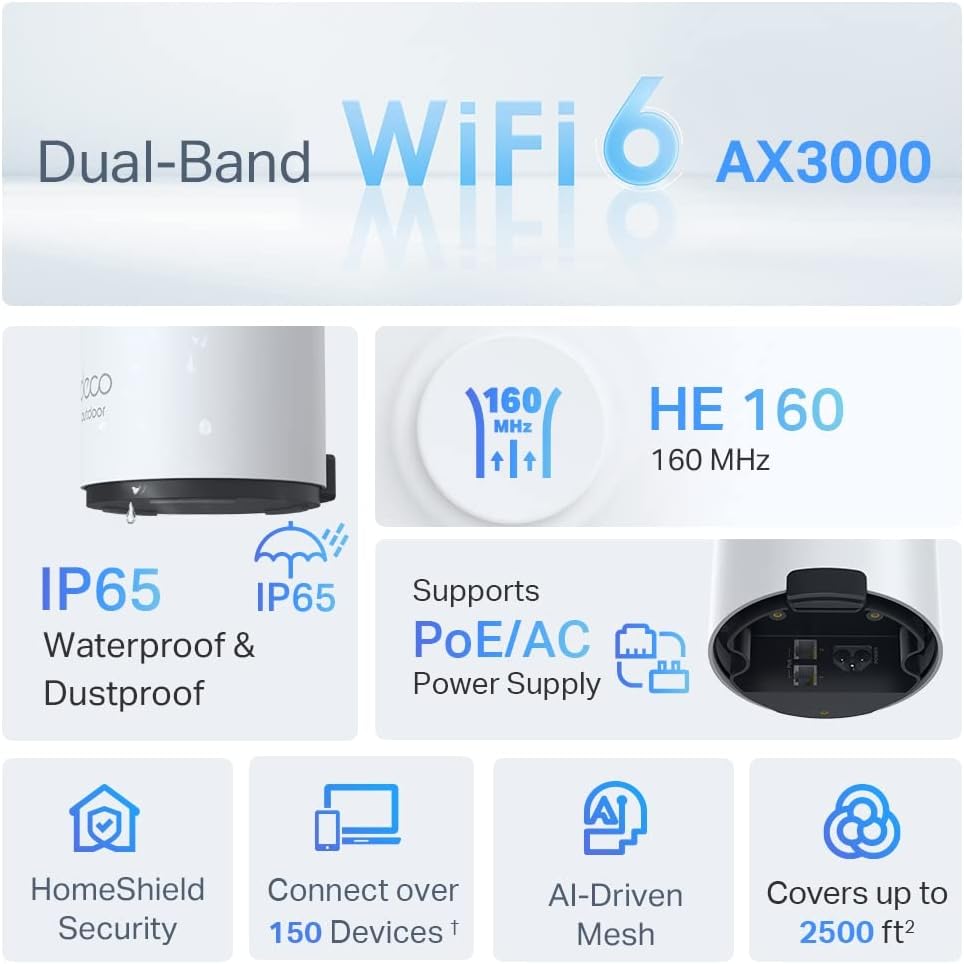
Image: An infographic highlighting key features of the Deco X50-Outdoor, including Dual-Band WiFi 6, AX3000 speeds, IP65 rating, PoE/AC power support, HomeShield Security, support for over 150 devices, AI-Driven Mesh, and up to 2500 sq ft coverage.
| Өзгөчөлүк | Деталь |
|---|---|
| Модель аты | AX3000 Outdoor Whole Home Mesh WiFi 6 Unit |
| Зымсыз стандарт | Wi-Fi 6 (802.11ax) |
| Жыштык тилкесинин классы | Кош тилкелүү |
| Маалыматтарды өткөрүү ылдамдыгы | 2402 Мбит/с (5 ГГц) + 574 Мбит/с (2.4 ГГц) чейин |
| Байланыш диапазону | Up to 2000 Square Feet (per unit) |
| Порттар | 2 x Gigabit Ethernet Ports (Auto-sensing WAN/LAN) |
| Электр камсыздоо | PoE (802.3at) or AC Power Adapter (240V AC) |
| Аба ырайына каршылык | IP65 (Суу өткөрбөйт жана чаң өткөрбөйт) |
| Коопсуздук протоколу | WPA, WPA2, WPA3 |
| Башкаруу ыкмасы | TP-Link Deco App |
| Элемент Салмагы | 0.9 килограмм |
10. Кепилдик жана колдоо
Кепилдик жөнүндө маалымат жана техникалык колдоо алуу үчүн, расмий TP-Link сайтына кайрылыңыз webсайтка же кардарларды тейлөөгө кайрылыңыз.
- TP-Link расмий Webсайт: www.tp-link.com
- Техникалык колдоо: TP-Linkтин колдоо бөлүмүнө өтүңүз webКөп берилүүчү суроолор, көйгөйлөрдү чечүү боюнча колдонмолор жана байланыш маалыматы үчүн сайт.