
DIZO DA2105
DIZO GoPods Neo True зымсыз кулакчындарынын колдонуу боюнча колдонмосу
Модел: DA2105
Бренд: DIZO (by realme Techlife)
Introduction
This manual provides comprehensive instructions for the DIZO GoPods Neo True Wireless Earbuds. Please read carefully to ensure proper use, maintenance, and to maximize your audio experience. These earbuds feature Active Noise Cancellation (ANC), Transparency Mode, and a long-lasting battery, designed for a seamless listening experience.

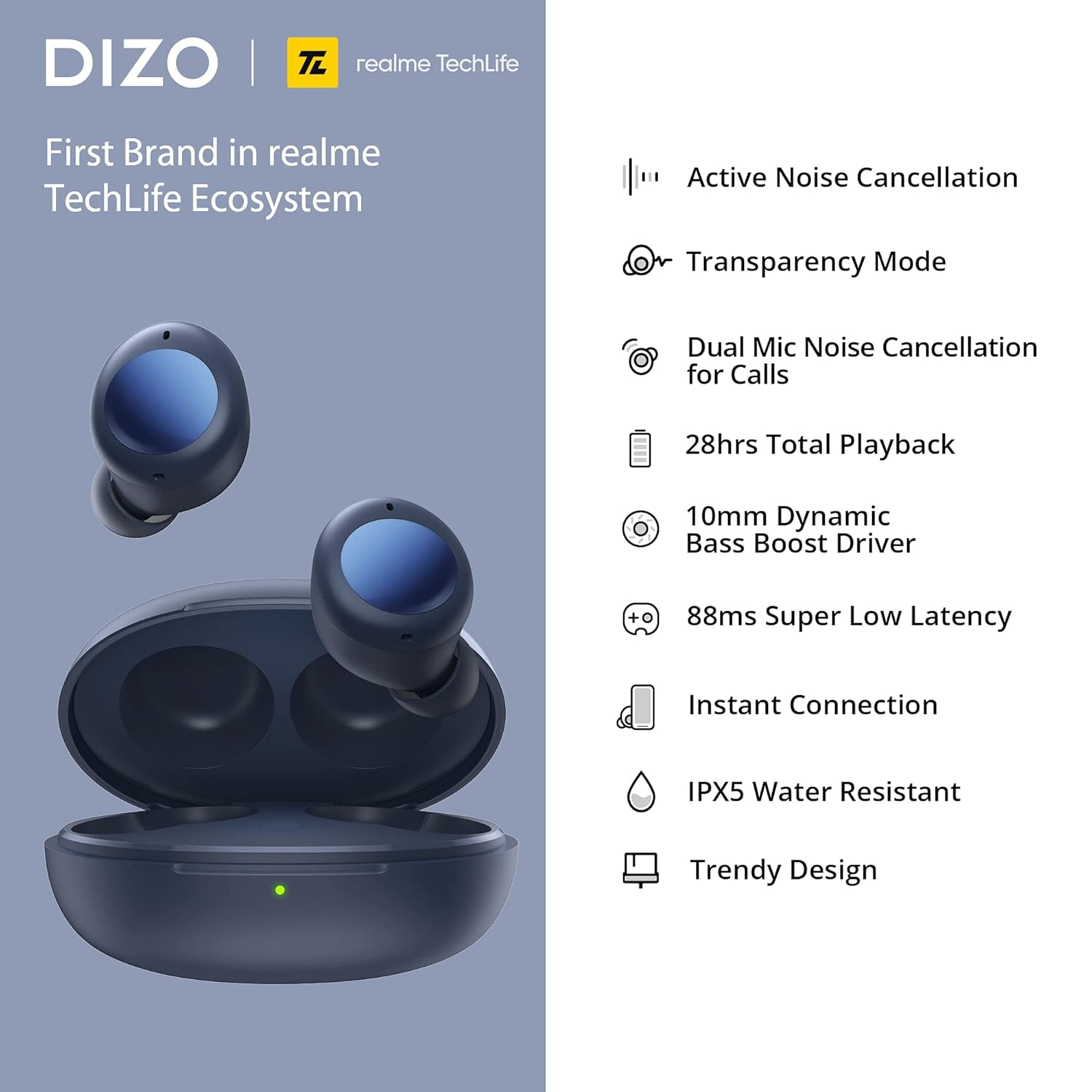
The DIZO GoPods Neo earbuds and their charging case, showcasing the compact design and deep blue color.
Негизги өзгөчөлүктөрү
Активдүү Шумду Жоюу (ANC)
Immerse yourself in music by reducing ambient noise up to 25dB, allowing for a focused listening experience.

Experience tranquility with ANC.
Transparency Mode
Stay aware of your surroundings without removing your earbuds. This mode allows external sounds to pass through.

Hear your environment clearly.
Dual Mic Noise Cancellation for Calls
Ensure clear voice calls even in noisy environments, thanks to advanced dual microphone technology.

Crystal-clear calls, anywhere.
10mm Bass Boost Driver
Experience rich, deep bass and high-quality audio with the powerful 10mm dynamic drivers.

Powerful audio performance.
Long Battery Life & Fast Charging
Enjoy up to 28 hours of total playback with the charging case. A quick 10-minute charge provides 3 hours of playback.

Extended listening with quick top-ups.
88ms Super Low Latency Game Mode
Experience synchronized audio and video for an immersive gaming experience with minimal delay.

Оюндар үчүн оптималдаштырылган.
IPX5 сууга туруктуулугу
Чачырандыларга жана терге туруштук берүү үчүн иштелип чыккан, бул аларды машыгууларга жана сырткы иш-чараларга ылайыктуу кылат.

Durable for active lifestyles.
Орнотуу колдонмосу
1. Кулакчындарды жана кутуну кубаттоо
Before first use, fully charge the DIZO GoPods Neo charging case and earbuds. Use the provided USB-C charging cable.
- Кулакчындардын экөөнү тең зарядкага салыңыз.
- Connect the USB-C cable to the charging port on the case and the other end to a power adapter (not included) or a computer's USB port.
- The indicator light on the case will show charging status. A full charge typically takes about 120 minutes.
Ensure your earbuds and case are fully charged for optimal performance.
2. Түзмөгүңүз менен жупташтыруу
Follow these steps to pair your DIZO GoPods Neo with a new device via Bluetooth:
- Кулакчындардын заряддоо кутучасында жана корпустун капкагы ачык экенин текшериңиз.
- On your device (smartphone, tablet, laptop), go to the Bluetooth settings and turn Bluetooth on.
- The DIZO GoPods Neo should appear in the list of available devices. Select it to initiate pairing.
- Туташкандан кийин, сиз үндүү ырастоону угасыз жана кулакчындар колдонууга даяр болот.
The earbuds offer instant connection for quick pairing.
Иштөө нускамалары
Touch Controls
The DIZO GoPods Neo earbuds feature intuitive touch controls on their outer surface. The following table outlines the default functions:
| Акция | Функция |
|---|---|
| Эки жолу таптаңыз | Музыканы ойнотуу/тындыруу, Чалууга жооп берүү/Аяктоо |
| Үч жолу таптаңыз | Кийинки ыр |
| Басып кармап туруңуз (бир кулакчын) | Toggle between ANC / Transparency Mode / Normal Mode |
| Press and Hold (both earbuds simultaneously) | Оюн режимине кирүү/чыгуу |
Note: Some touch controls may be customizable via the realme Link app (if applicable).
Үн режимдери
- Активдүү ызы-чууну жокко чыгаруу (ANC): Reduces external noise for an immersive audio experience. Activate by pressing and holding one earbud.
- Ачыктык режими: Allows you to hear your surroundings clearly without removing the earbuds. Activate by pressing and holding one earbud.
- Кадимки режим: Ызы-чууну жокко чыгаруучу же тунуктуксуз стандарттуу аудио режим.
Чалууларды жасоо
When a call comes in, double-tap either earbud to answer. Double-tap again to end the call. The dual microphones ensure clear communication.
Техникалык тейлөө жана кам көрүү
Тазалоо
- Кулакчындарды жана заряддоо кутусун жумшак, кургак, түксүз чүпүрөк менен дайыма тазалап туруңуз.
- өжөр кир үчүн, жеңил гampчүпүрөктү суу менен. Катуу химиялык заттарды же абразивдүү материалдарды колдонуудан алыс болуңуз.
- Gently clean the ear tips and speaker mesh to prevent wax buildup, which can affect sound quality.
Сактагыч
- Кулакчындарды колдонбогон учурда чаңдан, кирден жана бузулуудан коргоо үчүн ар дайым кубаттоочу кутучасында сактаңыз.
- Store the case and earbuds in a cool, dry place, away from direct sunlight and extreme temperatures.
Батареяга кам көрүү
- Батареянын иштөө мөөнөтүн узартуу үчүн, кулакчындарды жана кутучаны тез-тезден толугу менен зарядсыздандырбаңыз.
- Батареянын ден соолугун сактоо үчүн аппаратты тез-тез колдонбосо дагы, дайыма заряддаңыз.
Проблемаларды чечүү
If you encounter issues with your DIZO GoPods Neo, try the following solutions:
- Кулакчындар жупташтырылбай жатат:
- Эки кулакчындын тең кубаттоочу кутуда жана корпустун батареясы жетиштүү экенин текшериңиз.
- Түзмөгүңүздөгү Bluetooth'ду өчүрүп, күйгүзүңүз.
- Bluetooth тизмеңизден түзмөктү унутуп, кайра жупташтырып көрүңүз.
- Reset the earbuds (refer to the product's specific reset procedure if available, typically involves holding a button on the case).
- Бир кулакчындан үн чыкпайт:
- Place both earbuds back into the case, close the lid, wait a few seconds, then open and try again.
- Эки кулакчындын тең кубатталганын текшериңиз.
- Кулакчындардагы жана корпустагы заряддоо контакттарын тазалаңыз.
- Заряддоо маселелери:
- Заряддоо кабелин жана адаптердин бузулганын текшериңиз.
- Корпустун заряддоо порту таза жана таштандыдан таза экенин текшериңиз.
- Башка заряддоо кабелин же кубат булагын колдонуп көрүңүз.
- ANC эффективдүү иштебей жатат:
- Ensure the earbuds are properly seated in your ears to create a good seal.
- Check if ANC mode is correctly activated via touch controls.
Техникалык мүнөздөмөлөр
| Өзгөчөлүк | Спецификация |
|---|---|
| Модель аты | DIZO GoPods Neo |
| Модель номери | DA2105 |
| Байланыш технологиясы | Зымсыз (Bluetooth) |
| Noise Control | Активдүү ызы-чууну жокко чыгаруу |
| Айдоочунун өлчөмү | 10mm Dynamic Bass Boost Driver |
| Frequency Response | 20000 KHz |
| Сезимталдуулук | 103 дБ |
| Жалпы ойнотуу убактысы | 28 саатка чейин (заряддоо кутусу менен) |
| Бир ойнотуу убактысы | 7 саатка чейин |
| Single Talk Time | 4 саатка чейин |
| Заряддоо убактысы | Болжол менен. 120 мүнөт |
| Тез заряддоо | 10 mins charge for 3 hrs playback |
| Төмөн күтүү | 88мс (Оюн режими) |
| Сууга туруктуулук деңгээли | IPX5 Water Repellent |
| Башкаруу түрү | Сенсордук башкаруу, Үн менен башкаруу |
| Шайкеш түзмөктөр | Cellphones, Laptops, Telephones |
| Материал | Пластик |
| Элемент Салмагы | 10 грамм (наушник) |
| Продукциянын өлчөмдөрү (корпус) | 6 x 4.5 x 3.3 см |
| Камтылган компоненттер | USB заряддоо кабели |
Кепилдик маалымат
The DIZO GoPods Neo comes with a 12 айлык кепилдик from the date of purchase. This warranty covers manufacturing defects and issues arising from normal use. Please retain your proof of purchase for warranty claims. The warranty does not cover damage caused by misuse, accidents, unauthorized repairs, or normal wear and tear.
Колдоо
For further assistance, technical support, or warranty claims, please visit the official DIZO website or contact their customer service. Refer to the packaging or the official webэң заманбап байланыш маалыматы жана колдоо булактары үчүн сайт.
You can often find FAQs, troubleshooting guides, and software/firmware updates on the official product support page.
Ask a question about this manual
Ask about setup, troubleshooting, compatibility, parts, safety, or missing instructions. Manuals+ will review the question and use this page’s manual context to help answer it.