
1. Киришүү
This manual provides detailed instructions for the installation, configuration, and operation of your Keenetic Runner 4G N300 Mesh Router. This device combines 4G/LTE mobile internet access with N300 Wi-Fi and Mesh capabilities, featuring a 4-port smart switch for versatile network connectivity. Please read this manual thoroughly before using the device to ensure proper setup and optimal performance.
2. Коопсуздук маалыматы
- Роутерди жакшы желдетилген жерге, түз күн нурунан, жылуулук булактарынан жана нымдуулуктан алыс жайгаштырыңыз.
- Use only the power adapter supplied with the device. Using an unauthorized adapter may damage the router and void the warranty.
- Роутерди ачпаңыз casing. Тейлөөнү квалификациялуу персонал гана аткарышы керек.
- Аппаратты балдардан жана үй жаныбарларынан алыс кармаңыз.
- Маршрутизаторду күчтүү электромагниттик талаалардын жанына коюудан алыс болуңуз.
3. Пакеттин мазмуну
Пакетиңизде төмөнкү заттар бар экенин текшериңиз:
- Keenetic Runner 4G N300 Mesh Router (Model: KN-2211-01-EU)
- Type-C Power адаптери
- Multilingual Installation Manual
4. Продукт бүтүп калдыview
The Keenetic Runner 4G N300 is designed for reliable internet access via 4G/LTE and Wi-Fi. It features multiple ports and indicators for easy monitoring and connectivity.
4.1 Фронт View

Сүрөт: алдыңкы view of the Keenetic Runner 4G N300 Mesh Router, showing the Keenetic logo and indicator lights.
4.2 тарап View жана Өлчөмдөр

Сүрөт: каптал view of the Keenetic Runner 4G N300 Mesh Router, illustrating its dimensions: 185 mm width, 32 mm height, and 184 mm antenna height.
4.3 Порттор жана көрсөткүчтөр
- SIM Slot: For inserting a Nano SIM card for 4G/LTE connectivity.
- Ethernet порттору: Four LAN ports for wired connections to devices.
- Электр порту: Connects to the Type-C power adapter.
- Тышкы антенна туташтыргычтары: Two connectors for optional external 4G/LTE antennas to enhance signal reception.
- LED көрсөткүчтөрү: Provide status information for power, internet, Wi-Fi, and 4G/LTE signal.
5. Орнотуу
5.1 Аппараттык туташуу
- SIM картаны салыңыз: Locate the Nano SIM slot on the router. Gently insert your Nano SIM card until it clicks into place. Ensure the card is oriented correctly as indicated on the device.

Сүрөт: Жакын план view of the Nano SIM slot on the Keenetic Runner 4G N300 Mesh Router, showing a SIM card being inserted.
- Тышкы антенналарды туташтыруу (кошумча): If you wish to use external 4G/LTE antennas for improved signal, connect them to the two external antenna connectors on the router.
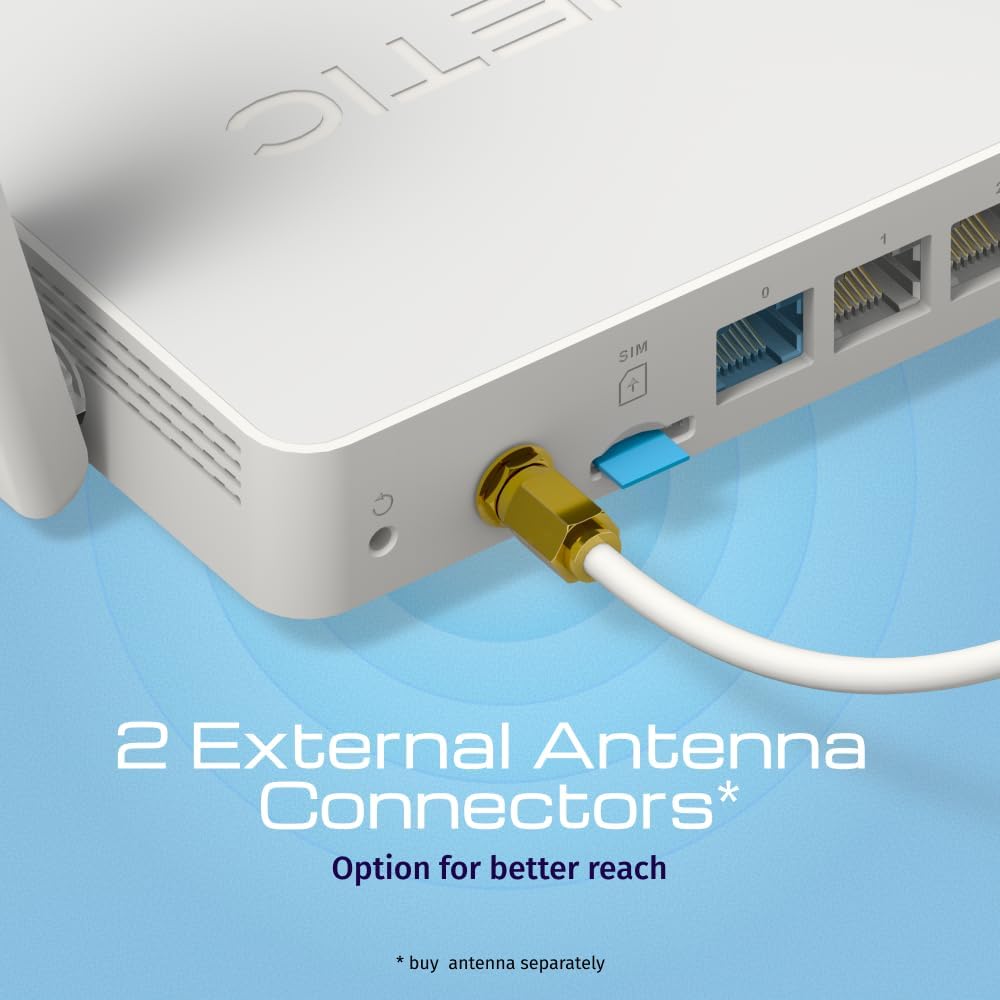
Сүрөт: View of the two external antenna connectors on the Keenetic Runner 4G N300 Mesh Router, with an antenna cable connected to one.
- Туташуу кубаты: Plug the Type-C power adapter into the router's power port and then into a power outlet. The router will power on automatically.
- Баштапкы туташуу: Connect your computer to one of the router's Ethernet LAN ports using an Ethernet cable, or connect wirelessly to the default Wi-Fi network (SSID and password usually found on a label on the router).
5.2 Баштапкы конфигурация
- Мүмкүнчүлүк Web Интерфейс: ачуу а web browser on your connected computer and enter the default IP address (e.g.,
192.168.1.1ormy.keenetic.net). - Кирүү: Демейки колдонуучу атын жана паролду киргизиңиз (адатта
adminэкөөнө тең же роутердин этикеткасында көрсөтүлгөндөй). - Орнотуу устасын аткарыңыз: The KeeneticOS web interface will guide you through the initial setup process, including setting up your internet connection (4G/LTE or Ethernet WAN), Wi-Fi network name (SSID), and password.
- Микропрограмманы жаңыртуу: It is recommended to check for and install the latest firmware updates for optimal performance and security.
6. Иштөө
6.1 4G/LTE Connectivity
The Keenetic Runner 4G N300 provides mobile internet access with download speeds up to 150 Mbps and upload speeds up to 50 Mbps, depending on your mobile network provider and signal strength.

Image: Graphic illustrating the mobile internet capabilities of the Keenetic Runner 4G N300, showing download speeds up to 150 Mbps and upload speeds up to 50 Mbps.
6.2 Wi-Fi тармагын конфигурациялоо
You can configure your Wi-Fi network settings, including SSID, security type (WPA2/WPA3 recommended), and password, through the KeeneticOS web interface or the Keenetic mobile app.
6.3 Mesh Wi-Fi Network Setup
The Keenetic Runner supports Mesh Wi-Fi technology, allowing you to expand your network coverage by adding other Keenetic Mesh-compatible devices. Refer to the KeeneticOS documentation for detailed instructions on setting up a Mesh system.
6.4 Advanced Features (KeeneticOS)
KeeneticOS, the router's operating system, offers a range of advanced features for network management and security.
6.4.1 VPN and DNS Filters
The router supports various VPN protocols and DNS filtering services for enhanced privacy and security.

Сүрөт: Графикалык көргөзмөasing KeeneticOS support for over 50 VPN features (WireGuard, OpenVPN, IPSec) and DNS filters (AdGuard, Cloudflare, OpenDNS).
6.4.2 Network Management via Keenetic App
Manage your network from anywhere using the Keenetic mobile application, providing real-time control and monitoring.

Image: Screenshot of the Keenetic App interface, demonstrating features like network overview, device list, and Quality of Service (QoS) management.
6.4.3 Smart Home & IoT Readiness
The router supports network segmentation and cybersecurity features to secure and manage your smart home and IoT devices.

Image: Diagram illustrating how the Keenetic Runner supports Smart Home and IoT devices through network segmentation and cybersecurity, showing devices connected within a home environment.
6.4.4 Өркүндөтүлгөн Ата-энелик көзөмөл
Implement parental controls to ensure safer browsing for children, including scheduling internet access, application filtering, and DNS-based content filtering.

Image: Screenshot of the KeeneticOS parental control interface, displaying options for schedules by age group, application filters, and DNS-based filters.
6.4.5 KeeneticOS Overview
KeeneticOS is a modular operating system that powers every Keenetic router, offering continuous updates, robust security, a unified platform across devices, and extensive customization options.

Image: Graphic highlighting the core aspects of KeeneticOS: always updated and safe, a unified platform across devices, customizable and modular, and providing long-term value.
7. Техникалык тейлөө
7.1 Микропрограмма жаңыртуулары
Regularly check for and install firmware updates through the KeeneticOS web interface or the Keenetic App. Firmware updates provide new features, performance improvements, and security patches.
7.2 Аппаратты баштапкы абалга келтирүү
If you encounter persistent issues, you may perform a factory reset. Locate the reset button (often a small pinhole) on the router. With the router powered on, press and hold the reset button for approximately 10 seconds until the indicators change. This will restore the router to its factory default settings.
8. Кыйынчылыктарды
- Интернет байланышы жок:
- SIM карта туура салынганын жана иштетилгенин текшериңиз.
- Verify 4G/LTE signal strength via the router's indicators or web интерфейс.
- Ensure your internet service provider (ISP) account is active.
- Роутерди жана туташкан түзмөктөрдү өчүрүп күйгүзүңүз.
- Жай ылдамдыктар:
- Check 4G/LTE signal strength; consider using external antennas if signal is weak.
- Башка эч бир түзмөк ашыкча өткөрүү жөндөмдүүлүгүн керектебесин текшериңиз.
- Көйгөйдү ырастоо үчүн ылдамдык сынагынан өтүңүз.
- Wi-Fi туташуу маселелери:
- Wi-Fi сырсөзүн ырастаңыз.
- Move closer to the router to improve signal.
- Башка электрондук шаймандардын кийлигишүүсүн текшериңиз.
- Роутер жооп бербей жатат:
- Кубат адаптерин сууруп, 10 секунд күтө туруңуз, андан кийин кайра сайыңыз.
- If the issue persists, perform a factory reset (refer to Section 7.2).
9. Техникалык шарттар
| Өзгөчөлүк | Деталь |
|---|---|
| Бренд | Keenetic |
| Модель аты | Keenetic Runner 4G 2nd Gen (KN-2211-01-EU) |
| Операция системасы | KeeneticOS |
| Байланыш технологиясы | Ethernet, LTE, Wi-Fi |
| Зымсыз байланыш стандарты | 802.11b, 802.11g, 802.11n |
| Жыштык тилкесинин классы | Жалгыз тилкелүү |
| Өзгөчөлүктөр | Mesh networking, advanced security, parental control |
| Шайкеш түзмөктөр | Game console, Personal Computer, Laptop, Smartphone, Tablet |
| Элемент Салмагы | 500 грамм |
| Камтылган компоненттер | Router, Type-C power adapter, multilingual installation manual |
10. Кепилдик жана колдоо
For warranty information and technical support, please refer to the official Keenetic website or contact your local Keenetic distributor. Keep your purchase receipt for warranty claims.