
1. Бүттүview
llano HDMI 2.1 которгучу дисплей түзмөгүңүздүн HDMI киргизүү мүмкүнчүлүктөрүн кеңейтүү үчүн иштелип чыккан. Ал сизге телевизоруңуздагы, мониторуңуздагы же проекторуңуздагы бир HDMI киргизүүсүнө төрт HDMI булак түзмөгүнө чейин туташтырууга мүмкүндүк берет. Бул түзмөк заманбап көңүл ачуу жана оюн орнотуулары үчүн оптималдуу иштөөнү камсыз кылуу үчүн жогорку чечилиштерди жана жаңыртуу ылдамдыктарын камтыган өнүккөн HDMI 2.1 функцияларын колдойт.

Сүрөт: llano HDMI 2.1 которгучу, анын компакттуу дизайны, бир нече HDMI порттору жана камтылган алыстан башкаруу пульту жана USB кубат кабели көрсөтүлгөн.
2. Негизги өзгөчөлүктөрү
- HDMI 2.1 шайкештиги: Жогорку өткөрүү жөндөмдүүлүгүндөгү маалыматтарды берүү үчүн эң акыркы HDMI 2.1 стандартын колдойт.
- Жогорку чечилиш жана жаңыртуу ылдамдыгы: 8K@60Hz жана 4K@120Hz чейинки видео чечилиштерин иштете алат.
- 4-киргизүү, 1-чыгыш конфигурациясы: Бир дисплейге төрт HDMI булак түзмөктөрүн туташтырат.
- Бир нече башкаруу параметрлери: Кол менен баскыч менен которуу, инфракызыл алыстан башкаруу жана CEC аркылуу автоматтык түрдө которуу функциялары бар.
- Өркүндөтүлгөн видео технологиялары: Өркүндөтүү үчүн CEC (Керектөөчүлөрдүн электроникасын башкаруу), HDCP2.3, 3D видео, HDR10+ (Жогорку динамикалык диапазон), VRR (Өзгөрүлмө жаңыртуу ылдамдыгы) жана ALLM (Автоматтык төмөн кечигүү режими) колдойт. viewоюн жана оюн тажрыйбалары.
- Аудио колдоо: Dolby Atmos жана PCM 7.1 сыяктуу ар кандай аудио форматтары менен шайкеш келет.

Сүрөт: HDMI 2.1'дин 60 Гцке чейинки 8K жыштыктагы жогорку өткөрүү жөндөмдүүлүгүн жана чечилиш мүмкүнчүлүктөрүн визуалдык түрдө көрсөтүү.

Сүрөт: Коммутатор аркылуу дисплейге туташтырылган оюн консолу, оюндун жылмакай жүрүшү үчүн 4K@120Hz, VRR жана ALLMди колдоого басым жасайт.
3. Продукциянын компоненттери
llano HDMI 2.1 Switcher топтому төмөнкү нерселерди камтыйт:
- llano HDMI 2.1 которгуч блогу
- IR Remote Control
- USB-C кубат кабели (электр менен камсыздоо үчүн, адаптер кошулган эмес)
- Колдонуучунун Колдонмосу (бул документ)
Видео: llano HDMI 2.1 Switcherдин функцияларын, анын ичинде анын 8K акылдуу чипин, 48 Гбит/сек маалыматтарды өткөрүүсүн, ARC колдоосун, 4K 120Гц VRR жана ар кандай которуу ыкмаларын көрсөткөн расмий продукт видеосу.
4. Орнотуу нускамалары
llano HDMI 2.1 которгучуңузду орнотуу үчүн төмөнкү кадамдарды аткарыңыз:
- Кубат туташуу: Берилген USB-C кубат кабелин коммутатордун 5V DC портуна туташтырыңыз. USB-C кабелинин экинчи учун ылайыктуу USB кубат адаптерине туташтырыңыз (мисалы, 5V/2A телефон кубаттагычы, комплектте жок). Коммутатордун туруктуу кубат алып жатканын текшериңиз.
- Киргизүү түзмөгүнүн туташуусу: HDMI булак түзмөктөрүңүздү (мисалы, PS5 же Xbox сыяктуу оюн консолдору, Blu-ray ойноткучтар, компьютерлер же агымдык түзмөктөр) коммутатордогу HDMI INPUT 1, INPUT 2, INPUT 3 жана INPUT 4/ARC портторуна туташтырыңыз. Оптималдуу иштөө үчүн жогорку сапаттагы HDMI 2.1 менен шайкеш келген кабелдерди колдонуңуз.
- Чыгаруу дисплейинин туташуусу: Телевизоруңузду, мониторуңузду же проекторуңузду коммутатордогу HDMI OUTPUT портуна туташтырыңыз. Дагы бир жолу, HDMI 2.1 менен шайкеш келген кабелди колдонуңуз.
- ARC туташуусу (милдеттүү эмес): Эгер сиз Аудио Кайтаруу Каналы (ARC) функциясын колдонууну пландап жатсаңыз, телевизоруңуз да, аудио кабыл алгычыңыз да ARCти колдой турганын текшериңиз. Телевизоруңуздун ARC иштетилген HDMI портунан HDMI кабелин туташтырыңыз INPUT 4/ARC коммутатордогу порт. ARC функциясын ушул гана киргизүү порту колдой турганын эске алыңыз.
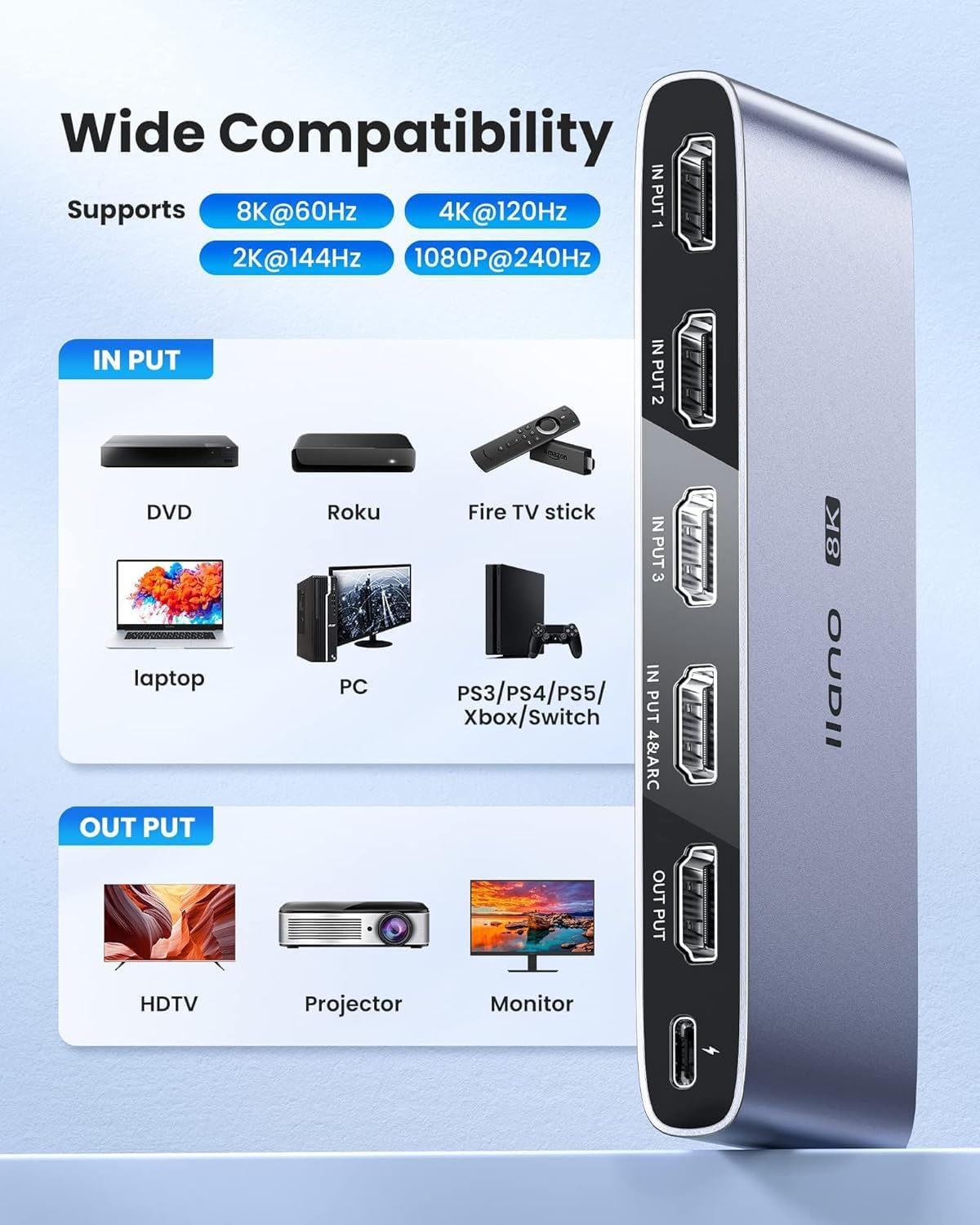
Сүрөт: Коммутаторго туташкан жана ар кандай дисплей түрлөрүнө чыгарган ар кандай киргизүү түзмөктөрүн көрсөткөн кеңири шайкештиктин иллюстрациясы.
5. Иштөө нускамалары
llano HDMI 2.1 которгучу каалаган киргизүү булагын тандоонун бир нече жолун сунуштайт:
- Кол менен которуу: Туташтырылган HDMI киргизүү булактары (1, 2, 3, 4 киргизүү) аркылуу өтүү үчүн которгучтун алдыңкы панелинде жайгашкан 'SELECT' баскычын басыңыз. Тиешелүү LED индикатору активдүү киргизүүнү көрсөтүү үчүн күйөт.
- IR алыстан башкаруу: Киргизүү булагын түз тандоо үчүн берилген инфракызыл пультту колдонуңуз. Тиешелүү HDMI киргизүүсүнө которулуу үчүн пульттагы '1', '2', '3' же '4' баскычын басыңыз. Туура иштеши үчүн, пульт менен которгучтагы инфракызыл кабыл алгычтын ортосунда ачык көрүнүү сызыгы бар экенин текшериңиз.
- Автоматтык которуу (CEC): Коммутатор керектөөчүлөрдүн электроникасын башкарууну (CEC) колдойт. Туташкан HDMI булак түзмөгү күйгүзүлгөндө же ойнотуу башталганда, коммутатор активдүү сигналды автоматтык түрдө аныктап, ошол киргизүүгө которулушу мүмкүн. Бул функция туташкан түзмөктөрүңүздүн CEC шайкештигине жана жөндөөлөрүнө жараша болот.
- Индикатор жарыктары: Учурда активдүү киргизүү булагын аныктоо үчүн алдыңкы панелдеги LED индикаторлоруна көңүл буруңуз.

Сүрөт: Киргизүүнү которуунун үч жеткиликтүү ыкмасынын сүрөттөлүшү: автоматтык, алыстан башкаруу жана кол менен башкаруу баскычы.
6. Техникалык тейлөө
llano HDMI 2.1 которгучуңуздун узак мөөнөттүү иштешин жана оптималдуу иштешин камсыз кылуу үчүн, төмөнкү техникалык тейлөө көрсөтмөлөрүн аткарыңыз:
- Тазалоо: Түзмөктүн сыртын тазалоо үчүн жумшак, кургак чүпүрөктү колдонуңуз. Суюк тазалоочу каражаттарды же абразивдүү материалдарды колдонуудан алыс болуңуз, анткени алар каптоого же ички компоненттерге зыян келтириши мүмкүн.
- Курчап турган чөйрө: Коммутаторду жакшы желдетилген жерге, түз күн нурунан, жылуулук булактарынан жана ашыкча нымдуулуктан алыс коюңуз. Желдетүүчү тешиктерди эч кандай буюмдар тосуп калбаганын текшериңиз.
- Колдонуу: Аппаратты этияттык менен колдонуңуз. Аны түшүрүүдөн же катуу таасирлерден сактаныңыз.
- Күч: Түзмөк көпкө чейин колдонулбай турганда, кубат адаптерин ажыратыңыз.
7. Кыйынчылыктарды
Эгерде сиз llano HDMI 2.1 которгучуңуз менен көйгөйлөргө туш болсоңуз, төмөнкү жалпы көйгөйлөрдү чечүү кадамдарын караңыз:
- Видео/аудио чыгаруу жок:
- Бардык HDMI кабелдери булак түзмөктөрүнө, которгучка жана дисплейге бекем туташтырылганын текшериңиз.
- Коммутатордо туура киргизүү булагынын тандалганын текшериңиз (LED индикаторлорун текшериңиз).
- Коммутатор USB-C кубат кабелинен жана адаптеринен кубат алып жатканын текшериңиз.
- Ар кандай HDMI кабелдери менен, айрыкча жогорку сапаттагы HDMI 2.1 сертификатталган кабелдер менен сынап көрүңүз, анткени төмөнкү сапаттагы кабелдер жогорку чечилиштерди/жаңыртуу ылдамдыктарын колдобошу мүмкүн.
- Баштапкы түзмөк менен дисплей туура иштеп жатканын текшерүү үчүн которгучту айланып өтүп, баштапкы түзмөктү түз эле дисплейге туташтырыңыз.
- Жымыңдаган экран же үзгүлтүктүү сигнал:
- Бул көбүнчө кабелдин сапатынан улам келип чыгышы мүмкүн. HDMI кабелдерин сертификатталган HDMI 2.1 кабелдери менен алмаштырыңыз.
- Электр менен камсыздоонун туруктуу жана жетиштүү экенине ынаныңыз.
- Көйгөй чечилеби же жокпу, билүү үчүн баштапкы түзмөктүн чечилишин же жаңыртуу жыштыгын азайтыңыз.
- Инфракызыл пульт жооп бербей жатат:
- Пульттагы батареяны текшерип, алмаштырыңыз.
- Которгучтагы пульт менен IR кабылдагычтын ортосунда эч кандай тоскоолдуктар жок экенин текшериңиз.
- Алыстан башкаруу пультунун натыйжалуу диапазону чектелүү болушу мүмкүн экенин эске алыңыз.
- ARC (Аудио кайтаруу каналы) иштебей жатат:
- Сыналгы жана аудио кабыл алгычыңыз экөө тең ARC иштетилгенин жана ARC алардын тиешелүү жөндөөлөрүндө иштетилгенин ырастаңыз.
- HDMI кабелинин туташтырылганын текшериңиз INPUT 4/ARC коммутатордогу портко жана телевизоруңуздагы белгиленген ARC HDMI портуна туташтырыңыз.
- Айрым телевизор бренддери (мисалы, Sony) тышкы которгучтар менен ARC шайкештигин аныктоо үчүн атайын шарттарды караштырышы мүмкүн. Телевизоруңуздун колдонмосун караңыз.
- Автоматтык которуу (CEC) маселелери:
- CEC функциялары ар кандай бренддерде жана түзмөктөрдө ар кандай болушу мүмкүн. Бардык туташкан түзмөктөрдө CEC иштетилгенин текшериңиз.
- Түзмөктөрүңүздө жана которгучта (эгер бар болсо) CECти өчүрүп жана кайра иштетип көрүңүз.
8. Техникалык шарттар
| Өзгөчөлүк | Деталь |
|---|---|
| Модель номери | LL-HDMI2.1-SWITCH |
| HDMI версиясы | HDMI 2.1 |
| Max чечим | 8K@60Hz, 4K@120Hz |
| Киргизүүлөр | 4 x HDMI |
| Чыгуулар | 1 x HDMI |
| ARC колдоо | Ооба (INPUT 4/ARC портунда) |
| HDCP Нускасы | HDCP2.3 |
| Колдоого алынган технологиялар | CEC, 3D, HDR10+, VRR, ALLM |
| Электр камсыздоо | DC 5V (USB-C аркылуу) |
| Элемент Салмагы | 9.2 унция |
| Пакеттин өлчөмдөрү | 5.87 x 4.25 x 1.14 дюйм |
9. Кепилдик жана колдоо
Кепилдик жөнүндө маалымат жана техникалык колдоо алуу үчүн, расмий llano сайтына кайрылыңыз webсайтка же кардарларды тейлөө бөлүмүнө кайрылыңыз. Кепилдик дооматтар үчүн сатып алуу дүмүрчөгүңүздү сактаңыз.