
1. Киришүү
The LASERLINER VideoPocket HD 082262A is a compact and versatile industrial endoscope designed for visual inspection in hard-to-reach areas. This device allows for real-time viewing, image capture, and video recording, making it an essential tool for professionals in various fields. This manual provides detailed instructions for the safe and effective operation, maintenance, and troubleshooting of your VideoPocket HD.
2. Коопсуздук нускамалары
- Жалпы коопсуздук: Read all instructions carefully before use. Keep the device away from water, high temperatures, and direct sunlight.
- Батареянын коопсуздугу: Use only specified AA alkaline batteries. Do not mix old and new batteries, or different types of batteries. Remove batteries if the device will not be used for an extended period.
- Камера кабели: Do not bend, pinch, or pull the camera cable excessively. Avoid inserting the camera into live electrical circuits or hazardous environments without proper safety precautions.
- Тазалоо: Тазалоодон мурун электрди өчүрүңүз. Жумшак, кургак чүпүрөктү колдонуңуз. Абразивдүү тазалагычтарды же эриткичтерди колдонбоңуз.
- Оңдоо: Аппаратты өзүңүз ачууга же оңдоого аракет кылбаңыз. Бардык тейлөөлөрдү квалификациялуу кызматкерлерге тапшырыңыз.
3. Пакеттин мазмуну
Пакетиңизде бардык буюмдар бар экенин текшериңиз:
- LASERLINER VideoPocket HD Main Unit
- Camera Cable with 5.2mm Camera Head (1m length)
- Магниттик тиркеме
- Mirror Attachment
- Илмек тиркеме
- Camera Tip Attachments (for securing magnet, mirror, hook)
- User Manual
4. Продукт бүтүп калдыview
The VideoPocket HD features a robust design for industrial use, with an integrated display and flexible camera probe.

1-сүрөт: LASERLINER VideoPocket HD industrial endoscope handheld unit. This image shows the complete device, highlighting its compact form factor and integrated display.

2-сүрөт: Close-up of the 5.2mm camera head with 6 integrated LEDs for illumination. The small diameter allows access into narrow spaces, and the LEDs provide necessary lighting.
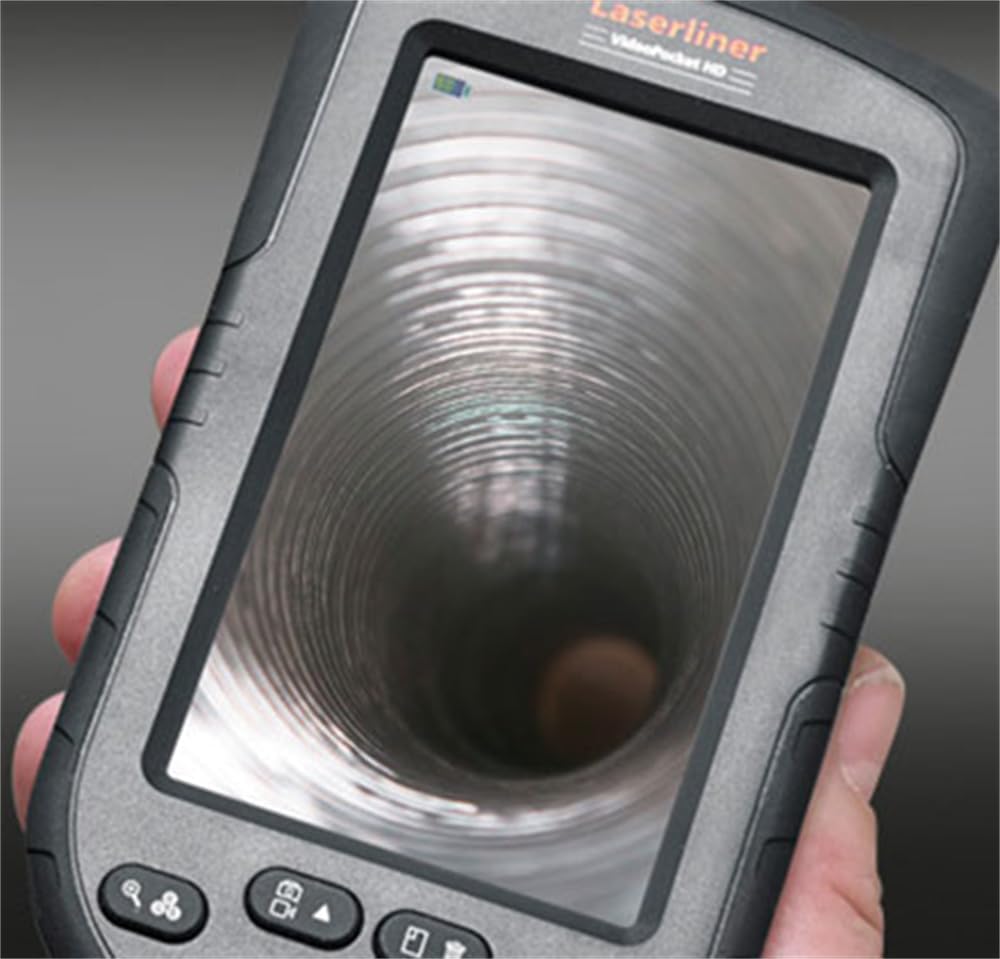
3-сүрөт: LASERLINER VideoPocket HD display showing a live view from inside a corrugated pipe. This demonstrates the device's capability to provide clear visuals during inspection.

4-сүрөт: Side view of the VideoPocket HD unit, highlighting the MicroUSB port and microSD card slot. These ports are used for data transfer and memory expansion.

5-сүрөт: Арткы view of the LASERLINER VideoPocket HD, showing the integrated storage for the camera cable. This design ensures convenient and secure storage of the probe.
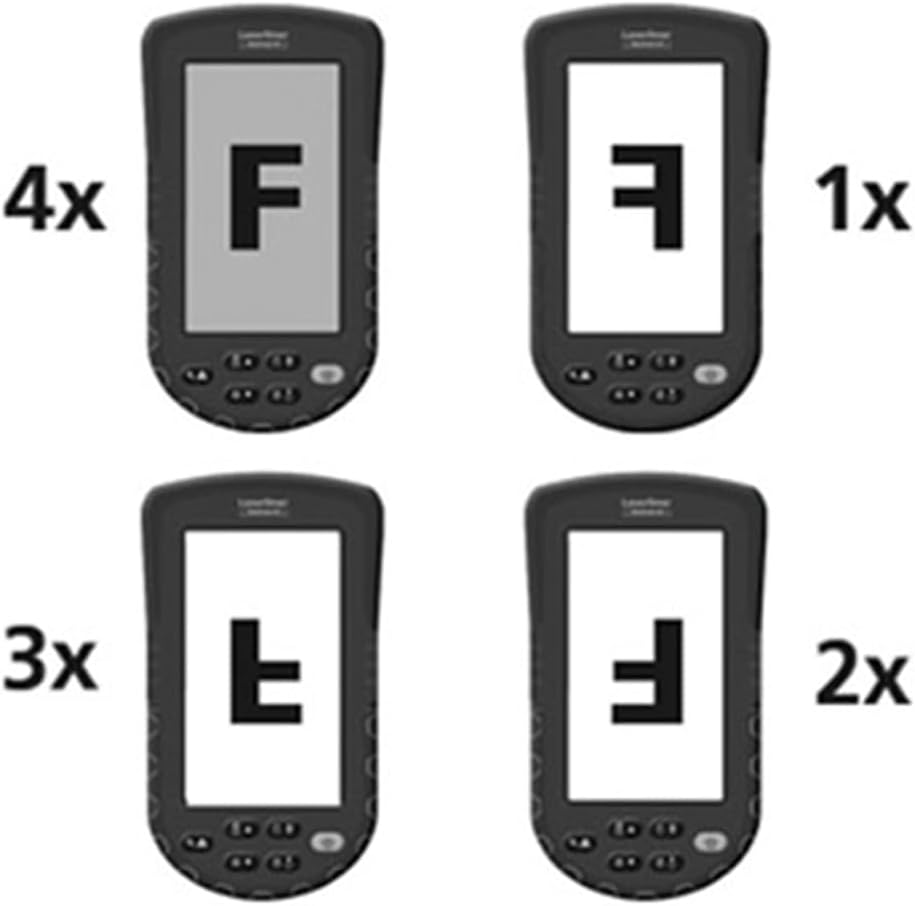
6-сүрөт: Diagram illustrating the 4x digital zoom function of the VideoPocket HD, showing different magnification levels. This feature allows for closer examination of details.
5. Орнотуу
5.1 Батареяны орнотуу
- Аппараттын артындагы батарея бөлүкчөсүнүн капкагын табыңыз.
- Капкакты жылдырып же ачуу менен ачыңыз.
- Төрт (4) AA щелочтуу батарейкасын бөлүмдүн ичинде көрсөтүлгөндөй туура полярдуулукту (+/-) камсыз кылып салыңыз.
- Батарея уясынын капкагын бекем жабыңыз.
5.2 MicroSD картасын киргизүү
- Locate the microSD card slot on the side of the device (refer to Figure 4).
- Insert a microSD card (up to 32GB, not included) into the slot with the contacts facing down, until it clicks into place.
- Чыгаруу үчүн картаны сыртка чыкканга чейин акырын түртүңүз.
5.3 Аксессуарларды тиркөө
The magnet, mirror, and hook attachments can be secured to the camera head using the provided camera tip attachments.
- Select the desired attachment (magnet, mirror, or hook).
- Carefully slide the camera tip attachment over the camera head.
- Ensure the accessory is firmly seated and aligned with the camera lens if necessary (e.g., mirror).
6. Иштөө нускамалары
6.1 Күйгүзүү/өчүрүү
- Күйгүзүү: Дисплей күйгөнгө чейин Кубат баскычын басып, кармап туруңуз.
- Өчүрүү: Дисплей өчкөнгө чейин Кубат баскычын басып, кармап туруңуз.
6.2 Live View жана Навигация
- Once powered on, the device will display a live feed from the camera probe.
- Use the directional buttons (if present) to navigate through menus or adjust settings.
6.3 Жарыктыкты жөндөө
The camera head features 6 LEDs with 10-stage brightness adjustment.
- Locate the brightness adjustment buttons (often marked with sun icons or up/down arrows).
- Press the appropriate button to increase or decrease the LED illumination intensity.
6.4 Санариптик масштабдоону колдонуу
The device supports up to 4x digital zoom (refer to Figure 6).
- Press the Zoom button (often marked with a magnifying glass icon) to cycle through zoom levels (1x, 2x, 3x, 4x).
6.5 Сүрөттөрдү жана видеолорду тартуу
Ensure a microSD card is inserted before attempting to record.
- Сүрөттү тартуу: Түз эфирде view, press the Photo/Capture button (often marked with a camera icon) to take a still image.
- Видеону жаздыруу: Press the Video/Record button (often marked with a video camera icon) to start recording. Press it again to stop recording.
6.6 Viewжаздырылган медианы алуу
- Enter Playback mode (usually via a dedicated button or menu option).
- Use the directional buttons to browse through captured images and videos.
- OK/Ойнотуу баскычын басыңыз view an image or play a video.
6.7 Компьютерге туташуу
Use the MicroUSB port to transfer fileс компьютерге.
- Connect the device to your computer using a MicroUSB cable (not included).
- Түзмөк компьютериңизде алынуучу сактагыч катары көрсөтүлүшү керек.
- You can then access and transfer the images and videos stored on the microSD card.
7. Техникалык тейлөө
7.1 Тазалоо
- Негизги блок: Wipe the main unit and display with a soft, dry, lint-free cloth. For stubborn dirt, a slightly damp кездеме, андан кийин кургак чүпүрөк колдонсо болот.
- Камера башчысы: Gently clean the camera lens with a soft lens cleaning cloth or cotton swab. Avoid scratching the lens.
- Аппараттын эч бир бөлүгүн сууга салбаңыз.
7.2 Сактоо
- Аппаратты салкын, кургак жерде, тике күн нурунан жана экстремалдык температурадан алыс сактаңыз.
- Агып кетпеш үчүн аппарат узак убакыт бою колдонулбаса, батареяларды алып салыңыз.
- Ensure the camera cable is neatly coiled and stored in its designated compartment (refer to Figure 5).
8. Кыйынчылыктарды
| Көйгөй | Мүмкүн себеп | Чечим |
|---|---|---|
| Түзмөк күйбөйт. | Батареялар өлүп калган же туура эмес салынган. | Туура полярдуулукту камсыз кылуу менен, батарейкаларды жаңы AA щелочтуу батарейкалары менен алмаштырыңыз. |
| Дисплейде эч кандай сүрөт жок. | Camera cable not properly connected or damaged. | Check the camera cable connection. If problem persists, contact support. |
| Cannot capture images/videos. | microSD картасы салынган эмес же карта толуп калган/бузулган. | Insert a valid microSD card. Delete unnecessary files or format the card (this will erase all data). |
| Image is too dark/bright. | LED brightness is not adjusted correctly. | Adjust the LED brightness using the dedicated buttons. |
| Түзмөк катып калат же жооп бербей калат. | Убактылуу программалык ката. | Катуу баштапкы абалга келтирүү үчүн батарейкаларды алып салып, кайра салыңыз. |
9. Техникалык шарттар
| Өзгөчөлүк | Спецификация |
|---|---|
| Бренд | Лазерлайнер |
| Модель номери | 082262A |
| Өнүмдүн Өлчөмдөрү (Ж x Y x D) | 8.5 x 15.5 x 3.2 см |
| Салмагы (батареялар менен) | 370 г |
| Product Weight (Gross/Shipping) | 810 г |
| Камера башынын диаметри | 5.2 мм |
| Камера кабелинин узундугу | 1 м |
| Камеранын чечилиши | 1280 x 720 пиксель |
| талаасы View | 65° |
| Фокустук аралык | 3 - 8 см |
| Дисплей түрү | 4.3 дюймдук TFT түстүү дисплей |
| Display Resolution | 480 x 272 пиксель |
| LED жарыктыгын жөндөө | 10 сtages |
| Digital Zoom | 4x |
| Видео тартуунун резолюциясы | 1080p (for saved files) |
| Memory Media | MicroSD карта (32 ГБ чейин) |
| Порт | MicroUSB |
| Power Source | 4 х AA щелочтук батарейкалар |
| Камтылган аксессуарлар | Magnet, Mirror, Hook, Camera Tip Attachments |
10. Кепилдик жана колдоо
10.1 Кепилдик маалыматы
This LASERLINER VideoPocket HD 082262A comes with a 1 жылдык өндүрүүчүнүн кепилдиги сатып алынган күндөн тартып. Бул кепилдик нормалдуу колдонуудагы материалдардагы жана жасалгадагы кемчиликтерди камтыйт. Бул туура эмес колдонуудан, кырсыктардан, уруксатсыз өзгөртүүлөрдөн же кадимки эскирүүдөн келип чыккан зыянды камтыбайт. Кепилдик дооматтары үчүн сатып алганыңыздын далилин сактап коюңуз.
10.2 Кардарларды колдоо
For technical assistance, troubleshooting beyond this manual, or warranty inquiries, please contact your retailer or visit the official Laserliner website for support contact information. When contacting support, please have your product model number (082262A) and proof of purchase readily available.