
Introduction
This manual provides instructions for the VINABTY COV33662806 replacement remote control. This remote is designed to function as a direct replacement for the original remote controls of various LG DVD player models, ensuring seamless operation of your device. Please read this manual carefully before use to ensure proper setup and functionality.
Орнотуу: Батареяны орнотуу
Алыстан башкаруу аппараты иштөө үчүн эки AAA батарейкасын (кошумча эмес) талап кылат. Батареяларды орнотуу үчүн төмөнкү кадамдарды аткарыңыз:
- Пульттун артындагы батарея отсегин табыңыз.
- Өтмөктү ылдый басып, аны ачуу үчүн батареянын капкагын ылдый жылдырыңыз.
- Оң (+) жана терс (-) терминалдары бөлүмдүн ичиндеги белгилер менен туура дал келишин камсыз кылып, эки AAA батарейкасын салыңыз.
- Батареянын капкагын бекем чыккыча ордуна жылдырыңыз.
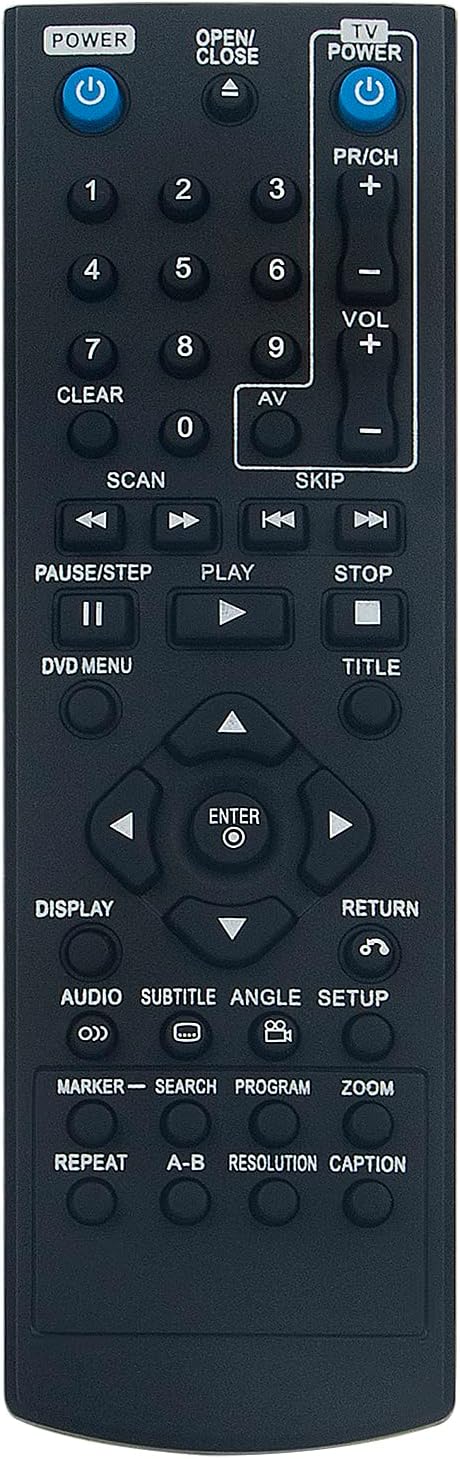
Сүрөт: Алыстан башкаруу пультунун арткы бети, батарея бөлүмү ачык, AAA батареясын туура киргизүүнүн багытын көрсөтөт.
Алыстан башкарууну иштетүү
Point the remote control directly at your LG DVD player. Ensure there are no obstructions between the remote and the device. The remote operates using infrared (IR) technology.
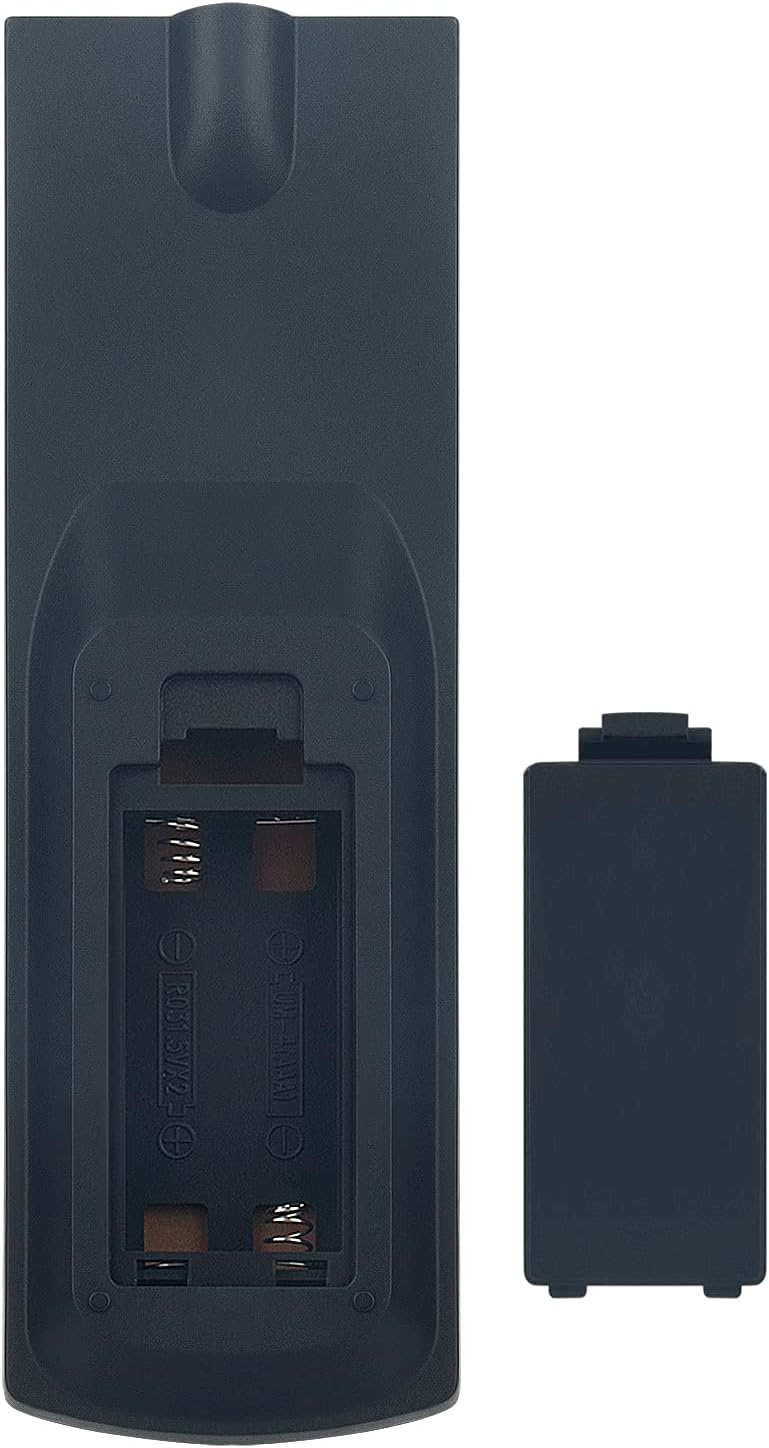
Сүрөт: алдыңкы view бардык функционалдык баскычтардын жайгашуусун көрсөтөт.
Негизги баскыч функциялары:
| баскыч | Функция |
|---|---|
| POWER (DVD) | DVD ойноткучту күйгүзөт же өчүрөт. |
| АЧУУ/ЖАБУУ | Opens or closes the DVD tray. |
| TV POWER | Turns the connected TV on or off (if compatible). |
| VOL +/- | Үн деңгээлин тууралайт. |
| PR/CH +/- | Changes channels (if controlling a TV). |
| Сандык тактасы (0-9) | Direct input for track numbers or other numerical selections. |
| ОЙНОО (►) | Starts playback of a DVD or track. |
| PAUSE/STEP (▐▐) | Ойноону тындырат же кадр боюнча алдыга жылдырат. |
| STOP (■) | Ойноону токтотот. |
| SCAN (◀◀ / ►►) | Fast reverse or fast forward during playback. |
| SKIP (◀◀| / |►►) | Мурунку же кийинки трекке/бөлүмгө өткөрөт. |
| Navigation (▲ ◀ ► ▼) | Менюлар жана тандоолор аркылуу өтөт. |
| ENTER | Confirms a selection in menus. |
| DVD МЕНЮС | Accesses the main DVD menu. |
| TITLE | DVD аталышынын менюсуна кирет. |
| ДИСПЛЕЙ | Экрандагы дисплей маалыматын көрсөтөт. |
| АУДИО | Аудио тректерди же тилдерди өзгөртөт. |
| SUBTITLE | Toggles or selects subtitle options. |
| ЖАЙГАШУУ | Тутум орнотуу менюсуна кирет. |
| КАЙТУУ | Мурунку менюга же экранга кайтып келет. |
Техникалык тейлөө
Тазалоо:
Пультту тазалоо үчүн жумшак, кургак чүпүрөктү колдонуңуз. Суюк тазалоочу каражаттарды, чачыраткычтарды же абразивдүү материалдарды колдонбоңуз, анткени алар пульттун бетине же ички компоненттерине зыян келтириши мүмкүн.
Батареяны алмаштыруу:
Replace batteries when the remote's response becomes sluggish or stops working. Always replace both batteries at the same time with new AAA alkaline batteries. Do not mix old and new batteries or different types of batteries. Remove batteries if the remote will not be used for an extended period to prevent leakage.
Сактагыч:
Пультту салкын, кургак жерде, күндүн түз нурунан, өтө жогорку температурадан жана жогорку нымдуулуктан алыс сактаңыз.
Проблемаларды чечүү
- Пульт жооп бербей жатат:
Check if the batteries are inserted correctly with the correct polarity (+/-). Replace old batteries with new ones. Ensure there is a clear line of sight between the remote and the DVD player's IR sensor. - Чектелген диапазон:
Ensure batteries are fresh. Reduce the distance between the remote and the DVD player. Remove any obstructions. - Атайын баскычтар иштебейт:
This could indicate a faulty button or very low battery power. Try replacing batteries first. If the issue persists, contact customer support. - Remote controls other devices unintentionally:
This remote is specifically designed for LG DVD players. If it affects other devices, ensure you are pointing it directly at the intended LG DVD player.
Продукт спецификациялары
| Өзгөчөлүк | Деталь |
|---|---|
| Бренд | VINABTY |
| Модель номери | COV33662806 |
| Шайкеш түзмөктөр | LG DVD/Blu-ray Players (DP132H, DZ9500, DVX9500, DP540H, DP542H, DGK777, DGK778) |
| Байланыш технологиясы | Инфракызыл (IR) |
| баскычтардын саны | 10 (main functional buttons, excluding number pad) |
| Максималдуу диапазон | 10 метр |
| Power Source | 2 x AAA Батареялар (киргизилген эмес) |
| Батареянын сүрөттөлүшү | Alkaline (recommended) |
| Түс | Кара |
| Өзгөчө өзгөчөлүк | Эргономикалык дизайн |
| Элемент Салмагы | 44 грамм |
| Келип чыккан өлкө | Кытай |
Кепилдик жана Кардарларды колдоо
For any questions, technical assistance, or issues not covered in this manual, please contact the seller or manufacturer directly through your purchase platform. Please retain your proof of purchase for any warranty claims.