
Introduction
This manual provides essential information for the safe and efficient use of your ONN 42-Inch Full HD LED Smart TV, Model 100018254. Please read these instructions thoroughly before operating your television and retain them for future reference.
Кутуда эмне бар
Орнотууну улантуудан мурун бардык компоненттер бар экенин текшериңиз.
- ONN 42-Inch Full HD LED Smart TV
- Алыстан башкаруу
- Телевизор (2 даана)
- Телевизордук стенд үчүн бурамалар
- Электр кабели
- Ыкчам баштоо колдонмосу (бул колдонмодо камтылган эмес)

Сүрөт: алдыңкы view of the ONN 42-inch Smart TV displaying the Roku TV home screen with various streaming app icons like Netflix, Disney+, Apple TV, Hulu, Peacock, and Roku Channel. The TV is black with slim bezels and two stand feet.
Жайгашуу
1. Телевизордун отургучун бекитүү
- Телевизордун экранын кылдаттык менен ылдый каратып жумшак, таза бетке коюңуз.
- Ар бир тирөөч бөлүгүн телевизордун түбүндөгү тиешелүү бурама тешиктери менен тегиздеңиз.
- Ар бир стенд бөлүгүн берилген бурамалар менен бекитиңиз. Алардын бекем кысылганын текшериңиз.

Image: A diagram illustrating the dimensions of the ONN 42-inch TV, showing its width as 43 inches and height as 37 inches when placed on its stand.
2. Дубалга орнотуу (кошумча)
This TV is compatible with VESA standard wall mounts. Refer to your wall mount's instructions for proper installation. Ensure the wall mount can support the weight of the television.

Сүрөт: Арткы view of the ONN 42-inch TV, highlighting the VESA mounting screw holes in a square pattern and various input ports on the side and bottom right.
3. Түзмөктөрдү туташтыруу
Connect your external devices such as cable boxes, gaming consoles, or Blu-ray players to the TV's input ports.
- HDMI: For high-definition audio and video. Use an HDMI cable to connect devices like set-top boxes, game consoles, or streaming sticks.
- USB: Медияны ойнотуу үчүн USB сактагыч түзмөктөрдү туташтыруу үчүн files.
- Wi-Fi: For internet connectivity to access smart TV features and streaming services.
4. Баштапкы күйгүзүү жана орнотуу устасы
- Электр шнурду сыналгыга, андан кийин розеткага сайыңыз.
- Пульттагы же сыналгынын өзүндөгү кубат баскычын басыңыз.
- Follow the on-screen instructions to complete the initial setup, including language selection, network connection (Wi-Fi), channel scanning, and linking to your Roku account (if applicable).
Телевизорду иштетүү
1. Remote Control Overview
The remote control allows you to navigate the TV's interface and control various functions.
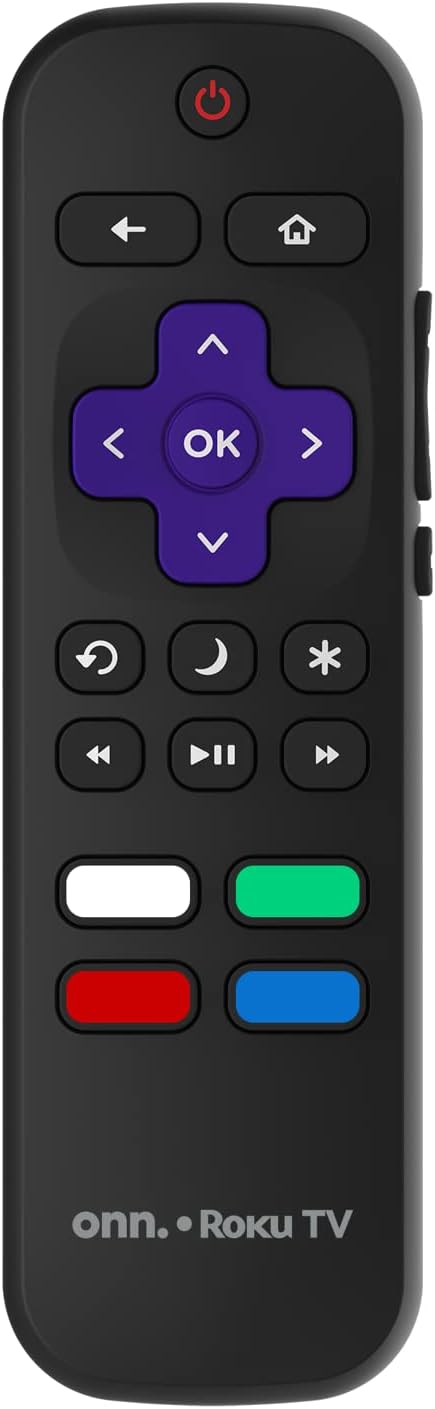
Image: The ONN Roku TV remote control, featuring a power button, directional pad, OK button, home button, back button, volume controls, and dedicated buttons for popular streaming services.
- Кубат баскычы: Телевизорду күйгүзөт же өчүрөт.
- Directional Pad (D-Pad) & OK: Менюларды багыттоо жана тандоолорду ырастоо.
- Үй баскычы: Roku TV башкы экранына кайтарат.
- Артка баскычы: Мурунку экранга же менюга кайтат.
- Үнүн жогорулатуу/төмөндөтүү: Аудионун үнүн тууралайт.
- Үнсүз баскычы: Аудионун үнүн өчүрөт же ачат.
- Канал өйдө/төмөн: Changes channels (for antenna/cable inputs).
- Колдонмонун атайын баскычтары: Quick access to popular streaming services like Netflix, Hulu, etc.
2. Smart TV өзгөчөлүктөрү
Your ONN Smart TV provides access to a wide range of streaming content and smart functionalities.
- Агым кызматтары: Access pre-installed apps like Netflix, YouTube, and many more through the Roku Channel Store.
- Үн менен башкаруу: Compatible with Alexa and Google Assistant for hands-free control (requires a separate compatible voice assistant device).
- Автоматтык программалык камсыздоо жаңыртуулары: The TV will automatically update its software when connected to the internet, ensuring you have the latest features and security.
3. Киргизүүнү тандоо
To switch between connected devices (e.g., cable box, game console), use the Киргизүү button on your remote or select the desired input from the Roku TV home screen.
4. Сүрөт жана үн орнотуулары
Access the TV's settings menu to customize picture and sound preferences. Navigate to Settings > TV picture settings or Орнотуулар > Аудио to adjust options like brightness, contrast, color, sound mode, and equalizer settings.
Техникалык тейлөө
1. Экранды тазалоо
- Тазалоодон мурун ар дайым телевизорду өчүрүп, розеткадан сууруп алыңыз.
- Жумшак, түксүз кездемени колдонуңуз, бир аз dampсуу же атайын экран тазалоочу менен бүткөрүлөт.
- Тазалоочу каражатты түз экранга чачпаңыз. Алгач аны кездемеге сүйкөңүз.
- Абразивдүү тазалагычтарды, спиртти, бензолду же суюлтуучу каражаттарды колдонуудан алыс болуңуз, алар экранга зыян келтириши мүмкүн.
2. Программалык камсыздоону жаңыртуу
Ensure your TV is connected to the internet to receive automatic software updates. These updates improve performance, add features, and enhance security. You can manually check for updates in the Орнотуулар > Система > Системаны жаңыртуу меню.
Проблемаларды чечүү
Телевизоруңузда көйгөйлөргө туш болсоңуз, төмөнкү жалпы чечимдерди караңыз:
Күч жок
- Электр шнурунун сыналгыга да, розеткага да бекем сайылганын текшериңиз.
- Башка аспапка сайып, розетка иштеп жатканын текшериңиз.
- Жөн гана пульттун эмес, сыналгыдагы кубат баскычын басып көрүңүз.
Сүрөт жок / Бурмаланган сүрөт
- Туура киргизүү булагынын тандалганын текшериңиз (мисалы, HDMI 1, HDMI 2).
- Сыналгы менен тышкы түзмөктөрдүн ортосундагы бардык кабелдик байланыштарды текшериңиз.
- Мүмкүн болсо, башка HDMI кабелин колдонуп көрүңүз.
- Adjust picture settings (brightness, contrast) in the TV menu.
Үн жок / Үн төмөн
- Check if the TV is muted or if the volume is turned down.
- Ensure external audio devices (soundbars, receivers) are properly connected and powered on.
- Сыналгы менюсунда аудио жөндөөлөрүн текшериңиз.
Тармакка туташуу маселелери
- Verify your Wi-Fi router is powered on and functioning.
- Роутериңизди жана модемиңизди өчүрүп күйгүзүңүз.
- барыңыз Орнотуулар > Тармак > Байланышты текшерүү көйгөйдү аныктоо үчүн телевизоруңузда.
- Туура Wi-Fi сырсөзүн киргизип жатканыңызды текшериңиз.
Техникалык шарттар
| Өзгөчөлүк | Деталь |
|---|---|
| Модель номери | 100018254 |
| Screen Size | 42 дюйм |
| Дисплей технологиясы | LED |
| Резолюция | 1080p (Full HD) |
| Жаңыртуу ылдамдыгы | 60 Гц |
| Байланыш | USB, Wi-Fi |
| Колдоого алынган Интернет кызматтары | Netflix, YouTube (and others via Roku platform) |
| Башкаруу ыкмасы | Voice (via Alexa & Google Assistant compatible devices), Remote Control |
| Монтаж түрү | Дубалга орнотуу (VESA шайкеш) |
| Түс | Кара |
| UPC | 671227025567 |

Image: Energy Guide label for Television Model 100018254, indicating an estimated yearly energy cost of $11 based on 12 cents per kWh and 5 hours use per day.
Кепилдик жана колдоо
For warranty information and technical support, please refer to the documentation included with your purchase or visit the official ONN support webсайт. Кепилдик дооматтары үчүн сатып алуу дүмүрчөгүңүздү сактаңыз.