
UNITOPSCI A3197A4
UNITOPSCI 2G+64G 9 Inch Double Din Android Car Stereo
User Manual
1. Киришүү
Thank you for choosing the UNITOPSCI 2G+64G 9 Inch Double Din Android Car Stereo. This advanced head unit is designed to enhance your driving experience with its comprehensive features, including a 9-inch capacitive touch screen, Android 13 operating system, wireless Apple CarPlay, Android Auto, Bluetooth, GPS navigation, mirror link, WiFi, FM radio, USB connectivity, steering wheel control (SWC), and DVR support. This manual provides detailed instructions for installation, operation, maintenance, and troubleshooting to ensure optimal performance and longevity of your device.

Image: The UNITOPSCI 9-inch Android Car Stereo, showcasing its user interface with navigation, music playback, and system settings.
2. Кутуда эмне бар
Please verify that all components are present in the package before proceeding with installation.
- 1 x Android унаа стереосу
- 1 х Камера
- 1 x GPS антеннасы
- 1 x Арткы камеранын киргизүү кабели
- 1 x RCA кабели
- 1 x Кубат кабели
- 1 x USB кабели
- 2 x Металл каркас
- 1 x User Manual
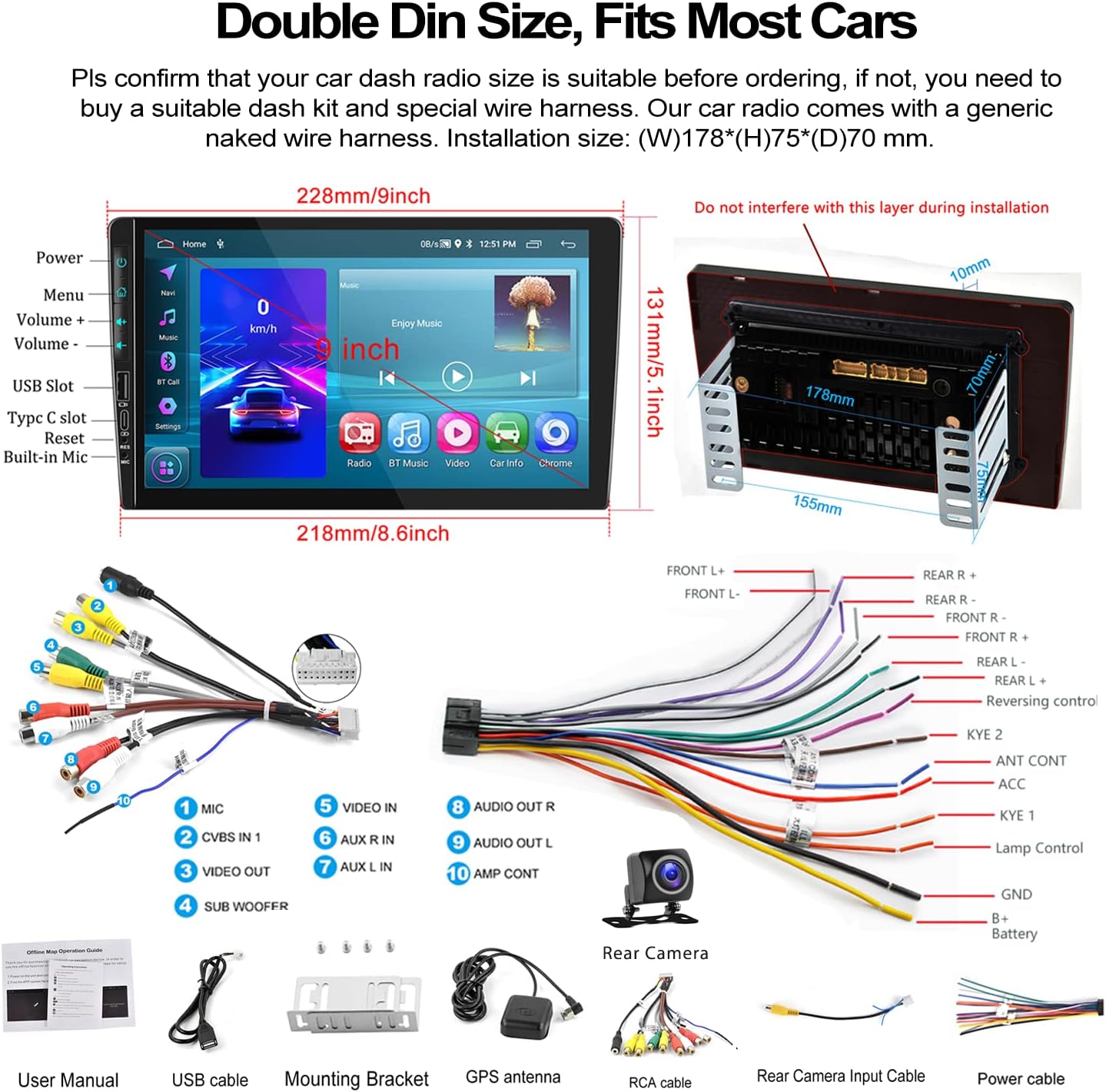
Image: A visual representation of the car stereo's dimensions, along with all the cables and accessories included in the package, such as the power cable, RCA cables, USB cable, GPS antenna, and backup camera.
3. Техникалык шарттар
| Өзгөчөлүк | Description |
|---|---|
| Система | Android 13 |
| RAM | 2 ГБ |
| ROM | 64 ГБ |
| Screen Size | 9 дюйм |
| Screen Resolution | 1024x600 |
| Күч Ampкөтөргүч чип | 7388 |
| Радио чип | 8035 |
| Power Output | 4*45 Вт |
| Bluetooth версиясы | 4.2 |
| Радио жыштык диапазону | FM/RDS |
| Иштөө температурасы | -40 градустан 80 градуска чейин |
| Орнотуу өлчөмү | 7 inch (W), 3.8 inch (H) / 178mm (W) x 97mm (H) |
| Продукциянын өлчөмдөрү | 1.85 x 7 x 4.02 дюйм |
| Элемент Салмагы | 2.29 фунт |
4. Орнотуу жана орнотуу
Proper installation is crucial for the performance and safety of your car stereo. It is recommended to have the installation performed by a professional if you are unsure about any steps.
4.1 Орнотууга чейинки текшерүү
- Ensure your car's dashboard opening is compatible with the standard double din size (approximately 7 inches wide by 3.8 inches high).
- Disconnect the car battery's negative terminal before starting any wiring.
- Familiarize yourself with the wiring harness provided.
4.2 Зымдарды туташтыруу
Refer to the wiring diagram provided in the 'What's in the Box' section and the specific rear view wiring diagram below for detailed connections.
- Кубат кабели: Connect the power cable to your car's power supply according to the diagram.
- RCA кабелдери: Connect audio and video input/output cables as needed for external devices (e.g., amplifiers, headrest monitors).
- USB кабелдери: Connect the dual USB interfaces for media playback, charging, or wired Android Auto.
- GPS антеннасы: GPS антеннасын ачык жерге орнотуңуз view оптималдуу сигнал кабыл алуу үчүн асман.
- Арткы камеранын кириш кабели: This cable is essential for the backup camera functionality.
4.3 Камеранын резервдик зымдары
The included AHD backup camera requires specific wiring for proper operation:
- Камеранын күчү: The red wire of the backup camera connects to the positive (+) back battery supply (e.g., reverse light power). The black wire connects to the negative (-) battery supply (ground).
- Video Input: The yellow RCA video output from the backup camera connects to the "CAM IN" port on the rear of the car radio.
- Trigger зымы: Locate the wire labeled "BACK" or "REVERSE" on the car radio's wire harness. This wire needs to be connected to the positive power supply of your car's reversing light. This signal tells the head unit to automatically switch to the reversing image when reverse gear is engaged.

Image: A comprehensive wiring diagram for the backup camera, showing how to connect the camera's power, video signal, and the trigger wire to the car stereo and vehicle's reverse light system.
5. Иштөө нускамалары
This section details the various functions and how to operate your UNITOPSCI car stereo.
5.1 Зымсыз Apple CarPlay & Android Auto
Connect your smartphone for seamless integration of navigation, music, calls, and more.
- Зымсыз туташуу: For both Apple CarPlay and Android Auto, connect your phone via Bluetooth and/or WiFi. Follow the on-screen prompts to establish the connection.
- Зымдуу туташуу: Alternatively, connect your Android phone via a USB data cable for wired Android Auto.
- Үн менен башкаруу: Utilize Siri (for CarPlay) or Google Assistant (for Android Auto) for hands-free operation of functions like navigation, calls, and music.
- Эскертүү: The Android Auto function may not work for some Samsung phones. CarPlay supports iOS phones up to version 15.4.

Image: Displays of the car stereo showing Wireless Apple CarPlay, Wireless Android Auto, and Mirror Link in action, highlighting their respective interfaces and connection methods.
5.2 Mirror Link
Mirror Link смартфонуңуздун экранын түз эле унаанын стереосунун дисплейине көрсөтүүгө мүмкүндүк берет.
- Android/iOS Compatibility: Supports screen mirroring for both Android and iOS devices.
- Байланыш: Connect your phone via USB or WiFi as per the instructions on the stereo.

Image: The car stereo screen mirroring a smartphone, demonstrating the Mirror Link feature.
5.3 Bluetooth Hands-Free & FM Radio
Enjoy safe communication and your favorite radio stations.
- Bluetooth жупташууда: Enable Bluetooth on your phone and search for the car stereo. Pair the devices to enable hands-free calling and wireless audio streaming.
- Телефондук китеп: The stereo supports automatic download of your phone book for easy access to contacts.
- FM радиосу: Tune into your favorite FM stations. The radio features 18 preset stations for quick access to news, sports, and music.

Image: The car stereo's display showing the Bluetooth hands-free calling interface, FM radio tuner, and options for Bluetooth music and phone book access.
5.4 GPS багыттоо & WiFi
Navigate with ease and stay connected.
- Оффлайн карталары: The unit comes with built-in offline maps (HERE WE GO). Switch on WiFi to download map data for your region.
- Онлайн карталар: Supports various online navigation apps for real-time traffic and updates.
- WiFi байланышы: Connect to a WiFi hotspot (e.g., from your phone) to access online features, download apps, and browse the internet.
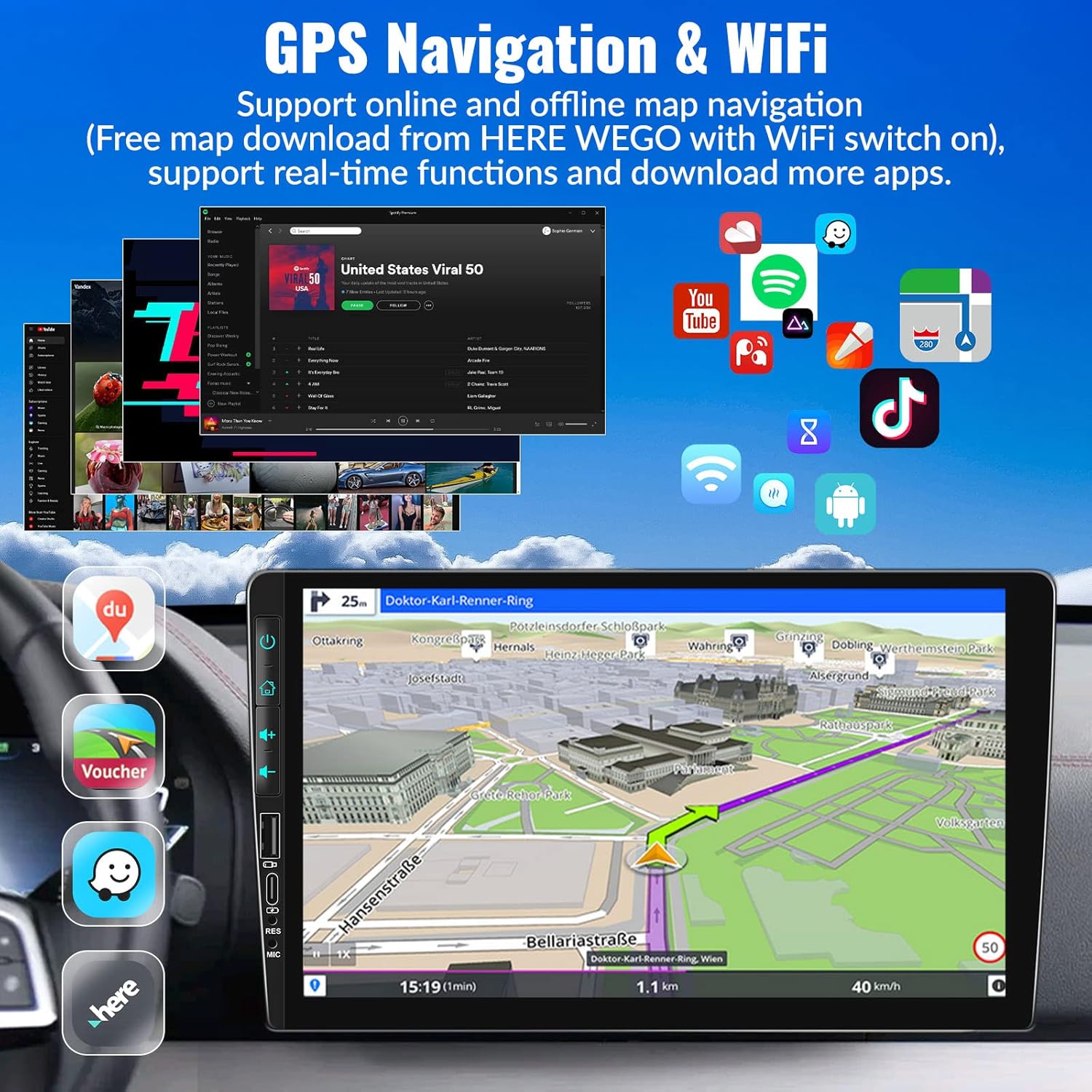
Image: The car stereo's screen showing a GPS navigation map, with various app icons floating around, illustrating the device's WiFi and app capabilities.
5.5 Рулду башкаруу (SWC)
Control your stereo without taking your hands off the wheel.
- Жайгашуу: Access the Steering Wheel Control settings in the system menu. Follow the on-screen instructions to map your car's steering wheel buttons to the stereo's functions (e.g., volume up/down, track skip, mode).
- Ыңгайлуулугу: Easily switch songs, radio channels, and adjust volume for a safer driving experience.
5.6 EQ Sound Setting
Customize your audio experience.
- Алдын ала орнотуулар: Choose from various preset EQ modes such as Pop, Classic, Rock, Jazz, and more.
- Ыңгайлаштыруу: Adjust individual frequency bands to create your preferred sound profile.

Image: The car stereo screen showing the AHD rear view camera display with parking lines, and a separate image illustrating the steering wheel control setup interface.
5.7 AHD арткы View Камера
Enhance parking safety with the included backup camera.
- Автоматтык которуу: When properly wired, the stereo will automatically switch to the reversing image on the 9-inch touch screen when you engage reverse gear.
- Өзгөчөлүктөрү: The camera provides HD image quality, is waterproof, offers night vision, and has a wide-angle view.
5.8 HD Screen & UI Themes
Personalize your stereo's appearance.
- Дисплей: The 1024x600 capacitive touch screen features 2.5D glass and supports HD 1080p video playback.
- UI темалары: Choose from 28 different UI themes to customize the look and feel of your car stereo's interface.

Image: The car stereo's HD screen displaying a vibrant image, alongside a selection of 28 different desktop UI themes for personalization.
5.9 Түркүн түстүү жарыктар
Customize the button illumination.
- Параметрлер: There are 7 options for button light colors, allowing you to match your car's interior lighting or your personal preference.

Image: The car stereo showcasing its customizable colorful button lights, with a spectrum of 7 color options.
6. Техникалык тейлөө
Унаа стереоңуздун узак иштөөсүн жана оптималдуу иштешин камсыз кылуу үчүн, төмөнкү тейлөө көрсөтмөлөрүн аткарыңыз:
- Экранды тазалоо: Сенсордук экранды акырын сүртүү үчүн жумшак, түксүз чүпүрөктү колдонуңуз. өжөр тактар үчүн, бир аз гampчүпүрөккө суу же экранды тазалоочу каражат. Абразивдүү материалдардан же катуу химиялык заттардан алыс болуңуз.
- Жалпы тазалоо: Агрегатты чаңдан жана таштандыдан алыс кармаңыз. Желдетүүчү тешиктерди жана баскычтардын жаракаларын тазалоо үчүн жумшак щетка же кысылган абаны колдонуңуз.
- Температураны көзөмөлдөө: Түзмөктү узак убакыт бою өтө жогорку температурага (өтө ысык же өтө суук) дуушар кылбаңыз, анткени бул анын иштешине жана иштөө мөөнөтүнө таасир этиши мүмкүн.
- Программалык камсыздоо жаңыртуулары: Periodically check for software updates from UNITOPSCI to ensure you have the latest features and bug fixes.
- Кабелдик байланыштар: Бардык кабелдер коопсуз туташтырылганын текшериңиз. Бошоң байланыштар үзгүлтүксүз көйгөйлөргө алып келиши мүмкүн.
7. Кыйынчылыктарды
Унаа стереоңузда кандайдыр бир көйгөйгө туш болсоңуз, төмөнкү жалпы көйгөйлөрдү жана чечимдерди караңыз:
| Көйгөй | Мүмкүн болгон себеп жана чечим |
|---|---|
| Кубат жок / Түзмөк күйбөйт |
|
| Үн чыгышы жок |
|
| Backup Camera Not Displaying Image |
|
| Wireless CarPlay/Android Auto Not Connecting or Laggy |
|
| Рулдун башкаруу элементтери иштебейт |
|
| Touch Screen Unresponsive or Malfunctioning |
|
Бул чечимдерди колдонуп көргөндөн кийин көйгөй чечилбесе, кошумча жардам алуу үчүн кардарларды колдоо бөлүмүнө кайрылыңыз.
8. Кепилдик жана колдоо
UNITOPSCI is committed to providing high-quality products and satisfactory services.
- Кепилдик: Бул продукт сатып алынган күндөн тартып 1 жылдык кепилдик менен келет.
- Алмаштыруу кызматы: Enjoy a 12-month replacement service for eligible issues.
- Акчаны кайтаруу кепилдиги: 30 күндүк акчаны кайтарып берүү кепилдиги сунушталат.
- Өмүр бою колдоо: UNITOPSCI provides full-life product support, including after-sales consultation and technical assistance.
- Колдоо кызматы менен байланышуу: For any product problems or inquiries, please feel free to write to us at UNITOPSCI@126.com. Our team aims for a quick response within 16 hours.

Image: Visual representation of UNITOPSCI's customer support services, including contact information.