
1. Киришүү
Сатып алганыңыз үчүн рахматasing the LFF LDR113-EU Kitchen Radio. This manual provides essential information for the safe and efficient operation of your device. Please read it thoroughly before use and retain it for future reference.
The LFF LDR113-EU is a versatile kitchen radio featuring DAB+, FM, and Bluetooth connectivity. It includes dual alarms, a sleep timer, and 60 station presets, designed for both tabletop use and under-cabinet mounting.
2. Коопсуздук маалыматы
- Кубат булагы: Берилген кубат адаптерин гана колдонуңуз. Voltage сиздин жергиликтүү электр камсыздооңузга дал келет.
- Суу жана ным: Do not expose the device to water, rain, or excessive moisture. Avoid placing liquids near the radio.
- Вентиляция: Ensure adequate ventilation around the device. Do not block ventilation openings.
- Жылуулук: Аппаратты радиаторлор, жылуулук регистрлери, мештер же башка жылуулук чыгаруучу шаймандар сыяктуу жылуулук булактарынан алыс кармаңыз.
- Тазалоо: Тазалоодон мурун электр кубатынан ажыратыңыз. Жумшак, кургак чүпүрөктү колдонуңуз. Суюк тазалагычтарды же аэрозоль тазалагычтарды колдонбоңуз.
- Тейлөө: Бул продуктту өзүңүз тейлөөгө аракет кылбаңыз. Бардык тейлөөнү квалификациялуу тейлөө кызматкерлерине тапшырыңыз.
- Жайгашкан жери: Place the radio on a stable, level surface or mount it securely according to the instructions.
3. Пакеттин мазмуну
Пакетте бардык буюмдар бар экенин текшериңиз:
- LFF LDR113-EU Kitchen Radio
- Кубаттуу адаптер
- Mounting Kit (screws, spacers, mounting template)
- Колдонуучунун Колдонмосу (бул документ)
4. Продукт бүтүп калдыview
Радионун компоненттери жана башкаруу элементтери менен таанышып алыңыз.

4.1-сүрөт: Фронт view of the LFF LDR113-EU Kitchen Radio, showing the LCD display on the left, control buttons in the center, and a large rotary knob on the right. The buttons include power, mode, menu, info, preset, timer/sleep, and navigation arrows. The rotary knob is for volume and selection.

4.2-сүрөт: Diagram illustrating the key features of the LFF Kitchen Radio, including DAB/DAB+ radio, FM radio, two alarms, sleep timer, Bluetooth connectivity, and 60 station presets.
4.1. Башкаруу жана дисплей
- LCD түстүү дисплей: Shows current mode, station information, time, and settings.
- Кубат баскычы: Радиону күйгүзөт/өчөт.
- Режим баскычы: Switches between DAB+, FM, and Bluetooth modes.
- Menu/Info Button: Accesses menu options or displays station information.
- Алдын ала коюлган баскычтар (1-5): Сакталган станцияларга тез жетүү.
- Timer/Sleep Button: Уйку таймерин же ойготкуч функцияларын орнотот.
- Чабыттоо баскычтары (өйдө/төмөн/сол/оң): Navigates through menus and station lists.
- Rotary Knob (Volume/Enter): Adjusts volume, scrolls through options, and confirms selections.
5. Орнотуу
5.1. Power Connection
- Кубат адаптерин радионун арткы жагындагы DC IN портуна туташтырыңыз.
- Кубат адаптерин розеткага сайыңыз.
- Радио күйөт же күтүү режимине өтөт.
5.2. Initial Scan (DAB+ and FM)
Upon first power-on, the radio will typically perform an automatic scan for DAB+ and FM stations. If not, follow these steps:
- басыңыз Mode button to select DAB+ or FM mode.
- For DAB+, the radio will usually initiate a full scan automatically. If not, navigate to the 'Full Scan' option in the DAB+ menu and press the rotary knob to confirm.
- For FM, navigate to the 'Auto Scan' option in the FM menu and press the rotary knob to confirm.
- The radio will search for available stations and store them.

5.1-сүрөт: The LFF Kitchen Radio's LCD color screen displaying the main menu with icons for Digital Radio (DAB+), FM Radio, and Bluetooth, indicating available modes.
6. Иштөө нускамалары
6.1. Күйгүзүү/өчүрүү
басыңыз Күч button to turn the radio on or off (standby mode).
6.2. Режимди тандоо
басыңыз Mode button repeatedly to cycle through DAB+, FM, and Bluetooth modes.
6.3. DAB+ радиосунун иштеши
- DAB+ режиминде, колдонуңуз Өйдө/Төмөн navigation buttons or the rotary knob to browse available stations.
- Press the rotary knob to select a station.
- Басыңыз Меню/Инфо чейин view station information (e.g., program type, signal strength).
6.4. FM радиосунун иштеши
- FM режиминде, колдонуңуз Өйдө/Төмөн navigation buttons to tune to stations manually.
- басып, кармап туруңуз Өйдө/Төмөн buttons for automatic station seeking.
- Басыңыз Меню/Инфо чейин view станция маалыматы.
6.5. Bluetooth байланышы
Connect your smartphone or other Bluetooth-enabled device to the radio.
- басыңыз Mode button to select Bluetooth mode. The display will show 'Bluetooth Pairing'.
- Мобилдик түзмөгүңүздө Bluetooth иштетип, жеткиликтүү түзмөктөрдү издеңиз.
- Select 'LFF LDR113-EU' from the list of devices.
- Once connected, the radio display will show 'Bluetooth Connected'. You can now play audio from your device through the radio.
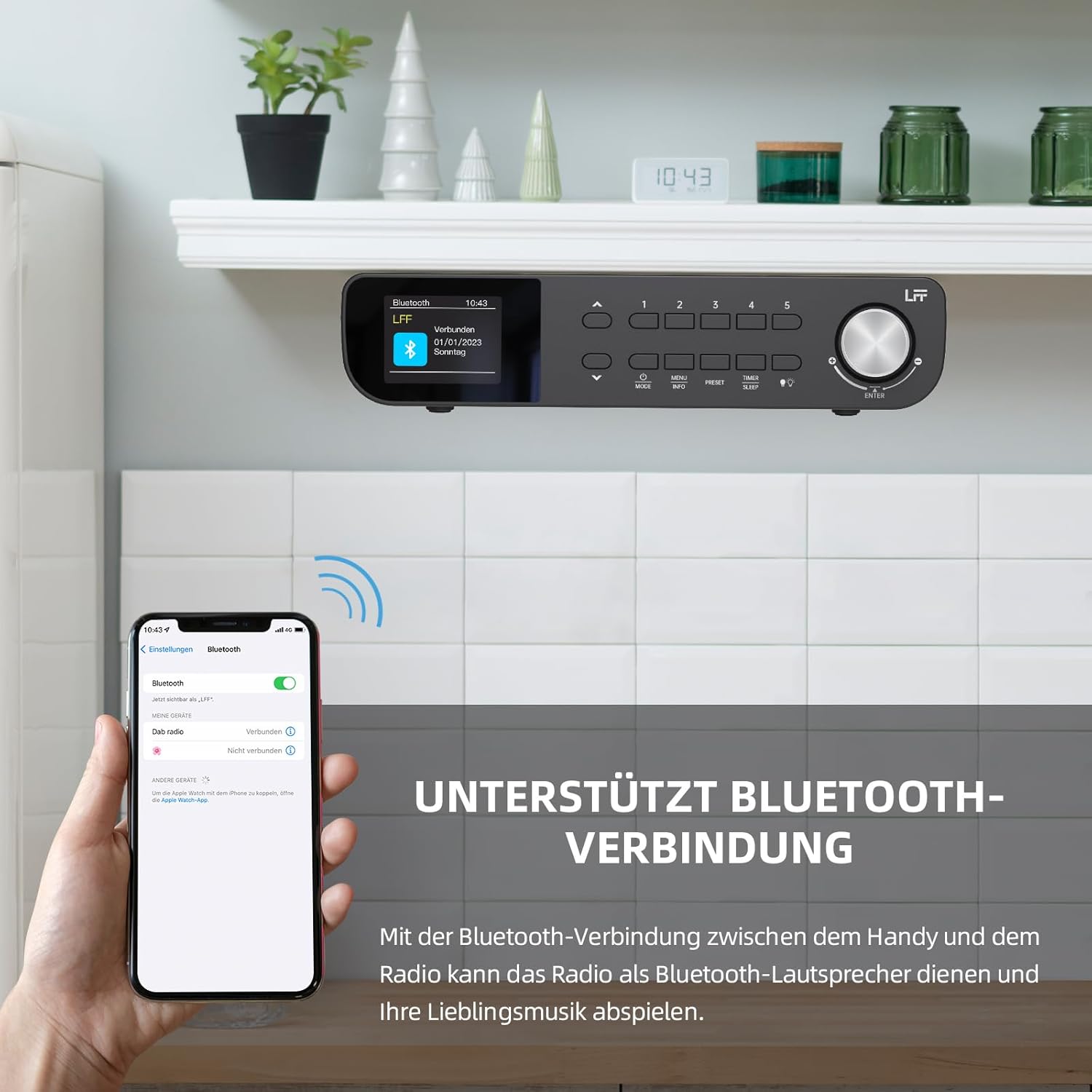
6.1-сүрөт: The LFF Kitchen Radio displaying a successful Bluetooth connection, with a smartphone screen showing the radio as a connected device.

6.2-сүрөт: Жакын план view of the radio's display indicating 'LFF' and 'Connected' under the Bluetooth menu, confirming a successful pairing.
6.6. Сигналдарды коюу
The radio features two independent alarms.
- басыңыз Таймер/Уйку button repeatedly until 'Alarm 1' or 'Alarm 2' appears.
- Use the navigation buttons and rotary knob to set the alarm time, source (DAB+, FM, or Buzzer), and frequency (daily, weekdays, weekends, once).
- Confirm settings by pressing the rotary knob.

6.3-сүрөт: Close-up of the radio's display showing the current time and options to activate or deactivate Alarm 1 and Alarm 2.
6.7. Уйку таймери
Уйку таймери радиону белгиленген убакыттан кийин автоматтык түрдө өчүрүүгө мүмкүндүк берет.
- басыңыз Таймер/Уйку button repeatedly until 'Sleep Timer' appears.
- Use the navigation buttons or rotary knob to select the desired sleep duration (e.g., 15, 30, 60 minutes).
- Айлануучу баскычты басуу менен ырастаңыз.

6.4-сүрөт: Close-up of the radio's display showing the 'Sleep Timer' setting, with an option to set the duration, for example, to 30 minutes.
6.8. Алдын ала орнотуулар
Тез жетүү үчүн 60ге чейин сүйүктүү станцияларды сактап коюңуз.
- Алдын ала орнотууну сактоо үчүн: Tune to the desired station. Press and hold one of the Алдын ала коюлган (1-5) buttons until 'Preset Saved' appears. For additional presets, use the 'Preset Store' option in the menu.
- Алдын ала орнотууну кайра чакырып алуу үчүн: баскычтарынын бирин кыскача басыңыз Алдын ала коюлган (1-5) buttons. For other presets, navigate to 'Preset Recall' in the menu.
6.9. LED жарык
The radio includes an integrated LED light, useful for illuminating the area below if mounted under a cabinet.
- басыңыз Жарык button (if available, or navigate through menu) to turn the LED light on or off.

6.5-сүрөт: The LFF Kitchen Radio mounted under a kitchen cabinet, with its integrated LED light providing illumination to the countertop below.
6.10. Жарыкты көрсөтүү
Adjust the display backlight brightness to suit your environment.
- Access the 'Display' or 'Settings' menu.
- Select 'Brightness' and choose from High, Medium, or Low settings.

6.6-сүрөт: A visual comparison of the LFF Kitchen Radio's display at three different backlight brightness levels: High, Medium, and Low, demonstrating the adjustable visibility.
7. Монтаждоо боюнча нускамалар
The LFF LDR113-EU Kitchen Radio offers flexible placement options: tabletop or under-cabinet mounting.
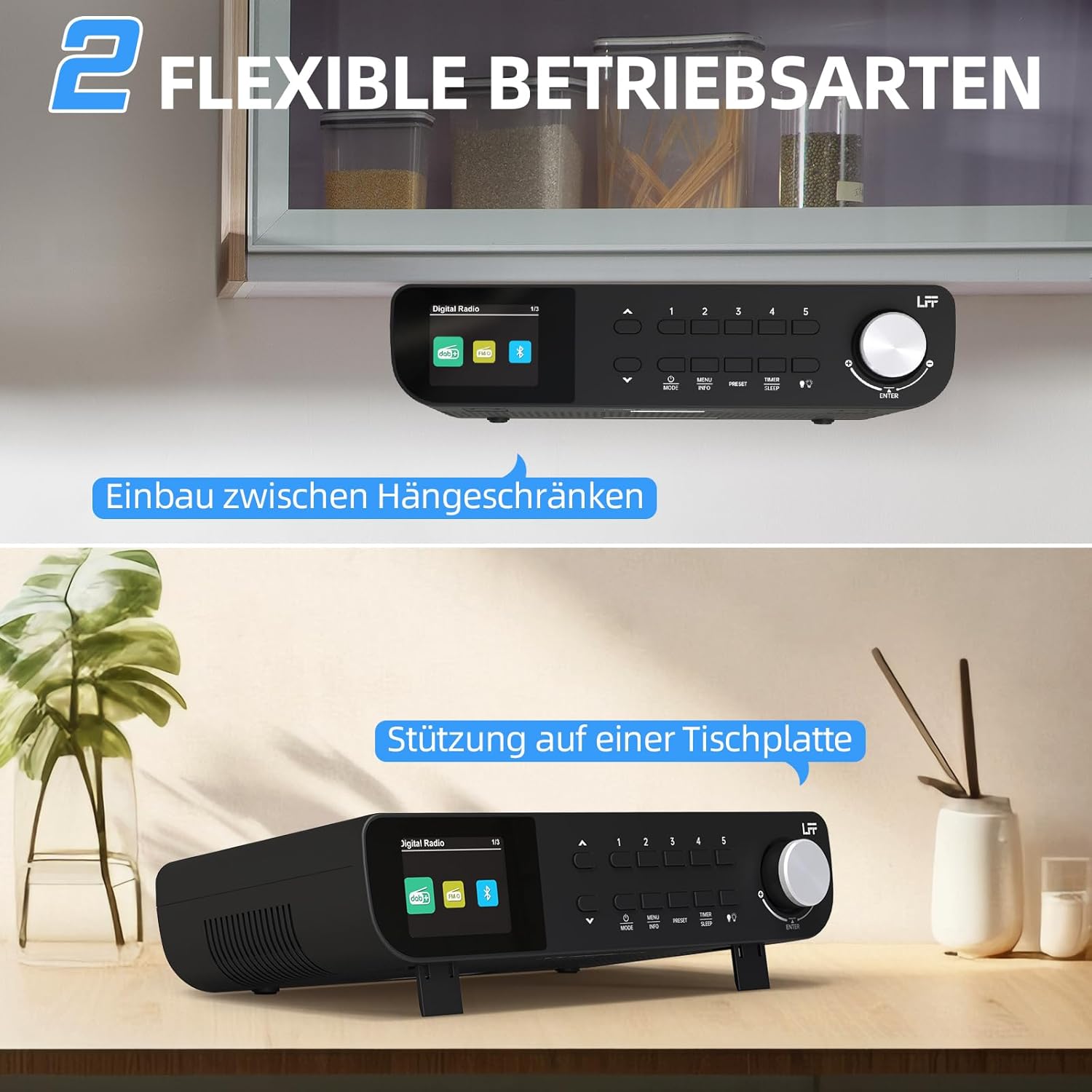
7.1-сүрөт: The LFF Kitchen Radio displayed in two common installation scenarios: mounted underneath a kitchen cabinet and placed freestanding on a tabletop.
7.1. Үстөлдүн үстүнө коюу
Simply place the radio on a stable, flat surface. Ensure it is not near the edge to prevent accidental falls.
7.2. Under-Cabinet Mounting
For under-cabinet installation, use the provided mounting kit.
- Жайгашкан жерди даярдоо: Choose a suitable location under a kitchen cabinet, ensuring there is enough space and access to a power outlet.
- Бургулоо тешиктерин белгилөө: Use the provided mounting template to mark the drill holes on the underside of the cabinet.
- Бургулоочу тешиктер: Белгиленген позицияларда пилоттук тешиктерди бургула.
- Attach Mounting Plate (if applicable): Some models may include a separate mounting plate. Attach this to the cabinet using the screws.
- Secure the Radio: Align the radio with the mounting holes or plate and secure it using the provided screws. Ensure it is firmly attached.
- Туташуу кубаты: Кубат адаптерин сайыңыз.

7.2-сүрөт: Detailed diagram showing the steps for under-cabinet mounting, including measuring distances (e.g., 58mm) and securing the radio with screws.
8. Техникалык тейлөө
- Тазалоо: To clean the radio, disconnect it from the power supply. Use a soft, dry, lint-free cloth. Do not use abrasive cleaners, waxes, or solvents.
- Антенна: Ensure the antenna is extended for optimal reception in DAB+ and FM modes. Handle it gently to avoid damage.
- Сактагыч: If storing the radio for an extended period, disconnect it from power and store it in a cool, dry place.
9. Кыйынчылыктарды
| Көйгөй | Мүмкүн себеп | Чечим |
|---|---|---|
| Күч жок | Кубат адаптери туташкан эмес же туура эмес розетка. | Электр байланышын текшериңиз. Башка розеткадан аракет кылып көрүңүз. |
| DAB+/FM кабыл алуу начар | Антенна узартылган эмес, сигнал алсыз же тоскоолдук бар. | Fully extend the antenna. Reposition the radio. Perform a full scan. |
| Bluetooth туташпай жатат | Radio not in pairing mode, device too far, or already connected to another device. | Ensure radio is in Bluetooth mode. Move device closer. Disconnect from other devices. |
| Үн жок | Volume too low, mute activated, or incorrect mode. | Increase volume. Check if mute is active. Ensure correct mode (DAB+, FM, Bluetooth). |
| Дисплей иштебейт | Brightness too low or device malfunction. | Adjust display brightness. If problem persists, contact support. |
10. Техникалык шарттар

10.1-сүрөт: Diagram showing the dimensions of the LFF Kitchen Radio: 250mm length, 146mm width, and 55mm height.
| Өзгөчөлүк | Деталь |
|---|---|
| Бренд | LFF кеңейтүүсү |
| Модель номери | LDR113-EU |
| Түс | Кара |
| Байланыш | Bluetooth |
| Тюнинг технологиясы | DAB Plus, FM |
| Power Source | Электр кабели |
| Жыштык | 108 МГц (FM макс.) |
| Өлчөмдөрү (L x W x Y) | 250мм x 146мм x 55мм |
| Алдын ала орнотуулар | 60 |
| Дисплей | ЖК түстүү экран |
| Өзгөчөлүктөр | Dual Alarms, Sleep Timer, Under-cabinet mounting option, LED Light |
11. Кепилдик жана колдоо
This product comes with a standard manufacturer's warranty. Please refer to the warranty card included in your package for specific terms and conditions. For technical support, troubleshooting assistance, or warranty claims, please contact your retailer or the LFF customer service department.


