
Daakro
Daakro AK45 Stereo Audio Amplifier Колдонмо
Модели: AK45
1. Киришүү
Сатып алганыңыз үчүн рахматasing the Daakro AK45 Stereo Audio Ampкөтөргүч. Бул amplifier is designed to provide high-quality audio for your home theater, karaoke, or general audio system. Featuring Bluetooth 5.0 connectivity, USB/SD card input, FM radio, and versatile controls, the AK45 offers a comprehensive audio solution. Please read this manual carefully before operation to ensure proper use and optimal performance.
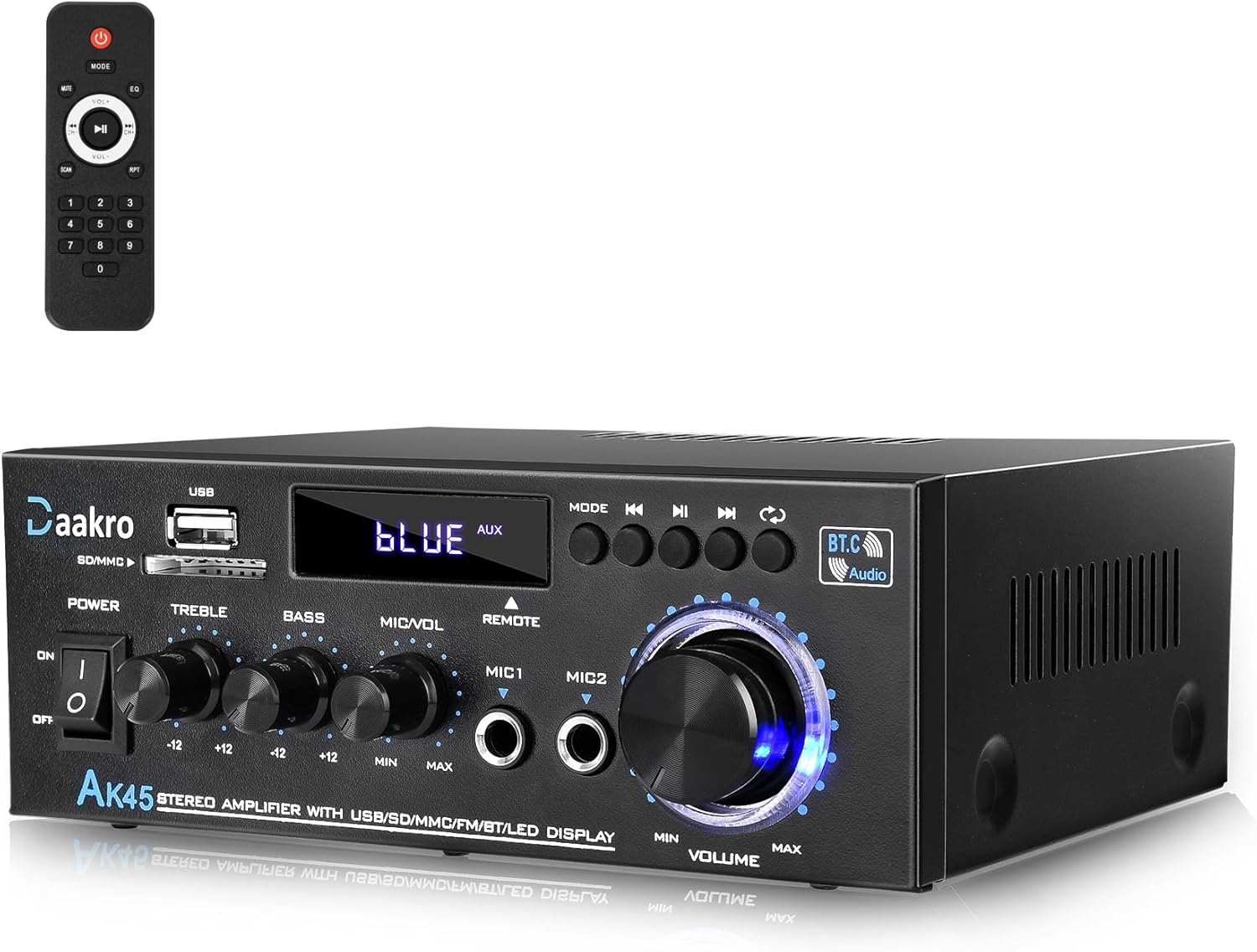
Figure 1: Daakro AK45 Stereo Audio Ampкөтөргүч жана алыстан башкаруу.
2. Коопсуздук чаралары
- Do not expose this unit to rain or moisture to prevent fire or electric shock.
- ачпагыла ampкөтөргүч casinг. Ичинде колдонуучу тейлей турган бөлүктөр жок. Бардык тейлөөлөрдү квалификациялуу кызматкерлерге тапшырыңыз.
- Туура желдетүүнү камсыз кылыңыз. Вентиляция тешиктерин жаап албаңыз.
- Бул блок үчүн белгиленген кубат менен жабдууну гана колдонуңуз.
- Keep the distance within 30ft/10m between the device and amplifier for Bluetooth connection without any wall blocking. For TV or PC devices, keep the distance within 15ft/5m.
- Remove the isolation plastic sheet from the remote control before first use.
3. Пакеттин мазмуну
Пакетте бардык буюмдар бар экенин текшериңиз:
- Daakro AK45 Stereo Audio Ampөмүрлүү
- Алыстан башкаруу
- Электр кабели
- FM антеннасы
- Колдонуучунун Колдонмосу (бул документ)

2-сүрөт: кутуда эмне бар.
4. Продукт бүтүп калдыview
4.1 алдыңкы панели

Figure 3: Front Panel Controls and Inputs.
- Кубат которгучу: Агрегатты күйгүзөт же өчүрөт.
- USB/SD Card Input: Аудио ойнотуу үчүн files from USB flash drives or SD cards.
- Режим баскычы: Киргизүү режимдеринин ортосунда которулат (Bluetooth, FM, USB, SD, AUX).
- Play/Pause, Next/Previous Track Buttons: Медиа ойнотууну башкаруу.
- Үч ыргытуу баскычы: Adjusts the high-frequency audio level.
- Басс баскычы: Adjusts the low-frequency audio level.
- MIC/VOL баскычы: Микрофондун үнүн тууралайт.
- MIC1/MIC2 киргизүүлөрү: Микрофондор үчүн 6.35 мм уяча киргизүүлөрү.
- Мастердин үнүн көзөмөлдөө: Жалпы чыгаруу көлөмүн тууралайт.
- LED дисплей: Учурдагы режимди, трек маалыматын же FM жыштыгын көрсөтөт.
4.2 Арткы панель

Figure 4: Back Panel Connections.
- FM антенна киргизүү: Радио кабыл алуу үчүн комплекттеги FM антеннасын туташтырыңыз.
- Аудио киргизүү (RCA): Connect external audio sources like CD/DVD players, TVs, or computers using RCA cables.
- Динамиктин чыгышы: Пассивдүү динамиктерди туташтырыңыз (4-16 Ом импеданс). Туура полярдуулукту (+ дан + га жана - дан - га) текшериңиз.
- DC 12V/5A кубат киргизүү: For external DC power supply (if applicable, typically for car use).
- AC кубаттуулугун киргизүү: Connect the provided AC power cable to a wall outlet.
5. Орнотуу
- Жайгашкан жери: кой amplifier on a stable, flat surface with adequate ventilation. Avoid placing it near heat sources or in direct sunlight.
- Динамик туташуу:
- Identify the positive (+) and negative (-) terminals on your passive speakers and on the ampкөтөргүчтүн динамик чыгуулары.
- Connect the positive terminal of the left speaker to the "LCH +" terminal on the ampөмүрлүү.
- Connect the negative terminal of the left speaker to the "LCH -" terminal on the ampөмүрлүү.
- Repeat for the right speaker, connecting to the "RCH +" and "RCH -" terminals.
- Ensure all connections are secure to prevent short circuits. The amplifier is suitable for 4-16 inch passive speakers.
Figure 5: Connecting Passive Speakers.
- FM антенна туташуу: Connect the included FM antenna to the "FM.ANT" input on the back panel. Extend the antenna for better reception.
- Audio Source Connection (AUX):
- For external devices like CD/DVD players, connect RCA audio cables from the device's audio output to the "AUDIO INPUT" (red for right, white for left) on the amplifier's back panel.

Figure 6: Connecting External Audio Sources.
- Кубат туташуу: Connect the provided AC power cable to the "AC POWER INPUT" on the back panel, then plug the other end into a standard wall outlet.
6. Иштөө нускамалары
6.1 Күйгүзүү/өчүрүү
Алдыңкы панелдеги "POWER" которгучун "ON" абалына буруп, күйгүзүңүз amplifier. Flip it to "OFF" to turn it off.
6.2 Киргизүү режимин тандоо
Press the "MODE" button on the front panel or the remote control to cycle through available input modes: Bluetooth (BT), FM Radio, USB, SD Card, and AUX (Line Input).
6.3 Үндү башкаруу
Adjust the "VOLUME" knob on the front panel to control the overall audio output level. The remote control also has volume adjustment buttons.
Эскертүү: The front panel volume knob and the remote control volume buttons operate independently. For optimal control, set the remote volume to maximum and use the front panel knob for primary volume adjustment, or vice-versa, depending on your preference. If using the remote, be aware that the digital volume level resets to maximum (30) when the unit is powered off and on via the main power switch.
6.4 Тондорду башкаруу
Use the "TREBLE" and "BASS" knobs on the front panel to adjust the high and low frequencies of the audio output, respectively. Turn clockwise to increase, counter-clockwise to decrease.

Figure 7: Bass and Treble Controls.
6.5 Bluetooth операциясы
- которуштуруу amplifier to "BT" mode using the "MODE" button. The LED display will show "BLUE".
- Мобилдик түзмөгүңүздө (смартфон, планшет, компьютер) Bluetooth функциясын иштетиңиз.
- Издөө "AK45" in the list of available Bluetooth devices and select it to pair.
- Жупташкандан кийин, amplifier will indicate a successful connection. You can now play audio from your device through the ampөмүрлүү.
- Control playback (play/pause, next/previous) using the buttons on the amplifier or your connected device.
Эскертүү: Maintain a distance of within 30 feet (10 meters) between the Bluetooth device and the amplifier for optimal connection, ensuring no significant obstacles. For TV or PC connections, keep the distance within 15 feet (5 meters).

Figure 8: Bluetooth Connection Range.
6.6 USB/SD картаны ойнотуу
- USB флэш-дискти же аудиону камтыган SD картаны салыңыз fileалдыңкы панелдеги тиешелүү уячага киргизиңиз.
- The amplifier will automatically switch to USB or SD mode and begin playing audio. If not, press the "MODE" button to select the correct input.
- Use the playback control buttons on the front panel or remote to navigate tracks.
6.7 FM радиосунун иштеши
- которуштуруу amplifier to "FM" mode using the "MODE" button.
- Жеткиликтүү FM станцияларын автоматтык түрдө издөөнү баштоо үчүн Ойнотуу/Тыным баскычын басыңыз. The ampliifier табылган станцияларды сактап калат.
- Use the Next/Previous track buttons to cycle through saved stations.
- Adjust the FM antenna position for better reception if needed.
6.8 Микрофон жана караоке функциясы
АК45 amplifier features two microphone inputs for karaoke or public address use.
- Plug your microphones into the "MIC1" or "MIC2" inputs on the front panel.
- Микрофондун үнүн башкаруу үчүн "MIC/VOL" баскычын тууралаңыз.
- Ensure the microphone volume is turned down when not in use to prevent feedback or background noise.

Figure 9: Karaoke Functionality.
6.9 Алыстан башкарууну колдонуу
Камтылган алыстан башкаруу алыстан ыңгайлуу иштөөгө мүмкүндүк берет.
- Ensure the plastic isolation sheet is removed from the battery compartment before first use.
- Point the remote control directly at the ampкөтөргүчтүн алдыңкы панели.
- Functions include power on/off, mode selection, volume up/down, mute, EQ presets, and media playback controls.
Figure 10: Remote Control in Use.
7. Техникалык тейлөө
- Тазалоо: Сыртын тазалоо үчүн жумшак, кургак чүпүрөктү колдонуңуз ampкөтөргүч. Суюк тазалагычтарды же аэрозолдорду колдонбоңуз.
- Вентиляция: Ашыкча ысып кетүүнүн алдын алуу үчүн желдетүү тешиктери чаңдан жана таштандыдан таза экенин дайыма текшерип туруңуз.
- Сактагыч: сакталган болсо ampкөтөргүчтү узак мөөнөткө электр кубатынан ажыратып, салкын, кургак жерде сактаңыз.
8. Кыйынчылыктарды
| Көйгөй | Мүмкүн себеп | Чечим |
|---|---|---|
| Күч жок | Электр кабели туташкан эмес; Кубат өчүргүч өчүрүлгөн; Розетка иштебейт. | Ensure power cable is securely connected. Turn power switch to ON. Test outlet with another device. |
| Үн чыгышы жок | Incorrect input mode; Volume too low; Speaker wires loose/incorrectly connected; Mute activated. | Press MODE to select correct input. Increase volume. Check speaker connections and polarity. Press MUTE on remote. |
| Bluetooth байланышы көйгөйлөрү | Device too far; Obstacles blocking signal; Amplifier not in BT mode; Device not paired. | Move device closer (within 30ft/10m). Ensure clear line of sight. Switch amplifier to BT mode. Re-pair device. |
| FM кабыл алуу начар | Antenna not connected; Antenna not extended; Weak signal. | Connect FM antenna. Extend antenna fully. Try repositioning the antenna or ampөмүрлүү. |
| Бурмаланган үн | Volume too high; Incorrect tone settings; Loose connections; Speaker impedance mismatch. | Reduce volume. Adjust Bass/Treble knobs. Check all cable connections. Ensure speakers are 4-16 ohms. |
| Пульт иштебей жатат | Battery depleted; Plastic isolation sheet not removed; Obstruction between remote and ampөмүрлүү. | Replace battery. Remove plastic sheet. Ensure clear line of sight to ampкөтөргүчтүн инфракызыл кабыл алгычы. |
| Digital volume resets to max after power cycle | This is expected behavior for the digital volume when powered off via the main switch. | Adjust the digital volume via remote after each power-on, or primarily use the analog volume knob on the front panel. |
9. Техникалык шарттар
| Өзгөчөлүк | Спецификация |
|---|---|
| Модель номери | AK45 |
| Эң жогорку кубаттуулук | 300 Вт + 300 Вт |
| Номиналдык кубаттуулук | 40 Вт + 40 Вт |
| Динамик импедансы | 4-16 Ом |
| Bluetooth версиясы | 5.0 |
| Bluetooth диапазону | Up to 30ft/10m (without blocking); 15ft/5m (with TV/PC) |
| Киргизүүлөр | USB 2.0, SD Card, FM Radio, Bluetooth, AUX (RCA), 2x Microphone (6.35mm) |
| Controls | Volume, Treble, Bass, Microphone Volume |
| Электр камсыздоо | AC 240V (or as specified on unit), DC 12V/5A |
| Өлчөмдөрү (L x W x Y) | Approx. 7.1 x 5.5 x 2.6 inches (based on image) |
| Элемент Салмагы | 1.91 фунт |
| Батареялар (Алыстан) | 1 CR2 батарейка (кошулган) |
Figure 11: Approximate Product Dimensions.
10. Кепилдик жана колдоо
Daakro provides a 36 айлык кепилдик for this product, ensuring peace of mind regarding manufacturing defects and performance issues.
For any questions, technical assistance, or warranty claims, please contact Daakro customer service. We offer 24 саат онлайн кардарларды тейлөө to assist you promptly.
Байланыш маалыматы:
- Refer to your purchase platform or the Daakro official webакыркы байланыш маалыматы үчүн сайт.
- зыярат кылыңыз Daakro Store on Amazon көбүрөөк маалымат жана колдоо үчүн.

Figure 12: Daakro After-Sales Support.
Ask a question about this manual
Ask about setup, troubleshooting, compatibility, parts, safety, or missing instructions. Manuals+ will review the question and use this page’s manual context to help answer it.