
OPTICON L-46X
L-46X 1D жана 2D USB штрих-код сканери үчүн колдонмо
Model: L-46X | Brand: OPTICON
1. Киришүү
The OPTICON L-46X 2D Imager is a versatile barcode scanner designed to read both 1D and 2D barcodes. It incorporates Opticon’s advanced 2D CMOS imaging technology, enabling efficient point-and-shoot barcode scanning. The device features a disinfectant-ready protective casing, making it suitable for use in various environments, including healthcare settings.
2. Негизги өзгөчөлүктөрү
- Өркүндөтүлгөн сканерлөө технологиясы: Utilizes next-generation scanning technology for optimal performance, durability, and reliability.
- Мыкты туруктуулук: Constructed with a durable, lightweight, and ergonomic design for comfortable extended use. The scanner is drop-tested to withstand falls of up to 6 feet onto concrete.
- Курчап турган чөйрөгө каршылык: Features an IP42 rating, providing protection against dust and water splashes, making it suitable for demanding environments such as retail, logistics, and healthcare.
- Disinfectant Ready: Designed with a protective casing that can be safely disinfected.
- Байланыш: USB Cable for reliable connection to desktop and laptop computers.
3. Пакеттин мазмуну
Пакетте бардык буюмдар бар экенин текшериңиз:
- L-46X Barcode Scanner Unit
- USB туташуу кабели
- Stand Mount (if included with your specific model)
4. Орнотуу колдонмосу
Follow these steps to set up your L-46X Barcode Scanner:
- Сканерди таңгактан чыгаруу: Carefully remove the L-46X scanner and its accessories from the packaging.
- USB кабелин туташтыруу: Insert the USB cable into the port at the base of the scanner. Connect the other end of the USB cable to an available USB port on your desktop or laptop computer.
- Драйверди орнотуу: The L-46X is typically a plug-and-play device. Your operating system (Windows, macOS, Linux) should automatically detect and install the necessary drivers. Wait for the installation to complete, which may take a few moments.
- Сканерди жайгаштырыңыз: If your model includes a stand mount, assemble it according to its instructions and place the scanner securely in the stand. Ensure the scanner is positioned for easy access and comfortable use.
- Сканерди сыноо: Open a text editor (e.g., Notepad, Word) or a compatible application. Scan a known barcode. The barcode data should appear in the text editor or application, indicating successful setup.
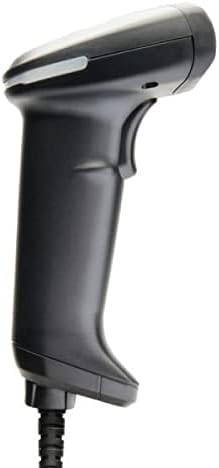
Image: The L-46X barcode scanner, a black handheld device with a trigger button and a USB cable extending from its base. This image illustrates the scanner's design and connectivity point.
5. Иштөө нускамалары
To operate your L-46X Barcode Scanner:
- Күйгүзүү: Сканер кубатталган USB портуна туташтырылганда автоматтык түрдө күйөт.
- Aim the Scanner: Point the scanning window of the L-46X directly at the barcode you wish to scan. Ensure the entire barcode is within the scanner's field of view.
- Press the Trigger: Press and hold the trigger button located on the handle of the scanner. A scanning beam or light will be emitted.
- Скандоону ырастоо: Upon a successful scan, the scanner will typically emit an audible beep and/or a visual indicator (e.g., an LED light will flash). The scanned data will be transmitted to your connected computer and appear in the active application.
- Триггерди чыгаруу: Release the trigger button after a successful scan.
The L-46X is capable of reading both 1D (linear) and 2D (matrix) barcodes, including QR codes, Data Matrix, and PDF417.
6. Техникалык тейлөө
Proper maintenance ensures the longevity and optimal performance of your L-46X scanner:
- Сканерлөө терезесин тазалоо: Бир аз жумшак, түксүз кездемени колдонуңуз dampened with water or a mild, non-abrasive cleaning solution to gently wipe the scanning window. Avoid harsh chemicals or abrasive materials that could scratch the surface.
- Тазалоо Casing: The L-46X features a disinfectant-ready casing. You may use common disinfectant wipes or solutions to clean the exterior. Always follow the disinfectant manufacturer's instructions and ensure the scanner is powered off and disconnected before cleaning.
- Сактагыч: When not in use, store the scanner in a clean, dry environment, away from extreme temperatures, direct sunlight, and corrosive materials.
- Кабельге кам көрүү: USB кабелин өтө ийип же бурап албаңыз, анткени бул ички зымдарга зыян келтириши мүмкүн.
7. Кыйынчылыктарды
If you encounter issues with your L-46X scanner, refer to the following common problems and solutions:
| Көйгөй | Мүмкүн себеп | Чечим |
|---|---|---|
| Сканер күйбөйт. | USB cable not properly connected or USB port is faulty. | USB кабелинин сканерге да, компьютерге да бекем туташтырылганын текшериңиз. Компьютериңиздеги башка USB портун колдонуп көрүңүз. |
| Сканер штрих-коддорду окубайт. | Barcode is damaged, poor quality, or not supported; scanner window is dirty; incorrect aiming. | Try scanning a different, known-good barcode. Clean the scanning window. Ensure the barcode is fully within the scanner's field of view and the trigger is pressed. Verify the barcode type is supported (1D/2D). |
| Сканерленген маалыматтар туура эмес көрсөтүлөт. | Keyboard layout mismatch or software conflict. | Ensure your computer's keyboard layout matches the scanner's default settings. Restart the computer and the application you are using. |
| No beep or visual confirmation after scanning. | Scanner settings may have disabled feedback. | Refer to the full programming manual (available from Opticon support) to enable audible/visual feedback. |
If the problem persists, please contact Opticon customer support for further assistance.
8. Техникалык шарттар
| Өзгөчөлүк | Деталь |
|---|---|
| Модел | L-46X |
| Скандоо технологиясы | 2D CMOS Imager (1D and 2D barcode support) |
| Байланыш | USB кабели |
| Power Source | Зымдуу электр (USB аркылуу) |
| Шайкеш түзмөктөр | Иш такта, ноутбук |
| Элемент Салмагы | 1.5 фунт |
| Туруктуулук рейтинги | IP42 (чаңга жана чачыратууга туруктуу) |
| Drop Specification | 6 feet to concrete |
| Өндүрүүчү | Opticon |
9. Кепилдик жана колдоо
The OPTICON L-46X Barcode Scanner is backed by a эки жылдык өндүрүүчү кепилдик сатып алынган күндөн тартып. Бул кепилдик нормалдуу колдонуудагы материалдардагы жана жасалгадагы кемчиликтерди камтыйт.
For technical support, warranty claims, or additional information, please contact Opticon customer service. You can typically find contact details on the official Opticon website or through your product reseller.
Сураныч, кепилдик максаттары үчүн сатып алганыңыздын далилин сактап коюңуз.
Ask a question about this manual
Ask about setup, troubleshooting, compatibility, parts, safety, or missing instructions. Manuals+ will review the question and use this page’s manual context to help answer it.