
1. Киришүү
This manual provides detailed instructions for the setup, operation, maintenance, and troubleshooting of your Cosmic Byte ARES Wired Controller for PC. Designed for an enhanced gaming experience, this controller features Hall Effect joysticks and triggers, dual vibration, and customizable Turbo functions.
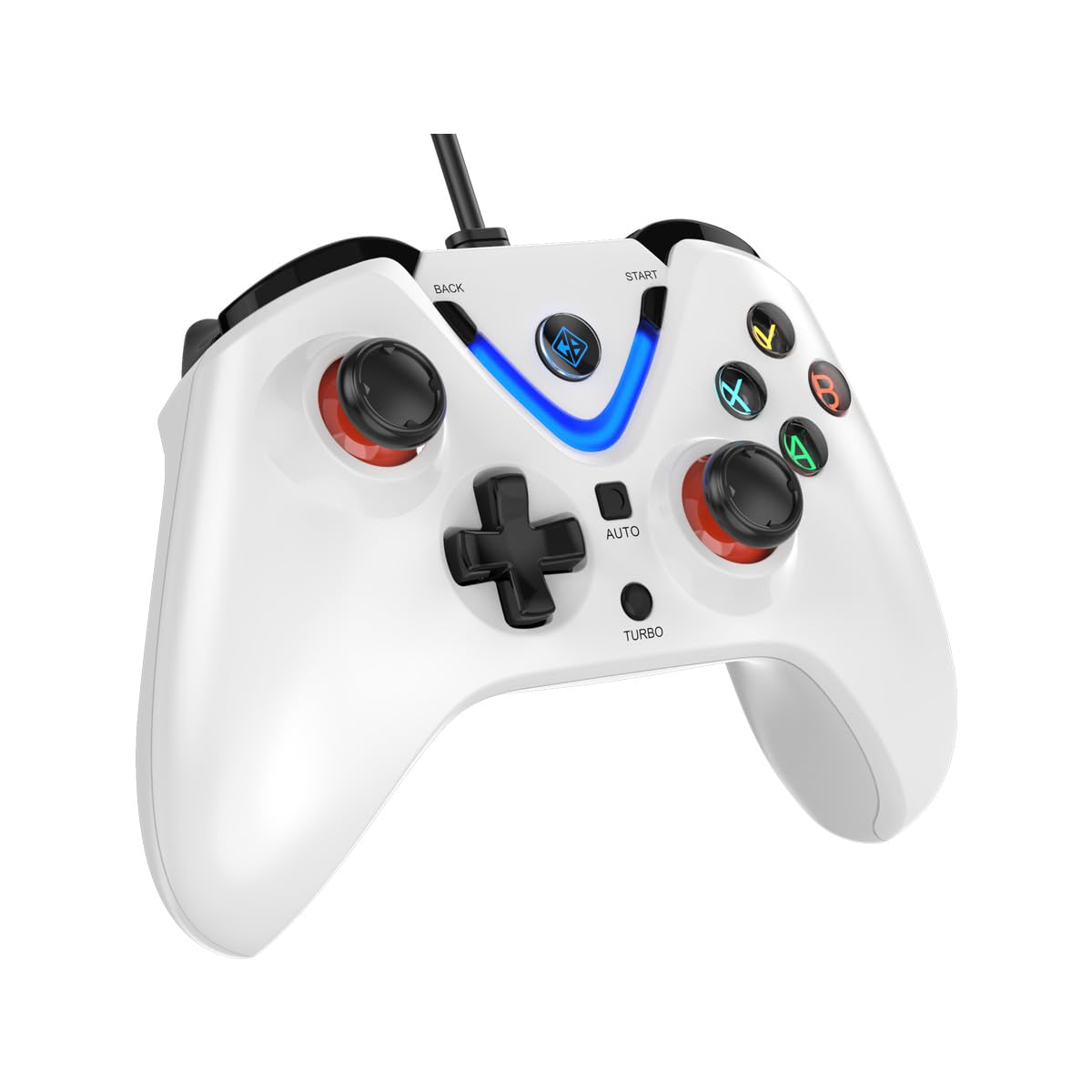
Image 1: The Cosmic Byte ARES Wired Controller in white, showcasing анын эргономикалык дизайны.
2. Орнотуу нускамалары
2.1 Компьютерге туташуу
- Компьютериңиз күйгүзүлгөнүн текшериңиз.
- Компьютериңизден жеткиликтүү USB портун табыңыз.
- Plug the USB connector of the Cosmic Byte ARES Wired Controller into the USB port.
- Иштөө системасы автоматтык түрдө керектүү драйверлерди таап, орнотот. Бул процесс бир нече мүнөткө созулушу мүмкүн.
- Once installation is complete, the controller is ready for use.

Image 2: The controller connected via its wired USB connection, ensuring fast response.
3. Иштөө нускамалары
3.1 Негизги башкаруу каражаттары
The Cosmic Byte ARES controller features standard gamepad layouts, including:
- Left and Right Analog Joysticks: Кыймылды так башкаруу жана камераны башкаруу үчүн.
- D-Pad: For directional input, often used in menus or for specific game actions.
- Аракет баскычтары (A, B, X, Y): For primary game interactions.
- Ийин баскычтары (L1, R1) жана триггерлер (L2, R2): For various in-game functions like shooting, aiming, or accelerating.
- Баштоо жана Артка баскычтары: Оюндарды тындыруу, менюларга же оюндагы белгилүү буйруктарга кирүү үчүн.
- Турбо баскычы: For activating rapid-fire functions.
- Авто баскычы: For activating automatic rapid-fire functions.
3.2 Холл эффектисинин джойстиктери жана триггерлери
The controller is equipped with Hall Effect joysticks and triggers, which use magnetic sensors instead of physical contacts. This technology provides:
- Жакшыртылган тактык: More accurate and responsive input.
- Increased Durability: Reduces wear and tear, preventing stick drift over time.
- Жылмакай операция: Consistent and linear response for triggers, allowing for nuanced control in games.

Сүрөт 3: Жарылып кеткен view illustrating the Hall Effect joystick mechanism and the Hall Effect triggers.
3.3 Кош титирөө кайтарым байланышы
The controller features dual vibration motors that provide tactile feedback during gameplay, enhancing immersion by simulating in-game events such as impacts, explosions, or engine rumbling.
3.4 Backlit LED Buttons
The action buttons (A, B, X, Y) and the central V-shaped indicator feature LED backlighting, providing visibility in low-light conditions and adding to the controller's aesthetic.

Image 4: The controller with its LED buttons illuminated and visual representation of vibration effects.
3.5 Turbo and Auto Turbo Functions
The Turbo and Auto Turbo functions allow for rapid, repeated input of a button press without continuously pressing the button.
- Турбону иштетүү: Press and hold the desired action button (e.g., A) and then press the Турбо button. The button will now rapidly repeat its input as long as you hold it down.
- Activating Auto Turbo: Press and hold the desired action button (e.g., A) and then press the Авто button. The button will now rapidly repeat its input automatically without needing to be held down.
- Deactivating Turbo/Auto Turbo: To deactivate, repeat the activation steps for the specific button, or press the Таза button (if available) or disconnect and reconnect the controller.

Image 5: Close-up of the controller showing the Turbo and Auto function buttons.
4. Техникалык тейлөө
- Тазалоо: Башкаргычты тазалоо үчүн жумшак, кургак чүпүрөктү колдонуңуз. Өтө кир болсо, бир азamp cloth can be used, ensuring no liquid enters the controller. Avoid harsh chemicals or abrasive cleaners.
- Сактагыч: Store the controller in a cool, dry place away from direct sunlight and extreme temperatures. Avoid placing heavy objects on the controller.
- Кабельге кам көрүү: Do not sharply bend or pull the USB cable. Always grasp the plug when disconnecting from the PC.
5. Кыйынчылыктарды
- Контроллер таанылган жок:
- USB кабелинин контроллерге да, компьютерге да бекем туташтырылганын текшериңиз.
- Контроллерди башка USB портуна сайып көрүңүз.
- Компьютериңизди өчүрүп күйгүзүңүз.
- Check Device Manager on Windows to see if the controller is listed and if there are any driver issues.
- Баскычтар/джойстиктер жооп бербей жатат:
- Verify the controller is recognized by your PC (see above).
- Test the controller in a different game or a controller testing utility to rule out game-specific issues.
- Башка киргизүү түзмөктөрү тоскоолдук кылбай турганын текшериңиз.
- Вибрация иштебей жатат:
- Вибрациялык кайтарым байланыш иштетилгенин текшерүү үчүн оюн ичиндеги жөндөөлөрдү текшериңиз.
- Some games may not support vibration or may have limited vibration effects.
6. Техникалык шарттар
| Өзгөчөлүк | Деталь |
|---|---|
| Бренд | Космикалык байт |
| Модель аты | Арес |
| Шайкеш түзмөктөр | PC |
| Controller Type | Gamepad |
| Байланыш технологиясы | USB |
| Продукт өзгөчөлүктөрү | Эргономикалык |
| Button Quantity | 16 |
| Аппараттык платформа | PC |
| Кубат булагынын түрү | Электр кабели, USB кабели |
| Элемент Салмагы | 220 грамм |
| Элементтин өлчөмдөрү | 6 x 10 x 4 сантиметр |
| Түс | Ак |
| Келип чыккан өлкө | Кытай |

Image 6: A comparison table highlighting features of different ARES controller models.
7. Кепилдик жана колдоо
7.1 Кепилдик маалыматы
The Cosmic Byte ARES Wired Controller comes with a Өндүрүштүк кемчиликтерге каршы 1 жылдык кепилдик сатып алынган күндөн тартып. Кепилдик дооматтары үчүн сатып алганыңыздын далилин сактап коюңуз.
7.2 Өндүрүүчүнүн байланыш маалыматы
For support, service, or warranty inquiries, please contact:
Космикалык байтPrakash Warehousing, S. No.163, Hissa No 1-2-3-4-5A-5B/2/1,
Phursungi, Pune 412308, Maharashtra, India
For further assistance, please visit the official Cosmic Byte webсайтка же кардарларды тейлөөгө кайрылыңыз.