
1. Киришүү
This manual provides detailed instructions for the installation, operation, and maintenance of your VIMIN VM-GS1620 18-Port Gigabit Ethernet Switch. Please read this manual thoroughly before using the device to ensure proper setup and optimal performance. Keep this manual for future reference.
2. Продукт бүтүп калдыview
The VIMIN VM-GS1620 is an unmanaged 18-port Gigabit Ethernet switch designed for high-speed network expansion. It features 16 Gigabit Ethernet ports (10/100/1000 Mbps) and 2 dedicated 1000Mbps uplink ports. The switch supports IEEE802.3af/at standards and includes a One Key VLAN function for enhanced network security and bandwidth management. Its durable metal housing allows for versatile desktop or rack-mount installation.
2.1 Алдыңкы жана арткы панелдер

1-сүрөт: Front and Rear Panels of the VIMIN VM-GS1620 Switch. The front panel displays 16 Gigabit ports (1-16), 2 Uplink ports (17-18), LED indicators for Power and Data, and a VLAN switch. The rear panel shows the AC power input.
Алдыңкы панелдин өзгөчөлүктөрү:
- 1-16 порттору: 10/100/1000 Mbps Gigabit Ethernet ports for connecting network devices.
- 17-18 порттор (Uplink): Dedicated 1000 Mbps Gigabit uplink ports for connecting to a router or main network.
- Power LED: Кубаттын абалын көрсөтөт.
- Data/Link/Act LEDs: Indicate data activity and link status for each port.
- VLAN которгучу: Toggles the One Key VLAN function on or off.
Арткы панелдин өзгөчөлүктөрү:
- AC кубаттуулугун киргизүү: Connects to the provided power cord (AC/IN 100-240V).
2.2 Негизги өзгөчөлүктөрү
- Жогорку ылдамдыктагы туташуу: 16 Gigabit Ethernet ports and 2 Gigabit uplink ports for fast data transfer.
- One Key VLAN: Enhances network security by isolating ports 1-16 while allowing communication with uplink ports.
- Күчтүү коргоо: Features 4KV lightning protection for device and network safety.
- Туруктуу дизайн: Sturdy metal housing ensures longevity and efficient heat dissipation.
- Вентиляторсуз иштөө: Provides quiet operation, suitable for various environments.
- Plug and Play: No complex configuration required for basic network setup.
2-сүрөт: The VIMIN VM-GS1620 features a fanless, quiet design within a durable metal case for reliable performance.
3. Пакеттин мазмуну
Please verify the contents of your package. If any items are missing or damaged, contact VIMIN support immediately.
- VIMIN VM-GS1620 18-Port Gigabit Ethernet Switch
- AC Power Cord
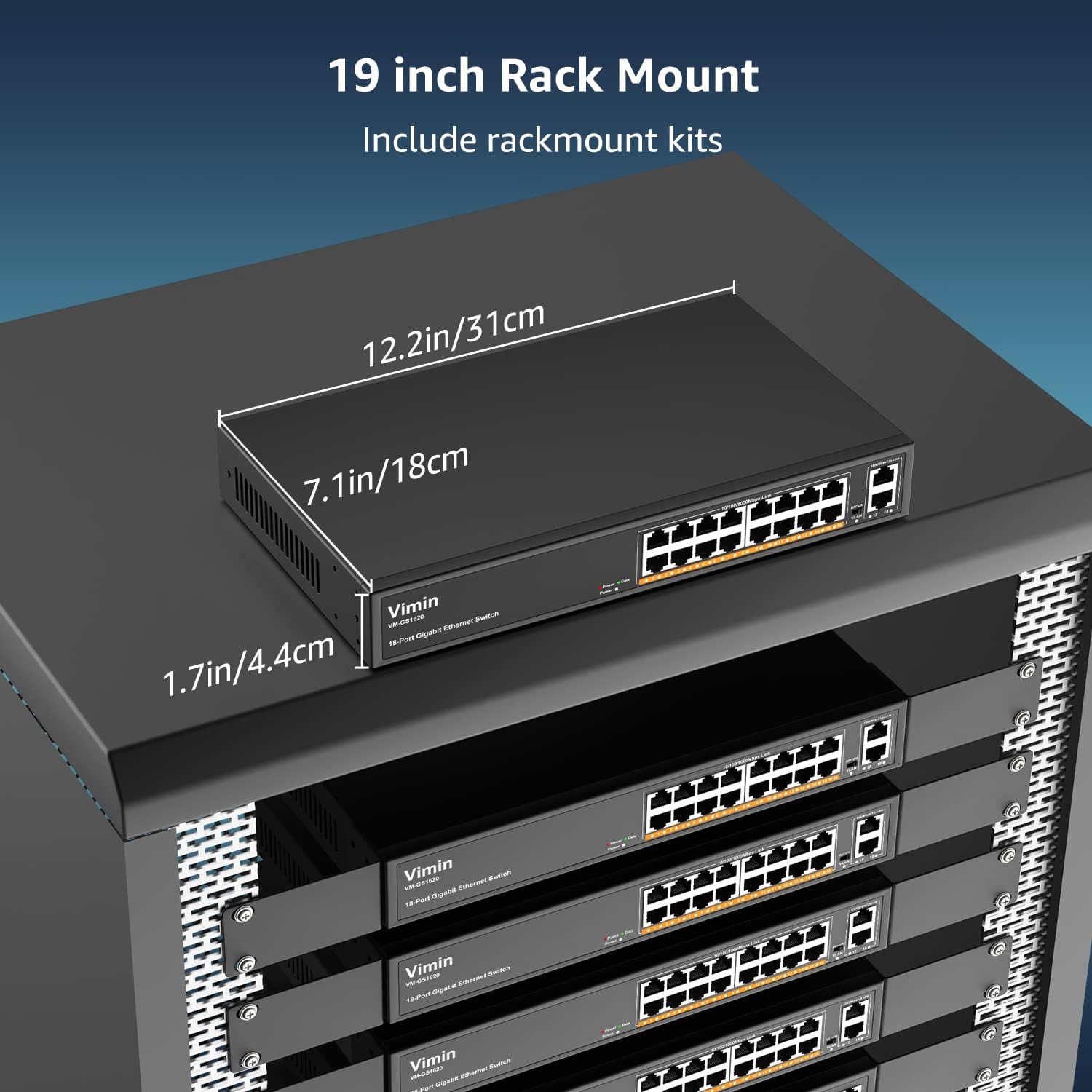
- Rack-Mount Kits (for 19-inch rack installation)
- Колдонуучунун Колдонмосу (бул документ)
4. Орнотуу нускамалары
4.1 Физикалык орнотуу
The VIMIN VM-GS1620 switch can be installed on a desktop or mounted in a 19-inch rack.
Иш тактада жайгаштыруу:
- Которгучту жалпак, туруктуу бетке коюңуз.
- Ensure adequate ventilation around the device. Do not block the ventilation holes.
- Keep the switch away from heat sources, direct sunlight, and excessive moisture.
Стойкага орнотуу:
- Attach the provided rack-mount brackets to the sides of the switch using the included screws.
- Которгучту стандарттуу 19 дюймдук жабдуу стойкасына ылайыктуу стойка бурамалар менен бекитиңиз (кошумча эмес).
- Ensure proper airflow within the rack to prevent overheating.

3-сүрөт: The VIMIN VM-GS1620 switch can be installed in a 19-inch rack using the included rack-mount kits. Dimensions are approximately 12.2in (31cm) wide, 7.1in (18cm) deep, and 1.7in (4.4cm) high.
4.2 Кубат туташтыруу
- Connect one end of the AC power cord to the power input on the rear panel of the switch.
- Plug the other end of the power cord into a standard electrical outlet (AC 100-240V).
- Алдыңкы панелдеги Power LED жарыгы күйүп, коммутатор кубат алып жатканын көрсөтүп турат.
4.3 Тармактык байланыштар
The VIMIN VM-GS1620 is a Plug and Play device, requiring no software configuration for basic operation.
- Connect your network devices (e.g., computers, printers, IP cameras, access points) to any of the Gigabit Ports 1-16 using standard Ethernet cables.
- Connect your router or main network backbone to one of the Uplink Ports 17-18.
- Once a device is connected and powered on, the corresponding Link/Act LED for that port will illuminate, indicating a successful connection and activity.

4-сүрөт: Simple Plug and Play connection. Insert an Ethernet cable into any available port.

5-сүрөт: Connection diagram illustrating power connection, device connections to the switch, and the resulting network functionality.
5. Иштөө нускамалары
5.1 Негизги операция
Once the switch is powered on and devices are connected, the VIMIN VM-GS1620 operates automatically. It functions as an unmanaged switch, forwarding data packets between connected devices at Gigabit speeds without requiring any user configuration.
5.2 One Key VLAN Mode
The switch features a physical VLAN switch on the front panel. This function allows you to quickly enable or disable VLAN isolation.
- VLAN OFF (Default): All ports (1-18) operate as a standard switch, allowing all connected devices to communicate with each other.
- VLAN ON: When the VLAN switch is set to ON, ports 1-16 are isolated from each other. Devices connected to ports 1-16 can only communicate with the uplink ports (17-18) and not directly with other devices on ports 1-16. This enhances network security and can improve bandwidth utilization by preventing broadcast storms within the isolated segments.

6-сүрөт: The One Key VLAN switch isolates ports 1-16 from each other, allowing them to communicate only with the uplink ports (17-18). This setup is useful for segmenting a network for security or performance.
6. Техникалык тейлөө
The VIMIN VM-GS1620 switch is designed for minimal maintenance. Follow these guidelines to ensure its longevity:
- Тазалоо: Которгучтун сыртын тазалоо үчүн жумшак, кургак чүпүрөктү колдонуңуз. Суюктук же аэрозолдук тазалоочу каражаттарды колдонбоңуз.
- Вентиляция: Ensure that the ventilation holes are not obstructed to allow for proper heat dissipation.
- Курчап турган чөйрө: Operate the switch within its specified environmental conditions (temperature, humidity).
- Кабелдик башкаруу: Сигналдын начарлашына жол бербөө үчүн тармак кабелдерин иреттүү жана ийилип кетпеген же ашыкча ийилген абалда кармаңыз.
7. Кыйынчылыктарды
If you encounter issues with your VIMIN VM-GS1620 switch, refer to the following common troubleshooting steps:
- Кубат жок:
- Кубат шнуру өчүргүчкө да, розеткага да бекем туташтырылганын текшериңиз.
- Электр розеткасынын иштеп турганын текшериңиз.
- Алдыңкы панелдеги кубаттуулук индикатору күйүп турганын текшериңиз.
- Портто шилтеме/аракет жок:
- Ethernet кабелинин коммутатордун портуна жана туташкан түзмөккө бекем туташтырылганын текшериңиз.
- Кабелдин бузулушуна жол бербөө үчүн башка Ethernet кабелин колдонуп көрүңүз.
- Түзмөктү коммутатордогу башка портко туташтырыңыз.
- Туташкан аппараттын күйгүзүлгөнүн жана туура иштеп жатканын текшериңиз.
- Жай тармак ылдамдыгы:
- Бардык туташкан түзмөктөр жана кабелдер Gigabit Ethernet (Cat5e же андан жогорку) колдой турганын текшериңиз.
- Ашыкча тармактык трафикти же өткөрүү жөндөмдүүлүгүн көп талап кылган тиркемелерди текшериңиз.
- Consider enabling VLAN mode if network segmentation is desired to reduce broadcast domains.
- Devices Cannot Communicate (VLAN ON):
- If the VLAN switch is ON, devices on ports 1-16 are isolated from each other and can only communicate with uplink ports. This is expected behavior.
- If you require direct communication between all devices, ensure the VLAN switch is set to OFF.
If the problem persists after trying these steps, please contact VIMIN technical support.
8. Техникалык шарттар
| Өзгөчөлүк | Description |
|---|---|
| Модел | VM-GS1620 |
| Порттар | 16 x 10/100/1000Mbps RJ45 Ports, 2 x 1000Mbps Uplink RJ45 Ports |
| Маалыматтарды өткөрүү ылдамдыгы | Секундасына 1000 мегабит (Гигабит) |
| Switching Capacity | 36 Гбит/сек |
| Стандарттар | IEEE 802.3, IEEE 802.3u, IEEE 802.3ab, IEEE 802.3x, IEEE 802.3af/at |
| VLAN колдоо | One Key VLAN (Port Isolation) |
| Lightning Protection | 4КВ |
| Power Input | AC 100-240V |
| Иштин материалы | Металл |
| Орнотуу | Desktop, 19-inch Rack-Mount |
| Өлчөмдөрү (түзмөк) | Болжол менен 12.2 x 7.1 x 1.7 дюйм (31 x 18 x 4.4 см) |
| Элемент Салмагы | 3.85 фунт (1.75 кг) |
| Шайкеш түзмөктөр | Desktop, Gaming Console, Laptop, Printer, IP Camera, Access Point |
9. Кепилдик жана колдоо
VIMIN stands behind the quality and reliability of its products.
9.1 Кепилдик маалыматы
This VIMIN VM-GS1620 switch comes with a бир жылдык кепилдик сатып алынган күндөн тартып. Бул кепилдик өндүрүштүк кемчиликтерди жана нормалдуу колдонуудагы бузулууларды камтыйт. Бул туура эмес пайдалануудан, кырсыктардан, уруксатсыз өзгөртүүлөрдөн же табигый кырсыктардан келтирилген зыянды камтыбайт.
9.2 Техникалык колдоо
VIMIN provides өмүр бою техникалык колдоо for this product. If you have any questions, require assistance with installation, or encounter any issues not covered in the troubleshooting section, please contact our professional technical team.

7-сүрөт: VIMIN offers dedicated customer support.
Байланыш маалыматы:
- Электрондук почта: support@vimintech.com
- Our support team is available to provide 24-hour high-quality service.