
TRILINK XSC-TP1-M26
TRILINK XSC-TP1-M26 Clip-on Fan User Manual
Model: XSC-TP1-M26
1. Киришүү
Thank you for choosing the TRILINK XSC-TP1-M26 Small Clip-on Fan. This versatile and portable fan is designed to provide personal cooling in various environments, including desks, strollers, tents, and more. Featuring an 8000mAh rechargeable battery, five wind modes, and remote control functionality, it offers convenience and powerful airflow. Please read this manual thoroughly before use to ensure proper operation and maintenance.

Image 1.1: The TRILINK XSC-TP1-M26 Clip-on Fan with its remote control.
2. Коопсуздук маалыматы
- Do not insert fingers or any objects into the fan grill when the fan is operating.
- Электр тогуна урунбоо үчүн желдеткичти суудан же башка суюктуктардан алыс кармаңыз.
- Do not disassemble, repair, or modify the fan yourself. Contact qualified service personnel for assistance.
- Ensure the fan is placed on a stable surface or securely clipped to prevent it from falling.
- Кичинекей балдар жана үй жаныбарлары жетпеген жерде сактаңыз.
- Use only the provided charging cable or a compatible USB power source (5V DC).
- Батареяны экстремалдык температурага же түз күндүн нуруна калтырбаңыз.
3. Пакеттин мазмуну
Сураныч, кутудан чыкканда пакеттин мазмунун текшериңиз:
- TRILINK XSC-TP1-M26 Clip-on Fan (with built-in battery)
- Алыстан башкаруу
- USB заряддоо кабели
- Колдонуучунун Колдонмосу (бул документ)
4. Продукт бүтүп калдыview
The TRILINK XSC-TP1-M26 fan is designed for portability and adaptability, offering multiple placement options and control methods.

Image 4.1: Key features of the TRILINK portable fan.
4.1 Компоненттер
- Вентилятор башы: Contains the motor and blades. Features a detachable front grill for cleaning.
- Башкаруу баскычы: Located on top of the fan head for manual operation.
- LED дисплей: Shows current wind speed and battery level.
- Жөнгө салынуучу биргелешкен: Allows for 270° vertical and 360° horizontal manual rotation of the fan head.
- Clip/Base: Multifunctional base that can be used to clip the fan onto surfaces, stand it on a flat surface, or hang it.
- Алыстан башкаруу уячасы: Integrated into the base for convenient storage of the remote control.
- USB-C заряддоо порту: Located on the back of the fan for charging.

Image 4.2: Fan rotation capabilities and dimensions.
5. Орнотуу
The TRILINK fan offers three primary setup methods:
- Клип: Use the strong clip at the base to attach the fan to the edge of a desk, shelf, baby stroller, or other suitable surfaces. Ensure the clip is firmly secured.
- Стенд: Place the fan on any flat, stable surface such as a desk, table, or nightstand. The wide base provides stability.
- Асуу: The clip base also features a hook design, allowing you to hang the fan in places like a camping tent or a wall hook.

Image 5.1: Demonstrating the fan's 3-in-1 setup versatility.
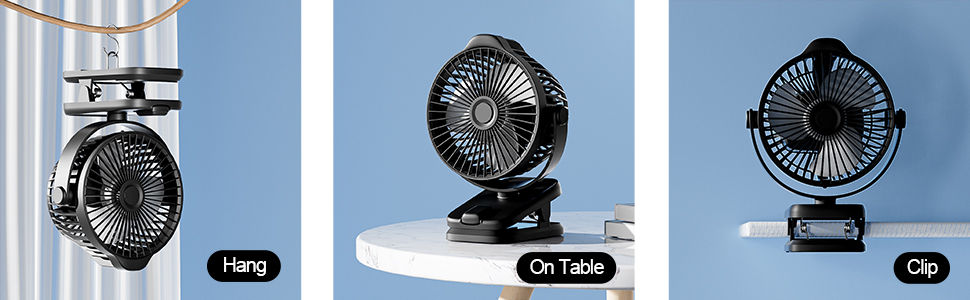
Сүрөт 5.2: Детальдуу view of hanging, table, and clip setups.
6. Вентиляторду кубаттоо
The fan is equipped with a built-in 8000mAh lithium-ion battery, providing extended cordless operation.
- Connect the provided USB charging cable to the USB-C port on the back of the fan.
- Plug the other end of the USB cable into a compatible USB power source (e.g., wall adapter, power bank, laptop, desktop computer).
- The LED display will show the battery charging status. A full charge is indicated by 100% on the display.
- A full charge can provide up to 29 hours of operation on the lowest setting (Mode 1).

Image 6.1: Battery life estimates for each fan mode.
7. Иштөө нускамалары
7.1 Power On/Off and Speed Control (Manual)
- To turn on the fan, press the control button located on the top of the fan head.
- Each subsequent press of the button will cycle through the 5 wind modes:
- Mode 1: Sleep Mode (Quiet, lowest speed)
- Mode 2: Natural Mode
- Mode 3: Normal Mode
- Mode 4: Strong Mode (Highest speed)
- Mode 5: Gradient Mode (Pulsating speed)
- To turn off the fan, continue pressing the button until the fan stops.
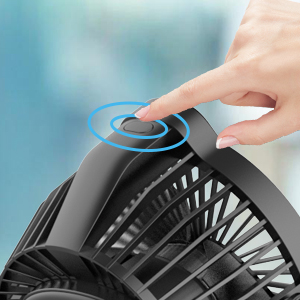
Image 7.1: Manual control button on the fan head.
7.2 Алыстан башкаруунун иштеши
The included remote control allows for convenient operation from a distance of approximately 3 meters.
- The remote control is stored in a dedicated slot on the fan's base to prevent loss. Slide it out for use.
- Ensure there is a clear line of sight between the remote and the fan for optimal performance.
- Use the buttons on the remote to power on/off and adjust fan speeds, mirroring the manual control functions.

Image 7.2: Remote control storage on the fan base.
7.3 LED дисплей
The LED display on the fan head provides real-time information:
- When the fan is on, it displays the current wind mode (1-5).
- When charging or checking battery, it displays the battery percentage (0-100%).
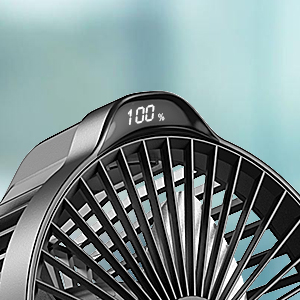
Image 7.3: LED display showing battery level.
7.4 Adjusting Fan Direction
Manually adjust the fan head to direct airflow:
- Вертикалдуу айлануу: The fan head can be manually rotated 270° vertically to angle the airflow up or down.
- Горизонталдык айлануу: The fan head can be manually rotated 360° horizontally on its base to direct airflow left or right.
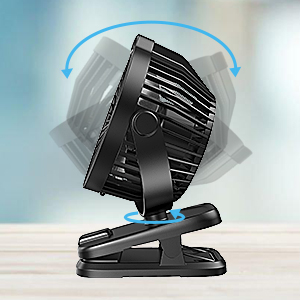
Image 7.4: Fan head rotation capability.
8. Техникалык тейлөө
Үзгүлтүксүз тазалоо желдеткичиңиздин оптималдуу иштешин жана узак мөөнөттүү иштешин камсыз кылат.
- Cleaning the Fan Grill: The front grill of the fan is detachable for easy cleaning. Gently twist or unclip the front cover to remove it. Wipe the blades and inside of the grill with a soft, dry cloth. Do not use abrasive cleaners or immerse the fan in water.
- Тышкы тазалоо: Желдеткичтин сыртын жумшак менен сүртүңүз, гamp кездеме.
- Сактагыч: When not in use for extended periods, store the fan in a cool, dry place, away from direct sunlight.
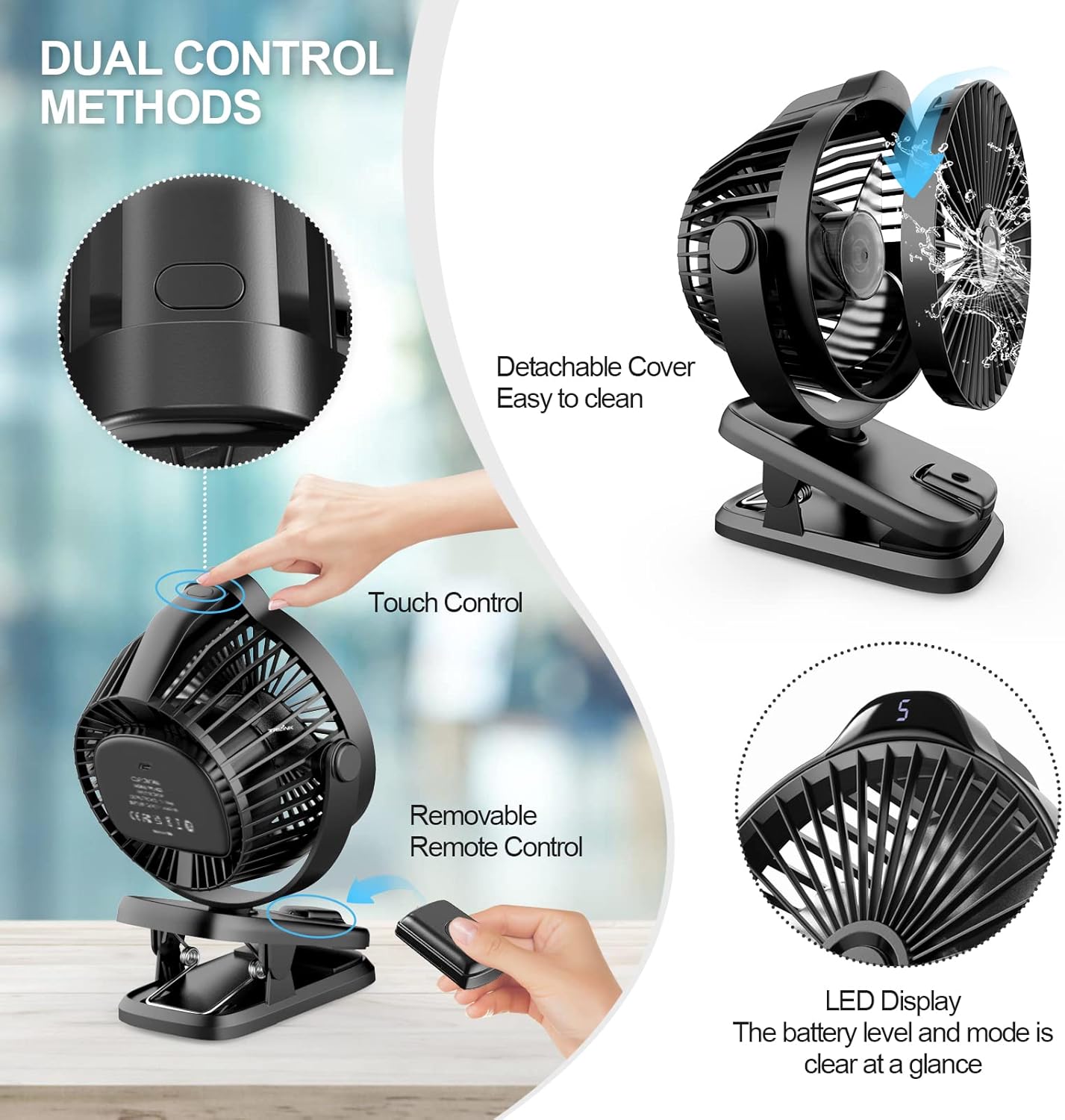
Image 8.1: Detachable front cover for cleaning.
9. Кыйынчылыктарды
If you encounter issues with your TRILINK fan, please refer to the following common problems and solutions:
| Көйгөй | Мүмкүн себеп | Чечим |
|---|---|---|
| Желдеткич күйбөйт. | Батарея түгөнүп калды. | Берилген USB кабелин колдонуп, желдеткичти кубаттаңыз. |
| Кубат баскычы туура басылган жок. | Ensure a firm press on the control button or use the remote. | |
| Пульт иштебей жатат. | Алыскы батареянын заряды аз же өлүп калды. | Replace the remote control battery (CR2012 lithium battery). |
| No clear line of sight. | Ensure no obstructions between the remote and the fan. Operate within 3 meters. | |
| Алсыз аба агымы. | Fan grill or blades are dirty. | Clean the fan grill and blades as per maintenance instructions. |
| Вентилятор төмөнкү ылдамдыкта иштеп жатат. | Increase the fan speed using the control button or remote. | |
| Иш учурунда адаттан тыш ызы-чуу. | Вентилятор калакчаларындагы тоскоолдук. | Turn off the fan immediately and check for any foreign objects. Clean if necessary. |
| Желдетүүчү туруктуу жерде эмес. | Ensure the fan is placed or clipped on a stable, flat surface. |
10. Техникалык шарттар
| Өзгөчөлүк | Спецификация |
|---|---|
| Бренд | TRILINK |
| Модель аты | XSC-TP1-M26 |
| Электр желдеткич дизайн | Table Fan / Clip-on Fan |
| Power Source | Батарея менен иштейт (кайра заряддалуучу) |
| Батарея сыйымдуулугу | 8000mAh литий-ион (кошулган) |
| Working Hours (Max) | Up to 29 hours (Mode 1) |
| Кубат деңгээли саны | 5 |
| Башкаруу ыкмасы | Remote, Touch Button |
| Продукциянын өлчөмдөрү | 2.7"D x 5.9"W x 7.8"H (6.86 см D x 14.99 см В x 19.81 см H) |
| Элемент Салмагы | 0.6 килограмм (1.32 фунт) |
| Ватtage | 5 ватт |
| Тtage | 5 вольт (ток) |
| Blades саны | 5 |
| Материал | Пластик |
| Айлануу | 360° Horizontal, 270° Vertical (Manual) |
| Камтылган компоненттер | Fan, Built-in Battery, Charging Cord, User Manual, Remote Control |
11. Кепилдик жана колдоо
TRILINK products are manufactured to high-quality standards. For warranty information, technical support, or customer service inquiries, please refer to the contact information provided on the product packaging or the official TRILINK webсайт. Кепилдик дооматтары үчүн сатып алганыңыздын далилин сактап коюңуз.
Ask a question about this manual
Ask about setup, troubleshooting, compatibility, parts, safety, or missing instructions. Manuals+ will review the question and use this page’s manual context to help answer it.