
Продукт бүттүview
The Delton S12 Ergonomic Vertical Wireless Mouse is designed for comfort and efficiency, promoting a natural hand and wrist posture. It features a 2.4GHz wireless connection, six buttons, and three adjustable DPI levels for precise control. This manual provides instructions for setup, operation, maintenance, and troubleshooting.

Image: The Delton S12 Ergonomic Vertical Wireless Mouse, showcasinанын вертикалдуу дизайны.
Жайгашуу
1. таңгактан чыгаруу
Carefully remove the mouse and its accessories from the packaging. Ensure all components are present: the Delton S12 Vertical Wireless Mouse and the USB dongle.
2. Батареяны орнотуу
The Delton S12 mouse requires two (2) AAA batteries (not included). Follow these steps to install them:
- Чычкандын астыңкы жагындагы батарея бөлүкчөсүн табыңыз.
- Батарея бөлүкчөсүнүн капкагын акырын жылдырыңыз.
- Туура полярдуулукту (+/-) камсыз кылуу менен эки AAA батарейкасын салыңыз.
- Батарея бөлүкчөсүнүн капкагын тыкылдаганча жабыңыз.
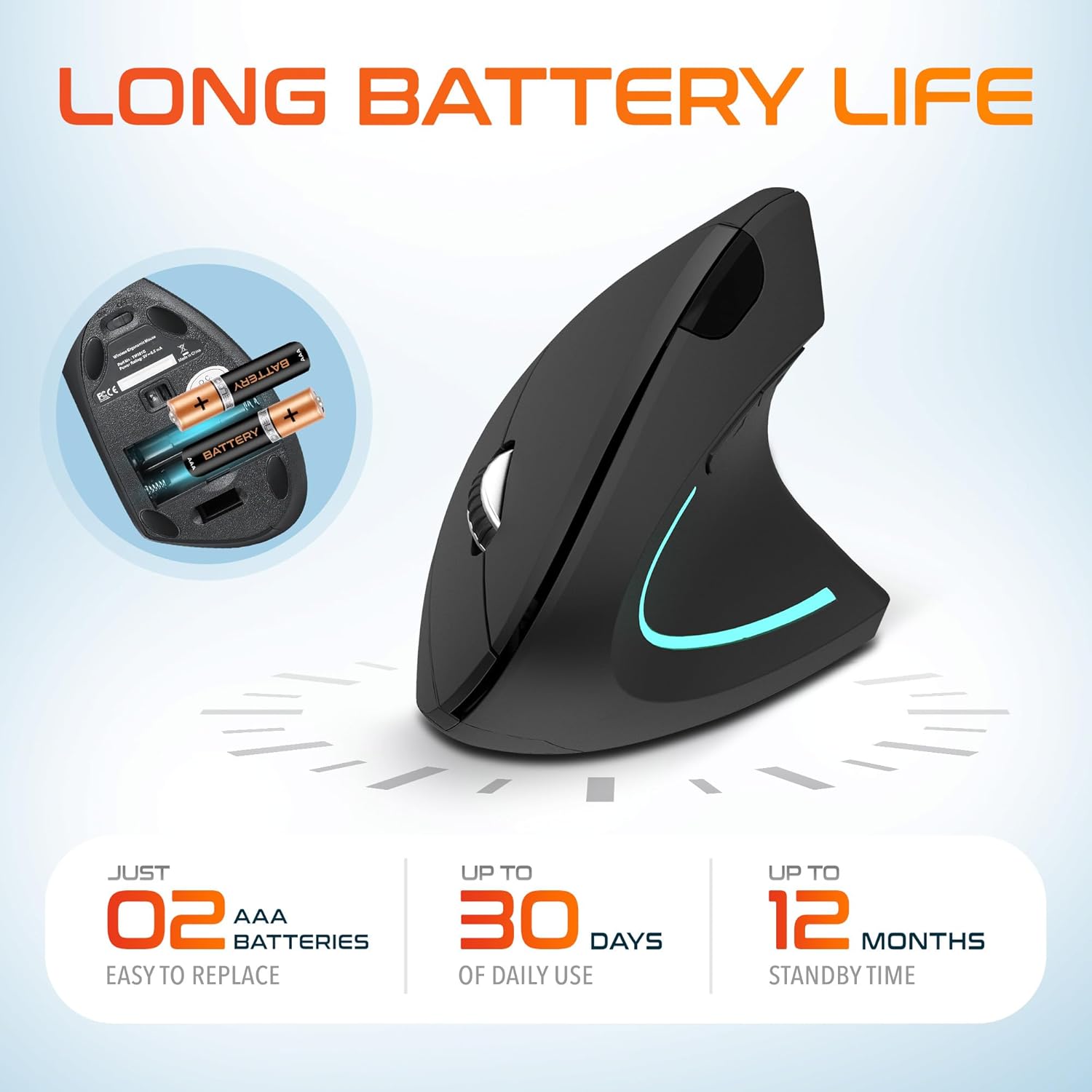
Image: The underside of the Delton S12 mouse with the battery compartment open, showing the correct placement for two AAA batteries.
3. USB донглду туташтыруу
The mouse connects wirelessly via a 2.4GHz USB dongle. No drivers are typically required for most operating systems.
- Remove the USB dongle from its storage slot, usually located near the battery compartment.
- Plug the USB dongle into an available USB port on your computer (PC, Laptop, Mac, Chromebook, etc.).
- The computer should automatically detect and install the necessary drivers. The mouse is ready for use once detected.

Image: The Delton S12 mouse positioned next to its USB dongle, ready for connection to a computer.
Чычканыңызды иштетүү
The Delton S12 mouse features six buttons and a scroll wheel for enhanced functionality.
1. Баскыч функциялары
- Сол чыкылдатуу: Primary selection and activation button.
- Оң чыкылдатуу: Контексттик менюларга жетет.
- Жылдыруу дөңгөлөгү: Документтерди тигинен жылдырат жана web баракчалар. Ошондой эле, ортоңку чыкылдатуу функциясы үчүн чыкылдатса болот.
- DPI которуу баскычы: Курсордун сезгичтигин (DPI) тууралайт.
- Алга баскычы: Алга карай жылдырат web браузерлер же file изилдөөчүлөр.
- Артка баскычы: Артка карай багыт алат web браузерлер же file изилдөөчүлөр.

Image: Diagram illustrating the location and function of the six buttons on the Delton S12 Ergonomic Vertical Wireless Mouse.
2. DPI тууралоо
The mouse offers three adjustable DPI levels (800, 1200, 2400) to suit different tasks and preferences. Press the DPI Switch Button (located behind the scroll wheel) to cycle through the settings. An indicator LED will change color to show the current DPI level:
- Көк LED: 800 DPI (Lower sensitivity, suitable for precise work)
- Кызыл LED: 1200 DPI (Medium sensitivity, standard use)
- Жашыл LED: 2400 DPI (Higher sensitivity, suitable for faster cursor movement)

Image: Close-up of the Delton S12 mouse showing the DPI indicator LED changing colors (blue, red, green) for different sensitivity settings.
Техникалык тейлөө
1. Тазалоо
Оптималдуу иштеши үчүн чычканыңызды дайыма тазалаңыз. Бетти сүртүү үчүн жумшак, кургак чүпүрөктү колдонуңуз. өжөр кир үчүн, бир аз гamp кездемени колдонсо болот, бирок ным ички компоненттерге кирбеши керек. Катуу химиялык заттардан же абразивдүү тазалагычтардан алыс болуңуз.
2. Батареяны алмаштыруу
When the mouse performance degrades or it stops responding, it's time to replace the batteries. Follow the battery installation steps outlined in the Setup section. Dispose of used batteries responsibly according to local regulations.
Проблемаларды чечүү
Чычкан жооп бербейт:
- Чычкан күйгүзүлгөнүн текшериңиз.
- Батареялар туура орнотулганын жана заряды жетиштүү экендигин текшериңиз. Керек болсо алмаштырыңыз.
- Verify the USB dongle is securely plugged into a working USB port on your computer. Try a different USB port.
- Move the mouse closer to the USB dongle to ensure it's within the 30-foot operating range.
- Компьютериңизди өчүрүп күйгүзүңүз.
Курсордун туруксуз кыймылы:
- Чычкандын астыңкы жагындагы оптикалык сенсорду жумшак, кургак чүпүрөк менен тазалаңыз.
- Чычканды ылайыктуу бетте колдонуп жатканыңызды текшериңиз. Өтө жарык чагылдырган же тунук беттерден алыс болуңуз. Чычкан жаздыкчасы сунушталат.
- Башка зымсыз аппараттардын кийлигишүүсүн текшериңиз.
DPI Indicator Light Not Changing:
- Press the DPI switch button firmly. If the issue persists, ensure batteries are fresh.
Техникалык шарттар
| Бренд | Делтон |
| Модель номери | S12 |
| Байланыш технологиясы | 2.4GHz Wireless (USB Dongle) |
| Кыймылды аныктоо технологиясы | Оптикалык |
| DPI деңгээли | 800, 1200, 2400 |
| баскычтардын саны | 6 |
| Колдун багыты | Туура |
| Power Source | Батарея менен иштейт (2 x AAA батарейкасы талап кылынат) |
| Батареянын орточо иштөө мөөнөтү | Up to 30 days (daily use) |
| Зымсыз диапазон | 30 метрге чейин |
| Шайкеш түзмөктөр | PC, Laptop, Mac, Chromebook, iOS devices |
| Операция системасы | Windows 11/10/9/8/7/XP, Mac OS 9/8/7, Linux, Chrome OS |
| Материал | Пластик |
Кепилдик жана колдоо
Кепилдик маалыматы:
This Delton S12 Ergonomic Vertical Wireless Mouse comes with a 1-Year Manufacturer Warranty. This warranty covers defects in materials and workmanship under normal use. For warranty claims, please retain your proof of purchase.
Кардарларды колдоо:
For technical assistance, troubleshooting, or any questions regarding your Delton S12 mouse, please contact Delton customer support. Refer to the product packaging or the official Delton webакыркы байланыш маалыматы үчүн сайт.