
1. Киришүү
Thank you for choosing the Osee LCM215-HDR+ 21.5 Inch Full HD Field Production Monitor. This monitor is designed for professional video production, offering a 1500-nit ultra-high brightness panel, excellent backlight uniformity, and comprehensive input/output options. This manual provides essential information for the safe and efficient use of your monitor, including setup, operation, maintenance, and troubleshooting.
2. Коопсуздук маалыматы
- Электр камсыздоо: Use only the specified power adapter. Ensure the power source matches the monitor's requirements.
- Вентиляция: Do not block ventilation openings. Ensure adequate airflow around the monitor to prevent overheating.
- Суу жана ным: Keep the monitor away from water, rain, and high humidity. Do not operate with wet hands.
- Тазалоо: Тазалоодон мурун электр кубатынан сууруп алыңыз. Жумшак, кургак чүпүрөктү колдонуңуз. Суюк тазалоочу каражаттардан же аэрозольдордон алыс болуңуз.
- Колдонуу: Мониторду этияттык менен колдонуңуз. Аны түшүрүүдөн же катуу таасирлерге дуушар кылуудан алыс болуңуз.
- Оңдоо: Мониторду өзүңүз оңдоого аракет кылбаңыз. Бардык тейлөөлөрдү квалификациялуу кызматкерлерге тапшырыңыз.
3. Пакеттин мазмуну
Пакетиңизде бардык буюмдар бар экенин текшериңиз:
- Osee LCM215-HDR+ 21.5 Inch Full HD Ultra-High Brightness Field Production Monitor
- V-Mount Батарея плитасы
- Sun Hood
- C-Stand Adapter
- Custom Foam Mold
- Иш столунун буттары
- Электр кабели
- User Manual
- Osee 1-Year Limited Warranty Card
4. Продукт бүтүп калдыview
The Osee LCM215-HDR+ is an upgraded version of the LCM215-HDR monitor, featuring a new 1500-nit ultra-high brightness panel with excellent backlight uniformity. This super 1500-nit screen is approximately 3-4 times brighter than other field monitors, allowing outdoor shooting in direct sunlight without image washout. It does not require a sun hood during use. The LCM215-HDR+ monitor supports various connectors, including 2Ch 3G/HD/SD-SDI input, 1Ch video input, 1 HDMI input, and 1Ch 3G/HD/SD-SDI output. It supports most audio and video formats. The monitor's compatibility makes it suitable for various application scenarios, whether placed on a table, mounted on a rod using a C-stand adapter, or transmitting signals and images wirelessly. It offers superior software functions, including built-in SDR/HDR 3DLUTs. The LCM215-HDR+ provides 30 SDR 3DLUTs to convert log modes to REC 709 for major camera brands like FUJIFILM, GoPro, JVC, Panasonic, RED, and Sony. Additionally, it offers 14 HDR 3DLUTs to further convert log modes.
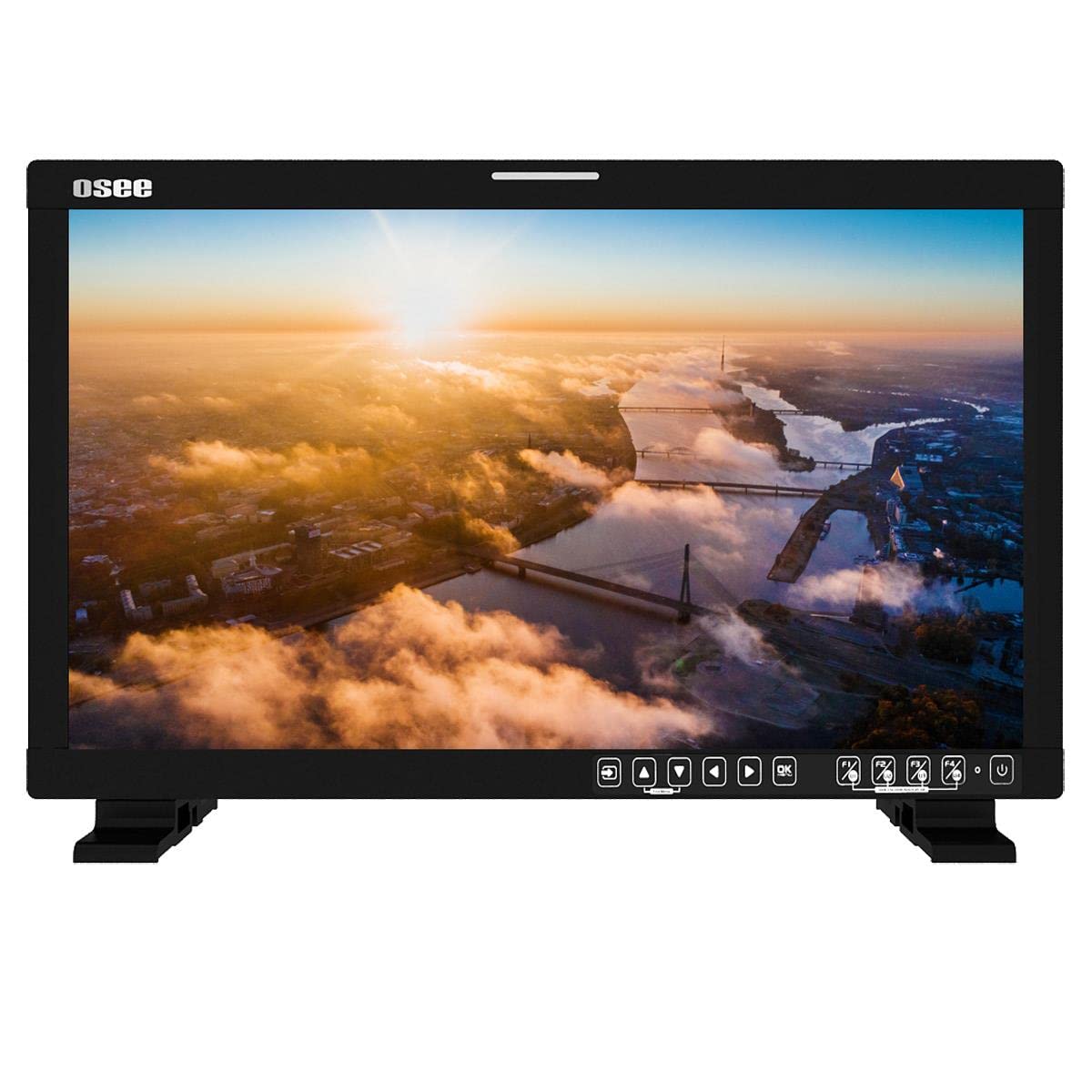
Сүрөт 4.1: Алдыңкы view of the Osee LCM215-HDR+ monitor, displaying a vibrant landscape scene.
4.2-сүрөт: Каптал view of the Osee LCM215-HDR+ monitor, showing its slim profile and robust build.

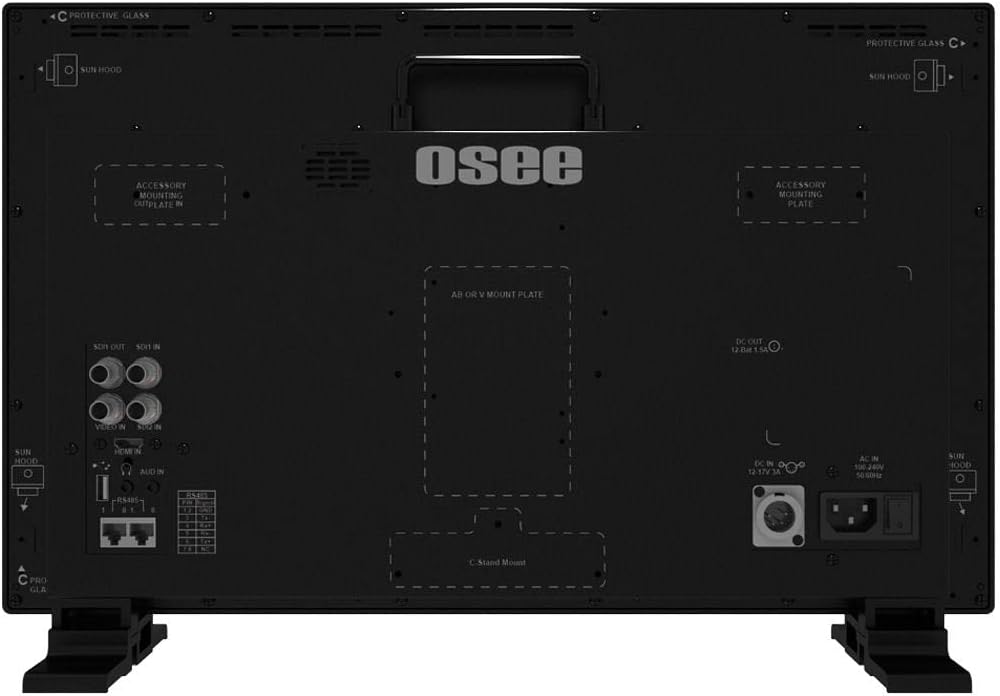
4.3-сүрөт: Арткы view of the Osee LCM215-HDR+ monitor, highlighting various input/output ports including SDI, HDMI, and power connections.

Figure 4.4: Osee LCM215-HDR+ monitor displayed with its included accessories: sun hood, C-stand adapter, and V-mount battery plate.

Figure 4.5: Two Osee LCM215-HDR+ monitors in a field production setting, displaying video content from cameras.
5. Орнотуу
5.1 Мониторду орнотуу
- Иш тактада колдонуу: Attach the provided desktop stand feet to the bottom of the monitor. Ensure they are securely fastened.
- C-Stand Mounting: Use the included C-stand adapter to mount the monitor onto a C-stand or other compatible rod. Secure the adapter firmly to the monitor and the stand.
- Accessory Mounting Plates: The monitor features accessory mounting plates on the rear for additional equipment.
5.2 Кубат туташтыруу
- Connect the power cable to the AC input port on the rear of the monitor.
- Plug the other end of the power cable into a suitable power outlet (100-240V AC).
- Alternatively, attach a V-mount battery to the V-mount battery plate for portable operation.
5.3 Киргизүү байланыштары
The LCM215-HDR+ supports multiple input types:
- SDI: Connect your 3G/HD/SD-SDI sources to the SDI IN ports. The monitor has 2 SDI inputs.
- HDMI: Connect your HDMI source to the HDMI IN port.
- Видео: Connect analog video sources to the Video IN port.
The monitor also features 1Ch 3G/HD/SD-SDI output for looping through signals to other devices.
6. Иштөө
6.1 Күйгүзүү/өчүрүү
Press the power button located on the front panel to turn the monitor on or off. The power indicator light will illuminate when the monitor is on.
6.2 Меню Навигациясы
Use the control buttons on the front panel to navigate the on-screen display (OSD) menu. Typically, there are buttons for menu access, navigation (up/down/left/right), and selection (enter).
6.3 Киргизүүнү тандоо
Access the input menu via the OSD to select the desired input source (SDI 1, SDI 2, HDMI, Video).
6.4 Brightness and Picture Settings
Adjust brightness, contrast, saturation, and other picture parameters through the OSD menu. The LCM215-HDR+ offers a super bright 1500-nit display, ideal for outdoor viewing.
6.5 LUT Functions
The monitor includes built-in 3DLUTs for color management:
- SDR 3DLUTs: Access 30 SDR 3DLUTs to convert log modes from major camera brands (FUJIFILM, GoPro, JVC, Panasonic, RED, Sony) to REC 709.
- HDR 3DLUTs: Utilize 14 HDR 3DLUTs for advanced log mode conversions.
These functions are accessible through the OSD menu, allowing you to apply them to your input signal for accurate monitoring.
6.6 Аудио чыгаруу
The monitor features a built-in speaker for audio monitoring. Adjust the volume through the OSD menu.
7. Техникалык тейлөө
7.1 Тазалоо
- Экран: Экранды жумшак, түксүз чүпүрөк менен акырын сүртүңүз. өжөр белгилери үчүн, бир аз гampкездемени суу же экранга арналган тазалоочу эритме менен сүртүңүз (экранга түз чачпаңыз).
- Дене: Монитордун экранын сүртүңүзasinжумшак, кургак чүпүрөк менен сүртүңүз. Абразивдүү тазалоочу каражаттардан же эриткичтерден алыс болуңуз.
7.2 Сактоо
When not in use for extended periods, store the monitor in a cool, dry place, away from direct sunlight and extreme temperatures. Use the custom foam mold and original packaging for protection during transport or storage.
7.3 Battery Care (V-Mount)
If using a V-mount battery, follow the battery manufacturer's guidelines for charging, discharging, and storage to maximize battery life and performance.
8. Кыйынчылыктарды
- Кубат жок:
- Электр кабели мониторго да, электр розеткасына да бекем туташтырылганын текшериңиз.
- If using a V-mount battery, ensure it is charged and properly attached.
- Электр розеткасынын иштешин текшериңиз.
- Сигнал жок:
- Ensure the input source (camera, video switcher) is powered on and outputting a signal.
- Check that the video cables (SDI, HDMI, Video) are securely connected to both the source and the monitor.
- Монитордун OSD менюсунда туура киргизүү булагынын тандалганын текшериңиз.
- Confirm the signal format from your source is supported by the monitor (refer to Specifications).
- Сүрөт көйгөйлөрү (бурмаланган, жымыңдаган, туура эмес түстөр):
- Видео кабелдин бузулганын же байланыштары бошоп калганын текшериңиз. Мүмкүн болсо, башка кабелди колдонуп көрүңүз.
- Reset the monitor's picture settings to default via the OSD menu.
- Ensure the correct LUT is applied, or disable LUTs to check the raw signal.
- If the issue persists, try connecting a different video source to isolate the problem.
- Аудио жок:
- Check the audio settings in the OSD menu and ensure the volume is not muted or set too low.
- Verify that the input source is sending an audio signal.
If you encounter issues not covered here, please contact Osee customer support.
9. Техникалык шарттар
| Өзгөчөлүк | Спецификация |
|---|---|
| Бренд | Osee |
| Модель номери | LCM215-HDR+ |
| Screen Size | 21.5 дюйм |
| Резолюция | FHD 1080p (Native: 1920 x 1080) |
| Дисплей түрү | LED-LCD |
| Screen Surface Finish | Жылтырак |
| Viewбурч | 170 градус |
| Өзгөчөлүктөрү | Built-in Speaker, High Dynamic Range |
| Киргизүү интерфейстери | 2x 3G/HD/SD-SDI, 1x Video, 1x HDMI |
| Output Interfaces | 1x 3G/HD/SD-SDI |
| Power Input | AC 100-240V, V-Mount Battery |
| Түс | Кара |
| Продукт колдонуу | Иш такта |
| Монтаж түрү | Үстөлгө орнотуу |
| UPC | 650971522317 |
| ASIN | B0BZKSSN5D |
10. Кепилдик жана колдоо
The Osee LCM215-HDR+ monitor comes with a 1-year limited warranty. Please refer to the warranty card included in your package for detailed terms and conditions. For technical support, service, or further inquiries, please visit the official Osee webсайтка кайрылыңыз же жергиликтүү дистрибьютериңиз менен байланышыңыз. Сатып алуу квитанциясын кепилдик дооматтары үчүн сатып алуунун далили катары сактаңыз.