
MOUNTUP MU1003
MOUNTUP өзүнчө турган монитор стендин колдонуучу колдонмосу
Модель: MU1003 | Бренд: MOUNTUP
1. Киришүү
MOUNTUP өзүнчө турган монитор стендин тандаганыңыз үчүн рахмат. Бул колдонмодо жаңы монитор стендиңизди чогултуу, иштетүү жана тейлөө боюнча кеңири көрсөтмөлөр берилген. Эргономикалык жактан ыңгайлуу. viewБул стенд 17.6 фунт салмактагы 13-32 дюймдук жалпак же ийри экрандар менен шайкеш келет жана 75x75 мм жана 100x100 мм VESA үлгүлөрүн колдойт.

1-сүрөт: MOUNTUP өзүнчө турган монитор стенди (MU1003 модели)
Бул сүрөттө тик кара түстөгү чыңалган айнек негизге бекем орнотулган, тик кара мамыга бекитилген кара VESA бекитүүчү пластинасы бар MOUNTUP өзүнчө турган монитор стенди толугу менен көрсөтүлгөн.
2. Продукциянын өзгөчөлүктөрү
- Экрандын шайкештиги: 17.6 фунтка чейинки 13-32 дюймдук жалпак же ийри экранды колдойт. 75x75 мм жана 100x100 мм VESA үлгүлөрү менен шайкеш келет.
- Эргономикалык жөндөөлөр:
- Россия: Оптималдуу үчүн +30°/-30° viewбурчтар.
- Айлануучу: Ийкемдүү экранды жайгаштыруу үчүн +25°/-25°.
- Айлануу: Пейзаждык жана тигинен жайгаштыруу режимдеринин ортосунда оңой которулуу үчүн 360°.
- Бийиктигин тууралоо: Ар кандай отуруу абалдарына туура келүү үчүн 6.89 дюймга чейин.
- Өз алдынча дизайн: Бургулоо же тазалоо жокampталап кылынат, ыңгайлуулукту камсыз кылат жана столуңуздун бетин коргойт. Туруктуулук жана көрктүү көрүнүш үчүн калың чыңалган айнек негизге ээ.
- Кабелдик башкаруу: Интеграцияланган кабель клиптери зымдарды таза жана башаламан эмес жумуш орду үчүн иреттүү кармайт.
- Мыкты курулуш: Узак мөөнөттүү колдонуу үчүн бышык металлдан жана чыңалган айнектен жасалган.

2-сүрөт: Продукциянын өлчөмдөрү жана VESA шайкештиги
Бул сүрөттө монитордун стендинин негизги өлчөмдөрү, анын ичинде жалпы бийиктиги 17.3 дюйм, негизинин туурасы 7.9 дюйм жана негизинин тереңдиги 11.8 дюйм көрсөтүлгөн. Ошондой эле, монитордун максималдуу өлчөмү 32 дюйм, салмак көтөрүмдүүлүгү 17.6 фунт жана 75x75 мм жана 100x100 мм үлгүлөрү үчүн VESA шайкештиги баса белгиленген.
3. Пакеттин мазмуну
Чогултууну баштоодон мурун, бардык компоненттердин бар экенин жана жакшы абалда экенин текшериңиз. Эгерде кандайдыр бир тетиктер жок болсо же бузулса, кардарларды колдоо кызматына кайрылыңыз.
- Монитордун таяныч негизи (чыңдалган айнек)
- Вертикалдык колдоо мамыча
- VESA монтаждоо плитасы
- Орнотуу жабдууларынын комплекти (бурамалар, шайбалар, аралыктар)
- Монтаждоо куралдары (мисалы, Аллен ачкычы)
- Көрсөтмө (бул документ)
4. Орнотуу жана орнотуу
MOUNTUP мониторунун стенди тез жана оңой чогултуу үчүн иштелип чыккан, адатта 5 мүнөттүн ичинде. Коопсуз орнотуу үчүн төмөнкү кадамдарды аткарыңыз:
- Колдоочу мамычаларды негизге бекитиңиз: Берилген бурамалар жана шаймандар менен вертикалдык таяныч мамысын чыңалган айнек негизге бекитиңиз. Туруктуулук үчүн анын бекем тартылганын текшериңиз.
- Монитор үчүн VESA пластинкасын тиркөө: VESA бекитүүчү пластинаны мониторуңуздун арткы жагындагы VESA тешиктери менен тегиздеңиз. Пластинаны мониторуңузга бекем бекитүү үчүн аппараттык топтомдогу тиешелүү бурамаларды, шайбаларды жана аралыктарды колдонуңуз. Бурамалар жетиштүү түрдө бекемделгенин текшериңиз, бирок өтө катуу тартпаңыз.
- Мониторду стендге орнотуу: Монитор тиркелген VESA пластинасын вертикалдык таяныч мамыга этияттык менен жылдырыңыз. Монитордун туура орнотулганын жана коопсуздук кулпу механизми менен бекитилгенин текшериңиз.
Толук визуалдык көрсөтмөлөр үчүн, эгер бар болсо, тиркелген тез баштоо көрсөтмөсүн же расмий продукт чогултуу видеосун караңыз.
5. Иштөө нускамалары
MOUNTUP мониторунун стенди идеалдуу эргономикалык абалыңызга жетүү үчүн ар кандай жөндөөлөрдү сунуштайт viewпозиция.
5.1 Бийиктигин тууралоо
Монитордун бийиктигин тууралоо үчүн, вертикалдык мамычанын арткы жагындагы тутканы бошотуп, мониторду каалаган деңгээлге чейин өйдө же ылдый жылдырып, андан кийин аны бекитүү үчүн тутканы кайра бекемдеңиз. Тирөөч так жайгаштыруу үчүн бир нече бийиктик деңгээлдерин сунуштайт.

3-сүрөт: 6 деңгээлдеги бийиктикти тууралоо
Бул сүрөттө монитор тиркелген стенд көрсөтүлүп, столдун бетинен VESA плитасынын ортосуна чейин 7.3 дюймдан 14.3 дюймга чейинки тууралоого мүмкүн болгон алты башка бийиктик деңгээли көрсөтүлгөн.
5.2 Эңкейүүнү тууралоо
Мониторду жаркыроону азайтуу жана оптималдаштыруу үчүн +30°/-30° кыйшайтууга болот viewыңгайлуулукту камсыз кылуу. VESA пластина механизминдеги болтту бошотуу үчүн берилген алты бурчтуу ачкычты колдонуңуз, эңкейүү бурчун тууралаңыз, андан кийин мониторду ордуна бекитүү үчүн болтту бекем тартыңыз.
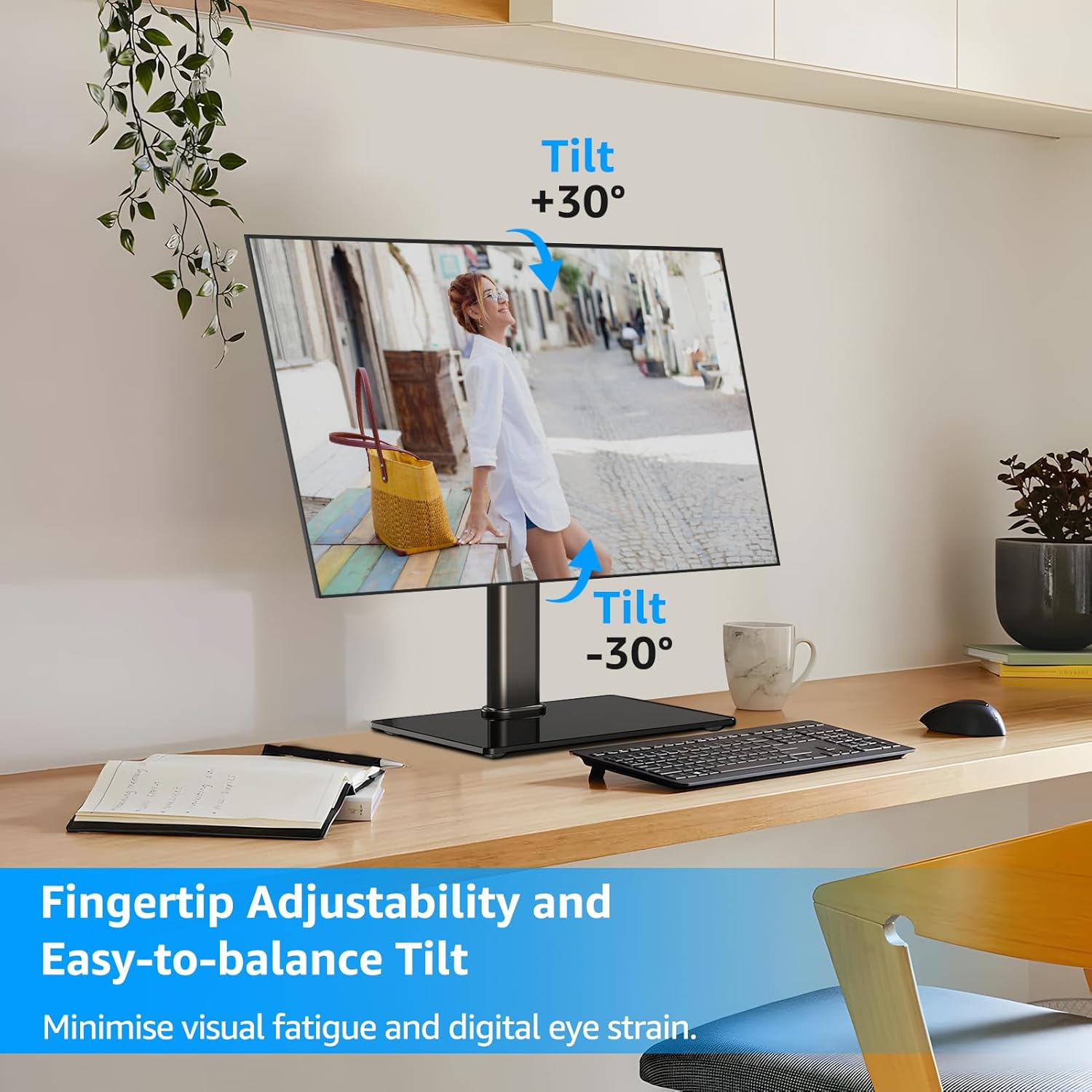
4-сүрөт: Эңкейүүнү жөндөө диапазону
Бул сүрөттө стенддеги монитор көрсөтүлгөн, анда эргономикалык натыйжага жетүү үчүн экранды өйдө (+30°) жана ылдый (-30°) кыйшайтуу мүмкүнчүлүгү көрсөтүлгөн. viewкөздүн көрүү бурчун азайтып, көздүн чарчоосун азайтат.
5.3 Айланууну жөндөө
Экраныңызды бөлүшүү же экраныңызды тууралоо үчүн мониторду +25°/-25° солго же оңго буруңуз viewбүтүндөй стендди жылдырбастан бурчту өзгөртүү.

5-сүрөт: Айлануучу жөндөө диапазону
Бул сүрөттө монитордун стендинин айлануу мүмкүнчүлүгү көрсөтүлгөн, ал экранды оңго +25° жана солго -25° айландырууга мүмкүндүк берет, бул экранды столдун үстүндө ийкемдүү жайгаштырууга мүмкүндүк берет.
5.4 Айланууну тууралоо
Мониторду 360° айландырып, горизонталдык жана тигинен багыттардын ортосунда оңой которулуңуз, бул код жазуу же документ түзүү сыяктуу ар кандай тапшырмалар үчүн идеалдуу. viewing.
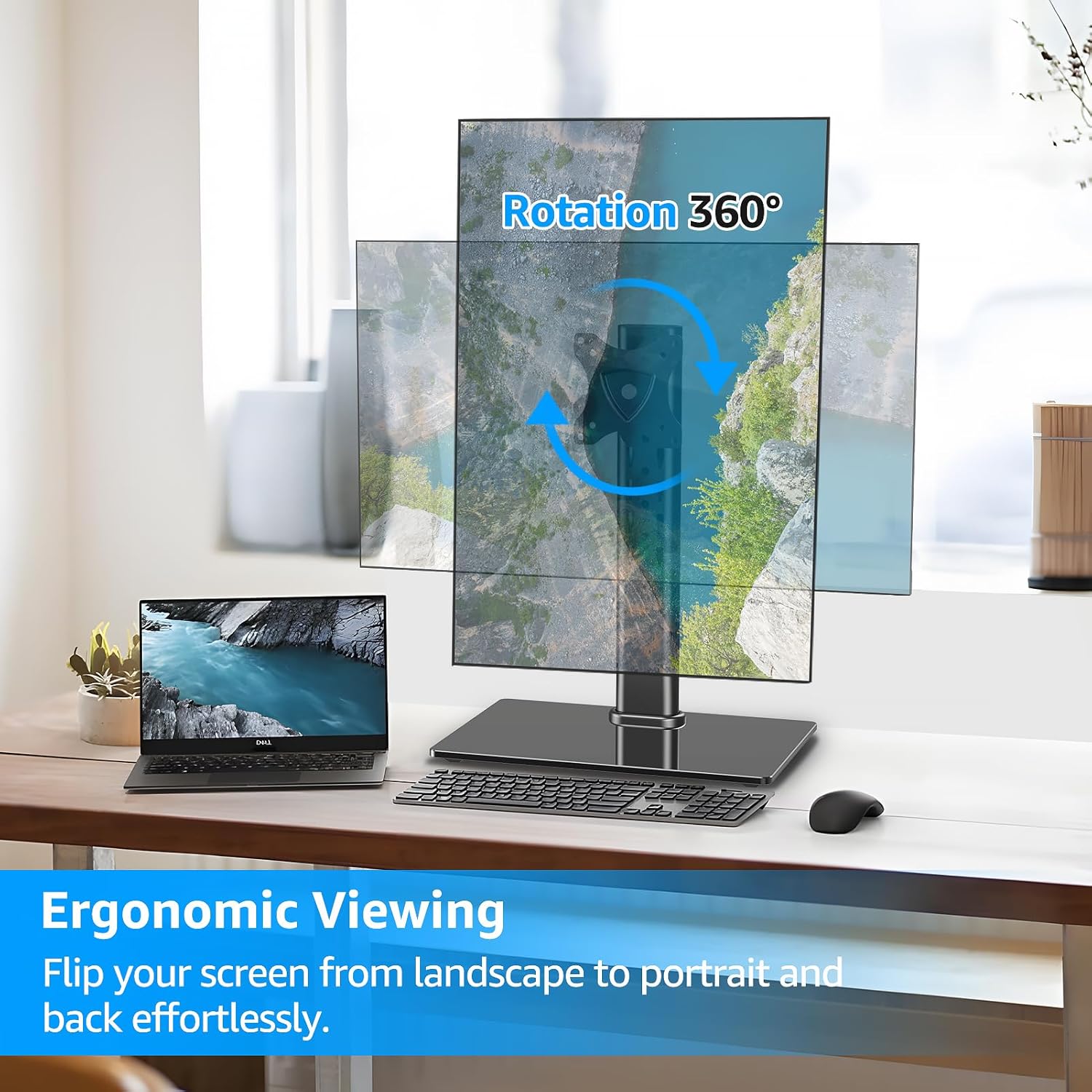
6-сүрөт: 360° айлануу мүмкүнчүлүгү
Бул сүрөттө монитордун стендинин толук 360° айлануу функциясы көрсөтүлгөн, бул колдонуучуга мониторду ар кандай максаттарда пейзаждык жана вертикалдык багыттардын ортосунда оңой которуштурууга мүмкүндүк берет. viewмуктаждыктары.
5.5 Кабелди башкаруу
Монитор кабелдериңизди багыттоо жана иретке келтирүү үчүн вертикалдык мамыга орнотулган кабель клиптерин колдонуңуз, ошондой эле жумуш ордун тыкан жана кесипкөй кармаңыз.

7-сүрөт: Кабелди башкаруу жана тайгаланбай турган буттар
Бул сүрөттө монитордун стендинин арткы бетиндеги кабелдерди башкаруу функциясы баса белгиленип, кабелдердин тыкан жайгаштырылганы көрсөтүлгөн. Ошондой эле, кошумча туруктуулук үчүн түбүндөгү тайгаланбаган резина буттары көрсөтүлгөн.
5.6 Иштөө боюнча видео көрсөтмө
Стенддин функцияларын жана жөндөөлөрүн визуалдык түрдө көрсөтүү үчүн, төмөндөгү расмий продукт видеосун көрүңүз:
Видео 1: MOUNTUP монитор стендинин функциялары
Бул видеодо MOUNTUP мониторунун стендинин айлануу, айлануу, эңкейүү жана бийиктикти жөндөө сыяктуу ар кандай эргономикалык жөндөөлөрү көрсөтүлгөн.asing оптималдуу натыйжага кантип жетүүгө болот viewыңгайлуулук жана баш аламандыксыз жасалгалоо.
6. Техникалык тейлөө
MOUNTUP мониторуңуздун стендинин узак мөөнөттүү жана оптималдуу иштешин камсыз кылуу үчүн, төмөнкү жөнөкөй тейлөө көрсөтмөлөрүн аткарыңыз:
- Тазалоо: Тирөөчтү жана анын негизин жумшак, d менен сүртүңүзamp кездеме. Каптамага же чыңалган айнекке зыян келтире турган абразивдүү тазалоочу каражаттарды же эриткичтерди колдонуудан алыс болуңуз.
- Мезгилдүү текшерүү: Бардык бурамаларды жана туташтыргычтарды бекем кармап туруу үчүн мезгил-мезгили менен текшерип туруңуз. Туруктуулукту сактоо үчүн зарыл болсо, кайра бекемдеңиз.
- Майлоо: Жөндөө механизмдери үчүн майлоонун кажети жок. Эгерде кандайдыр бир кыймыл катып калса, эч кандай таштандылар механизмди тосуп калбаганын текшериңиз.
7. Кыйынчылыктарды
| Көйгөй | Мүмкүн себеп | Чечим |
|---|---|---|
| Монитор туруктуу эмес же чайпалып турат. | Бош туташуулар; тегиз эмес бет; монитор өтө оор. | Бардык бурамалардын бекем бекитилгенин текшериңиз. Трибунаны тегиз, туруктуу бетке коюңуз. Монитордун салмагы 17.6 фунт чегинде экенин текшериңиз. |
| Эңкейишти тууралоодогу кыйынчылык. | Эңкейтүүчү болт жетиштүү деңгээлде бошотулган же бекемделген эмес. | VESA пластина механизминдеги эңкейтүүчү болтту бошотуу үчүн берилген Аллен ачкычын колдонуңуз. Мониторду каалаган бурчка тууралап, андан кийин болтту бекем тартыңыз. Өжөрлүк менен жөндөө үчүн, ачкыч толугу менен бекитилгенин текшерип, жетиштүү күч колдонуңуз. |
| Бийиктигин тууралагандан кийин монитор ылдый жылат. | Бийиктикти жөндөө баскычы жетиштүү түрдө тартылган эмес. | Каалаган бийиктикти койгондон кийин, вертикалдык мамыдагы бийиктикти жөндөө баскычы толугу менен бекемделгенин текшериңиз. |
| VESA плитасы мониторго туура келбейт. | Туура эмес VESA үлгүсү же монитордун өлчөмү. | Мониторуңуздун VESA үлгүсү 75x75 мм же 100x100 мм экенин текшериңиз. Мониторуңуздун өлчөмү 13-32 дюймдун ортосунда экенин текшериңиз. |
8. Техникалык шарттар
| Өзгөчөлүк | Деталь |
|---|---|
| Бренд | КӨТӨРҮЛҮҮ |
| Модель номери | MU1003 |
| Шайкеш экран өлчөмү | 13-32 дюйм |
| Салмак сыйымдуулугу | 17.6 фунтка чейин |
| VESA шайкештиги | 75x75 мм, 100x100 мм |
| Тит бурч | +30° / -30° |
| Swivel Angle | +25° / -25° |
| Айлануу | 360° |
| Бийиктигин тууралоо | 6.89 дюймга чейин |
| Материал | Металл, чыңдалган айнек |
| Түс | Кара |
| Монтаж түрү | Үстөлгө орнотуу (өзүнчө туруу) |
9. Кепилдик жана колдоо
MOUNTUP камсыз кылат 3 жылдык өндүрүүчүнүн колдоосу бул продукт үчүн. Эгерде сизде монитордун стенди боюнча кандайдыр бир көйгөйлөргө туш болсоңуз же суроолоруңуз болсо, биздин достук мамиледеги техникалык колдоо тобубузга кайрылуудан тартынбаңыз.
Колдоо алуу үчүн, расмий MOUNTUP сайтына кириңиз webсайтка же сатып алуу документтериңиз менен берилген байланыш маалыматына кайрылыңыз.
Ask a question about this manual
Ask about setup, troubleshooting, compatibility, parts, safety, or missing instructions. Manuals+ will review the question and use this page’s manual context to help answer it.