
1. Киришүү
This manual provides comprehensive instructions for the setup, operation, and maintenance of your Tibuta 15.6 Inch WiFi Digital Photo Frame. Please read this manual thoroughly before using the device to ensure proper functionality and to maximize your user experience.

Image 1.1: Tibuta 15.6 Inch WiFi Digital Photo Frame in use, showing its touchscreen capabilities and companion app integration.
2. Коопсуздук маалыматы
Түзмөккө зыян келтирбөө же жеке жаракат алууну алдын алуу үчүн төмөнкү коопсуздук чараларын сактаңыз:
- Аппаратты сууга же ашыкча нымдуулукка дуушар кылбаңыз.
- Түзмөктү жылуулук булактарынын жанына же күндүн түз тийген жерине узак убакытка коюудан алыс болуңуз.
- Берилген кубат адаптерин гана колдонуңуз.
- Аппаратты өз алдынча бөлүүгө же оңдоого аракет кылбаңыз. Жардам алуу үчүн кардарларды колдоо бөлүмүнө кайрылыңыз.
- Аппаратты балдардан жана үй жаныбарларынан алыс кармаңыз.
3. Пакеттин мазмуну
Пакетте бардык буюмдар бар экенин текшериңиз:
- Tibuta 15.6 Inch WiFi Digital Photo Frame
- Кубаттуу адаптер
- Колдонуучунун Колдонмосу (бул документ)
- Тур
4. Продукт бүтүп калдыview
Санариптик сүрөт алкагыңыздын компоненттери менен таанышып алыңыз.
4.1 Фронт View

Сүрөт 4.1: Алдыңкы view and key features of the Tibuta 15.6 Inch Digital Photo Frame.
- 15.6 дюймдук HD сенсордук экран: High-definition display with 1280x800 resolution and IPS technology for wide viewбурчтар.
- Сенсордук экран интерфейси: Allows for direct interaction with the frame's menus and settings.
4.2 Арткы View жана порттор

Сүрөт 4.2: Арткы view of the Tibuta Digital Photo Frame with labeled ports and features.
- Кубат которгучу: Аппаратты күйгүзөт же өчүрөт.
- Дубалга орнотулган: Mounting points for wall installation.
- Ampжашагандар: Аудио ойнотуу үчүн интеграцияланган динамиктер.
- Микро SD карта слоту: Supports Micro SD cards up to 128GB for expanded storage.
- Наушник уячасы: Тышкы аудио түзүлүштөрдү туташтыруу үчүн.
- Type-A USB Port: USB дисктерди же башка перифериялык түзүлүштөрдү туташтыруу үчүн.
- Мини USB порт: For data transfer (if applicable).
- DC Power Port: Кубат адаптерине туташат.
- Стенд: Attachable stand for desktop placement.
5. Орнотуу
5.1 Баштапкы күйгүзүү
- Attach the stand to the back of the photo frame for stable placement on a flat surface.
- Connect the power adapter to the DC Power Port on the back of the frame.
- Кубат адаптерин розеткага сайыңыз.
- Press the Power Switch to turn on the device.
- Тилди, убакыт алкагын тандап, Wi-Fi тармагына туташуу үчүн экрандагы көрсөтмөлөрдү аткарыңыз.
5.2 Wi-Fiга туташуу
- From the main menu, navigate to "Settings" and then "Wi-Fi".
- Тизмеден каалаган Wi-Fi тармагын тандаңыз.
- Экрандагы клавиатураны колдонуп Wi-Fi сырсөзүн киргизиңиз.
- Tap "Connect". Once connected, a Wi-Fi icon will appear on the screen.
5.3 Companion колдонмосун орнотуу
To share photos and videos remotely, download the dedicated companion app.

Image 5.1: Download the Uhale App from Google Play or the App Store.
- On your smartphone or tablet, open the Google Play дүкөнү (Android түзмөктөрү үчүн) же Apple App Store (iOS түзмөктөрү үчүн).
- Издөө "Uhale App" (or the specified app name in your frame's instructions).
- Колдонмону жүктөп алып, орнотуңуз.
- Follow the in-app instructions to pair your device with the digital photo frame. This typically involves entering a unique code displayed on your photo frame.
6. Иштөө нускамалары
6.1 Sharing Photos and Videos via App
Once the frame is connected to Wi-Fi and paired with the app:
- Смартфонуңуздагы өнөктөш колдонмосун ачыңыз.
- Select the photos or videos you wish to share.
- Tap the "Send" or "Share" button within the app.
- The selected media will be transferred to your digital photo frame and displayed.
The frame supports various display modes, including timing, zooming, and cropping, which can often be adjusted via the app or directly on the frame's settings.
6.2 Using External Storage (Micro SD Card)
The frame has 16GB of built-in storage and supports Micro SD cards up to 128GB.
- Insert a Micro SD card into the designated slot on the back of the frame.
- The frame will automatically detect the card.
- Navigate to the "Gallery" or "Files" section on the frame to access content from the Micro SD card.
- Сиз көчүрө аласыз files from the Micro SD card to the internal storage or play them directly.
6.3 Automatic Rotation (Gravity Sensing)
The frame features gravity sensing for automatic rotation, adjusting the display orientation based on how the frame is positioned (landscape or portrait).
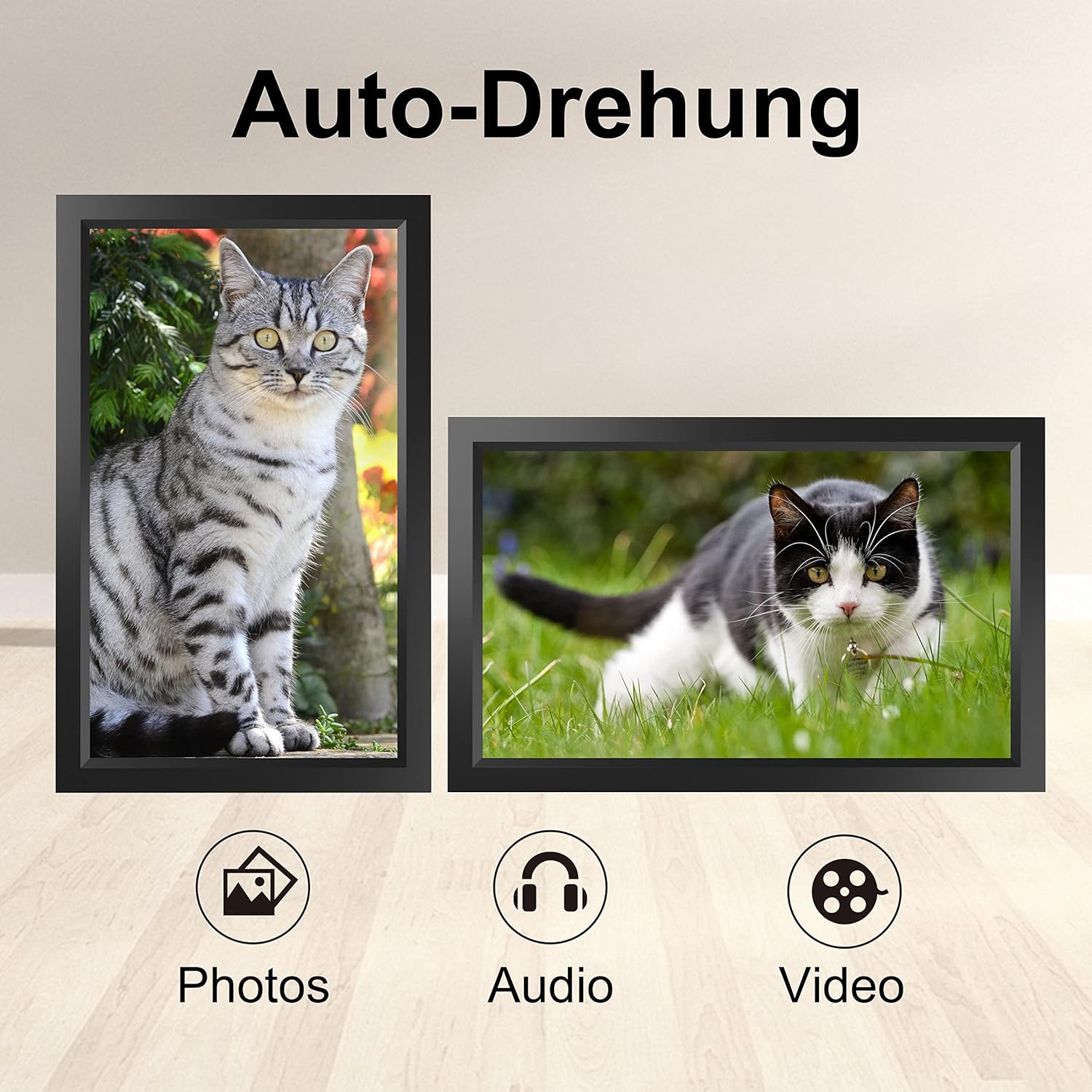
Image 6.1: Automatic display rotation based on frame orientation.
Ensure the gravity sensing feature is enabled in the frame's settings if you wish to utilize this functionality.
6.4 Дисплей орнотуулары
Сиздин жекелештирүү viewing experience through the frame's settings menu:
- Слайдшоу аралыгы: Adjust how long each photo is displayed.
- Өткөөл таасирлер: Choose different effects between photos.
- Жарыктык: Экран жарыктыгын тууралаңыз.
- Уйку режими/таймер: Set schedules for the frame to turn on/off automatically.
- Zoom/Crop: Options to adjust how photos fit the screen.
7. Техникалык тейлөө
7.1 Экранды тазалоо
Сенсордук экранды тазалоо үчүн аны жумшак, мамыксыз чүпүрөк менен акырын сүртүңүз. Өжөр тактар үчүн бир аз сүртүңүз.ampчүпүрөккө суу же экранды тазалоо эритмеси. Катуу химиялык заттарды же абразивдүү материалдарды колдонуудан алыс болуңуз.
7.2 Жалпы кам көрүү
- Keep the frame in a dry environment.
- Protect it from dust by occasionally wiping the frame's body with a soft cloth.
- Аппаратты жерге түшүрүүдөн же катуу таасирлерден сактаныңыз.
8. Кыйынчылыктарды
| Көйгөй | Мүмкүн себеп | Чечим |
|---|---|---|
| Рамка күйбөйт. | Кубат адаптери туташкан эмес же туура эмес. | Кубат адаптери рамкага да, иштеп жаткан розеткага да бекем туташтырылганын текшериңиз. Башка розетканы колдонуп көрүңүз. |
| Wi-Fi'га туташпай жатат. | Туура эмес сырсөз, диапазондон тышкары же тармак маселеси. | Verify the Wi-Fi password. Move the frame closer to the router. Restart your router. |
| Photos/videos not appearing. | App not paired, incorrect file format, or storage issue. | Ensure the app is correctly paired. Check if the media files are in a supported format. Verify sufficient storage space on the frame or SD card. |
| Сенсордук экран жооп бербей жатат. | Убактылуу программалык ката. | Restart the frame by holding the power button or unplugging and replugging the power adapter. |
| Automatic rotation not working. | Feature disabled or sensor issue. | Check the frame's settings to ensure gravity sensing/auto-rotation is enabled. |
9. Техникалык шарттар
| Өзгөчөлүк | Деталь |
|---|---|
| Модель номери | TID15.6 |
| Screen Size | 15.6 дюйм |
| Дисплей түрү | IPS сенсордук экраны |
| Резолюция | 1280x800 |
| Ички сактагыч | 16 ГБ (болжол менен 20 000 сүрөт) |
| Тышкы сактагыч | 128 ГБ чейин Micro SD карта |
| Байланыш | Wi-Fi |
| Өзгөчөлүктөр | Gravity Sensing Automatic Rotation, Touchscreen |
| Өлчөмдөрү (L x W x Y) | 39.12 x 24.64 x 2.51 см |
| Салмагы | 1.48 кг |
| Power Source | Battery Powered (includes 1 Lithium Ion battery) |
Эскертүү: Техникалык мүнөздөмөлөр алдын ала эскертүүсүз өзгөртүлүшү мүмкүн.
10. Кепилдик жана колдоо
10.1 Продукциянын кепилдиги
The Tibuta Digital Photo Frame comes with a one-year product warranty. This warranty covers manufacturing defects and operational issues arising from normal use. If any issues arise during this period, please contact our after-sales support team for assistance.
10.2 Кардарларды колдоо
For technical support, warranty claims, or any other inquiries, please refer to the contact information provided on the Tibuta official website or your purchase documentation. When contacting support, please have your model number (TID15.6) and purchase date available.