
1. Киришүү
Thank you for choosing the TECKNET Wireless Doorbell. This manual provides detailed instructions for the installation, operation, and maintenance of your new doorbell system. Please read this manual thoroughly before use to ensure proper function and longevity of the product.
2. Пакеттин мазмуну
Please check the package contents carefully. If any items are missing or damaged, please contact TECKNET customer support.
- 1 x зымсыз эшик коңгуроосун кабыл алуучу
- 1 x Зымсыз эшик коңгуроосунун өткөргүчү (баскыч)
- Орнотуу жабдуулары (бурамалар, дубал анкерлери, жабышчаак лента)
- 1 х Колдонуучунун колдонмосу (Бул документ)
3. Продукциянын өзгөчөлүктөрү
The TECKNET Wireless Doorbell offers a range of features designed for convenience and reliability:
- 60 тандалуучу обондор: Choose from a wide variety of chimes.
- 5 Жөнгө салынуучу үн деңгээли: Ranging from 0dB (silent with LED flash) to 90dB.
- IP65 суу өткөрбөйт өткөргүч: Ар кандай тышкы аба ырайынын шарттарына туруштук берүү үчүн иштелип чыккан.
- 400M (1300ft) Operating Range: Ensures reliable signal transmission across large homes or properties.
- LED жарк көрсөткүчү: Visual alert for visitors, especially useful in noisy environments or for hearing-impaired individuals.

Image: Features of the TECKNET Wireless Doorbell receiver, highlighting melody and volume options.
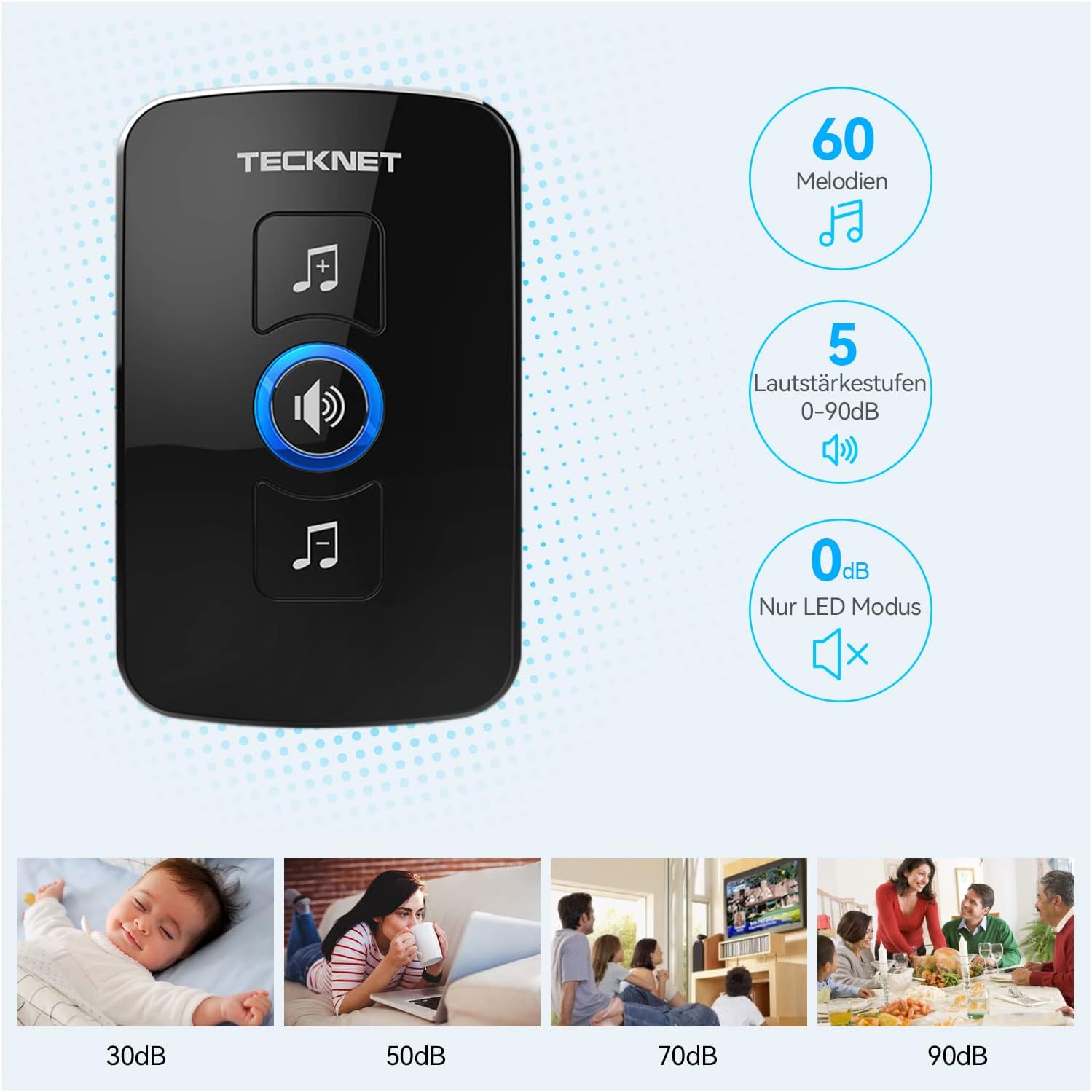
Image: The doorbell transmitter's IP65 waterproof rating and wide operating temperature range.
4. Орнотуу жана орнотуу
Follow these steps to set up your TECKNET Wireless Doorbell system.
4.1 Трансмиттердин батареясын орнотуу
- Locate the small notch on the side or bottom of the transmitter.
- Use a small flat-head screwdriver to gently pry open the back cover of the transmitter.
- Insert the CR2032 lithium coin cell battery (included or purchased separately) into the battery compartment, ensuring the positive (+) side faces up.
- Арткы капкакты бекем жабыңыз.
Эскертүү: The transmitter typically uses a CR2032 battery. Please refer to the packaging for specific battery requirements.
4.2 Кабыл алгычты жайгаштыруу
Plug the receiver into a standard electrical outlet in a central location within your home. Ensure it is within the operating range of the transmitter and not obstructed by large metal objects or thick walls, which can reduce signal strength.
4.3 Өткөргүчтү орнотуу
There are two primary methods for mounting the transmitter:

Image: Steps for battery installation and two mounting methods for the transmitter.
Method 1: Screw Mounting
- Mark the desired mounting location on your wall or door frame.
- Drill two small holes at the marked spots.
- Insert the wall anchors (if necessary for your surface).
- Align the transmitter's back plate with the holes and secure it with the provided screws.
- Attach the transmitter unit to the back plate.
Method 2: Adhesive Mounting
- Орнотуучу беттин кургак жана чаңсыз же майсыз экенине ынануу үчүн аны кылдаттык менен тазалаңыз.
- Peel off one side of the protective film from the adhesive tape.
- Attach the adhesive tape to the back of the transmitter.
- Peel off the other side of the protective film.
- Firmly press the transmitter onto the desired mounting surface for at least 30 seconds.
Сунуш: For best results and long-term stability, screw mounting is recommended, especially for outdoor use.
5. Иштөө нускамалары
5.1 Мелодияларды өзгөртүү
To change the melody on your receiver:
- Press the "Melody Selection" button (often indicated by a music note icon) on the receiver.
- Each press will cycle through the available 60 melodies.
- Stop pressing when you hear your desired melody. The receiver will automatically save the selection.
5.2 Үндү тууралоо
Үн деңгээлин тууралоо үчүн:
- Press the "Volume Control" button (often indicated by a speaker icon) on the receiver.
- Each press will cycle through the 5 available volume levels (including silent mode).
- Select the volume level that suits your preference.
5.3 Pairing (If Needed)
Your doorbell system usually comes pre-paired. If the transmitter and receiver lose connection or if you add additional transmitters/receivers, follow these steps to pair them:
- Ресиверге сайыңыз.
- Press and hold the "Volume Control" button on the receiver for approximately 5 seconds until you hear a "ding" sound or the LED indicator flashes rapidly. This indicates pairing mode.
- Immediately press the transmitter (push button) once.
- You should hear the selected melody, confirming successful pairing.
- Эгер жупташтыруу ишке ашпай калса, ресиверди сууруп, процессти кайталаңыз.
6. Техникалык тейлөө
- Тазалоо: Эшиктин коңгуроо блокторун жумшак, кургак чүпүрөк менен сүртүңүз. Абразивдүү тазалоочу каражаттарды же эриткичтерди колдонбоңуз.
- Батареяны алмаштыруу: When the transmitter's LED indicator no longer lights up or the range decreases significantly, it's time to replace the CR2032 battery. Follow the battery installation steps in Section 4.1.
- Экологиялык шарттар: While the transmitter is IP65 waterproof, extreme temperatures or prolonged direct exposure to harsh weather conditions may affect its lifespan.
7. Кыйынчылыктарды
| Көйгөй | Мүмкүн себеп | Чечим |
|---|---|---|
| Коңгуроо кагылбайт. |
|
|
| Кыска иштөө диапазону. |
|
|
| Кабыл алгычтын диоду күйөт, бирок үн жок. | Volume is set to 0dB (silent mode). | Increase the volume using the "Volume Control" button (see Section 5.2). |
8. Техникалык шарттар
| Өзгөчөлүк | Деталь |
|---|---|
| Бренд | TECNET |
| Модель номери | B0BZVDJHCS |
| Өндүрүүчү | TECNET |
| Элемент Салмагы | 3.87 унция (болжол менен 110 грамм) |
| Продукциянын өлчөмдөрү | 2.36 x 2.32 x 3.62 дюйм (Алуучу) |
| Кубат булагы (кабыл алуучу) | Электр зымдары |
| Кубат булагы (өткөргүч) | Battery (CR2032, typically not included as per specifications, but required for operation) |
| Суу өткөрбөйт рейтинги (өткөргүч) | IP65 |
| Иштөө диапазону | Ачык абада 400 метрге (1300 фут) чейин |
| Обондор | 60 тандоо |
| Үн деңгээли | 5 (0 дБден 90 дБга чейин) |
| Камтылган компоненттер | Manual (and doorbell units, mounting hardware) |
| Дата биринчи жеткиликтүү | 18-май, 2024-жыл |
9. Кепилдик жана колдоо
TECKNET products come with a standard warranty. For specific warranty details, please refer to the warranty card included with your product or visit the official TECKNET website. If you encounter any issues or have questions regarding your doorbell, please contact TECKNET customer support:
- Webсайт: www.tecknet.co.uk (же тиешелүү аймактык webсайт)
- Электрондук почта: Өнүмүңүздүн таңгагын караңыз же webбайланыш электрондук почта үчүн сайт.
Please have your model number (B0BZVDJHCS) and purchase date ready when contacting support.