
1. Коопсуздук боюнча маанилүү маалымат
Сураныч, чогултуу жана колдонуу алдында бардык нускамаларды кунт коюп окуп чыгыңыз. Бул колдонмону келечектеги маалымат үчүн сактаңыз.
- Стулга турбаңыз.
- Эгерде кандайдыр бир бөлүктөрү бузулган же жок болсо, отургучту колдонбоңуз.
- Колдонуудан мурун бардык болттор жана бурамалар бекем бекемделгенин текшериңиз. Мезгил-мезгили менен текшерип, зарыл болсо, кайра бекемдөө.
- Чогултуу учурунда балдарды жана үй жаныбарларын алыс кармаңыз. Чакан бөлүктөрү муунтуу коркунучу болушу мүмкүн.
- Do not expose the chair to direct sunlight or extreme temperatures.
- The Bluetooth speakers contain a built-in battery. Do not use the speakers while charging.
- Maximum weight capacity: Information not explicitly provided, but general gaming chair limits are usually around 120-150kg. Users should refer to product packaging or official website for exact limits.
2. Пакеттин мазмуну
Монтаждоону баштоодон мурун бардык компоненттер бар экендигин текшериңиз. Эгерде кандайдыр бир бөлүктөрү жок же бузулуп калса, кардарларды колдоо менен байланышыңыз.
- Арткы таяныч
- Отуруучу жаздык
- Колтук таянычтары (Сол жана Оң)
- Legs/Base
- Чогултуу жабдыктары (бурамалар, шайбалар, алты бурчтуу ачкычтар)
- Power Adapter for Bluetooth Speakers
- Lumbar Support Cushion (with vibration function)
- Баш таяныч жаздыкчасы
3. Орнотуу жана чогултуу
Follow these steps to assemble your GTRACING Gaming Chair. It is recommended to have two people for assembly.
- Базаны тиркөө: Secure the chair legs/base to the bottom of the seat cushion using the provided hardware.
- Колтук таянычтарын орнотуу: Attach the armrests to the sides of the seat cushion.
- Арка таянычын туташтыруу: Align the backrest with the seat cushion and secure it using the bolts.
- Important Note for Lumbar Support: If your model includes integrated side speakers, ensure these are properly positioned and connected before fully securing the backrest, as this may affect the fit of the lumbar support cushion. Some users have reported difficulty fitting the lumbar support if the side speakers are not attached first.
- Attach Headrest and Lumbar Support: Place the headrest and lumbar support cushions as desired. The lumbar support cushion has a vibration function.
- Акыркы текшерүү: Колдонуудан мурун, бардык туташуулардын бекем экенин жана отургучтун туруктуу экенин текшериңиз.
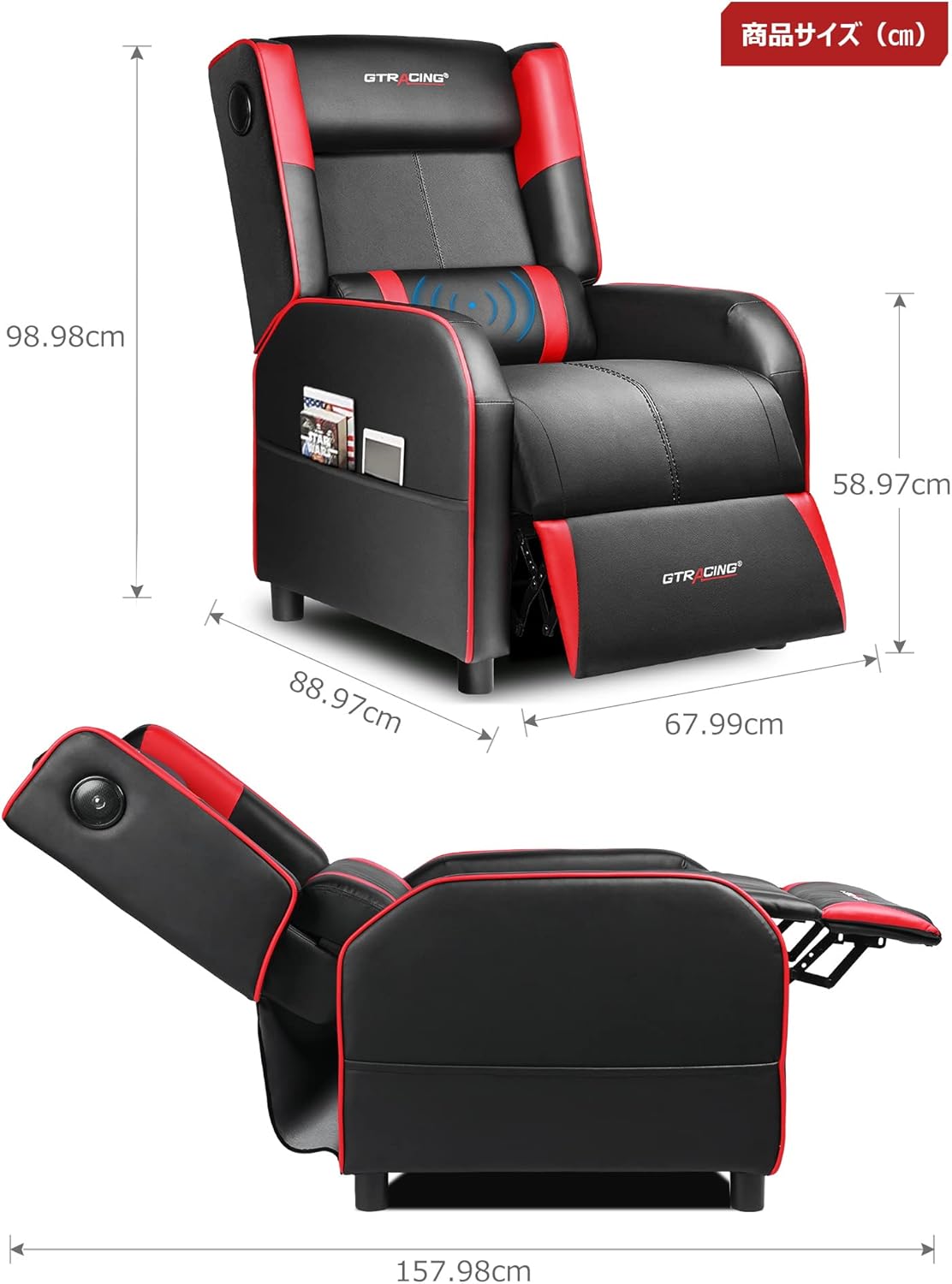
Image: Overall dimensions of the GTRACING Gaming Chair, showing height, width, and depth in both upright and reclined positions.
4. Иштөө нускамалары
4.1 Bluetooth колонкасынын иштеши
Your GTRACING Gaming Chair features integrated Bluetooth 5.1 speakers for an immersive audio experience.
- Күйгүзүү/өчүрүү: Locate the power button on the speaker control panel (usually on the side of the chair). Press and hold to power on or off.
- Жупташтыруу: Once powered on, the speakers will enter pairing mode. On your device (PC, smartphone, tablet), search for Bluetooth devices and select "GTRACING Speaker" (or similar name) to connect.
- Байланыш диапазону: The speakers support a wireless connection range of approximately 15 meters (49 feet).
- Батареянын иштөө мөөнөтү: The built-in battery provides up to 15 hours of continuous playback on a full charge.
- Заряддоо: Connect the provided power adapter to the charging port on the speaker control panel. Note: The speakers cannot be used while charging.
- Консоль шайкештиги: For PS4, PS5, XBOX, or SWITCH consoles, a dedicated USB adapter (sold separately) is required for low-latency connection (approx. 0.1 seconds delay).

Image: A user enjoying a game while seated in the GTRACING Gaming Chair, highlighting the integrated Bluetooth speakers located in the backrest for an immersive audio experience.
4.2 Жатуу функциясы
Adjust the backrest to your preferred angle for various activities.
- Жөнгө салуу диапазону: The backrest can recline from 95° to 150°.
- Жататуу механизми: To recline, push the lever (usually on the right side of the chair) and lean back. Release the lever to lock the position.
- Integrated Ottoman: The ottoman extends and retracts in synchronization with the backrest, providing continuous leg support as you recline.
- Recommended Modes:
- 90° Game/Work Mode: Upright position for focused tasks.
- 115° Entertainment Mode: Slightly reclined for watching movies or casual browsing.
- 150° Nap Mode: Fully reclined for short rests or naps.
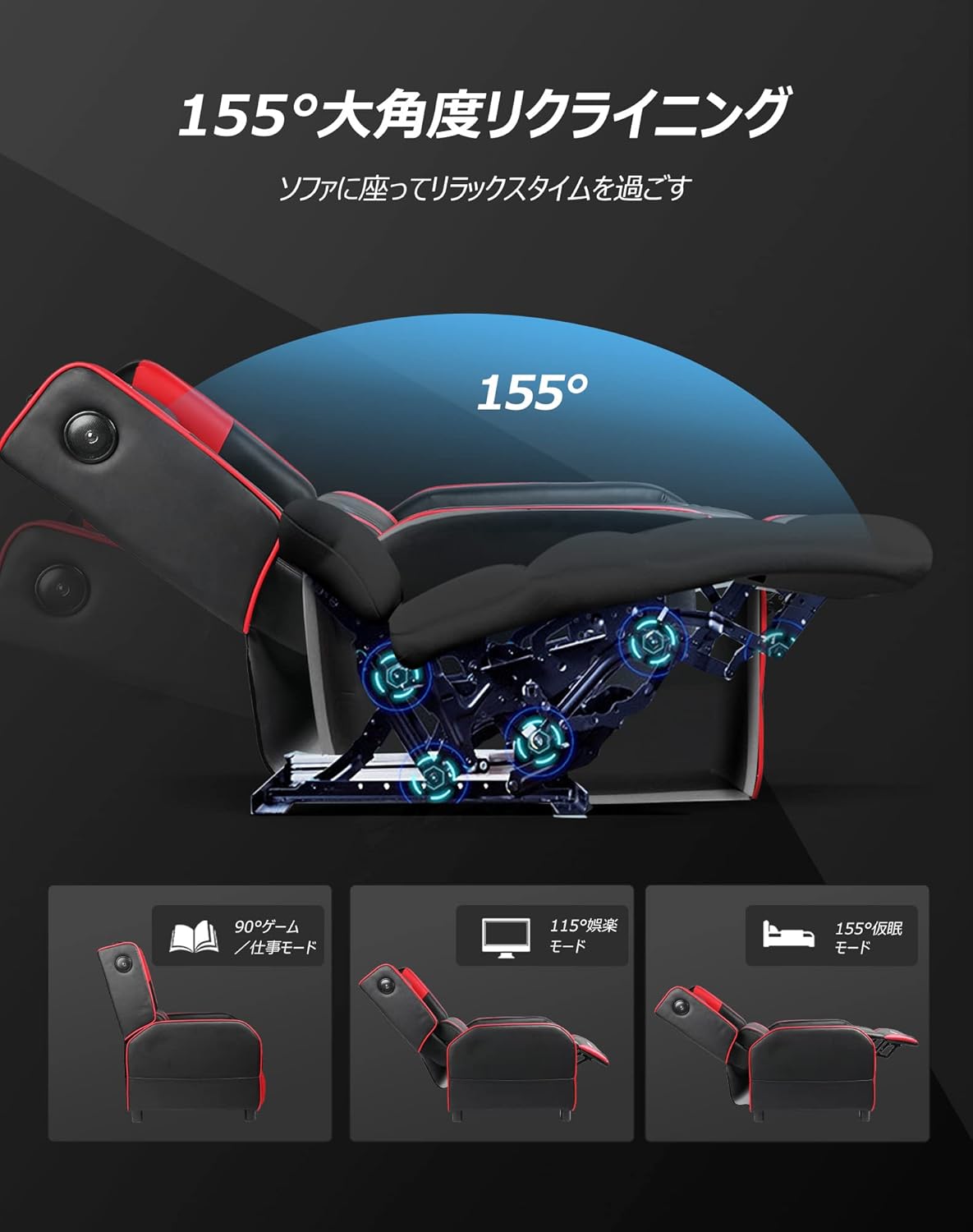
Image: Diagram illustrating the reclining function of the GTRACING Gaming Chair, showing the chair in upright (90°), entertainment (115°), and nap (155°) positions, with the ottoman extending accordingly.
4.3 Vibration Lumbar Support
The lumbar support cushion features a vibration function designed to alleviate lower back discomfort during prolonged sitting.
- Жандандыруу: Connect the lumbar support's USB cable to a power source (e.g., USB port on a computer, power bank, or wall adapter).
- Артыкчылыктары: The vibration helps to distribute pressure, reducing stress on the pelvis, lumbar spine, and sacrum.
4.4 Seat Comfort Features
The seat cushion is engineered for superior comfort and support.
- Integrated Urethane Cushion: The seat uses a highly elastic, integrated molded urethane cushion.
- Internal Spring System: Springs are incorporated within the urethane for enhanced elasticity and durability.
- Thick Backrest and Seat: The generous padding of both the backrest and seat cradles the body, providing a sofa-like seating experience.

Сүрөт: кесилиши view of the GTRACING Gaming Chair's seat cushion, detailing the layers of high-quality PU leather, high-rebound urethane, high-density urethane, internal pocket coils, and integrated molded urethane for optimal comfort and support.
5. Техникалык тейлөө
Туура кам көрүү оюн отургучуңуздун иштөө мөөнөтүн жана көрүнүшүн узартат.
- Тазалоо: жумшак менен тазалап, damp кездеме. Катуу химиялык заттардан же абразивдүү тазалагычтардан алыс болуңуз.
- Төгүлүүлөр: Таза, кургак чүпүрөк менен дароо төгүлөт.
- Күн нурунун таасири: Материалдын өңү өчүп, бузулуп кетпеши үчүн, күндүн түз тийген нурларына көпкө дуушар болбоңуз.
- Аппараттык камсыздоону текшерүү: Туруктуулугун камсыз кылуу үчүн бардык бурамалар менен болтторду мезгил-мезгили менен текшерип жана бекемдеп туруңуз.
6. Кыйынчылыктарды
If you encounter any issues, refer to the following common solutions.
- Bluetooth Speakers Not Connecting:
- Ensure the speakers are powered on and in pairing mode.
- Түзмөгүңүздө Bluetooth иштетилгенин текшериңиз.
- Move your device closer to the chair (within 15m).
- Bluetooth жөндөөлөрүңүздөн түзмөктү унутуп, кайра жупташтырып көрүңүз.
- Ensure the speakers are not currently charging.
- Lumbar Support Not Fitting During Assembly:
- As noted in the assembly section, ensure any integrated side speakers are attached before fully securing the backrest, as this can impact the fit of the lumbar support cushion.
- Reclining Mechanism Not Working Smoothly:
- Check for any obstructions around the reclining mechanism.
- Ensure the lever is fully engaged or disengaged.
- Verify that all assembly bolts related to the backrest are securely tightened.
7. Техникалык шарттар
| Модель номери | GT208M |
| Бренд | GTRACING |
| Материал | Faux Leather (PU Leather) |
| Түс | Кызыл |
| Продукциянын өлчөмдөрү (тик) | Approx. 80 cm (Depth) x 80 cm (Width) x 80 cm (Height) |
| Продукт Салмагы | 30 кг |
| Пакеттин өлчөмдөрү | 77 см х 69 см х 52 см |
| Пакет Салмагы | 28 кг |
| Recling Angle | 95°тан 150°ка чейин |
| Bluetooth версиясы | 5.1 |
| Speaker Battery Life | 15 саатка чейин (үзгүлтүксүз ойнотуу) |
| Динамик заряддоо | Not usable while charging |
| Care Instructions | Таза сүртүңүз |
8. Кепилдик жана колдоо
For warranty information or technical support, please refer to the official GTRACING webсайтка же түздөн-түз кардарларды тейлөөгө кайрылыңыз.
GTRACING offers after-sales support for their products. Please retain your proof of purchase for any warranty claims.
Көбүнчө колдоо кызматынын байланыш маалыматтарын өндүрүүчүнүн сайтынан таба аласыз webсайты же продуктуну сатып алган сатуучу аркылуу.