
Twotrees TTC 450
TTC 450 CNC Milling Machine User Manual
Модел: TTC 450 | Бренд: Twotrees
1. Киришүү
The Twotrees TTC 450 is a versatile 3-axis CNC milling machine designed for precision engraving and cutting a variety of materials. Its robust construction and advanced features make it suitable for both hobbyists and professionals. This manual provides essential information for the safe and effective operation, maintenance, and troubleshooting of your TTC 450 machine.
The machine features an 80W spindle with a speed range of 0 to 12000 RPM, capable of working with materials such as plastic, soft aluminum, wood, acrylic, PVC, and PCB.

Figure 1.1: ашыкview of the TTC 450 CNC Milling Machine.
2. Коопсуздук нускамалары
Operating a CNC machine requires adherence to strict safety protocols to prevent injury and damage to the equipment. Always read and understand these instructions before operating the machine.
- Көздү коргоо: Көзүңүздү учкан калдыктардан коргоо үчүн ар дайым коргоочу көз айнек же көз айнекти тагыныңыз.
- Дем алуу органдарын коргоо: Use a dust mask or respirator, especially when working with materials that produce fine dust (e.g., wood, MDF). Ensure adequate ventilation in your workspace.
- Колдун коопсуздугу: Keep hands and fingers clear of moving parts, especially the spindle and cutting tool, during operation. Do not wear loose clothing, jewelry, or gloves that could get caught in the machine.
- Шашылыш токтотуу: Авариялык токтотуу баскычынын жайгашкан жери жана иштеши менен таанышыңыз.
- Электр энергиясын өчүрүү: Always disconnect power before performing any maintenance, cleaning, or assembly.
- Материалдык шайкештик: Ensure the material you are working with is suitable for CNC milling and does not pose a fire or toxic fume hazard. The machine is not designed for carving hard metals or jade.
- Көзөмөл: Иш учурунда машинаны эч качан кароосуз калтырбаңыз.
3. Орнотуу
3.1 Пакеттен чыгаруу жана компоненттерди текшерүү
Carefully unpack all components from the packaging. Verify that all parts listed in the packing list are present and undamaged. Report any missing or damaged parts to the supplier immediately.
3.2 Ассамблея
The TTC 450 CNC machine comes 70% pre-assembled, significantly reducing the complexity of the setup process. Follow the included assembly guide for detailed instructions on connecting the remaining components, such as the gantry and workbed. Ensure all screws are tightened securely.

Figure 3.1: The TTC 450 is 70% pre-assembled, simplifying setup.
3.3 Кубат туташтыруу
Connect the provided power adapter to the machine and then to a suitable power outlet. Ensure the power supply matches the machine's requirements (120W, 24V, 5A).
3.4 Программалык камсыздоону орнотуу
The TTC 450 is compatible with various CAM software, including Candle, Carveco, Artcam, and Easel. Install your preferred software on your computer. Refer to the software's documentation for specific installation and setup procedures. The machine's integrated ESP32 32-bit chip and built-in WiFi module allow for direct control via computer, application, and the smart display.

Figure 3.2: The TTC 450 supports popular CAM software like Candle, Carveco, Artcam, and Easel.
4. Иштөө нускамалары
4.1 Smart Display and Control
The TTC 450 features an intelligent display for direct control and monitoring. The integrated WiFi module allows for seamless control from a computer or a dedicated mobile application. The ESP32 chip provides advanced functionalities and supports additional modules like a laser head or rotary axis.

Figure 4.1: The smart display provides intuitive control and monitoring.
4.2 Жүктөөчү материал
Securely fasten your material to the workbed using clamps or other appropriate fixtures. Ensure the material is flat and stable to prevent movement during the milling process.
4.3 Setting Up a Job
Use your CAM software to design or import your desired carving path. The TTC 450 features 3-axis (XYZ) movement control. For precise results, note the Z-axis movement accuracy of 0.0025 mm and a dimensional accuracy of up to 0.1 mm.

Figure 4.2: The machine offers high precision with 0.0025mm Z-axis movement accuracy.
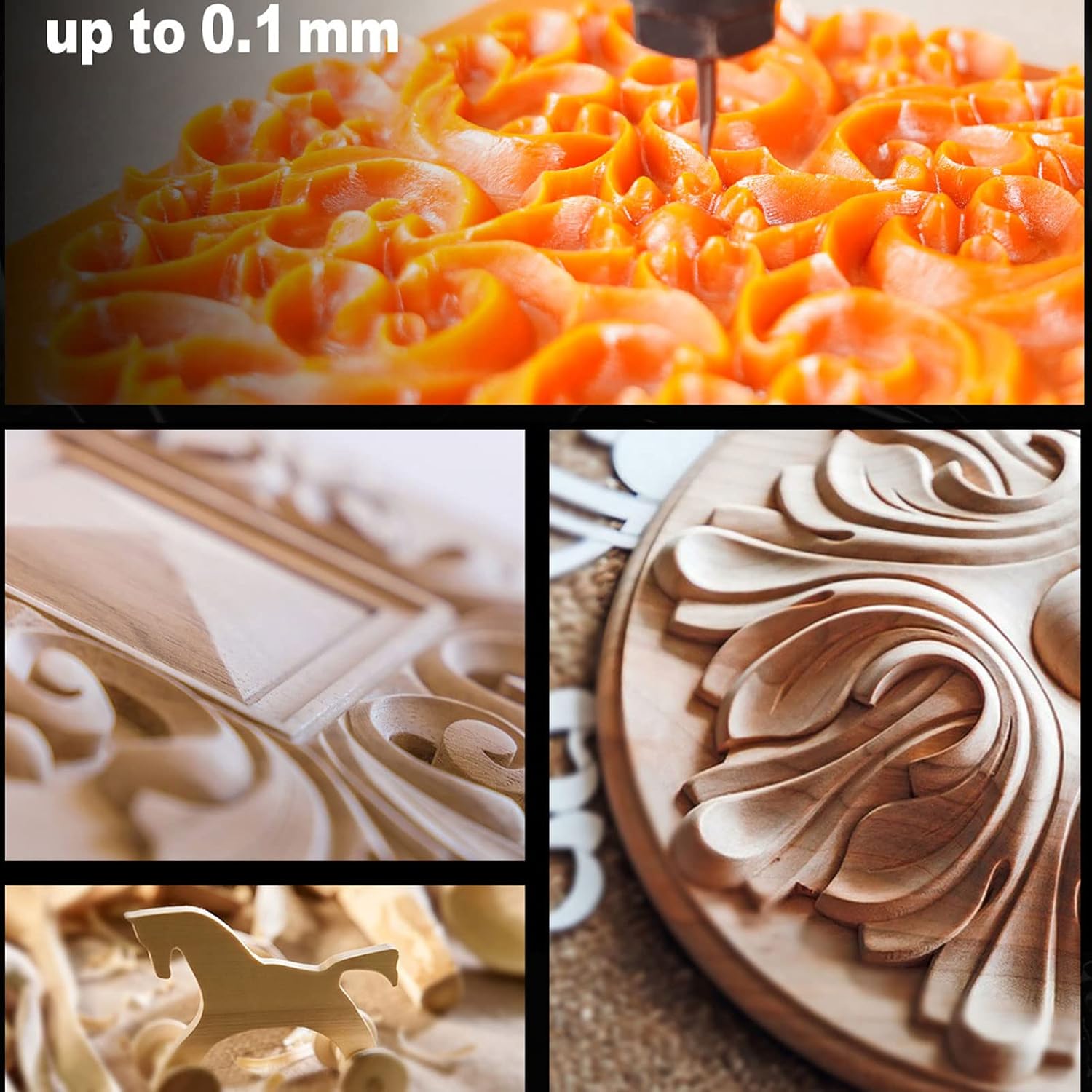
4.3-сүрөт: Мисamples demonstrating the fine detail achievable with the TTC 450.
4.4 Spindle Operation and Tooling
The machine is equipped with an 80W spindle, providing ample power for various materials. The spindle speed can be adjusted from 0 to 12000 RPM. The ER11 system ensures compatibility with a wide variety of clamp sets and cutting tools, allowing for diverse applications.

Figure 4.4: The powerful 80W spindle module.

Figure 4.5: The ER11 system allows for a wide range of compatible clamp sets and tools.
4.5 Monitoring the Process
Always monitor the machine during operation. Pay attention to unusual noises, vibrations, or smoke. Be prepared to use the emergency stop button if any issues arise.
5. Техникалык тейлөө
Regular maintenance ensures the longevity and optimal performance of your TTC 450 CNC machine.
- Тазалоо: After each use, clean the work area and machine components to remove dust and debris. Use a soft brush or compressed air. Avoid using liquids directly on electronic components.
- Майлоо: Periodically lubricate the leadscrews and linear rails according to the manufacturer's recommendations to ensure smooth movement and prevent wear.
- Компонентти текшерүү: Regularly inspect all cables, connectors, and moving parts for signs of wear or damage. Check the homing switches (X, Y, Z double limit switch + ESTOP) for proper function.
- Куралды тейлөө: Keep your cutting tools sharp and clean. Dull tools can lead to poor cut quality and increased strain on the machine.
6. Кыйынчылыктарды
This section addresses common issues you might encounter with your TTC 450 CNC machine.
| Көйгөй | Мүмкүн себеп | Чечим |
|---|---|---|
| Машина иштебейт. | Power cable disconnected; faulty power supply; emergency stop engaged. | Check power connections; test power supply; disengage emergency stop. |
| Poor engraving/cutting quality. | Dull tool; incorrect feed rate/spindle speed; loose material; machine vibration. | Replace/sharpen tool; adjust settings in CAM software; secure material; check machine for loose components. |
| Машина программалык камсыздоого туташпай жатат. | Incorrect port selection; driver issues; WiFi connectivity problems. | Verify COM port; reinstall drivers; check WiFi connection and settings. |
| Иш учурунда адаттан тыш үндөр. | Loose components; dry leadscrews; motor issues; tool hitting clamps. | Inspect and tighten components; lubricate leadscrews; check tool path for obstructions. |
7. Техникалык шарттар
Detailed technical specifications for the TTC 450 CNC Milling Machine.

Figure 7.1: Key technical specifications of the TTC 450.
| Өзгөчөлүк | Деталь |
|---|---|
| Модель аты | TTC450 CNC Router Machine |
| Жумуш аймагы | 460 x 460 x 80mm (18.11" x 18.11" x 3.15") |
| Дене материалы | Metal Frame & Aluminium 4080U Profile |
| Drive System | Translation Screws Drive With Double Y-axis System |
| Башкы башкармалык | DLC32 V2.1 |
| Stepper Driver | A4988, 1.3A |
| Stepper Motors | 17HS8401S, NEMA23 20mN.m |
| Шпиндель | 80W, 0-12000 RPM |
| Максималдуу ылдамдык | 800 мм/мин |
| Running Accuracy | ±0.1MM |
| Repositioning Accuracy | ±0.0025MM |
| Электр камсыздоо | 120Вт, 24В, 5А |
| CAM Программасы | Candle, Carveco, Artcam, Easel |
| Homing Switches | X,Y,Z double limit switch + ESTOP |
| Leadscrew Size & Type | T8 2mm Pitch, 4mm Lead 5 Start Acme Lead Screw |
8. Кепилдик жана колдоо
For warranty information and technical support, please refer to the documentation provided with your purchase or contact the manufacturer directly. Keep your proof of purchase for warranty claims.
Manufacturer: Twotrees
For further assistance, please visit the official Twotrees webсайтка же кардарларды тейлөө бөлүмүнө кайрылыңыз.
Ask a question about this manual
Ask about setup, troubleshooting, compatibility, parts, safety, or missing instructions. Manuals+ will review the question and use this page’s manual context to help answer it.