
Wanptek TPS3010
Wanptek DC Power Supply 30V 10A User Manual
Model: TPS3010 | Brand: Wanptek
1. Киришүү
Thank you for choosing the Wanptek DC Power Supply. This bench power supply is designed to provide a stable and adjustable DC voltage and current output, making it ideal for various electronic testing, repair, and development applications. It features precise encoder knobs for accurate adjustments, an output enable/disable button, and integrated USB and Type-C quick-charge interfaces for added convenience. This manual provides detailed instructions for safe operation, setup, and maintenance of your device.
2. Коопсуздук маалыматы
Please read all safety warnings and instructions carefully before operating the device to prevent injury or damage. Keep this manual for future reference.
- Power In Voltage Тандоо: Before connecting the power supply to the AC mains, ensure the voltage selector switch (located near the power cord input on the rear panel) is set to match your local AC voltage (115V or 230V). Incorrect setting can lead to damage to the unit or connected devices.
- Ашыкча ток коргоо (OCP): The power supply features an OCP alarm function. In the event of a short circuit or overcurrent condition in the connected load, the unit will automatically stop output and sound a beeping alarm to protect both the power supply and the load.
- Вентиляция: Ensure adequate ventilation around the unit. Do not block the cooling fan or vents.
- Курчап турган чөйрө: Operate the device in a dry, well-ventilated area, away from direct sunlight, high temperatures, humidity, and corrosive gases.
- Негиздөө: Always connect the power supply to a properly grounded outlet.
- Чыгуу туташуу: Ensure output leads are connected correctly (positive to positive, negative to negative) before enabling output.
3. Пакеттин мазмуну
Пакетте бардык буюмдар бар экенин текшериңиз:

- Wanptek DC Power Supply Unit x 1
- Output Line (Test Leads) x 1 set
- Электр кабели x 1
- Колдонуучунун колдонмосу x 1
4. Продукттун өзгөчөлүктөрү жана компоненттери
Familiarize yourself with the various parts and functions of your Wanptek DC Power Supply.
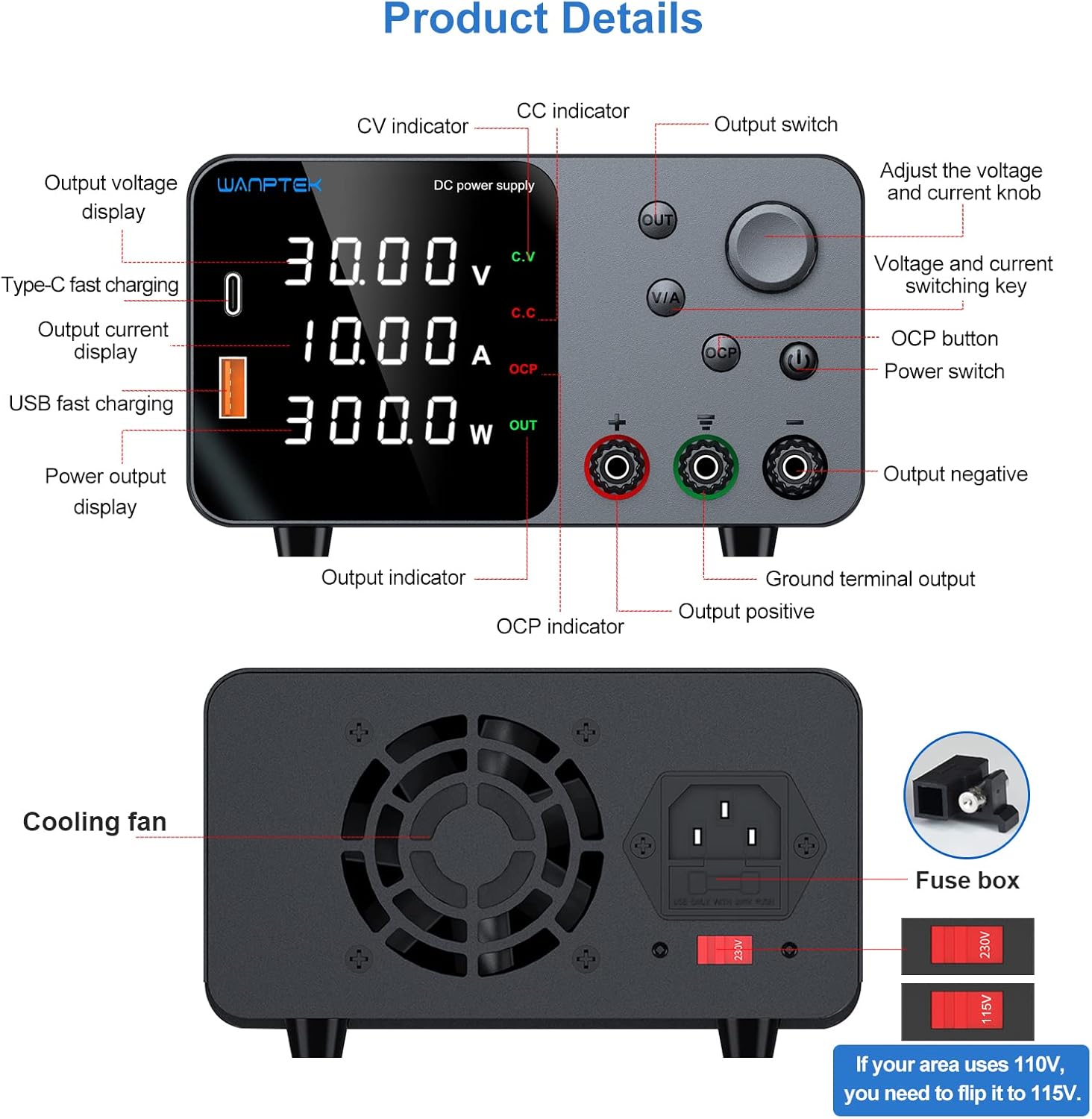
Front Panel Overview:
- Output Voltage Дисплей: Учурдагы чыгаруу көлөмүн көрсөтөтtage (V).
- Output Current Display: Shows the current output current (A).
- Power Output Display: Shows the calculated output power (W).
- CV Indicator: Constant Voltage mode indicator.
- CC Indicator: Constant Current mode indicator.
- OCP Indicator: Over Current Protection active indicator.
- Чыгуу көрсөткүчү: Indicates when the output is enabled.
- Type-C Fast Charging Port: For charging compatible devices.
- USB тез кубаттоо порту: For charging compatible devices.
- Adjust and Control Knob (Encoder Knob): Үндү тууралоо үчүн колдонулатtage and current values. Press to switch digit position.
- V/A Switching Button: Press to switch between voltage and current adjustment modes.
- OCP баскычы: Activates/deactivates Over Current Protection.
- Кубат которгучу: Аппаратты күйгүзөт/өчүрөт.
- OUT Button (Output Switch): Enables or disables the main DC output.
- Output Positive Terminal (+): Red terminal for positive output connection.
- Output Negative Terminal (-): Black terminal for negative output connection.
- Ground Terminal Output: Шассиге жерге туташтыруу үчүн жашыл терминал.
Арткы панел үстүндөview:
- Муздатуу желдеткич: Provides active cooling for the internal components.
- AC Power Input Socket: Электр шнурын туташтыруу үчүн.
- Сактандыргыч кутучасы: Contains the replaceable fuse.
- Тtage Тандоо которгучу (115V/230V): Must be set according to your local mains voltage.
Негизги өзгөчөлүктөрү:
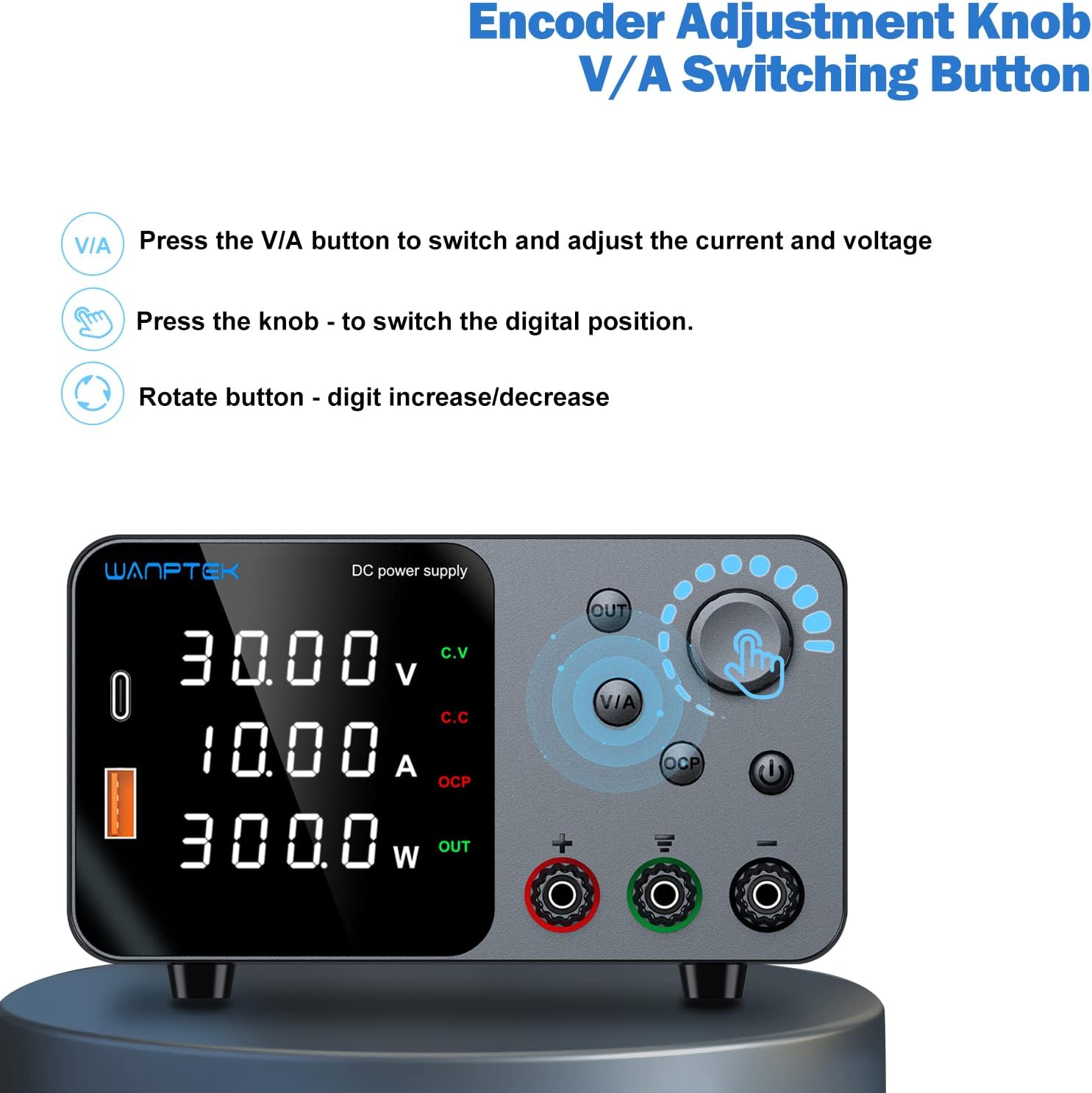
Precise Encoder Knob: Unlike traditional adjustment knobs, the precision encoder knob allows for direct and precise setting of voltage and current values. Press the V/A button to switch between adjusting voltage and current. Press the knob itself to switch the digital position (e.g., from tens to units digit). Rotate the knob to increase or decrease the selected digit.

Output Enable/Disable Button (OUT): This button allows you to turn the DC output on or off independently of the power supply's main power switch. This feature prevents accidental damage to connected loads when adjusting voltage or current settings, as you can set values before enabling output.

Short Circuit Alarm (OCP): When a short circuit or overcurrent condition occurs in the load device, the power supply will automatically stop output, sound a buzzer alarm, and display an
Ask a question about this manual
Ask about setup, troubleshooting, compatibility, parts, safety, or missing instructions. Manuals+ will review the question and use this page’s manual context to help answer it.