
Introduction
This manual provides detailed instructions for the installation, operation, and maintenance of your Gravity D96CP HiFi Audio Processor Car Stereo. Please read this manual thoroughly before using the product to ensure proper function and to prevent damage.
Коопсуздук маалыматы
- Кыска туташуулардын же агрегаттын жана унаанын бузулушунун алдын алуу үчүн бардык зымдар туура туташтырылганын текшериңиз.
- Агрегатты айдоодон алаксыта тургандай иштетпеңиз. Ар дайым жол коопсуздугун биринчи орунга коюу.
- Эгер кандайдыр бир кадамдарга ишене албасаңыз, орнотуу үчүн адиске кайрылыңыз.
- Агрегатты суудан жана ашыкча нымдан алыс кармаңыз.
- Do not attempt to repair the unit yourself. Refer servicing to qualified personnel.
Кутуда эмне бар
Пакетти ачканда, бардык компоненттер бар экенин текшериңиз:
- Gravity D96CP Car Stereo Unit
- Алыстан башкаруу
- Электр зымдары
- Колдонуучунун Колдонмосу (бул документ)
Note: Additional accessories such as a trim kit, specific vehicle wiring harness, or RCA cables may be required for installation and are sold separately.
Продукт бүттүview
Front Panel

1-сүрөт: Фронт view of the Gravity D96CP Car Stereo. The 6.5-inch touchscreen displays the main interface with icons for various functions. Physical buttons for IR, RST, Power, Band, Volume Up/Down, and Disc Eject are located on the left side. A USB port is at the bottom left.
Арткы панель жана туташуулар

2-сүрөт: Rear panel of the Gravity D96CP Car Stereo. This view highlights the multiple RCA jacks for audio/video input and output, a TV antenna port (functionality may vary), a radio antenna input, and the main connector for the wiring harness.
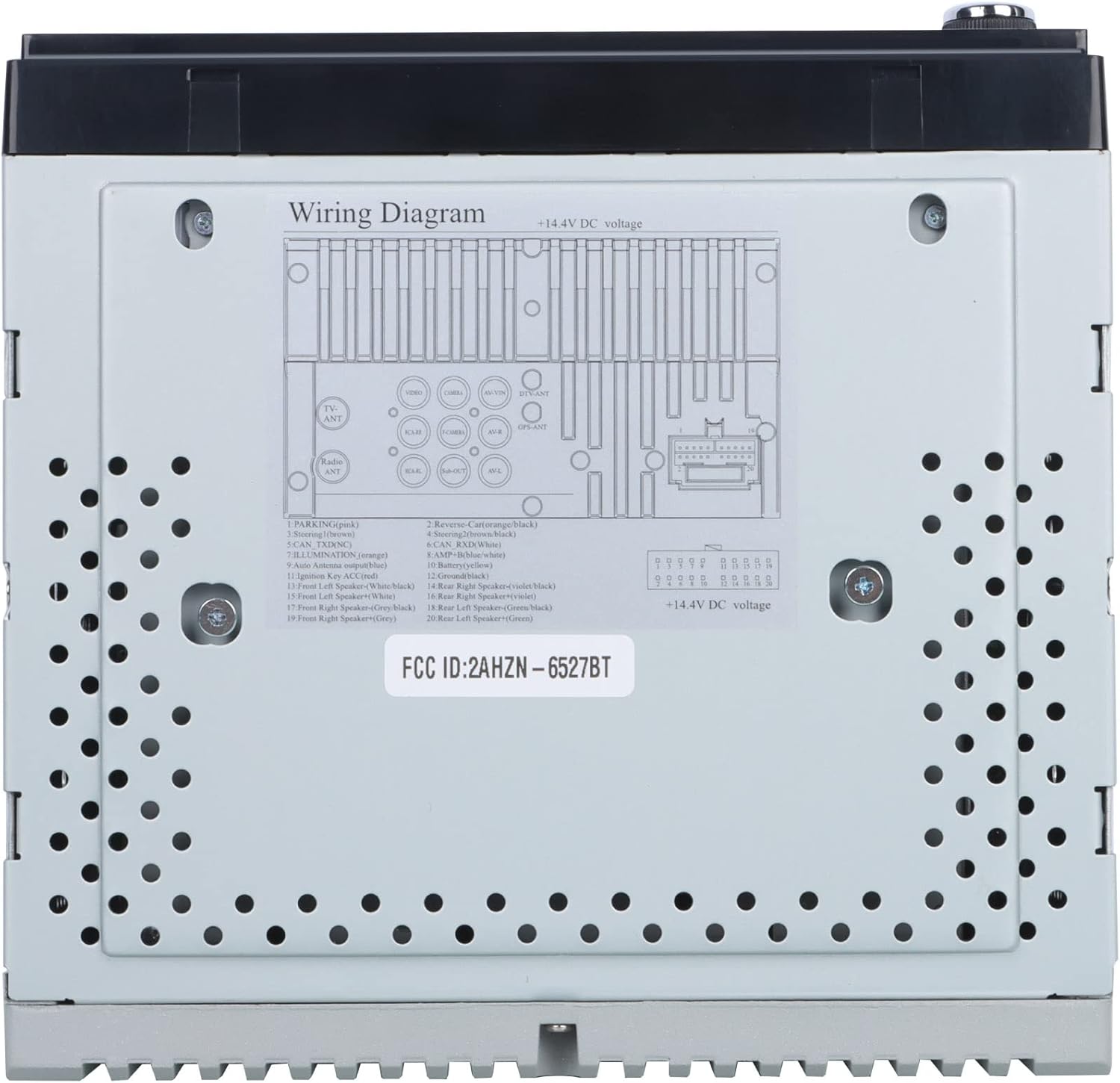
3-сүрөт: Detailed wiring diagram for the Gravity D96CP. This diagram illustrates the pin assignments for the main power and speaker harness, including connections for parking brake, reverse, illumination, antenna, and ampкөтөргүч башкаруу.
Орнотуу жана орнотуу
Proper installation is crucial for the performance and safety of your car stereo. If you are not confident in performing the installation yourself, seek professional assistance.
Орнотууга чейинки текшерүү тизмеси
- Зымдарды туташтыра баштоодон мурун, унаанын аккумулятору ажыратылганын текшериңиз.
- Verify the stereo's dimensions fit your vehicle's dashboard opening. A trim kit may be necessary.
- Obtain a vehicle-specific wiring harness adapter if not included, to avoid cutting factory wires.
Зымдарды туташтыруу
кайрылыңыз 3-сүрөт for the detailed wiring diagram. Key connections include:
- Күч (сары): Туруктуу 12V берүү.
- От алдыруу (Кызыл): 12V булактын которулушу (ACC).
- Жер (Кара): Таза шасси жерге туташтыруу.
- Динамиктердин зымдары: Connect to corresponding vehicle speakers (Front Left, Front Right, Rear Left, Rear Right). Ensure correct polarity.
- Reverse (Orange/Black): Connect to the vehicle's reverse light circuit for automatic camera display.
- Parking (Pink): This unit may not have a dedicated parking brake interlock. Exercise caution when operating video functions while driving.
- Антенна (Көк): Кубаттуу антенна/ampкөтөргүчтү алыстан күйгүзүү.
- Тышкы микрофон: Чалуу сапатын жакшыртуу үчүн тышкы микрофонду туташтырыңыз.
Note: The unit features RCA jacks for video in/out and audio in/out, allowing connection of external sources or additional screens. RCA cables are not included.
Иштөө нускамалары
Негизги операция
- Күйгүзүү/өчүрүү: Алдыңкы панелдеги кубат баскычын басыңыз.
- Үндү көзөмөлдөө: Use the VOL+ and VOL- buttons on the front panel or the touchscreen controls.
- Режим тандоо: Tap the desired icon on the touchscreen (e.g., Radio, Bluetooth, USB, AUX, Phonelink, Settings).
Apple CarPlay / Android Auto
Connect your iPhone (for CarPlay) or Android phone (for Android Auto) to the stereo via a certified USB cable. The system will automatically detect and launch the respective interface. This allows access to phone functions like navigation, music, calls, and messages directly from the stereo's touchscreen or via voice commands (Siri/Google Assistant).
- Телефонуңуздун операциялык системасы жаңыртылганын текшериңиз.
- Use the original USB cable for optimal connection stability.
- The phone screen and stereo screen operate independently, allowing different content to be displayed on each.
Mirror Link
The Mirror Link function projects your smartphone's screen directly onto the car stereo display. Connect your phone via a USB cable, and follow the on-screen prompts to activate mirroring. Any content displayed on your phone will be synchronized in real-time on the 6.5-inch stereo screen.
Bluetooth байланышы
- Жупташтыруу: Go to the Bluetooth menu on the stereo. Enable Bluetooth on your smartphone and search for available devices. Select "Gravity D96CP" (or similar name) and confirm pairing.
- Hands Free Чалуу: Once paired, you can answer/make calls directly from the stereo. The external microphone picks up your voice, and audio plays through the car speakers.
- Аудио агым: Stream music and audio from your phone to the stereo. Control playback (play/pause, skip) via the stereo's touchscreen or your phone.
DVD/CD ойноткуч
Insert a DVD or CD into the disc slot. The unit will automatically detect the disc and begin playback. Use the touchscreen controls for playback functions (play, pause, skip, menu).
Радио
- Негизги менюдан "Радио" сөлөкөтүн тандаңыз.
- Жеткиликтүү станцияларды табуу же жыштыкка кол менен күүлдөө үчүн сканерлөө функциясын колдонуңуз.
- Save preferred stations to preset buttons for quick access.
USB ойнотуу
Insert a USB drive into the front USB port. The unit will automatically detect compatible media files (audio, video, images) and allow you to browse and play them.
Арткы View Камера
Арткы шайкеш болсо view camera (sold separately) is connected and the reverse wire is properly installed, the stereo will automatically display the camera feed when the vehicle is shifted into reverse.
Техникалык тейлөө
- Экранды тазалоо: Сенсордук экранды акырын сүртүү үчүн жумшак, мамыксыз чүпүрөктү колдонуңуз. Абразивдүү тазалоочу каражаттарды же эриткичтерди колдонбоңуз.
- Жалпы тазалоо: Keep the unit free from dust and debris. Use a soft, dry cloth for exterior cleaning.
- Программалык камсыздоонун жаңыртуулары: Өндүрүүчүнү текшериңиз webиштин натыйжалуулугун жогорулатуу жана функцияларды кошуу үчүн мезгил-мезгили менен сайттагы микропрограммалык камсыздоонун жаңыртууларын карап туруңуз.
Проблемаларды чечүү
| Көйгөй | Мүмкүн себеп | Чечим |
|---|---|---|
| Түзмөк күйбөйт. | Incorrect wiring (power/ground), blown fuse. | Check all power and ground connections. Inspect the fuse on the wiring harness. |
| Үн жок. | Динамиктин зымдары туура эмес туташтырылган, үнү өтө төмөн, үнсүз режим иштетилген. | Verify speaker wiring polarity and connections. Increase volume. Check if mute is active. |
| Apple CarPlay/Android Auto not connecting or unstable. | Non-original USB cable, outdated phone OS, loose connection. | Use a certified, original USB cable. Ensure phone OS is updated. Reconnect the USB cable firmly. |
| Bluetooth connection issues or poor call quality. | Interference, phone not paired, microphone issue. | Re-pair the device. Ensure the external microphone is properly connected and positioned. |
| DVD player plays sound but no video. | Disc issue, video format incompatibility, parking brake safety feature (if present). | Try a different DVD. Ensure the video format is supported. Verify parking brake connection if applicable. |
| Screen goes black when headlights are turned on. | Illumination wire incorrectly connected. | Check the illumination wire connection (orange wire) to ensure it's correctly wired to the vehicle's dimmer circuit or constant 12V if no dimmer is desired. |
Техникалык шарттар
| Модель номери | VGR-D96CP |
| Бренд | Гравитация |
| Screen Size | 6.5 дюйм |
| Байланыш технологиясы | Көмөкчү, Bluetooth, USB |
| Controller Type | Android, Google Жардамчы, iOS |
| Өзгөчөлүктөр | Spotify, Touchscreen, Apple CarPlay, Android Auto, Mirror Link, DVD/CD Player |
| Шайкеш түзмөктөр | Mobile Phone, Speaker |
| Аудио чыгаруу режими | Курчап |
| Көлөмдүү үн каналынын конфигурациясы | 5.1 |
| Видеону коддоо | MPEG-2 |
| Каналдардын саны | 4 |
| Элемент Салмагы | 3.89 фунт |
| Пакеттин өлчөмдөрү | 9.69 x 9.41 x 7.17 дюйм |
Кепилдик маалымат
Specific warranty details for the Gravity D96CP are not provided in the available product information. Please refer to the warranty card included with your purchase or contact Gravity customer support for detailed warranty terms and conditions.
Кардарларды колдоо
For technical assistance, troubleshooting beyond this manual, or inquiries regarding your Gravity D96CP car stereo, please contact Gravity customer support. Contact information is typically found on the product packaging or the manufacturer's official webсайт.