
1. Киришүү
Thank you for choosing the Aigo AC SE 360 Rainbow 360mm Water Cooler. This all-in-one liquid cooling solution is designed to provide efficient thermal management for your high-performance CPU, featuring a 360mm triple radiator and vibrant ARGB lighting. This manual provides essential information for proper installation, operation, and maintenance to ensure optimal performance and longevity of your product.

Image 1.1: Aigo AC SE 360 Rainbow 360mm Water Cooler assembled view.
2. Коопсуздук маалыматы
- Орнотуудан же тейлөөдөн мурун ар дайым компьютериңизден электр кубатын ажыратыңыз.
- Компоненттерге зыян келтирбөө үчүн этияттык менен кармаңыз.
- Электрдик коркунучтарды алдын алуу үчүн туура жерге туташтырууну камсыз кылыңыз.
- Продукцияны нымдуулуктан жана экстремалдык температурадан алыс кармаңыз.
- Насосту же радиаторду ачууга аракет кылбаңыз, анткени бул кепилдикти жокко чыгарып, агып кетүүлөргө алып келиши мүмкүн.
- Балдар жетпеген жерде сактаңыз.
3. Пакеттин мазмуну
Төмөндө тизмеленген бардык компоненттер пакетиңизде бар экенин текшериңиз:
- 1x Aigo AC SE 360 Water Cooler Unit (Radiator, Pump/CPU Block, Tubing)
- 3x 120мм ARGB күйөрмандары
- Mounting Hardware for Intel Sockets (LGA 115X, 1200, 1700, 2011, 2066)
- Mounting Hardware for AMD Sockets (AM2, AM3, AM4, AM5)
- Термикалык паста
- Желдетүүчү бурамалар жана Радиатордун бурамалары
- ARGB Controller (if included with your specific model)
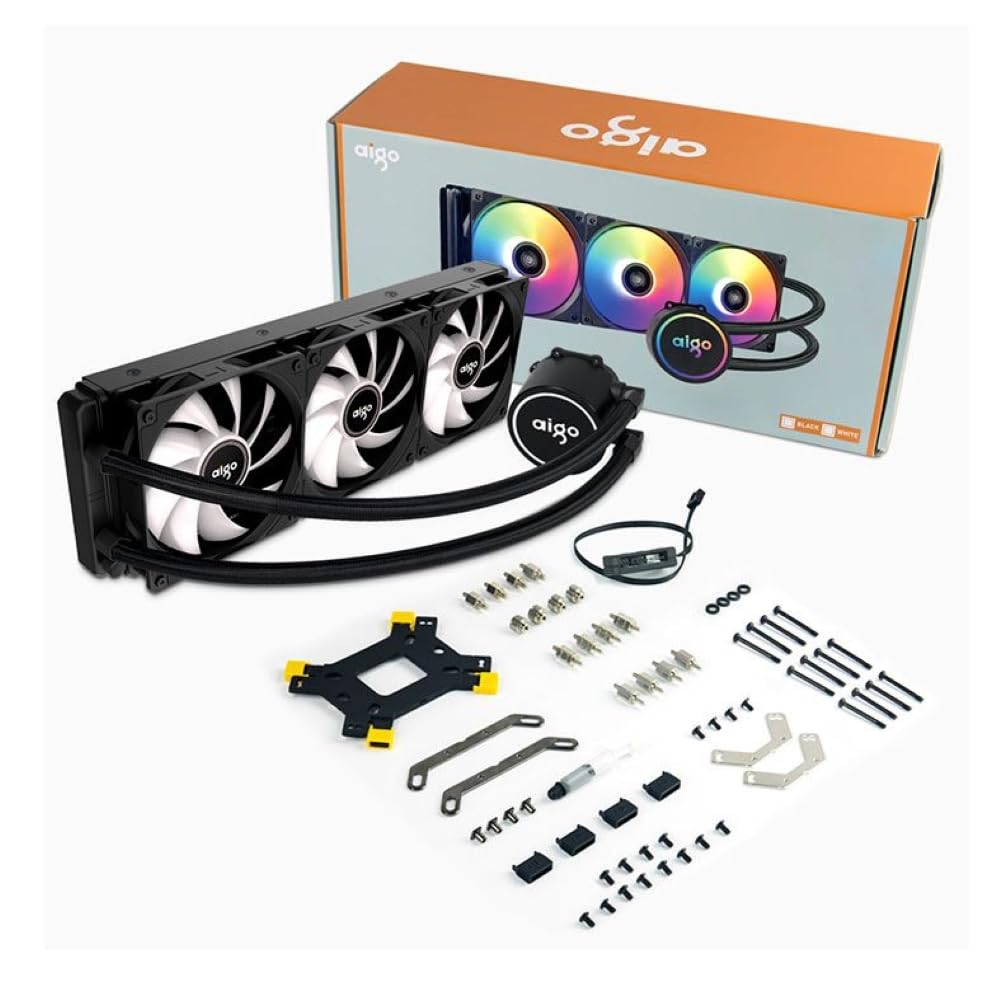
Image 3.1: All components included in the Aigo AC SE 360 package.
4. Орнотуу жана орнотуу
Follow these steps for proper installation of your Aigo AC SE 360 Water Cooler:
- Motherboard даярдоо: Install the appropriate backplate and standoffs for your CPU socket (Intel: 115X, 1200, 1700, 2011, 2066; AMD: AM2, AM3, AM4, AM5). Refer to your motherboard manual for specific instructions.
- Термикалык пастаны колдонуу: Clean the CPU surface. Apply a small amount of thermal paste to the center of the CPU IHS (Integrated Heat Spreader).
- Mount the CPU Block/Pump: Carefully place the CPU block onto the CPU, aligning it with the standoffs. Secure it with the provided screws, tightening them in a diagonal pattern until snug. The magnetic block design allows for easy rotation to align the logo or tubing as desired.
- Радиаторго желдеткичтерди орнотуу: Attach the three 120mm ARGB fans to the radiator using the longer screws provided. Ensure the fan airflow direction is correct for your case configuration (typically blowing air through the radiator).
- Радиатор тоосу: Install the radiator assembly into your PC case. The 360mm radiator is compatible with most ATX cases that support this size. Secure it with the appropriate screws.
- Connect Fans (Daisy Chain): The fans feature a daisy chain connection system. Connect the fans to each other in series, then connect the final fan's cable to the motherboard's fan header or an ARGB controller. This simplifies cable management by reducing the number of cables.
- ARGB жарыктандырууну туташтыруу: Connect the ARGB cables from the fans and pump to a 3-pin, 5V ARGB header on your motherboard or a dedicated ARGB controller. Ensure the voltage is correct (5V) to prevent damage.
- Connect Pump Power: Насостун 4 пиндик кубат туташтыргычын энелик платаңыздагы атайын AIO_PUMP же CPU_FAN башына туташтырыңыз.
- Кабелдик башкаруу: Organize all cables neatly to ensure proper airflow and a clean build.
5. Иштөө нускамалары
Once installed, the Aigo AC SE 360 Water Cooler operates automatically to maintain optimal CPU temperatures. Here are key operational aspects:
- Автоматтык муздатуу: The pump and fans will adjust their speed based on CPU temperature, ensuring efficient cooling. The pump operates at 12V with 3200 RPM, and fans operate between 800-1800 RPM.
- ARGB жарыкты башкаруу: The Rainbow ARGB lighting can be controlled via your motherboard's ARGB software (if connected to a compatible header) or through an included ARGB controller. This allows for various lighting effects and synchronization with other ARGB components.
- Ызы-чуу деңгээли: The cooler is designed for quiet operation, with a noise level of approximately 30 dB.
6. Техникалык тейлөө
Regular maintenance helps ensure the longevity and performance of your water cooler:
- Чаңды тазалоо: Аба агымына жана муздатуу иштешине тоскоол боло турган чаңдын топтолушуна жол бербөө үчүн радиатордун канаттарын жана желдеткичтин бычактарын мезгил-мезгили менен тазалап туруңуз. Кысылган абаны же жумшак щетканы колдонуңуз.
- Түтүктөрдү текшерүү: Түтүктө ийилген, агып кетүү же бузулуу белгилерин текшериңиз.
- Температураны көзөмөлдөө: Use monitoring software to keep an eye on your CPU temperatures. Significant increases may indicate a need for further inspection or cleaning.
- Термикалык паста: While not frequently required, reapplying thermal paste every few years can help maintain optimal thermal transfer.
7. Кыйынчылыктарды
If you encounter issues with your Aigo AC SE 360 Water Cooler, refer to the following common problems and solutions:
| Көйгөй | Мүмкүн себеп | Чечим |
|---|---|---|
| Жогорку CPU Температуралары | Insufficient thermal paste, poor contact, dust buildup, pump failure, fan failure. | Reapply thermal paste, ensure CPU block is securely mounted, clean radiator and fans, check pump/fan connections. |
| Күйөрмандар айланбай жатышат | Loose fan connection, incorrect fan header, faulty fan. | Check fan cables and connections, ensure connected to appropriate motherboard header, test fans individually if possible. |
| No ARGB Lighting | Loose ARGB connection, incorrect ARGB header (e.g., 12V instead of 5V), faulty ARGB component. | Verify ARGB cables are securely connected to a 3-pin, 5V ARGB header. Check motherboard manual for correct header. |
| Өзгөчө ызы-чуулар | Air bubbles in loop, fan rubbing, pump issue. | Gently tilt the PC case to help dislodge air bubbles. Check for obstructions around fans. If pump noise persists, contact support. |
8. Техникалык шарттар
| Өзгөчөлүк | Деталь |
|---|---|
| Модел | AC SE 360 |
| Радиатордун өлчөмү | 360 mm (394 x 120 x 27 mm) |
| Fan Size | 120 мм |
| Fan Speed | 800-1800 RPM |
| Аба агымы | 64.05 CFM |
| Статикалык басым | 1.85 ммН₂O |
| Ызы-чуу деңгээли | 30 дБ |
| Pump Voltage | 12 вольт |
| Насостун ылдамдыгы | 3200 RPM |
| Энергияны керектөө | 3.24 Ватт |
| Подшипник түрү | Керамикалык подшипник |
| TDP Supported | 280 Вт |
| Шайкеш розеткалар | Intel (LGA 115X, 1200, 1700, 2011, 2066), AMD (AM2, AM3, AM4, AM5) |
| Power Connector | 4-пин |
| ARGB туташтыргычы | 3-пин, 5V |
9. Кепилдик жана колдоо
The Aigo AC SE 360 Water Cooler comes with a 12 айлык кепилдик сатып алынган күндөн тартып. Бул кепилдик нормалдуу колдонуу шарттарында өндүрүш кемчиликтерин камтыйт.
For technical support, warranty claims, or any questions not covered in this manual, please contact your retailer or the Aigo customer support team. Please have your proof of purchase and product model number (ACSE360) ready when contacting support.