
1. Киришүү
Thank you for choosing the Aigo AC SE 120 Water Cooler. This All-in-One (AIO) liquid cooling system is designed to provide efficient thermal management for your CPU, ensuring stable performance and extended component lifespan. This manual provides detailed instructions for installation, operation, maintenance, and troubleshooting.
Please read this manual thoroughly before installation and use to ensure proper setup and to prevent any damage to your system.
2. Коопсуздук маалыматы
- Always disconnect power from your computer before installing or performing maintenance on any components.
- Компоненттерге зыян келтирбөө үчүн этияттык менен кармаңыз.
- Сезимтал компоненттердин электростатикалык разряддан (ЭСД) жабыркашын алдын алуу үчүн антистатикалык билек боону тагыныңыз.
- Do not open the sealed liquid cooling loop. Tampering with the unit may cause leaks and void your warranty.
- Кыймылдуу бөлүктөргө (мисалы, желдеткичтин калактарына) тоскоолдук кылбоо үчүн бардык кабелдердин туура туташтырылганын жана багытталганын текшериңиз.
- Балдар жетпеген жерде сактаңыз.
3. Пакеттин мазмуну
Verify that all components are present and in good condition before proceeding with installation.
- Aigo AC SE 120 Water Cooler Unit (Pump, Radiator, Fan pre-installed)
- Mounting Hardware for Intel Sockets (LGA 2066/ 2011-v3 / 2011 / 1700 / 1366 / 1200 / 115X)
- Mounting Hardware for AMD Sockets (FM1 / FM2 / FM2+ / AM2 / AM2+ / AM3 / AM3+ / AM4)
- Термикалык паста (алдын ала колдонулган же түтүктө)
- User Manual

Image: Aigo AC SE 120 Water Cooler unit with its fan, radiator, pump, and various mounting brackets and screws for different CPU sockets.
4. Техникалык шарттар
| Socket Compatibility (Intel) | LGA 2066/ 2011-v3 / 2011 / 1700 / 1366 / 1200 / 115X |
| Socket Compatibility (AMD) | FM1 / FM2 / FM2+ / AM2 / AM2+ / AM3 / AM3+ / AM4 |
| Суу блогунун өлчөмдөрү | 71 x 66.5 x 45 мм |
| Радиатор өлчөмдөрү | 154 x 120 x 27 мм |
| Fan өлчөмдөрү | 120 x 120 x 25 мм |
| Насостун ылдамдыгы | 3200 ± 10% RPM |
| Fan Speed | 800 ~ 1800 RPM |
| Аба агымы | 64.05 CFM |
| TDP (жылуулук долбоорлоо күчү) | 165 Вт |
| Ызы-чуу деңгээли | 30 дБА ± 10% |
| Статикалык басым | 1.85 ммН2О |
| Подшипник түрү | Керамикалык |
| Rated Voltage | 12V |
| Муздатуу ыкмасы | Суюктук (Суу) |
| Шайкеш түзмөктөр | Иш такта |
5. Орнотуу жана орнотуу
This section outlines the general steps for installing your Aigo AC SE 120 Water Cooler. Specific steps may vary slightly depending on your motherboard and PC case. Always refer to your motherboard and case manuals for detailed instructions.
5.1 CPU розеткасын даярдаңыз
- Intel розеткалары: Attach the correct Intel backplate to the rear of your motherboard. Secure the standoffs through the motherboard holes from the front.
- AMD розеткалары: The cooler typically uses the existing AMD backplate. Remove the plastic retention clips from the stock AMD cooler mount, leaving the backplate in place. Install the appropriate AMD standoffs.
- CPU өзүнүн розеткасына туура орнотулганын текшериңиз.
- Эски термикалык паста же калдыктарды кетирүү үчүн процессордун бетин изопропил спирти менен тазалаңыз.
- Apply a thin, even layer of thermal paste to the center of the CPU's integrated heat spreader (IHS). If thermal paste is pre-applied to the water block, skip this step.
5.2 Радиатор менен желдеткичти орнотуу
- Determine the optimal mounting location for the 120mm radiator in your PC case. Common locations include the rear exhaust or top exhaust.
- Mount the 120mm fan to the radiator using the provided screws. Ensure the fan is oriented to push or pull air in the desired direction (e.g., exhaust air out of the case).
- Secure the radiator assembly to your PC case using the appropriate screws.

Сүрөт: каптал view of the Aigo AC SE 120 Water Cooler, showing the radiator with a white fan attached, and the pump/water block unit.
5.3 Mount the Water Block
- Attach the correct mounting brackets to the water block/pump unit.
- Carefully place the water block onto the CPU, aligning the mounting holes with the standoffs.
- Secure the water block with the provided thumb screws or nuts, tightening them in a diagonal pattern until snug. Do not overtighten.
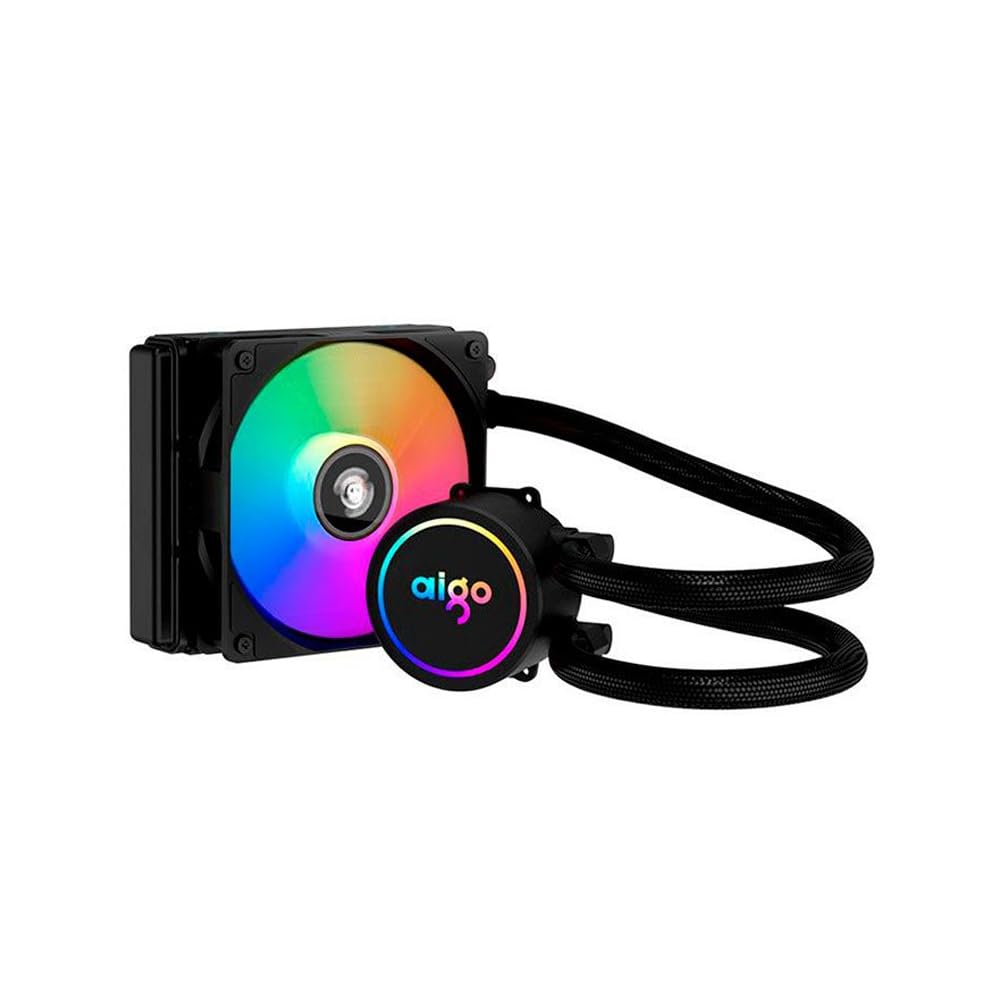
Image: The Aigo AC SE 120 Water Cooler showing the pump unit with an illuminated Aigo logo and a rainbow-colored fan on the radiator.
5.4 Кабелдерди туташтырыңыз
- Connect the pump power cable to a dedicated AIO_PUMP or CPU_FAN header on your motherboard. If your motherboard has neither, use a SYS_FAN header and ensure it is set to run at full speed in the BIOS.
- Connect the fan power cable to the CPU_FAN header on your motherboard. If your motherboard has multiple fan headers, consult your motherboard manual for the recommended CPU fan header.
- If your cooler has RGB lighting, connect the RGB cable to a compatible RGB header on your motherboard (e.g., 3-pin ARGB or 4-pin RGB, depending on the cooler's connector type).
- Route all cables neatly to avoid obstructing airflow or interfering with other components.
6. Иштөө нускамалары
Once installed, the Aigo AC SE 120 Water Cooler operates automatically based on your motherboard's fan control settings.
- Баштапкы күйгүзүү: After installation, power on your computer. The pump and fan should start operating.
- BIOS/UEFI Орнотуулары: Access your motherboard's BIOS/UEFI settings to ensure the CPU_FAN and AIO_PUMP headers are configured correctly. It is recommended to set the pump header to run at full speed (100%) for optimal cooling performance. Fan speeds can be adjusted based on temperature curves for a balance of cooling and noise.
- RGB жарыктандыруу: If connected to an RGB header, the lighting effects can typically be controlled via your motherboard's RGB software (e.g., ASUS Aura Sync, MSI Mystic Light, Gigabyte RGB Fusion, ASRock Polychrome Sync).
- Мониторинг: CPU температурасын текшерүү жана муздаткычтын натыйжалуу иштеп жатканын текшерүү үчүн системаны көзөмөлдөө программасын колдонуңуз.

Сүрөт: жогорудан төмөнгө view of the Aigo AC SE 120 Water Cooler, highlighting the illuminated Aigo logo on the pump and the rainbow lighting of the fan.
7. Техникалык тейлөө
Regular maintenance helps ensure optimal performance and longevity of your water cooler.
- Чаңды тазалоо: Аба агымына тоскоол болуп, муздатуу эффективдүүлүгүн төмөндөтүүчү чаңдын топтолушуна жол бербөө үчүн радиатордун канаттарын жана желдеткичтин пычактарын мезгил-мезгили менен тазалап туруңуз. Кысылган абаны же жумшак щетканы колдонуңуз.
- желдеткич текшерүү: Check the fan for any signs of wear, damage, or excessive noise. Replace if necessary.
- Шланг текшерүү: Visually inspect the hoses for any kinks, cracks, or signs of leakage. While AIOs are sealed, regular checks are recommended.
- Термикалык паста: The thermal paste typically lasts for several years. If you notice a significant increase in CPU temperatures over time, consider reapplying fresh thermal paste. This requires carefully removing the water block, cleaning both surfaces, and applying new paste.
8. Кыйынчылыктарды
If you encounter issues with your Aigo AC SE 120 Water Cooler, refer to the following common problems and solutions:
| Көйгөй | Мүмкүн себеп | Чечим |
|---|---|---|
| Жогорку CPU Температуралары |
|
|
| Желдетпейт |
|
|
| Pump Not Running / Unusual Noise |
|
|
| RGB жарыктандыруу иштебейт |
|
|
9. Кепилдик жана колдоо
The Aigo AC SE 120 Water Cooler comes with a 12 айлык кепилдик сатып алынган күндөн тартып. Бул кепилдик өндүрүштүн кемчиликтерин жана нормалдуу колдонуу шарттарындагы бузулууларды камтыйт.
Кепилдик төмөнкүлөрдү камтыбайт:
- Туура эмес орнотуудан, туура эмес колдонуудан, кыянаттык менен пайдалануудан же кайдыгерликтен улам келип чыккан зыян.
- Уруксатсыз өзгөртүүлөр же оңдоолордон улам келип чыккан зыян.
- Табигый кырсыктардан же кырсыктардан келтирилген зыян.
For technical support, warranty claims, or further assistance, please contact your retailer or the Aigo customer service department. Please have your proof of purchase and product model number (ACSE120-BK) ready when contacting support.