
1. Продукт бүтүп калдыview
This manual provides detailed instructions for the installation and use of the AGCUT LCD screen replacement for the T-Mobile Revvl 6 5G (Model TMAF025G). This replacement screen is designed to restore display functionality and touch sensitivity to your device.
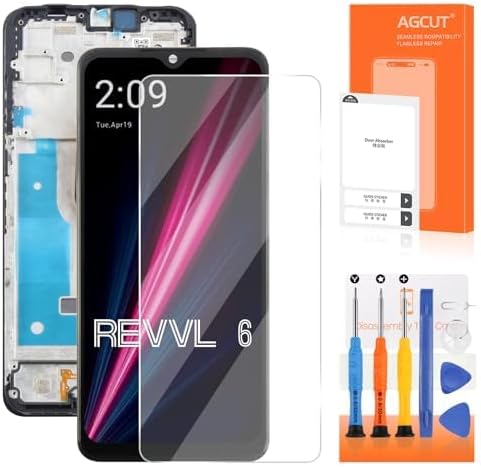
Image: AGCUT T-Mobile Revvl 6 5G screen replacement kit, including the screen assembly and various repair tools.

Сүрөт: алдыңкы жана арткы view of the T-Mobile Revvl 6 5G screen assembly, showing the display and the integrated frame.
2. Техникалык шарттар
- Шайкештик: T-Mobile Revvl 6 5G (Model TMAF025G)
- Экрандын өлчөмү: 6.52 дюйм
- Чечим: 720x1600 пиксел
- Материал: Температуралуу айнек
- Item Hardness: 9H
- Түсү: Кара
- Ассамблея түрү: LCD Digitizer Touch Screen Assembly with Frame

Image: Detailed specifications of the replacement screen, including model compatibility, resolution, size, and pixel density.

Image: Visual representation of the LCD screen replacement for T-Mobile REVVL 6, highlighting its resolution, size, and model number.
3. Эмнелер камтылган
The package includes the following items to assist with your screen replacement:
- AGCUT T-Mobile Revvl 6 5G LCD Screen Replacement with Frame
- Removal Tools (screwdrivers, prying tools, suction cup, SIM ejector tool)
- HD айнек экран коргоочу
- Чаңды кетирүүчү чаптамалар
- Эки тараптуу скотч
- Disassembly Tool Card

Image: Contents of the screen replacement kit, including the screen, various screwdrivers, prying tools, and adhesive.
4. Setup and Pre-Installation Testing
Before proceeding with the full installation, it is crucial to test the new screen to ensure it is fully functional. Non-professional installation is not recommended. If you are unsure, seek professional assistance.
4.1. Маанилүү сактык чаралары
- Өчүрүү: Always power off your phone completely before connecting the new display.
- Этияттык менен мамиле кылуу: The screen is fragile. Avoid applying excessive force, especially to the corners, during handling and installation.
- Статикалык электр: Take precautions against static electricity. Wear an anti-static wrist strap if available.
- Flex Cables: Ensure flex cables are connected correctly and securely. Improper connection can cause display issues or damage.
4.2. Сыноо процедурасы
Follow these steps to test the screen before final installation:
- Connect the New Display: Carefully connect the flex cables of the new screen to the phone's motherboard. Do not fully install the screen yet.
- Күйгүзүү: Power on your phone.
- Enter Test Mode: On the dial pad, enter *#0*# to access the phone's test menu.
- Сыноо Түстөр: Press "Red", "Green", and "Blue" to check for dead pixels or display abnormalities.
- Тийүү сезимталдыкты сыноо: Press "Touch" and draw across the screen to ensure full touch responsiveness without dead zones.
- Test Audio/Vibration: Press "Receiver" and "Vibration" to test the loudspeaker and earpiece functionality.
- Өчүрүү: Once testing is complete and the screen functions correctly, power off the phone before proceeding with full installation.
Video: Pre-installation testing guide for the T-Mobile Revvl 6 5G screen, demonstrating how to check display colors, touch sensitivity, and audio functions.
Video: General guide on how to test a screen before installation and troubleshoot common issues. Applicable to various phone models.
5. Орнотуу боюнча нускамалар
The screen replacement comes with a pre-assembled frame, which simplifies the installation process. Basic tools are provided. For a visual guide, it is recommended to search for installation videos on YouTube specific to the T-Mobile Revvl 6 5G screen replacement.
5.1. General Steps (Refer to online videos for detailed visual guidance)
- SIM салгычты алып салуу: Use the SIM ejector tool to remove the SIM card tray.
- Open Phone: Carefully open the phone's back cover using prying tools.
- Батареяны ажыратыңыз: Disconnect the battery flex cable to prevent short circuits.
- Remove Old Screen Assembly: Disconnect all flex cables from the old screen and carefully remove it from the phone's chassis.
- Таза кадр: Ensure the phone's frame is clean and free of old adhesive or debris.
- Желимди колдонуу: Apply new double-sided adhesive tape to the phone's frame where the new screen will sit.
- Жаңы экранды орнотуу: Carefully align and place the new screen assembly into the phone's frame.
- Ийкемдүү кабелдерди туташтырыңыз: Reconnect all flex cables securely.
- Батареяны кайра туташтыруу: Батареянын ийкемдүү кабелин кайра туташтырыңыз.
- Close Phone: Carefully reattach the back cover and secure it.

Image: A technician using a screwdriver to work on the internal components of a smartphone during screen replacement.
5.2. Screen with Frame Advantage
Choosing a screen with a pre-assembled frame significantly reduces the complexity and risk of installation, as it eliminates the need to separate the old screen from its frame and re-adhere the new screen precisely. This makes the replacement process more straightforward for users.
Video: Demonstration of an LCD screen for Revvl 6 5G with frame, highlighting its integrated design for easier installation.
6. Иштөө жана натыйжалуулук
The AGCUT replacement screen is designed to provide optimal performance comparable to the original display. Key features include:
- Жогорку жарыктык: Ар кандай жарык шарттарында так көрүнүүнү камсыздайт.
- Жогорку чечим: Delivers sharp and detailed images (720x1600 pixels).
- Жогорку сезгичтик: Provides smooth and accurate touch response.
- Кең түстөр гаммасы: Offers vibrant and accurate color reproduction.

Image: Highlights the professional features of the screen, including high brightness, resolution, and sensitivity.
7. Техникалык тейлөө
To ensure the longevity and optimal performance of your new screen, follow these maintenance tips:
- Screen коргоо: Use the provided HD glass screen protector to guard against scratches and minor impacts.
- Тазалоо: Clean the screen regularly with a soft, lint-free cloth. Avoid harsh chemicals or abrasive materials.
- Кысымдан качуу: Do not place heavy objects on the phone or apply excessive pressure to the screen.
- Температуранын кескин чеги: Avoid exposing the phone to extreme temperatures, which can affect screen performance and lifespan.
8. Кыйынчылыктарды
This section addresses common issues that may arise during or after screen replacement.
8.1. Common Display Issues
The replacement screen is intended to resolve issues such as:
- Incorrect screen response
- Display issues (e.g., pixel distortion, wrong colors)
- Cracked LCD screen
- Old or frozen LCD
- Dead zones or lines on the screen

Сүрөт: Visual examples of common display issues that the screen replacement aims to fix, such as display problems, dead screens, dust spots, and blurry photos.
8.2. Troubleshooting "Can't Turn On" or "Black Screen"
If your screen does not turn on or remains black after connecting:
- Ensure Phone is Off: The phone must be powered off before connecting the new display. If it was not, disconnect the new display, power off the phone, then reconnect.
- Батарея кабели: Remove and then reinstall the battery cable to ensure a secure connection.
- Flex Cable Connection: Verify that the screen's flex cables are securely and correctly connected to the motherboard. A loose or improperly connected cable can cause a black screen.
- Inspect Connector: Carefully inspect the cable connector for any damage or bent pins. Clean the connector if necessary.
8.3. Troubleshooting "Can't Touch" or "Touch Not Sensitive"
If the touch function is unresponsive or insensitive:
- Flex Cable Connection: Recheck the touch screen flex cable connection to ensure it is firm and correctly seated.
- Inspect Connector: Examine the connector for any physical damage or debris. Clean gently if needed.
- IC Damage: Avoid touching or applying excessive pressure to the IC (Integrated Circuit) part of the screen's flex cable. Damage to the IC can lead to black screen, screen lines, or unresponsive touch.