
Introduction
Сатып алганыңыз үчүн рахматasing the Hikity 2 Din Bluetooth Car Stereo. This manual provides detailed instructions for installation, operation, and maintenance to ensure optimal performance and longevity of your device. Please read this manual thoroughly before use and keep it for future reference.
Кутуда эмне бар
Carefully unpack the box and ensure all items are present. If any items are missing or damaged, please contact your retailer.
- Hikity 2 Din Car Stereo
- Арткы View Камера
- Тышкы микрофон
- Электр кабели
- Horn Cable
- Алыстан башкаруу
- Frame
- Колдонуучунун Колдонмосу (бул документ)
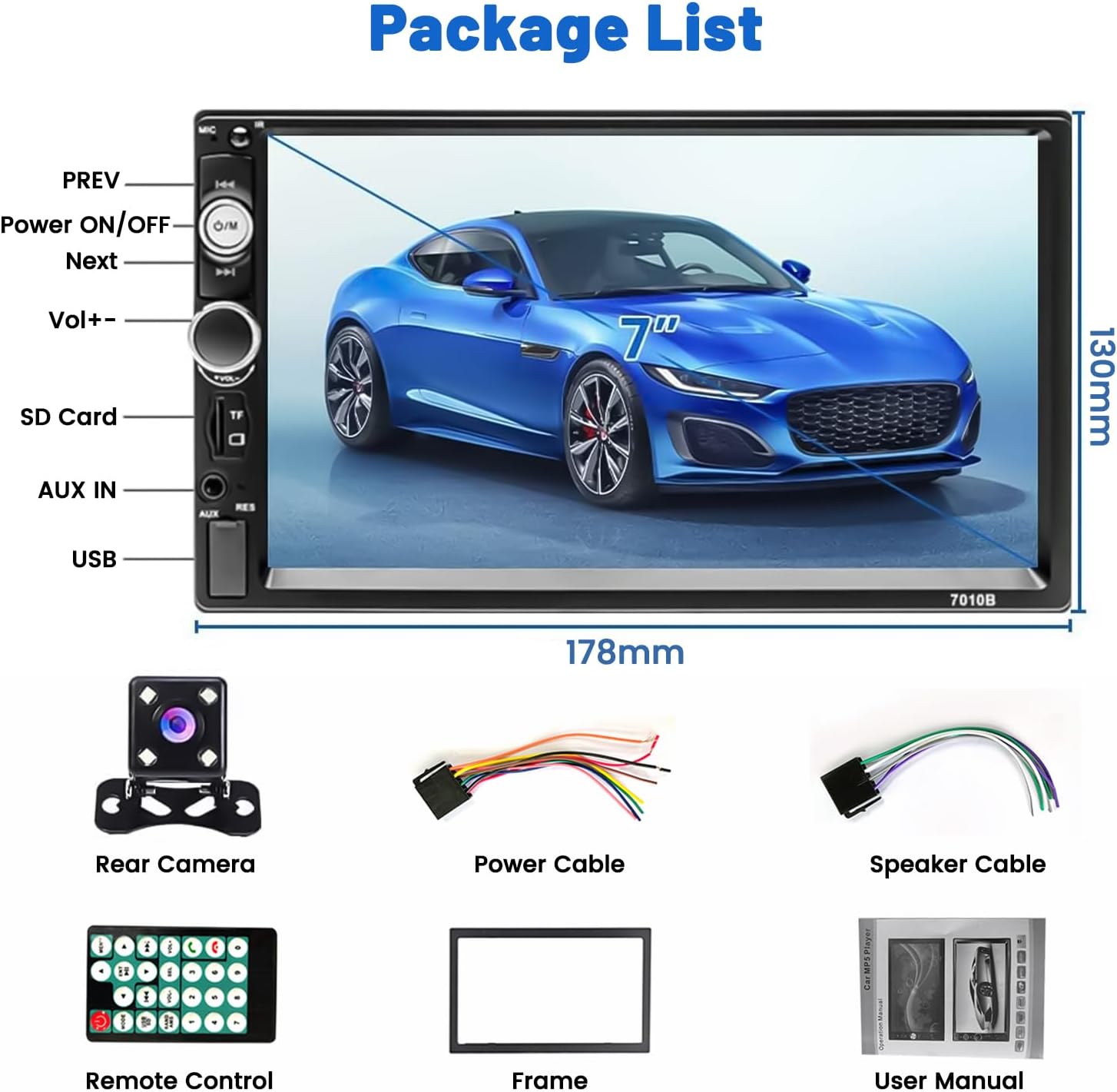
Image: Package contents and dimensions of the Hikity 2 Din Car Stereo.
Продукт бүттүview
Негизги өзгөчөлүктөрү
- 7 дюймдук сыйымдуулугу сенсордук экран
- Built-in Bluetooth for hands-free calling and music streaming
- FM Radio Receiver with 18 preset stations
- Mirror Link function for iOS and Android phones
- Rear Camera Input with automatic display
- USB, AUX, and SD Card slots for multimedia playback
- Рулду башкаруу (SWC) колдоосу
- 7-color LED backlight options
- EQ customization and audio output

Сүрөт: алдыңкы view of the Hikity 2 Din Car Stereo.
Алдыңкы панелдин башкаруу элементтери жана порттору

Сүрөт: деталдуу view of the front panel, including the 7-inch touchscreen, physical buttons, and input slots.
- АЛГА/КИЙИНКИ: Track skip/station tuning
- Power ON/OFF/M: Power button, also functions as Mode selector
- Көлөм+/-: Үн башкаргыч баскычы
- SD карта уячасы: For TF/SD memory cards
- AUX IN: 3.5 мм көмөкчү киргизүү
- USB порт: For USB drives and phone charging
- RES: Reset button (small pinhole)
Орнотуу жана орнотуу
Proper installation is crucial for the performance and safety of your car stereo. It is recommended to have this unit installed by a professional.
Зымдар диаграммасы
Refer to the following diagram for correct wiring connections. Incorrect wiring can cause damage to the unit or your vehicle's electrical system.

Image: Comprehensive wiring diagram for the car stereo, including power, speaker, and video connections.
- Электр кабели (A): Connect ACC (Red), GND (Black), B+ (Yellow), ANT (Blue), ILL (Orange).
- Динамиктин кабели (B): Connect Front Left (White/White-Black), Front Right (Gray/Gray-Black), Rear Left (Green/Green-Black), Rear Right (Purple/Purple-Black).
- Арткы камеранын киргизүүсү: Connect the red wire from the camera power to the reversing lamp positive, and the black wire to ground. Connect the video output cable to the unit's 'REVERSE CAMERA INPUT' (usually a yellow RCA jack).
- Steering Wheel Control (KEY1/KEY2): Connect to your vehicle's SWC wires.
Жалпы орнотуу кадамдары
- Унаанын терс батарея терминалын ажыратыңыз.
- Remove the existing car stereo or dashboard panel.
- Connect the wiring harness from the new stereo to the vehicle's wiring, following the diagram.
- If installing a rear camera, route the camera cable and connect it as per the diagram.
- Mount the new stereo securely into the dashboard.
- Reconnect the vehicle's negative battery terminal and test the unit.
Иштөө нускамалары
Сенсордук экрандын иштеши
The unit features a responsive 7-inch capacitive touchscreen. Navigate through menus and control functions by tapping, swiping, and dragging on the screen.

Сүрөт: Мисamples of touchscreen gestures for operating the unit.
Bluetooth туташуу
Pair your mobile phone with the car stereo for hands-free calling and wireless audio streaming.
- Мобилдик телефонуңузда Bluetooth'ду күйгүзүңүз.
- On the car stereo, go to the Bluetooth menu.
- Издөө available devices on your phone. The stereo's name will typically appear as "Hikity" or similar.
- Select the stereo from your phone's list and confirm pairing.
- Жупташтырылгандан кийин, сиз чалууларды жасап/кабыл алып, зымсыз музыка ойной аласыз.

Image: Bluetooth connection interface and FM radio display.
FM радиосунун иштеши
Access and tune into your favorite FM radio stations.
- Select the FM Radio mode from the main menu.
- Use the on-screen controls to scan for stations (AS/PS for auto scan/preset scan) or manually tune using the frequency display.
- You can save up to 18 stations as presets for quick access.
Mirror Link функциясы
Display your smartphone's screen directly on the car stereo's display.
- Connect your smartphone to the car stereo's USB port using an original USB cable.
- Select the "Mirror Link" or "PhoneLink" option on the car stereo.
- Follow the on-screen prompts on both your phone and the stereo to establish the connection.
- Туташкандан кийин, телефонуңуздун экраны чагылдырылат, бул сизге төмөнкүлөргө мүмкүнчүлүк берет view navigation, videos, and other apps.

Image: Phone screen mirroring for both iOS and Android devices.
Арткы камера дисплей
The unit automatically displays the rear camera feed when the vehicle is put into reverse gear.
- Ensure the rear camera is correctly installed and wired to the reverse light power source.
- When shifting into reverse, the stereo will automatically switch to the camera view.
- Камера 170 градус кең бурчтуу тартууну камсыз кылат view with night vision capabilities for enhanced safety.

Сүрөт: Арткы view camera display and parking assistance features.
Мультимедиа ойноткучу
Аудио жана видеону ойнотуу fileар кандай булактардан алынган.
- USB: USB дискти USB портуна салыңыз.
- SD карта: Insert a TF/SD card into the SD card slot.
- AUX: Connect an external audio device via the 3.5mm AUX input.
- Сиздин аркылуу чабыттоо files using the touchscreen interface.

Image: Multimedia playback options including SD card, AUX, and USB inputs.
Рулду башкаруу (SWC)
Control basic functions of the stereo using your vehicle's existing steering wheel buttons.
- Ensure the SWC wires (KEY1/KEY2) are correctly connected during installation.
- Access the SWC settings menu on the car stereo.
- Follow the on-screen instructions to program the steering wheel buttons to the desired functions (e.g., volume up/down, track skip, mode).
Image: Steering Wheel Control (SWC) setup interface.
Техникалык тейлөө
- Тазалоо: Экранды жана блокту тазалоо үчүн жумшак, кургак чүпүрөктү колдонуңуз. Абразивдүү тазалоочу каражаттарды же эриткичтерди колдонбоңуз.
- Температура: Аппаратты экстремалдык температурага же түз күн нуруна узак убакытка калтыруудан сактаңыз.
- Нымдуулук: Аппаратты кургак кармаңыз. Аны сууга же башка суюктуктарга тийгизбеңиз.
- Программалык камсыздоо жаңыртуулары: Hikity расмий сайтынан текшериңиз webбардык жеткиликтүү микропрограммаларды жаңыртуу үчүн сайтка мезгил-мезгили менен кириңиз.
Проблемаларды чечүү
Эгер көйгөйлөргө туш болсоңуз, төмөнкү жалпы көйгөйлөрдү жана чечимдерди караңыз:
| Көйгөй | Мүмкүн себеп | Чечим |
|---|---|---|
| Күч жок | Туура эмес зымдар; Күйгүзүүчү | Check power cable connections (ACC, B+, GND). Verify vehicle's fuse and the unit's fuse. |
| Үн жок | туура эмес динамик зымдары; Үн өтө төмөн; Үнсүздөө иштетилди | Check speaker connections. Increase volume. Ensure mute is off. |
| Bluetooth туташпай жатат | Bluetooth off on phone/stereo; Device not discoverable | Ensure Bluetooth is enabled on both devices. Make sure the stereo is in pairing mode. Try restarting both devices. |
| Күзгү шилтемеси иштебей жатат | Incorrect USB cable; App not installed/updated | Use an original USB cable. Ensure the required app (if any) is installed and updated on your phone. Check phone settings for USB debugging/file өткөрүп берүү режими. |
| Арткы камера көрүнбөйт | Incorrect camera wiring; Reverse trigger not connected | Verify camera power and video signal connections. Ensure the reverse trigger wire (REVERSE) is connected to the vehicle's reverse light positive. |
| Unit freezes or is unresponsive | Убактылуу программалык ката | Press the RESET button (small pinhole on the front panel) with a thin object. |
Техникалык шарттар
| Өзгөчөлүк | Деталь |
|---|---|
| Бренд | Hikity |
| Модель номери | 544e7620-8aa7-4010-8628-b58fa734ad5e |
| Screen Size | 7 дюйм |
| Экран түрү | Capacitive сенсордук экран |
| Байланыш технологиясы | AUX, Bluetooth, USB, Wi-Fi |
| Өзгөчөлүктөр | Built-in Bluetooth, Touchscreen, Rear Camera Input, SD Card Input, AUX Input, Mirror Link |
| Шайкеш түзмөктөр | Ampкөтөргүч, смартфон |
| Аудио чыгаруу режими | Моно |
| Көлөмдүү үн каналынын конфигурациясы | 5.1 |
| Видеону коддоо | AVI/MP4/FLV/RM/RMVB/MP1/MP |
| Түс | Кара |
| Продукциянын өлчөмдөрү (DxWxH) | 6.3 x 17.8 x 10.3 см |
| Чыгуу күчү | 60 Ватт |
| Каналдардын саны | 4 |
| Internet Applications | YouTube, Browser, Netflix |
| Башкаруу ыкмасы | Колдонмо, пульт, тийүү, үн |
| Аудио чыгаруу түрү | AUX, Speakers, Bluetooth |
| Колдоого алынган форматтар | AVI, WAV, WMA |
| Элемент Салмагы | 700 грамм |
Кепилдик жана колдоо
Продукт Кепилдиги
Бул Hikity продуктусу төмөнкүлөр менен келет 2 жылдык кепилдик сатып алынган күндөн тартып. Бул кепилдик өндүрүштүк кемчиликтерди жана нормалдуу колдонуудагы бузулууларды камтыйт. Бул туура эмес орнотуу, туура эмес колдонуу, кырсыктар же уруксатсыз өзгөртүүлөрдөн келип чыккан зыянды камтыбайт.
Кардарларды колдоо
For technical assistance, troubleshooting, or warranty claims, please contact Hikity customer support through the retailer where you purchased the product or visit the official Hikity store page:
Amazon'догу Hikity дүкөнүнө баш багыңыз
Please have your model number (544e7620-8aa7-4010-8628-b58fa734ad5e) and proof of purchase ready when contacting support.