
1. Киришүү
The UNI-T UT60S is a smart, true RMS digital multimeter designed for accurate and reliable electrical measurements. Featuring 9999 counts, this device can measure AC/DC voltage, AC/DC current, resistance, diode, capacitance, temperature, and frequency. Its fully automatic anti-burn intelligent design helps prevent operational errors and device damage, making it suitable for both professional technicians and everyday users.

Сүрөт 1: Алдыңкы view of the UNI-T UT60S Digital Multimeter.
2. Коопсуздук маалыматы
Мультиметрди колдонууда ар дайым коопсуздук чараларын сактаңыз. Муну аткарбоо электр тогуна урунууга, жаракат алууга же текшерилип жаткан эсептегичке же жабдууга зыян келтирүүгө алып келиши мүмкүн.
- Колдонмону окуу: Колдонуудан мурун, бул колдонмодогу бардык нускамаларды жана коопсуздук эскертүүлөрүн кылдат окуп чыгып, түшүнүңүз.
- Rated Voltage: Баалангандан ашык колдонбоңузtage, as marked on the meter, between terminals or between any terminal and earth ground. The UT60S is capable of withstanding a maximum overvoltage impulse of 1000V.
- Колдонуудан мурун текшерүү: Before each use, inspect the meter, test leads, and accessories for any damage. Do not use if damaged.
- Proper Terminals: Ensure test leads are connected to the correct input terminals for the measurement function selected.
- Чынжырды энергиясыздандыруу: Always de-energize the circuit and discharge all high-voltagкаршылыкты, үзгүлтүксүздүктү, диодду же сыйымдуулукту өлчөөдөн мурун e конденсаторлор.
- Live Circuit Work: When working on live circuits, work alone as little as possible, and ensure another person is present to provide assistance if needed.
- Ашыкча ток коргоо: The meter features overcurrent alarms and protection functions. Do not exceed the maximum current ratings for the input terminals.
- Экологиялык шарттар: Use the meter only as specified in this manual. Do not use the meter in explosive gas, vapor, or dusty environments.
- Жеке коргонуу каражаттары: Электр чынжырлар менен иштегенде ар дайым коопсуздук көз айнеги жана изоляцияланган кол кап сыяктуу тиешелүү жеке коргонуу каражаттарын (ЖКК) кийиңиз.
3. Продукциянын өзгөчөлүктөрү
The UNI-T UT60S Digital Multimeter offers a range of features for versatile and safe electrical testing:
- 9999 саны дисплей: Provides high-resolution measurements for precision.
- Чыныгы RMS өлчөө: Синусоидалык эмес толкун формалары үчүн так көрсөткүчтөрдү камсыз кылат.
- Fully Automatic Anti-Burn Design: Intelligent protection against operational errors and potential device damage.
- Кеңири өлчөө мүмкүнчүлүктөрү: Чаралар AC/DC тtage (up to 1000V), AC/DC current, resistance, diode, capacitance, temperature, and frequency.
- Large LCD Screen with Dual Display: Allows simultaneous display of AC voltage and frequency, enhancing readability.
- Full Button Design: Offers intuitive control and automatic recognition of current input jacks.
- Fast ADC (Analog to Digital Converter): Provides rapid measurement updates (3 times/second).
- Misoperation Protection: Capable of withstanding a maximum overvoltage impulse of 1000V, with overvoltage and overcurrent alarms.
- NCV (контактсыз томtage) Function: AC томун аныктайтtage without physical contact, featuring audible and visual alarms for safety.
- Автоматтык энергия үнөмдөө: Low power consumption (7mA during operation, 5uA in sleep state) and automatic backlight display in dark environments, extending battery life. Automatic shut-down feature.

Figure 2: The UT60S display with 9999 counts for precise readings.
4. Кутуда эмне бар
Пакетти ачканда, сиз төмөнкү нерселерди табышыңыз керек:
- UNI-T UT60S санариптик мультиметр
- Thermocouple (for temperature measurements)
- Мультиметрдик тесттер (кызыл жана кара)
- 1.5V AAA Batteries (pre-installed or included separately)

Figure 3: Contents of the UNI-T UT60S package, including the multimeter, test leads, and thermocouple.
5. Орнотуу
5.1. Батареяны орнотуу
The UT60S typically uses 1.5V AAA batteries. To install or replace batteries:
- Мультиметрдин өчүрүлгөнүн жана сыноо өткөргүчтөрү ажыратылганын текшериңиз.
- Эсептегичтин артындагы батарея отсегин табыңыз.
- Батарея бөлүкчөсүнүн капкагын ачуу үчүн бурагычты колдонуңуз.
- Insert the AAA batteries, observing correct polarity (+ and -).
- Батарея уясынын капкагын ордуна коюңуз жана аны бурама менен бекитиңиз.
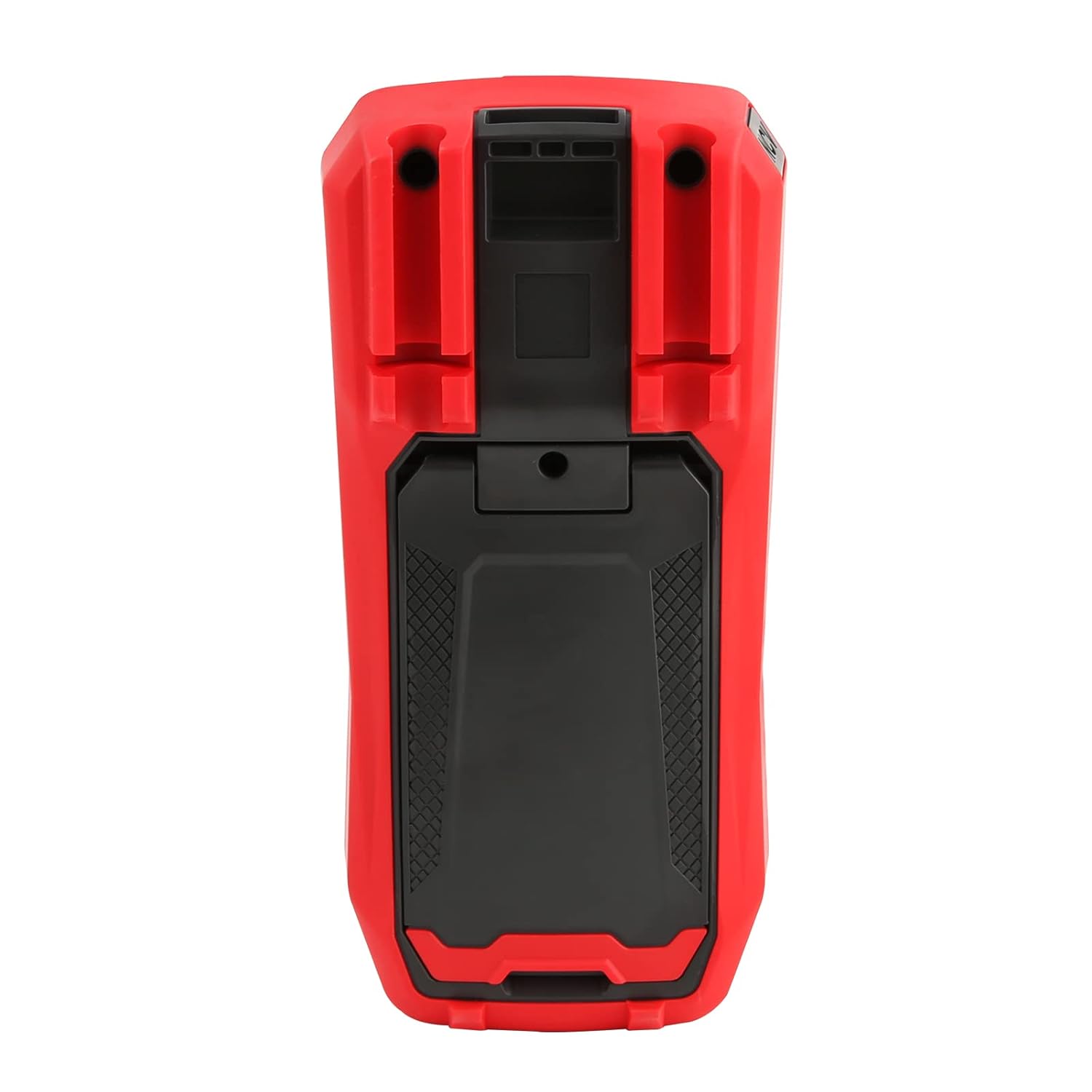
4-сүрөт: Арткы view of the UT60S, indicating the battery compartment location.
5.2. Сыноо линияларын туташтыруу
Connect the test leads to the appropriate input terminals:
- The black test lead (common) should always be connected to the COM терминал.
- Том үчүнtage, resistance, capacitance, frequency, diode, and continuity measurements, connect the red test lead to the VΩHzCAP терминал.
- For current measurements (mA/A), connect the red test lead to the мА/А терминал.
- Микро үчүнampere current measurements (μA), connect the red test lead to the мкА терминал.

Figure 5: Input terminals of the UT60S for connecting test leads.
6. Иштөө нускамалары
The UT60S features a full button design for selecting measurement functions. The meter's intelligent anti-burn design automatically recognizes the input jack and selected function.
6.1. Күйгүзүү/өчүрүү
басыңыз КҮЧ button to turn the meter on or off. The meter will automatically shut down after a period of inactivity to save battery life.
6.2. Auto Mode
In Auto mode, the meter automatically identifies the measurement type (voltage, resistance, continuity) and selects the appropriate range. This simplifies operation for general troubleshooting.
6.3. Өлчөө AC/DC Voltage
өлчөө үчүн томtage:
- Кара сыноо тилкесин төмөнкүгө туташтырыңыз COM терминал жана кызыл тест алып барат VΩHzCAP терминал.
- басыңыз V~ / Hz button to select AC voltage measurement, or the V= / NCV button for DC voltage. The meter may automatically select the correct mode in Auto range.
- Өлчөнө турган схемага же компонентке сыноо зонддорун туташтырыңыз.
- Томду окуңузtage value on the display. For AC voltage, the frequency may also be displayed simultaneously.

Сүрөт 6: AC көлөмүн өлчөөtage and frequency with the UT60S.
6.4. AC/DC токту өлчөө
Токту өлчөө үчүн:
- МААНИЛҮҮ: To measure current, the meter must be connected in series with the circuit. Always turn off power to the circuit before connecting the meter.
- Кара сыноо тилкесин төмөнкүгө туташтырыңыз COM терминал.
- For current up to 10A, connect the red test lead to the мА/А terminal. For microampere current, connect to the мкА терминал.
- басыңыз ACA/DCA button to select AC or DC current measurement.
- Чынжырды үзүп, сыноочу зымдарды жүктөм менен удаалаш туташтырыңыз.
- Схемага кубат бериңиз жана дисплейдеги учурдагы маанини окуңуз.
6.5. Measuring Resistance, Diode, and Continuity
Каршылык көрсөтүүнү, диодду же үзгүлтүксүздүктү өлчөө үчүн:
- Ensure the circuit is de-energized and capacitors are discharged.
- Кара сыноо тилкесин төмөнкүгө туташтырыңыз COM терминал жана кызыл тест алып барат VΩHzCAP терминал.
- басыңыз Ω→+ button to cycle through resistance, diode, and continuity functions.
- Сыноо зонддорун компоненттин үстүнө туташтырыңыз.
- Read the measurement. For continuity, an audible buzzer will sound if continuity is detected.
6.6. Өлчөө сыйымдуулугу
сыйымдуулукту өлчөө үчүн:
- Сыноодон мурун конденсатордун толук зарядсыздангандыгын текшериңиз.
- Кара сыноо тилкесин төмөнкүгө туташтырыңыз COM терминал жана кызыл тест алып барат VΩHzCAP терминал.
- басыңыз mV~°C°F button to select temperature measurement.
- Сыноочу зонддорду конденсатордун терминалдарына туташтырыңыз.
- Дисплейдеги сыйымдуулуктун маанисин окуңуз.

Figure 7: The UT60S performing a capacitance measurement.
6.7. Температураны өлчөө
Температураны өлчөө үчүн:
- Connect the thermocouple to the appropriate input terminals (usually the VΩHzCAP жана COM terminals, or dedicated temperature inputs if available).
- басыңыз mV~°C°F button to select temperature measurement.
- Термопара зондун температураны өлчөө керек болгон жерге коюңуз.
- Read the temperature value on the display in Celsius or Fahrenheit.
6.8. NCV (контактсыз томtagд) Функция
The NCV function allows detection of AC voltagөткөргүчтөр менен түз байланышсыз.
- басыңыз V= / NCV button to activate the NCV function.
- Move the top of the meter close to the conductor or outlet.
- The meter will provide an audible alarm and visual indication (flashing light) if AC voltage is detected. The intensity of the alarm and light may vary with voltagд күч.

Figure 8: Using the NCV function to detect live AC voltage.
6.9. Маалыматтарды кармоо
басыңыз БЕРҮҮ Учурдагы көрсөткүчтү дисплейде тоңдуруу үчүн баскычын басыңыз. Кармоо функциясын бошотуу үчүн аны кайра басыңыз.
6.10. Range Selection
While the meter typically operates in Auto range, you can manually select a range by pressing the RANGE button. This can be useful for specific applications or to speed up measurements in stable conditions. Press and hold the RANGE button to return to Auto range.
6.11. USB Communication (if applicable)
The UT60S series may support USB communication for data logging and analysis on a computer. If your model includes this feature, connect the meter to your computer using the provided USB cable and install the UNI-T software. Refer to the software manual for detailed instructions.
Video 1: Demonstration of features like NCV, LoZ, and USB communication on a UNI-T UT161 series multimeter. The UT60S shares similar functionalities.
7. Техникалык тейлөө
7.1. Тазалоо
Эсептегичтин кутучасын жарнама менен сүртүңүзamp кездеме жана жумшак жуугуч. Абразивдерди же эриткичтерди колдонбоңуз. Колдонуудан мурун эсептегич толугу менен кургатылганын текшериңиз.
7.2. Батареяны алмаштыруу
Дисплейде батарейка аз индикатору пайда болгондо батарейкаларды алмаштырыңыз. Батареяны орнотуу көрсөтмөлөрү үчүн 5.1-бөлүмдү караңыз.
7.3. Сактагычты алмаштыруу
If the current measurement function stops working, the fuse may need replacement. Refer to the full user manual for specific fuse ratings and replacement procedures. Always use fuses with the specified voltage жана учурдагы рейтингдер.
8. Кыйынчылыктарды
If you encounter issues with your UNI-T UT60S, try the following basic troubleshooting steps:
- Дисплей жок/күйгүзүлгөн: Батареянын орнотулушун текшерип, батарейкалары түгөнүп калбагандыгын текшериңиз. Керек болсо алмаштырыңыз.
- Туура эмес окуулар: Verify that the test leads are correctly connected to the appropriate terminals for the selected function. Ensure the function dial is set correctly. Check for damaged test leads.
- Учурдагы өлчөө иштебей жатат: Check the fuse. If blown, replace it with a fuse of the correct rating. Ensure the meter is connected in series with the circuit.
- "OL" же ашыкча жүктөө көрсөткүчү: This indicates that the measured value is outside the selected range or the maximum capability of the meter. Try selecting a higher range (if in manual range mode) or ensure the component is within the meter's specifications.
- NCV аныкталбай жатат: Ensure the NCV function is activated and the meter is brought close enough to the AC voltage булагы.
For more complex issues, refer to the detailed troubleshooting section in the complete user manual or contact UNI-T customer support.
9. Техникалык шарттар
Key specifications for the UNI-T UT60S Digital Multimeter:
| Өзгөчөлүк | Спецификация |
|---|---|
| Дисплейдин саны | 9999 |
| Чыныгы RMS | Ооба |
| AC/DC Voltage | 1000 В чейин |
| AC / DC ток | Up to 10A (mA/A terminals), Up to 1000μA (μA terminal) |
| Каршылык | 0.1Ω - 40MΩ |
| Сыйымдуулук | 1nF - 4000μF |
| Температура | Ооба (термопара менен) |
| Жыштык | Ооба |
| Диод сыноо | Ооба |
| Үзгүлтүксүздүк тести | Ооба |
| NCV (контактсыз томtage) | Ооба |
| Power Source | Battery Powered (1.5V AAA batteries) |
| Элемент Салмагы | 370 грамм |
| Коопсуздукту сактоо | UL 61010-1, IEC 61010-2-030, CAT III 1000V, CAT II 600V |
10. Кепилдик жана колдоо
UNI-T provides customer support for their products. If you encounter any problems during use, please contact UNI-T customer service directly via email. They offer 7/24 1-to-1 user support to address your concerns promptly.
For specific warranty details, please refer to the warranty card included with your product or visit the official UNI-T webсайт.