
Introduction
The SENCKIT S1 Bluetooth Tracker is designed to help you locate your valuable items quickly and efficiently. Utilizing Apple's Find My network, this smart tracker allows you to pinpoint the location of your keys, bags, wallets, pets, and other belongings directly from your iOS device. This manual provides detailed instructions for setting up, operating, and maintaining your SENCKIT S1 tracker.

Image: SENCKIT S1 Bluetooth Tracker, a white square device with a keychain, next to an iPhone displaying its location on a map.
Коопсуздук маалыматы
Эскертүү: 36 айга чейинки балдар үчүн ылайыктуу эмес.
Please keep the device and its small parts, especially the battery, out of reach of young children to prevent choking hazards.
Пакеттин мазмуну
Пакетиңизде бардык буюмдар бар экенин текшериңиз:
- 1 x SENCKIT S1 Bluetooth Tracker
- 1 х Инструкция (бул документ)
Жайгашуу
1. Батареяны орнотуу
The SENCKIT S1 tracker uses a replaceable CR2032 button cell battery. The battery is pre-installed, but you may need to remove a protective strip before first use.
- Locate the small groove on the side of the tracker.
- Carefully pry open the tracker casing using a thin, non-metallic tool or your fingernail.
- If present, remove the plastic protective strip from the battery compartment.
- CR2032 батарейкасынын оң (+) тарабы өйдө каратылып туура орнотулганын текшериңиз.
- Трекерди жабуу casing firmly until it clicks into place.

Image: The SENCKIT S1 tracker with its back cover removed, revealing the internal circuit board and a CR2032 battery. This illustrates the battery installation process.
2. Pairing with Apple Find My App
The SENCKIT S1 tracker is designed to work exclusively with Apple's Find My network. Ensure your iOS device is running the latest version of iOS.
- Алдын ала орнотулганды ачыңыз Find My iPhone же iPad'ыңыздагы колдонмо.
- басыңыз Items экрандын төмөн жагындагы өтмөктү басыңыз.
- таптаңыз + Нерсе кошуу, андан кийин тандаңыз Башка колдоого алынган нерсе.
- Place your SENCKIT S1 tracker near your iOS device. The app will detect the tracker.
- таптаңыз Туташуу суралганда.
- Follow the on-screen instructions to name your item and link it to your Apple ID.
- таптаңыз макул to the privacy statement and then Бүтүрүү. Your tracker is now paired.

Image: A sequence of three iPhone screens demonstrating the initial steps to pair the SENCKIT S1 tracker with the Apple Find My app, from opening the app to selecting "Other Supported Item."

Image: A sequence of three iPhone screens illustrating the completion of the pairing process, including tapping "Connect," linking to an Apple ID, and finalizing the setup.
Иштөө нускамалары
1. Locating Nearby Items
When your SENCKIT S1 tracker is within Bluetooth range of your iOS device, you can make it play a sound to help you find it.
- ачыңыз Find My колдонмо.
- барыңыз Items tab and select your SENCKIT S1 tracker.
- таптаңыз Үн ойнотуу. The tracker will emit a loud ring (up to 90dB) to guide you to its location.
- таптаңыз Stop Sound once you have found your item.

Image: An iPhone screen displaying the "Play Sound" function within the Find My app, indicating the tracker's proximity and the ability to trigger an audible alert. A SENCKIT tracker with keys is shown next to the phone.
2. Locating Far Away Items
If your item is out of Bluetooth range, the Apple Find My network can help you locate it. Hundreds of millions of Apple devices anonymously and securely relay the location of your tracker to you.
- ачыңыз Find My колдонмо.
- барыңыз Items tab and select your SENCKIT S1 tracker.
- Колдонмо картада трекердин акыркы белгилүү жайгашкан жерин көрсөтөт.
- таптаңыз Багыттар to get navigation to the tracker's location.

Image: An iPhone screen displaying the Find My app with a map showing the current location of the SENCKIT S1 tracker, indicating its use for remote tracking.
3. Артта калгандар жөнүндө эскертүүлөр
Receive notifications if you leave your item behind and it goes out of range of your iOS device.
- Ичинде Find My app, select your SENCKIT S1 tracker.
- Төмөн сыдырып, иштетиңиз Артында калганда кабарлаңыз которуштуруу.
- You can also set specific locations where you do not want to be notified (e.g., your home).
4. Lost Mode
If your SENCKIT S1 tracker is truly lost, you can enable Lost Mode to help others return it to you.
- Ичинде Find My app, select your SENCKIT S1 tracker.
- Төмөн сыдырып, таптаңыз Иштетүү астында Жоголгон режим.
- Байланыш телефон номерин же электрондук почта дарегин киргизүү үчүн көрсөтмөлөрдү аткарыңыз.
- If someone finds your tracker and scans it with an NFC-enabled smartphone, they will see your contact information.

Image: An iPhone screen displaying the "Lost Mode" feature within the Find My app, showing how a contact number can be displayed to someone who finds the tracker.
Техникалык тейлөө
1. Батареяны алмаштыруу
The SENCKIT S1 tracker has a battery life of up to 1 year. The Find My app will notify you when the battery is low. Replace the CR2032 battery following these steps:
- Locate the small groove on the side of the tracker.
- Carefully pry open the tracker casing.
- Эски CR2032 батареясын алып салыңыз.
- Жаңы CR2032 батареясын оң (+) тарабын өйдө каратып салыңыз.
- Трекерди жабуу casing firmly until it clicks into place.

Image: A graphic illustrating the SENCKIT S1 tracker's replaceable battery feature, highlighting its long-term use with a 365-day battery life.
2. Тазалоо
To clean your SENCKIT S1 tracker, wipe it with a soft, dry, or slightly damp Катуу химиялык заттарды же абразивдүү материалдарды колдонуудан алыс болуңуз, анткени алар түзмөккө зыян келтириши мүмкүн.
Проблемаларды чечүү
- Tracker not pairing:
- Батарея туура орнотулганын жана жетиштүү заряды бар экенин текшериңиз.
- Make sure your iOS device's Bluetooth is enabled.
- Bring the tracker very close to your iOS device during pairing.
- Restart your iOS device and try pairing again.
- Tracker not playing sound:
- Check the battery level in the Find My app. Replace the battery if low.
- Ensure the tracker is within Bluetooth range of your iOS device.
- Так эмес жайгашкан жер:
- Location accuracy depends on the density of Apple devices in the Find My network. In remote areas, updates may be less frequent.
- Картаны жаңыртуу үчүн iOS түзмөгүңүздө туруктуу интернет байланышы бар экенин текшериңиз.
Техникалык шарттар
| Модел | S1 |
| Өлчөмдөр | Узундугу 1.5" x Туурасы 1.5" x Т 0.28" (38мм x 38мм x 7мм) |
| Салмагы | 0.88 унция (8.7 г) |
| Батарея түрү | CR2032 (алмаштырылган) |
| Батареянын иштөө мөөнөтү | 1 жылга чейин |
| Байланыш | Bluetooth |
| Зымсыз диапазон | 10-20M (Indoor), 20-30M (Outdoor) |
| Базердин үнү | 90дБ чейин |
| Суу каршылык | IP65 |
| Шайкештик | Apple Find My (iOS Compatible) |
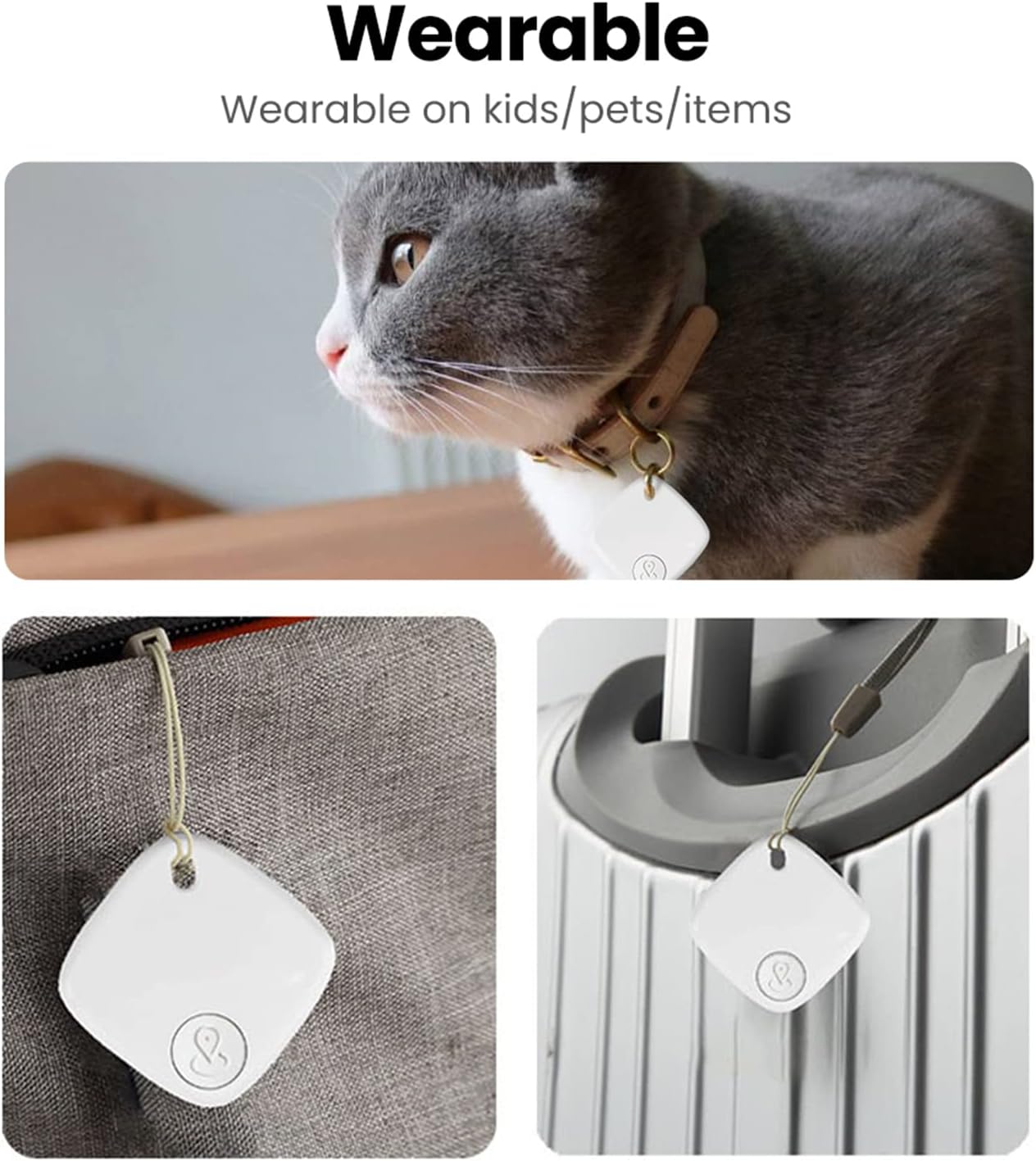
Image: A detailed diagram illustrating the physical dimensions and key specifications of the SENCKIT S1 Bluetooth Tracker.
Колдонуу сценарийлери
The SENCKIT S1 Bluetooth Tracker is versatile and can be attached to various items:
- Ачкычтар: Attach to your keyring to easily find misplaced keys.
- Bags & Backpacks: Secure to your luggage, handbag, or backpack for travel or daily use.
- Капчыктар: Slip into your wallet to prevent loss.
- Үй жаныбарлары: Attach to your pet's collar to help locate them if they wander off.

Image: A collage demonstrating various applications of the SENCKIT S1 tracker, including attachment to a pet's collar, a bag, and luggage.