
1. Продукт бүтүп калдыview
The Cudy GS108D is an 8-port Gigabit Ethernet Network Switch designed for expanding your network connectivity. It offers high-speed data transfer for devices such as computers, IPTVs, printers, NAS, game consoles, and routers. Featuring a plug-and-play design, fanless operation, and energy-efficient technology, this switch provides a reliable and quiet solution for both home and office networks.

Сүрөт: алдыңкы view of the Cudy GS108D switch, highlighting its 8 Gigabit Ethernet ports and LED indicators.
Негизги өзгөчөлүктөрү:
- 8 гигабит Ethernet порттору: Бир нече түзмөктөр үчүн жогорку ылдамдыктагы зымдуу туташууну камсыз кылат.
- Plug and Play: Requires no software installation or configuration for immediate use.
- желдеткичсиз дизайн: Ensures quiet operation, suitable for any environment.
- Энергияны үнөмдүү: Compliant with IEEE802.3az standard, saving power when ports are idle.
- Ар тараптуу монтаждоо: Жумушчу столдун жайгаштырылышын жана дубалга орнотууну колдойт.
2. Пакеттин мазмуну
Пакетиңизде төмөнкү заттар бар экенин текшериңиз:
- Cudy GS108D 8-Port Gigabit Ethernet Network Switch
- Кубаттуу адаптер
- Көрсөтмө (бул документ)
- Ethernet Cable (may vary by region/package)

Image: Contents of the Cudy GS108D package, showing the switch, power adapter, and an Ethernet cable.
3. Физикалык мүнөздөмө
Алдыңкы панели:
The front panel features eight 10/100/1000 Mbps RJ45 ports. Each port has an associated LED indicator to show link/activity status.
- Power LED: Которгучтун кубат абалын көрсөтөт.
- Байланыш/Акт светодиоддору (1-8):
- Катуу жашыл: A device is connected and the link is active.
- Жаркылдаган жашыл: Берилиштер портто өткөрүлүп же кабыл алынууда.
- Өчүк: No device is connected or the link is inactive.

Сүрөт: деталдуу view of the Cudy GS108D's front panel, showing the 8 RJ45 ports and their corresponding LED indicators.
Арткы Panel:
Арткы панелде, адатта, кубат киргизүү порту жайгашкан.
Өлчөмдөрү:
The compact design of the GS108D allows for flexible placement. Approximate dimensions are 138mm (5.43") L x 61.5mm (2.42") W x 24mm (0.94") H.
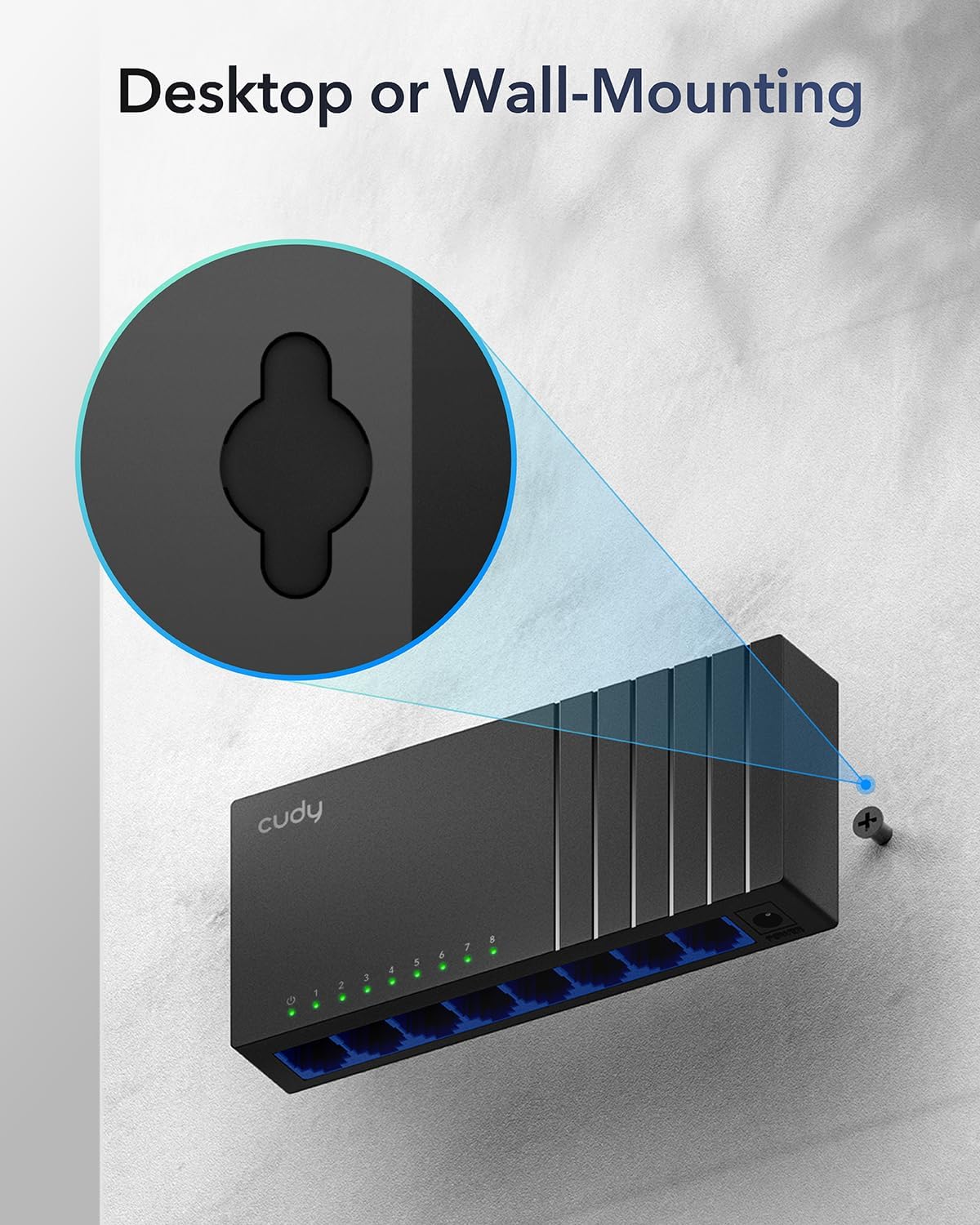
Image: The Cudy GS108D switch with its compact dimensions clearly indicated.
4. Орнотуу нускамалары
The Cudy GS108D switch is designed for simple plug-and-play installation. No complex configuration is required.
1-кадам: Power Connection
- Connect one end of the provided power adapter to the power port on the rear panel of the GS108D switch.
- Кубат адаптеринин экинчи учун стандарттуу электр розеткасына сайыңыз.
- Алдыңкы панелдеги Power LED диоду күйүп, которгуч кубат алып жатканын көрсөтүп жатканын текшериңиз.

Image: The Cudy GS108D switch with its power adapter connected and ready for use.
2-кадам: Түзмөк туташтыруу
- Connect your network devices (e.g., computer, router, NAS, game console) to any of the 8 RJ45 ports on the front panel using standard Ethernet cables (Cat5e or higher recommended for Gigabit speeds).
- Ensure the Link/Act LED for each connected port illuminates, indicating a successful connection. If the LED is flashing, data is being transmitted.

Image: A laptop being connected to the Cudy GS108D switch with an Ethernet cable, demonstrating a typical setup.
3-кадам: Монтаждоо параметрлери
The GS108D supports both desktop placement and wall mounting.
- Иш тактада жайгаштыруу: Simply place the switch on a flat, stable surface.
- Дубалга орнотуу: The switch features mounting slots on its underside. Use appropriate screws (not included) to secure the switch to a wall.

Image: The Cudy GS108D switch shown with its wall-mounting slots, illustrating how it can be securely attached to a wall.
5. Иштөө нускамалары
Once connected, the Cudy GS108D operates automatically without further user intervention.
Автоматтык сүйлөшүүлөр
Each port on the switch automatically detects the network speed (10/100/1000 Mbps) and duplex mode (Half/Full Duplex) of the connected device and adjusts accordingly for optimal performance.
Traffic Optimization
The switch features a 4 Mbit packet buffer to ensure stable and efficient data forwarding, reducing packet loss and improving overall network performance, especially during high traffic loads.
Energy Efficiency (IEEE 802.3az)
The GS108D incorporates energy-efficient Ethernet technology. It automatically adjusts power consumption based on cable length and network traffic, reducing energy usage when ports are idle or when connected devices are turned off.

Image: Visual representation of the power-saving feature, showing reduced energy consumption when ports are idle.
Узак аралыкка берүү
The switch supports long-distance Ethernet cable runs, allowing for reliable data transmission up to 170 meters (557 feet) with Cat5e or higher Ethernet cables.

Image: Illustration of the Cudy GS108D's capability for long-distance transmission, up to 170 meters, requiring Cat5e or higher cables.
6. Техникалык тейлөө
To ensure optimal performance and longevity of your Cudy GS108D switch, follow these maintenance guidelines:
- Жайгашкан жери: Коммутаторду салкын, кургак, күн нуру түз тийбеген, жылуулук булактарынан жана ашыкча нымдуулуктан алыс жерге коюңуз. Түзмөктүн айланасында жетиштүү желдетүүнү камсыз кылыңыз.
- Тазалоо: Которгучтун сыртын тазалоо үчүн жумшак, кургак чүпүрөктү колдонуңуз. Суюктук же аэрозолдук тазалоочу каражаттарды колдонбоңуз.
- Күч: Берилген кубат адаптерин гана колдонуңуз. Катуу шамал учурунда же узак убакыт бою колдонулбаган учурда кубат адаптерин сууруп коюңуз.
- Кабелдер: Ensure all Ethernet cables are securely connected and free from damage.
7. Кыйынчылыктарды
If you encounter issues with your Cudy GS108D switch, refer to the following common troubleshooting steps:
Күч жок
- Кубат адаптери өчүргүчкө да, иштеп жаткан электр розеткасына да бекем туташтырылганын текшериңиз.
- Башка аспапка туташтыруу менен электр розеткасынын иштешин текшериңиз.
- Verify that the Power LED on the switch is illuminated. If not, try a different power outlet.
Портто шилтеме/аракет жок
- Ethernet кабелинин коммутатордун портуна да, туташкан түзмөккө да бекем сайылганын текшериңиз.
- Try using a different Ethernet cable to rule out cable damage.
- Түзмөктү коммутатордогу башка портко туташтырыңыз.
- Verify that the connected device (e.g., computer, router) is powered on and its network adapter is enabled.
- If connecting to a router, ensure the router's port is active.
Жай тармак ылдамдыгы
- Ensure you are using Cat5e or higher Ethernet cables for Gigabit speeds. Older Cat5 cables may limit speed.
- Check the Link/Act LED for the port. A solid green light indicates a Gigabit connection. If it's amber or off, there might be a speed mismatch or connection issue.
- Verify that the connected devices also support Gigabit Ethernet.
- Бир эле учурда жогорку өткөрүү жөндөмдүүлүгүндөгү иш-аракеттерди чектөө менен тармактын тыгынын азайтыңыз.
8. Техникалык шарттар
| Өзгөчөлүк | Description |
|---|---|
| Бренд | Cudy |
| Модель номери | GS108D |
| Порттардын саны | 8 |
| Интерфейс | RJ45 |
| Маалыматтарды өткөрүү ылдамдыгы | Секундасына 1000 мегабит (Гигабит) |
| Которуу түрү | Ethernet которулуу |
| Шайкеш түзмөктөр | Camera, Desktop, Laptop, Router |
| Тtage | 28 Volts (Input for power adapter) |
| Иштөө температурасы | 40°F – 104°F (4.4°C – 40°C) |
| Иштин материалдык түрү | Пластик |
| Элементтин өлчөмдөрү (L x W x Y) | 7.87" x 5.91" x 5.91" (Product packaging dimensions, actual device is smaller) |
| Элемент Салмагы | 200 грамм |
9. Кепилдик жана колдоо
Кепилдик маалыматы:
The Cudy GS108D 8-Port Gigabit Ethernet Network Switch comes with a 2 жылдык кепилдик from the date of purchase. Please retain your proof of purchase for warranty claims. This warranty covers defects in materials and workmanship under normal use.
Техникалык колдоо:
For technical assistance, troubleshooting, or further inquiries, please visit the official Cudy website or contact Cudy customer support. Cudy is committed to delivering high-performance, user-friendly communication technology and provides resources to help you with your product.
You can often find support resources, FAQs, and contact information on the Cudy Store on Amazon or the main Cudy webсайт.