
1. Орнотуу
1.1 Камтылган компоненттер
Your MAGIC-REFINER MK32 keyboard package includes:
- MK32 82-Key Hot Swappable Wired Mechanical Keyboard
- Acrylic Wrist Rest
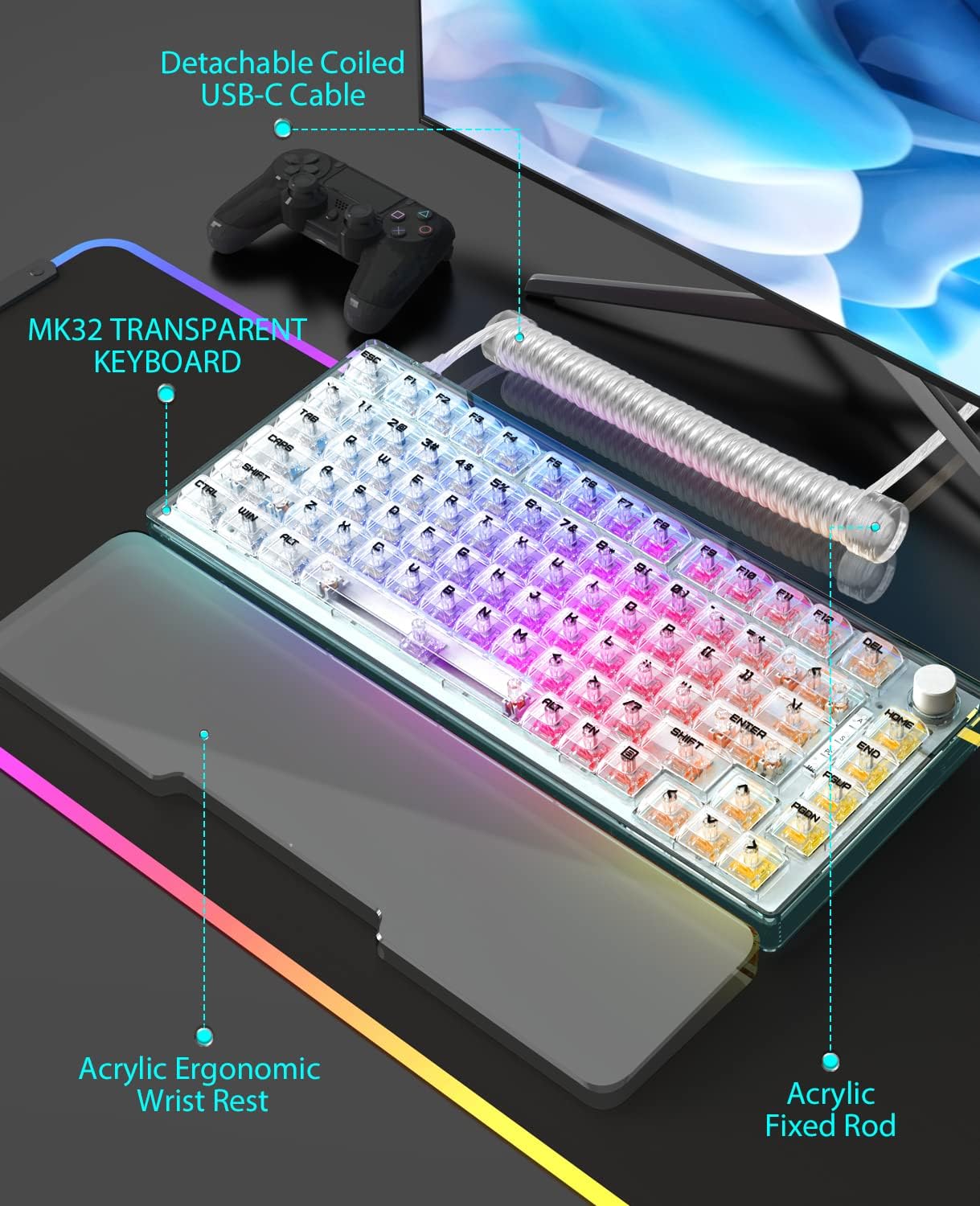
- Custom Coiled USB-C Cable
- Баскыч капкагын тарткыч
- Switch Puller
1.2 Байланыш
The MK32 keyboard offers versatile connectivity options:
- Зымдуу (USB-C): Берилген USB-C кабелин колдонуп, клавиатураны түзмөгүңүзгө түздөн-түз туташтырыңыз.
- 2.4 ГГц зымсыз: For a stable and fast wireless connection, use the dedicated 2.4GHz dongle.
- Bluetooth: Connect wirelessly to compatible devices via Bluetooth.
To switch between connectivity modes, locate the switch on the top edge of the keyboard. Select your desired mode (Wired, 2.4G, or Bluetooth).
1.3 Физикалык жөндөөлөр
The keyboard features two-level adjustable feet on the underside to customize your typing angle for optimal comfort.

Сүрөт: Жалпысынан view of the MAGIC-REFINER MK32 keyboard with vibrant RGB lighting.
2. Иштөө нускамалары
2.1 Негизги баскычтоп функциялары
The MK32 is an 82-key, 75% form factor keyboard. All standard alphanumeric and function keys operate as expected. Refer to your operating system's documentation for specific key combinations.
2.2 RGB жарыкты башкаруу
The keyboard features double-sided RGB LEDs with 18 default lighting effects. You can adjust multiple brightness levels and flowing backlight speeds. Use the FN key in combination with other keys (refer to the included function card) to:
- 18 жарыктандыруу эффектисин айланып өтүңүз.
- Жарыктуулук деңгээлин тууралаңыз.
- Control backlight speed.
- Control base and keyboard lighting effects separately.

Image: Dynamic RGB lighting effects illuminating the transparent keycaps and base of the MK32 keyboard.
2.3 Айлануучу баскычтын иштеши
The rotary knob located on the top right of the keyboard provides convenient media control:
- Айлантуу: Adjusts system volume (clockwise for up, counter-clockwise for down).
- Пресс: Медиа файлды ойнотуу үчүн ойнотууну/тындырууну өчүрөт.

Image: The 82-key layout of the MK32 keyboard, highlighting the convenient rotary knob for media control.
2.4 Ыкчам алмаштыруучу которгучтар
The MK32 features a hot-swappable PCB, allowing you to easily replace switches without soldering. It supports 99% of 3/5-pin MX-similar mechanical switches. The keyboard comes equipped with custom Ice-rock linear switches, designed for smooth and quick feedback with lower sound.
Сүрөт: жакын план view of the transparent OEM profile keycaps, showcasing their clear design and the underlying switches.
2.5 Системанын шайкештиги
The keyboard is compatible with a wide range of operating systems and devices, including:
- PC (Windows series)
- Android
- Linux
- iOS
- Gaming Consoles: PS4, Xbox Series X|S, Xbox One
3. Техникалык тейлөө
3.1 Баскычтопту тазалоо
Оптималдуу иштешин жана көрүнүшүн сактоо үчүн клавиатураңызды дайыма тазалаңыз:
- Баскычтардын ортосундагы чаңды жана таштандыларды кетирүү үчүн жумшак щетканы же кысылган абаны колдонуңуз.
- Wipe the keycaps and frame with a slightly damp, мамыксыз кездеме. Катуу химиялык заттардан алыс болуңуз.
- For the acrylic wrist rest, wipe clean with a damp cloth as needed, especially if it's white and prone to showing dirt.
3.2 Коммутаторлорду жана баскычтопторду алмаштыруу
Utilize the included keycap puller to carefully remove keycaps. Use the switch puller to gently extract switches from the PCB. When inserting new switches, ensure the pins are aligned correctly to avoid damage. Press firmly until the switch clicks into place.

Image: The MK32 keyboard paired with its ergonomic acrylic wrist rest and custom coiled USB-C cable.
4. Кыйынчылыктарды
4.1 Байланыш маселелери
- текст: Ensure the USB-C cable is securely connected to both the keyboard and your device. Try a different USB port or cable.
- 2.4 ГГц зымсыз: Verify the 2.4GHz dongle is properly inserted into your device. Ensure the keyboard is switched to 2.4GHz mode.
- Bluetooth: Ensure Bluetooth is enabled on your device and the keyboard is in pairing mode. Re-pair the device if necessary.
4.2 Негизги бузулуулар
If a key is unresponsive or inconsistent:
- Carefully remove the keycap and switch using the provided tools.
- Өчүргүчтө көрүнгөн бузулуулар же таштандылар бар-жогун текшериңиз. Зарыл болсо, тазалаңыз.
- Re-insert the switch firmly. If the issue persists, try replacing it with one of the spare switches or a known working switch.
4.3 RGB жарыктандыруу маселелери
If the RGB lighting is not functioning correctly:
- Check the keyboard's lighting settings using the FN key combinations.
- Ensure the brightness level is not set to minimum.
- If using wireless mode, ensure the battery has sufficient charge.
5. Техникалык шарттар
| Өзгөчөлүк | Деталь |
|---|---|
| Модель номери | MK32 |
| Макет | 82-Key, 75% Form Factor |
| Байланыш | Зымдуу (USB-C), 2.4 ГГц зымсыз, Bluetooth |
| Которгучтар | Hot-swappable, Custom Ice-rock Linear Switches (40g force) |
| Баскыч капкактары | Transparent OEM Profile Баскыч капкактары |
| Арткы жарыктандыруу | Double-sided RGB LEDs (18 effects, adjustable brightness/speed) |
| Материал | Japanese silencing NANO cotton, high-density EVA, acrylic, TPU |
| Өзгөчөлүктөр | Ergonomic Wrist Rest, Transparent Base, Rotary Knob, Two-level Adjustable Feet |
| Өлчөмдөр | 10 x 5 x 1 дюйм (Пакет) |
| Элемент Салмагы | 10.4 унция |
6. Кепилдик жана колдоо
6.1 Коргоо пландары
Optional protection plans are available for your product:
- 3 жылдык коргоо планы
- 4 жылдык коргоо планы
- Толук коргоо (ай сайын төлөнүүчү эсеп-фактура)
Камтуу жана шарттар жөнүндө кененирээк маалымат алуу үчүн, сураныч, коргоо планынын атайын документтерин караңыз.
6.2 Өндүрүүчүнү колдоо
For any product inquiries, technical assistance, or warranty claims, please contact MAGIC-REFINER customer support.
Өндүрүүчү: MAGIC-REFINER
Кошумча маалымат жана колдоо алуу үчүн, төмөнкү дарекке кириңиз: MAGIC-REFINER Store on Amazon.