
Introduction
This manual provides comprehensive instructions for the Dpofirs 1080P 30FPS Vlogging Camera Recorder. Please read this manual carefully before using the device to ensure proper operation and to maximize its performance. Keep this manual for future reference.
Продукт бүттүview
The Dpofirs Vlogging Camera Recorder is designed for capturing high-definition videos and photos. It features a 2.7-inch TFT rotatable screen, 16x digital zoom, and 16MP image resolution.
Негизги өзгөчөлүктөрү:
- HD камера: 2.7-inch TFT rotatable screen, 1080P video resolution, 16x digital zoom, 16MP pixels.
- Selfie Support: Front fill light for photos, 2 or 10-second self-timer.
- Сактагыч: Supports up to 32GB memory card (not included). A Class10 U3 chip memory card is recommended for optimal performance.
- USB туташуу: Connects to a computer for file transfer and can function as a PC camera.
- Интегралдык спикер: Аудио ойнотуу үчүн орнотулган динамик.
- Заряддоо учурунда жаздыруу: Supports continuous recording while connected to a power source.
Камера компоненттери:

Сүрөт 1: Жакын план view of the camera's video lens, showing the focal length and aperture details.

Сүрөт 2: Арткы view of the camcorder, highlighting the control buttons, menu button, mode button, and speaker grille.
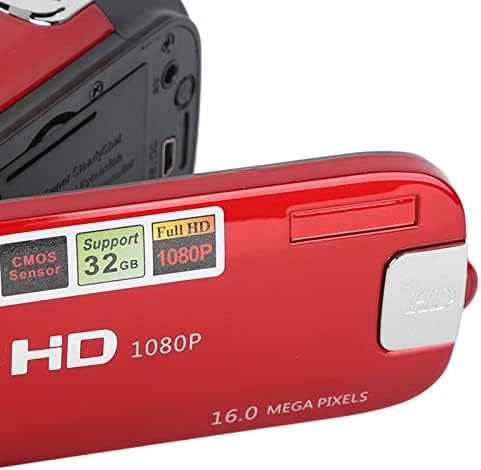
Сүрөт 3: Деталдаштырылган view of the camera's flip-out screen, showing resolution and megapixel information.

Сүрөт 4: The Dpofirs camcorder displayed with its standard accessories, including the battery, USB cable, and wrist strap.
Жайгашуу
- Батареяны заряддоо: Insert the included lithium battery into the camera. Connect the camera to a power source using the USB cable to fully charge the battery before first use.
- Эстутум картасын салыңыз: Open the memory card slot cover. Insert a compatible SDHC memory card (up to 32GB, Class10 U3 recommended) into the slot until it clicks into place. Ensure the card is inserted in the correct orientation.
- Күйгүзүү: Камераны иштетүү үчүн кубат баскычын басып, кармап туруңуз.
Иштөө нускамалары
Негизги операция:
- Күйгүзүү/өчүрүү: Камераны күйгүзүү же өчүрүү үчүн кубат баскычын басып, кармап туруңуз.
- Режим тандоо: басыңыз РЕЖИМ button to switch between Photo mode and Video recording mode.
- Видео жаздыруу:
- Видео режиминде, басыңыз Жаздыруу button (usually marked with a red dot or camera icon) to start recording.
- басыңыз Жаздыруу жазууну токтотуу үчүн кайра баскычын басыңыз.
- Сүрөткө тартуу:
- Сүрөт режиминде, басыңыз Жабык button (usually a larger button on top) to capture a photo.
- Чоңойтуу функциясы: Use the zoom lever/buttons (often marked with 'W' for Wide and 'T' for Telephoto) to adjust the 16x digital zoom.
- ReviewМазмунду киргизүү: басыңыз Ойнотуу баскычы (көбүнчө ойнотуу сөлөкөтү менен белгиленет) view recorded videos and photos. Use navigation buttons to browse.
Өркүндөтүлгөн функциялар:
- Авто таймер: Access the menu settings to select a 2-second or 10-second self-timer for photos.
- Жарык толтуруу: The camera features a front fill light. Activate it through the menu settings for improved lighting in low-light conditions, especially for selfies.

Сүрөт 5: The camcorder in use for a selfie, demonstrating the rotatable screen and front fill light feature.
- Компьютерге туташуу: Use the provided USB cable to connect the camera to a computer. The camera can be used to transfer files or as a PC camera.
- HD чыгаруу: The camera supports HD output for viewing content on compatible displays.
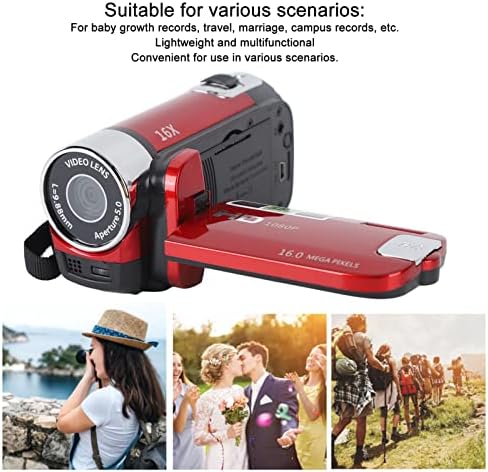
Сүрөт 6: Illustrates various applicable scenarios for the camcorder, such as travel, weddings, and personal recordings.
Техникалык тейлөө
- Тазалоо: Use a soft, dry cloth to clean the camera body. For the lens and screen, use a specialized lens cleaning cloth and solution. Avoid abrasive materials.
- Сактагыч: Камераны салкын, кургак жерде, күндүн түз тийген нурунан жана өтө жогорку температурадан алыс сактаңыз. Эгерде камера көпкө колдонулбаса, батареясын алып салыңыз.
- Батареяга кам көрүү: Fully charge the battery before storage and recharge it every few months to maintain its lifespan.
- Эстутум картасы: Regularly back up your data from the memory card to a computer or external storage device. Format the memory card periodically to maintain performance.
Проблемаларды чечүү
| Көйгөй | Мүмкүн себеп | Чечим |
|---|---|---|
| Камера күйбөйт. | Батарея түгөнүп калган же туура салынган эмес. | Батарея толук заряддалганын жана туура салынганын текшериңиз. |
| Видео жаздырууга же сүрөткө тартууга болбойт. | Memory card is full, not inserted, or incompatible. | Check memory card status. Ensure it is inserted, has free space, and is a Class10 U3 card. |
| Сүрөт/видео сапаты начар. | Жетишсиз жарык, кир линза же туура эмес орнотуулар. | Ensure adequate lighting. Clean the lens. Check resolution settings in the menu. |
| Камера компьютер тарабынан таанылган жок. | Faulty USB cable or incorrect connection mode. | Try a different USB cable. Ensure the camera is in PC camera or mass storage mode if applicable. |
Техникалык шарттар
| Өзгөчөлүк | Деталь |
|---|---|
| Модель номери | Dpofirsgn9zt6aq2u-12 |
| Сүрөттүн чечилиши | 16 Megapixels (effective), supports VGA, 1M, 5M, 12M, 16M |
| Сүрөт форматы | JPG |
| Video Resolution | 1080 Pixels (effective), supports FHD (1920x1080), HD (1280x720), 640x480 |
| Video Format | AVI |
| Screen Size | 2.7 дюйм TFT |
| Digital Zoom | 16x |
| Оптикалык масштаб | 16x |
| Жабык түрү | Электрондук |
| Авто таймер | 2 секунд, 10 секунд |
| TV Output | NTSC 30fps, PAL 25fps |
| Сактагыч медиа | SDHC memory card (up to 32GB, Class10 U3 recommended) |
| Батарея | 1 x 10²⁰mAh Lithium Battery (built-in) |
| Байланыш | USB |
| Sensor Technology | CMOS |
| Салмагы | 216 грамм |
| Пакеттин өлчөмдөрү | 14 x 11 x 7 см |
| Сүрөттүн катышы | 16:9 |
| Ак баланстын жөндөөлөрү | Авто |
| Экспозицияны башкаруу түрү | Автоматтык |
| Баяндамачылардын саны | 1 |
| Шайкеш түзмөктөр | Персоналдык компьютер |
| Видеокамера түрү | Видео камера |
| Сунушталган Колдонуулар | Personal recordings, baby growth records, travel, campus activities |
| Сууга туруктуулук деңгээли | Суу өткөрбөйт |
| Image Stabilization | Digital (Not Assured) |
| Форма фактору | Колдук |
| Линзанын түрү | Чоңойтуу |
| Фокус түрү | Автофокус |
| Атуу режимдери | Автоматтык |
Кепилдик жана колдоо
For warranty information and technical support, please refer to the documentation included with your purchase or contact Dpofirs customer service.
Кайтаруу саясаты: This product has a 30-day return policy for refund or replacement.