1. Киришүү
This manual provides essential information for the safe and efficient use of the Generic EPW3000-12A 3000W Server Power Supply. Please read this manual thoroughly before installation and operation to ensure proper functionality and to prevent damage to the unit or connected equipment. Keep this manual for future reference.
2. Коопсуздук маалыматы
- Электр коркунучу: Бул агрегат жогорку көлөмдө иштейтtage. Do not open the power supply casinг. Бардык тейлөөлөрдү квалификациялуу кызматкерлерге тапшырыңыз.
- Вентиляция: Электр булагынын айланасында жетиштүү аба айланышын камсыз кылыңыз. Желдетүүчү тешиктерди жаппаңыз. Ашыкча ысып кетүү бузулууга же өрткө алып келиши мүмкүн.
- Курчап турган чөйрө: Install the power supply in a dry, well-ventilated area, away from direct sunlight, heat sources, and moisture.
- Негиздөө: Always connect the power supply to a properly grounded electrical outlet.
- Электр энергиясын өчүрүү: Disconnect the power cord from the wall outlet before performing any installation, maintenance, or troubleshooting.
- Шайкештик: Ensure the power supply's specifications match the requirements of your server system.
3. Продукт бүтүп калдыview
The Generic EPW3000-12A is a high-performance 3000W server power supply designed to provide stable and reliable power to demanding server environments. It features a 12V output at 240A, making it suitable for various server configurations, including the RH5885V2. The unit incorporates an air cooling method to maintain optimal operating temperatures.
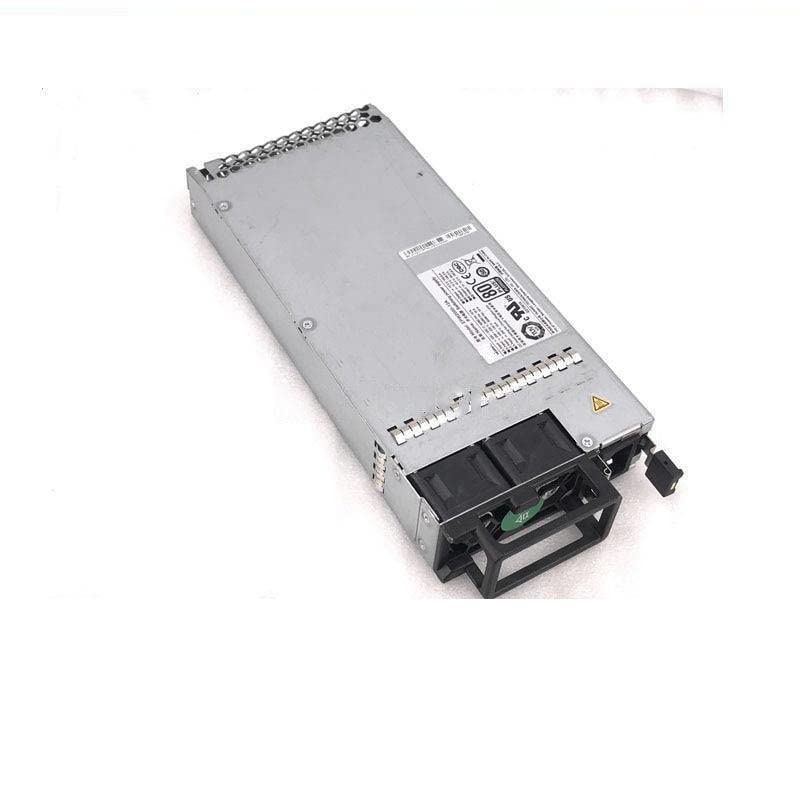
Figure 3.1: Generic EPW3000-12A 3000W Server Power Supply. This image displays the external view of the power supply unit, typically a rectangular metal enclosure with various connectors and cooling vents.
4. Орнотуу
- Пакеттен чыгаруу: Carefully remove the power supply from its packaging. Inspect for any signs of damage during transit.
- Монтаждоо: Install the power supply into the designated bay within your server chassis. Ensure it is securely fastened using appropriate screws.
- Кабелдик байланыштар: Connect all necessary power cables from the power supply to the server's motherboard, CPU, and other components (e.g., hard drives, GPUs). Ensure all connections are firm and correctly oriented.
- Электр кабели: Connect the AC power cord to the power supply's input port, then plug the other end into a grounded electrical outlet.
- Баштапкы күйгүзүү: After all connections are made, power on the server. Observe for any unusual noises, smells, or error indicators.
5. Иштөө нускамалары
The EPW3000-12A power supply operates automatically once installed and connected to a power source and the server components. It provides continuous power to the server system. No user intervention is typically required during normal operation.
- Күйгүзүү: The power supply will activate when the server is powered on.
- Өчүрүү: To power off the server and the power supply, follow the standard shutdown procedure for your server operating system, then disconnect the AC power cord if necessary for maintenance.
- Мониторинг: Server management software may provide information on power supply status, voltage, and temperature. Refer to your server's documentation for details.
6. Техникалык тейлөө
- Чаңды тазалоо: Periodically inspect the power supply's fan and vents for dust accumulation. Use compressed air to gently clean dust from the cooling fins and fan blades to ensure efficient heat dissipation. Perform this with the power supply disconnected from all power sources.
- Кабелдик текшерүү: Regularly check all power cables for signs of wear, fraying, or loose connections. Replace damaged cables immediately.
- Экологиялык текшерүү: Ensure the server environment remains within recommended temperature and humidity ranges to prevent stress on the power supply components.
7. Кыйынчылыктарды
| Көйгөй | Мүмкүн себеп | Чечим |
|---|---|---|
| No power to server | Loose power cable; tripped circuit breaker; faulty power supply | Check all power connections. Verify wall outlet functionality. Reset circuit breaker. If problem persists, test with a known good power supply. |
| Server shuts down unexpectedly | Overheating; power supply overload; internal fault | Ensure proper ventilation and clean dust. Verify total power draw does not exceed 3000W. If issues continue, professional diagnosis may be required. |
| Катуу желдеткичтин ызы-чуусу | Dust accumulation; failing fan bearing; high load/temperature | Clean fan and vents. Monitor server temperature. If noise is excessive and persistent, the fan may need replacement by a qualified technician. |
If you encounter issues not listed here or if the suggested solutions do not resolve the problem, contact your seller or a qualified service technician for assistance.
8. Техникалык шарттар
- Бренд: Жалпы
- Модел: EPW3000-12A
- Чыгуу Wattage: 3000 Ватт
- Output Voltage: 12V
- Чыгуу Ampкарылык: 240A
- Шайкеш түзмөктөр: Server (e.g., RH5885V2)
- Муздатуу ыкмасы: Аба
- ASIN: B0C3BHXNFM
- Биринчи жеткиликтүү болгон күнү: 23-апрель, 2023-жыл
9. Кепилдик жана колдоо
For warranty information and technical support, please refer to the documentation provided by your seller or contact the manufacturer directly. Specific warranty terms and support procedures may vary depending on your region and point of purchase.


