
Introduction
The Puro Sound Labs BT2200 Plus Kids Bluetooth Headphones are designed to provide a safe and high-quality audio experience for children. Featuring volume-limiting technology set at 85dB, these headphones protect young ears from potential hearing damage. They offer studio-grade audio with a Puro Balanced Response Curve for clear vocals and deep bass. The headphones support both wireless Bluetooth and wired connections, providing flexibility for various uses. With up to 20 hours of battery life and interchangeable ear cushions, the BT2200 Plus ensures comfort and extended listening enjoyment.

Image: Puro Sound Labs BT2200 Plus Kids Bluetooth Headphones, showcasing продукт жана анын таңгагы.
Жайгашуу
1. Кутудан чыгаруу жана баштапкы төлөм
Upon opening the package, verify that all included components are present:
- BT2200 Plus Headphones
- Коргоочу кап
- On-Ear & Over-Ear Cushions (interchangeable)
- 3.5 мм аудио кабель
- USB-C заряддоо кабели
- USB-C Daisy Chain Sharing Cable
Before first use, fully charge the headphones using the provided USB-C charging cable. Connect the USB-C end to the headphone's charging port and the USB-A end to a compatible USB power source (e.g., computer, wall adapter). The charging indicator light will show the charging status.

Сүрөт: An overview of all items included in the BT2200 Plus package, such as the headphones, case, cables, and ear cushions.
2. Bluetooth Жупташтыруу
- Наушниктердин заряддалганын жана өчүрүлгөнүн текшериңиз.
- Кулакчындардын Күйгүзүү баскычын LED индикатору көк жана кызыл түстө күйүп-өчкөнгө чейин басып туруңуз, бул жупташтыруу режимин көрсөтөт.
- Түзмөгүңүздө (смартфон, планшет, компьютер) Bluetooth жөндөөлөрүнө өтүп, Bluetooth'ду иштетиңиз.
- Select "Puro BT2200 Plus" from the list of available devices.
- Once connected, the LED indicator on the headphones will show a solid blue light.
3. Зымдуу туташуу
To use the headphones in wired mode, connect one end of the provided 3.5mm audio cable to the headphone's audio jack and the other end to your device's 3.5mm audio output. This allows for unlimited listening without battery consumption.

Image: Illustration of the headphones' dual connectivity options: Bluetooth for wireless use and a 3.5mm jack for wired connection.
4. Алмаштырылган кулак жаздыктары
The BT2200 Plus comes with both on-ear (compact) and over-ear (immersive) cushions. To switch them:
- Gently twist the existing ear cup counter-clockwise to detach it from the headphone.
- Align the new ear cushion with the headphone's ear cup and twist clockwise until it clicks securely into place.

Image: Visual guide on changing ear cushions, demonstrating the compact on-ear and immersive over-ear options.
Иштөө нускамалары
1. Күйгүзүү/өчүрүү
- Күйгүзүү үчүн: Кубат баскычын LED индикатору күйгүчө басып туруңуз.
- Өчүрүү үчүн: LED индикатору өчкөнчө Кубат баскычын басып, кармап туруңуз.
2. Үндү башкаруу
The headphones feature an 85dB volume limit for hearing protection. Use the volume control buttons on the headphone to adjust the listening level. The volume will not exceed the safe 85dB threshold.

Image: A visual representation of the 85dB volume limiting feature, showing a child using the headphones.
3. Музыканы ойнотуу жана чалууларды башкаруу
The headphones include push-button controls for managing audio and calls:
- Ойнотуу/тындыруу: Көп функциялуу баскычты бир жолу басыңыз.
- Кийинки трек: Көп функциялуу баскычты эки жолу басыңыз.
- Мурунку трек: Көп функциялуу баскычты үч жолу басыңыз.
- Чалууга жооп берүү/аяктоо: Кирүүчү чалуу учурунда же активдүү чалуу учурунда Көп функциялуу баскычты бир жолу басыңыз.
- Чакырууну четке кагуу: Кирүүчү чалуу учурунда Көп функциялуу баскычты басып, кармап туруңуз.
- Үн Жардамчысын жандыруу: Көп функциялуу баскычты 2 секунд басып туруңуз.
A built-in microphone allows for hands-free communication.
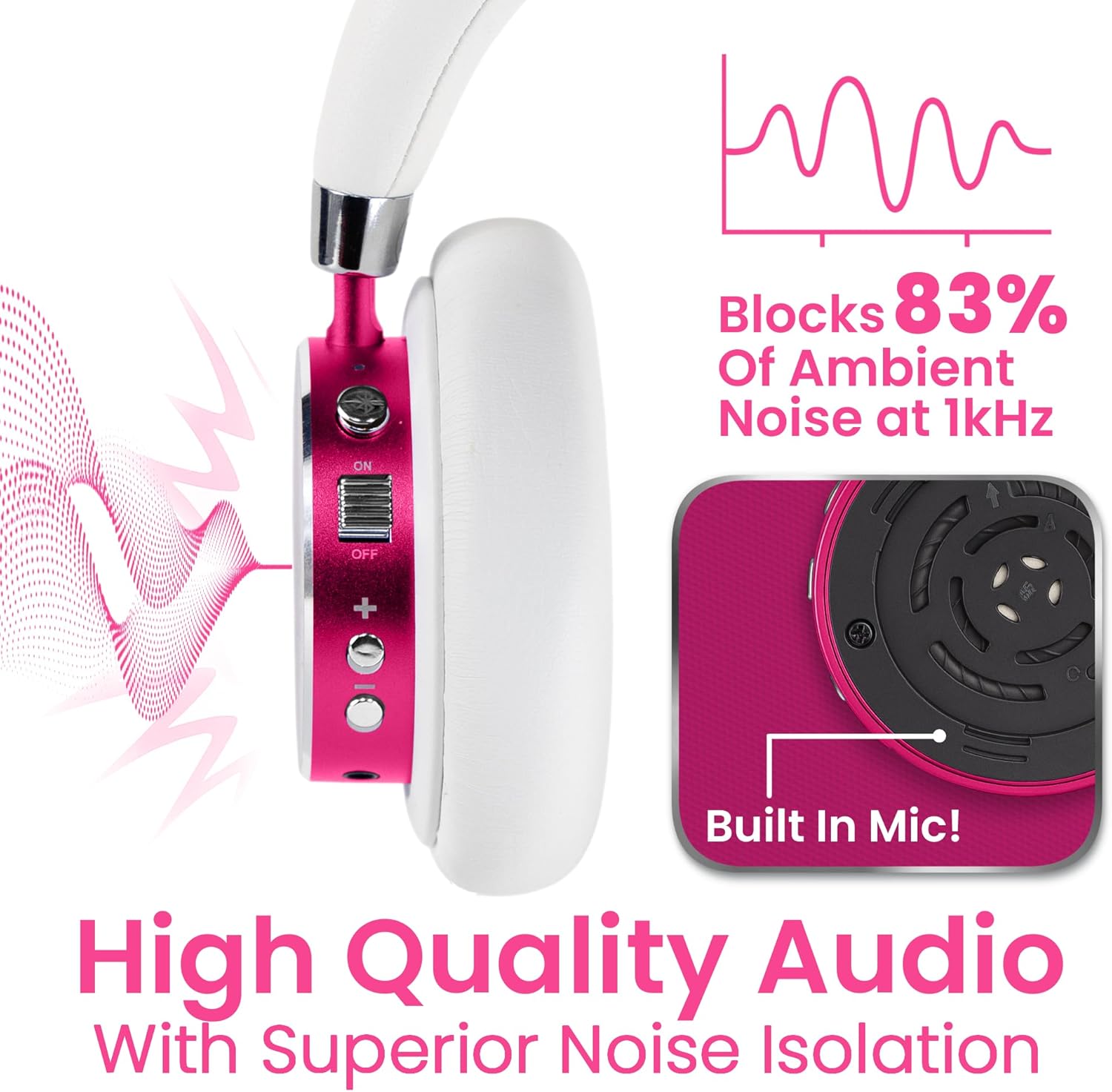
Сүрөт: деталдуу view of the headphone controls, highlighting the built-in microphone and noise isolation capabilities.
4. Daisy Chain Sharing
The included USB-C Daisy Chain Sharing Cable allows two BT2200 Plus headphones to connect to a single device, enabling shared listening experiences. Connect one end of the daisy chain cable to the USB-C port of the first headphone and the other end to the USB-C port of the second headphone. Then, connect the first headphone to your audio source via Bluetooth or the 3.5mm audio cable.
Note: The daisy chain cable is for audio sharing only and is not designed for charging the headphones.
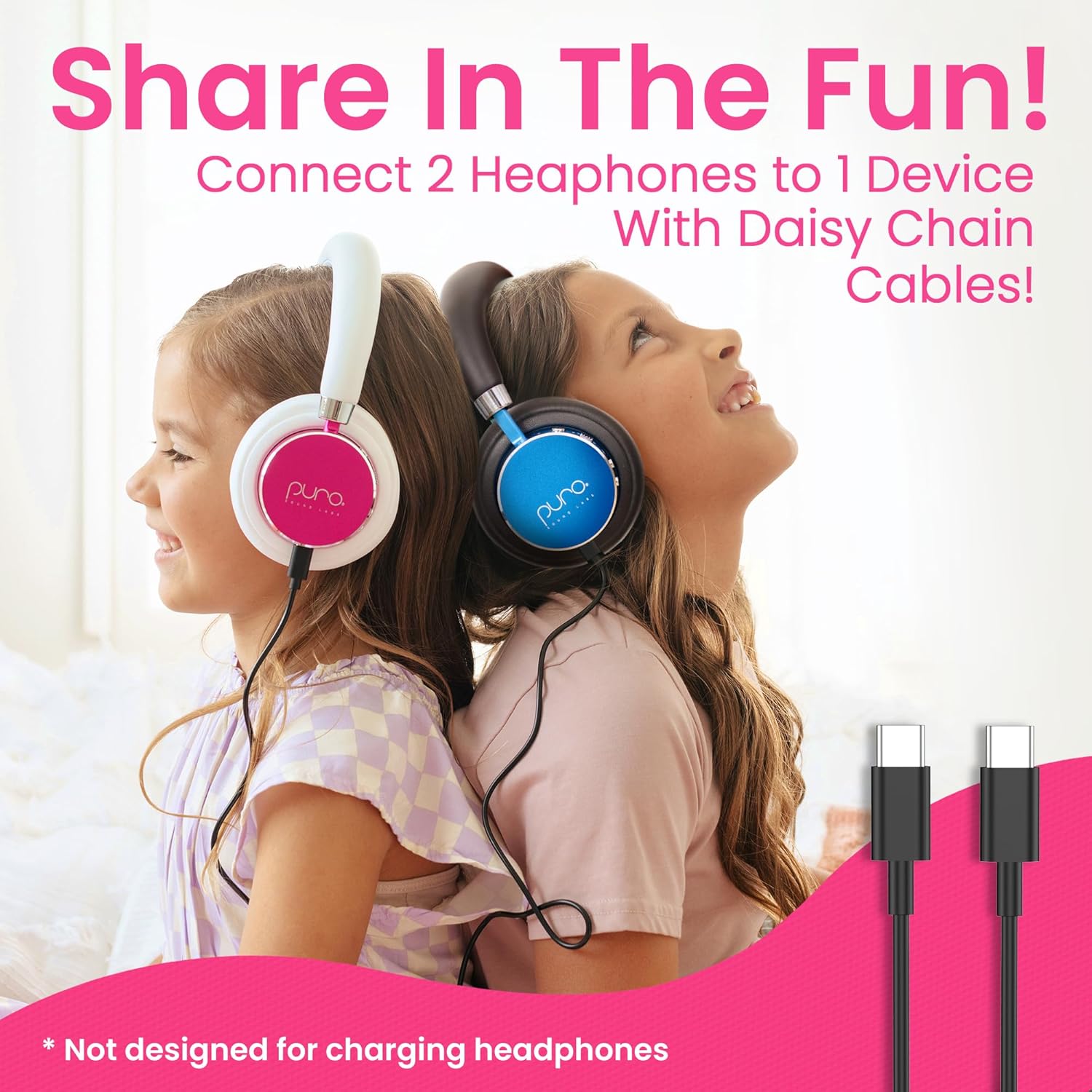
Image: Two children sharing audio using the daisy chain feature, with the USB-C sharing cables shown.
Техникалык тейлөө
1. Тазалоо
To maintain the headphones, gently wipe the ear cushions and headband with a soft, damp cloth. Avoid using harsh chemicals or abrasive materials. Ensure no moisture enters the ports.
2. Сактоо
When not in use, store the headphones in the provided protective hard case. This helps prevent damage from impacts, dust, and scratches, extending the product's lifespan.
Проблемаларды чечүү
- Кубат жок: Ensure the headphones are fully charged. Connect them to a power source using the USB-C charging cable.
- Bluetooth жупташтыруу мүмкүн эмес:
- Наушниктердин жупташтыруу режиминде экенин текшериңиз (LED көк жана кызыл күйүп турат).
- Түзмөгүңүздө Bluetooth иштетилгенин текшериңиз.
- Наушниктерди түзмөгүңүзгө жакыныраак жылдырыңыз.
- Эгер мурда жупташтырылган болсо, телефонуңуздагы аппаратты унутуп, кайра жупташып көрүңүз.
- No Sound (Wired Connection):
- Check that the 3.5mm audio cable is securely plugged into both the headphones and the audio source.
- Ensure the volume on both the headphones and the audio source is turned up.
- Төмөн үнү: The headphones are volume-limited to 85dB for hearing protection. This is a safety feature and not a malfunction. Ensure your device's volume is at its maximum setting.
- Микрофон иштебейт:
- Наушниктердин Bluetooth аркылуу туура туташтырылганын текшериңиз.
- Check your device's audio input settings to confirm the headphone microphone is selected.
Техникалык шарттар
| Өзгөчөлүк | Деталь |
|---|---|
| Модель аты | BT2200 Plus |
| Бренд | Puro Sound Labs |
| Байланыш технологиясы | Зымсыз (Bluetooth 5.0), Зымдуу (3.5 мм уяча) |
| Батареянын иштөө мөөнөтү | Up to 20 Hours (Wireless) |
| Көлөмдүн чеги | 85дБ |
| Кулак жайгаштыруу | Over Ear (with interchangeable cushions for On-Ear) |
| Материал | Faux Leather (Vegan Protein Leather for case) |
| Өзгөчөлүктөр | Adjustable Headband, Lightweight, Microphone Included, Noise Isolation, Volume Control |
| Жыштык диапазону | 20 Гц - 20 000 Гц |
| Bluetooth диапазону | 30 фут чейин |
| Элемент Салмагы | 1.21 фунт |
| UPC | 854381006911 |
Кепилдик жана колдоо
Puro Sound Labs stands behind the quality of its products. The BT2200 Plus Kids Bluetooth Headphones come with a 1 жылдык кепилдик сатып алынган күндөн тартып өндүрүш кемчиликтерин жабуу. Мындан тышкары, а 30 күндүк акчаны кайтаруу кепилдиги is offered for customer satisfaction.
For warranty claims, technical assistance, or any product-related inquiries, please contact Puro Sound Labs customer support directly. Contact information can typically be found on the official Puro Sound Labs webсайт же сатып алуу платформасы аркылуу.
Manufacturer: Puro Sound Labs