
HOCO HC5
Hoco HC5 Cool Enjoy Sports Wireless Speaker User Manual
Модел: HC5
Introduction
Сатып алганыңыз үчүн рахматasing the Hoco HC5 Cool Enjoy Sports Wireless Speaker. This manual provides important information regarding the setup, operation, and maintenance of your new speaker. Please read this manual thoroughly before using the product to ensure proper function and to extend its lifespan.
Коопсуздук маалыматы
- Динамикти экстремалдык температурага, түз күндүн нуруна же жогорку нымдуулукка дуушар кылбаңыз.
- Спикерди түшүрүүдөн же катуу таасирлерге дуушар кылуудан качыңыз.
- Do not disassemble, repair, or modify the speaker yourself. Refer to qualified service personnel.
- Динамикти суудан жана башка суюктуктардан алыс кармаңыз.
- Use only the specified charging cable and adapter.
- Динамикти жумшак, кургак чүпүрөк менен тазалаңыз. Катуу химиялык заттарды же абразивдүү тазалоочу каражаттарды колдонбоңуз.
Пакеттин мазмуну

Image: Hoco HC5 speaker in its retail packaging, showing the speaker and its accessories.
Пакеттин мазмунун кылдат текшериңиз. Эгерде кандайдыр бир буюмдар жок же бузулуп калса, сатуучуга кайрылыңыз.
- Hoco HC5 Wireless Speaker
- USB заряддоо кабели
- AUX кабели
- Погон
- Колдонуучунун Колдонмосу (бул документ)
Продукт бүттүview
Familiarize yourself with the various parts and controls of your Hoco HC5 speaker.

Сүрөт: алдыңкы view of the Hoco HC5 speaker, showcasing its cylindrical design, speaker grilles, and attached shoulder strap.

Сүрөт: Жакын план view of one end of the Hoco HC5 speaker, highlighting the speaker driver and the robust casing.
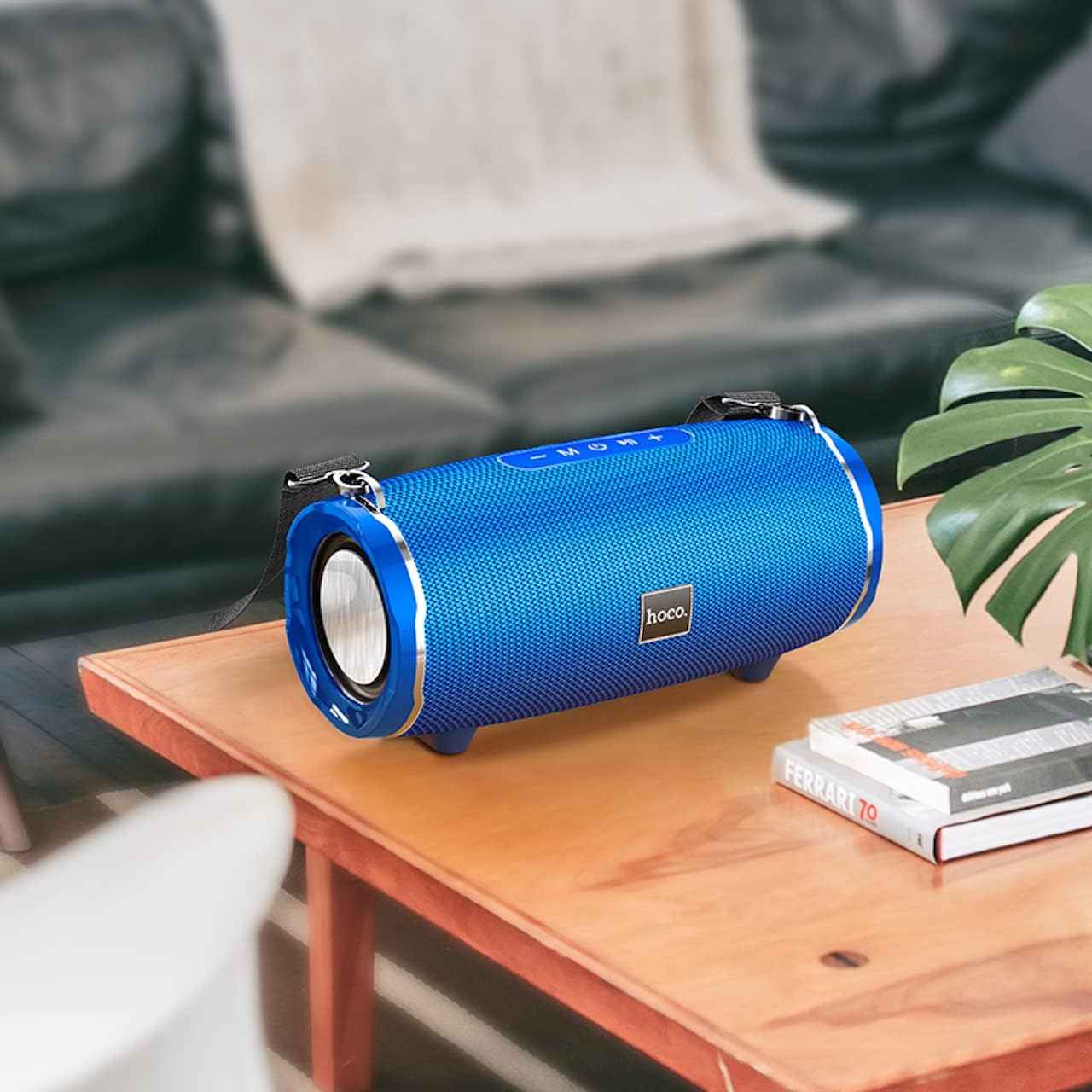
Image: The Hoco HC5 speaker placed on a wooden table, demonstrating its size and how it might appear in a home setting.
Control Panel (Top/Rear)
- Кубат баскычы: Күйгүзүү/өчүрүү үчүн басып туруңуз.
- Режим баскычы (M): Short press to switch between Bluetooth, TF Card, USB, AUX, and FM modes.
- Play/Pause Button (▶⏸): Short press to play or pause music. In FM mode, short press to auto-scan and save stations.
- Үндү азайтуу / Мурунку трек (-): Мурунку трекке кыска басыңыз. Үнүн азайтуу үчүн көпкө басыңыз.
- Үндү катуулатуу / Кийинки трек (+): Кийинки трекке кыска басыңыз. Үнүн жогорулатуу үчүн көпкө басыңыз.
Ports (Rear/Side)
- USB порт: USB флэш-дискти ойнотуу үчүн.
- TF карта уячасы: TF (MicroSD) картасын ойнотуу үчүн.
- AUX порту: 3.5 мм аудио кабель аркылуу тышкы аудио түзмөктөрдү туташтыруу үчүн.
- Заряддоо порту: Динамиктин ички батареясын заряддоо үчүн.
Жайгашуу
Спикерди заряддоо
- USB заряддоо кабелин динамиктин заряддоо портуна туташтырыңыз.
- USB кабелинин экинчи учун USB кубат адаптерине (5V/1A сунушталат) же компьютердин USB портуна туташтырыңыз.
- Заряддоо индикатору кубаттоо учурунда күйөт жана толук заряддалганда өчөт.
- Толук кубаттоо болжол менен 3.5 саатты талап кылат.
Күйгүзүү/өчүрүү
- Күйгүзүү үчүн: Press and hold the Power button for a few seconds until you hear a power-on prompt.
- Өчүрүү үчүн: Press and hold the Power button again for a few seconds until you hear a power-off prompt.
Иштөө нускамалары
Bluetooth режими
- Динамикти күйгүзүңүз. Ал автоматтык түрдө Bluetooth жупташтыруу режимине кирет, жаркыраган LED жарыгы менен көрсөтүлөт.
- Түзмөгүңүздө Bluetooth'ду иштетиңиз (смартфон, планшет ж.б.).
- Издөө "HC5" in the list of available Bluetooth devices and select it to connect.
- Once connected, the LED indicator will stop flashing, and you will hear a connection tone.
- Эми сиз түзмөгүңүздөн аудиону динамик аркылуу ойной аласыз.
- Use the Play/Pause, Volume Up/Down, and Previous/Next Track buttons on the speaker or your device to control playback.
TF Card / USB Mode
- Insert a TF (MicroSD) card or USB flash drive into the corresponding slot on the speaker.
- The speaker will automatically switch to TF Card or USB mode and begin playing audio files. If not, short press the "M" (Mode) button to switch.
- Сиздин аудиону камсыз кылуу fileлар шайкеш форматта (мисалы, MP3).
- Use the Play/Pause, Volume Up/Down, and Previous/Next Track buttons to control playback.
AUX режими
- Connect one end of the 3.5mm AUX cable to the speaker's AUX port.
- Экинчи учун тышкы аспабыңыздын аудио чыгаруу уячасына туташтырыңыз (мисалы, MP3 ойноткуч, компьютер).
- The speaker will automatically switch to AUX mode. If not, short press the "M" (Mode) button to switch.
- Audio will now play through the speaker. Control playback from your external device.
FM радио режими
- Short press the "M" (Mode) button until you enter FM radio mode.
- To auto-scan and save available FM stations, short press the Play/Pause button. The speaker will scan and store stations automatically.
- Сакталган станциялардын ортосунда багыт алуу үчүн "Мурунку/Кийинки трек" баскычтарын колдонуңуз.
TWS (True Wireless Stereo) Function (If Supported)
The Hoco HC5 speaker supports TWS function, allowing you to pair two HC5 speakers together for a true stereo sound experience.
- Ensure both HC5 speakers are powered on and not connected to any Bluetooth device.
- On one of the speakers (this will be the primary speaker), long press the Play/Pause button until you hear a prompt indicating TWS pairing mode.
- Эки динамик автоматтык түрдө бири-бирин издеп, туташат. Туташкандан кийин, сиз ырастоо обонун угасыз.
- Now, connect your device to the primary speaker via Bluetooth as described in the "Bluetooth Mode" section.
- Аудио эми эки динамиктен тең стерео режиминде ойнотулат.
Техникалык тейлөө
- Тазалоо: Use a soft, dry, lint-free cloth to wipe the surface of the speaker. Do not use liquid cleaners, aerosols, or solvents.
- Сактагыч: Узак мөөнөткө колдонулбаганда, динамикти күн тийбеген жана өтө температурадан алыс, салкын, кургак жерде сактаңыз.
- Батареяга кам көрүү: Батареянын иштөө мөөнөтүн узартуу үчүн, бат-баттан батарейканы толук зарядсыздандырбаңыз. Колдонулбаса дагы, динамикти дайыма заряддап туруңуз.
Проблемаларды чечүү
| Көйгөй | Мүмкүн себеп | Чечим |
|---|---|---|
| Динамик күйбөйт. | Батарея аз же түгөнүп калган. | Динамикти толук заряддаңыз. |
| Bluetooth түзмөгү менен жупташтыруу мүмкүн эмес. | Динамик жупташтыруу режиминде эмес; түзмөктүн Bluetooth функциясы өчүк; динамик мурунтан эле башка түзмөккө туташып турат. | Ensure speaker is in pairing mode (flashing LED). Turn off and on Bluetooth on your device. Disconnect from other devices. |
| Динамиктен үн жок. | Үн өтө төмөн; туура эмес режим тандалган; аудио булагы маселеси. | Increase speaker and device volume. Press "M" button to select correct mode. Check audio source. |
| FM радиосун кабыл алуу начар. | Алсыз сигнал; экологиялык кийлигишүү. | Relocate the speaker. Re-scan for stations. |
Техникалык шарттар
| Өзгөчөлүк | Деталь |
|---|---|
| Модел | HC5 |
| Bluetooth версиясы | 5.0 (JL chip) |
| Динамик өлчөмү | 76мм * 2 |
| Динамиктин кубаттуулугу | 15W * 2 (Жалпысынан 30W) |
| Батарея сыйымдуулугу | 3600mAh |
| Заряддоо убактысы | Болжол менен 3.5 саат |
| Музыка/Сүйлөшүү убактысы | 4 саатка чейин |
| Туташуу параметрлери | Bluetooth, TF card, USB, AUX, FM, TWS |
| Продукциянын өлчөмдөрү | 292 x 139 x 132 мм |
| Продукт Салмагы | 1.5 кг |
| Аудио чыгаруу режими | Курчап |
| Монтаж түрү | Стол үстү |
Кепилдик жана колдоо
The Hoco HC5 speaker comes with a standard manufacturer's warranty. Please refer to the warranty card included in your package for specific terms and conditions. For technical support, troubleshooting assistance, or warranty claims, please contact the retailer where you purchased the product or visit the official HOCO webбайланыш маалыматы үчүн сайт.
Өндүрүүчү: Hoco
Келип чыккан өлкө: Кытай
Ask a question about this manual
Ask about setup, troubleshooting, compatibility, parts, safety, or missing instructions. Manuals+ will review the question and use this page’s manual context to help answer it.