
1. Киришүү
Сатып алганыңыз үчүн рахматasing the Audizio Adria DAB/Internet Radio Tuner. This device offers a versatile audio experience, combining Internet Radio, DAB+, FM radio, Bluetooth connectivity, and Spotify Connect. This manual provides essential information for setting up, operating, and maintaining your tuner to ensure optimal performance and longevity.
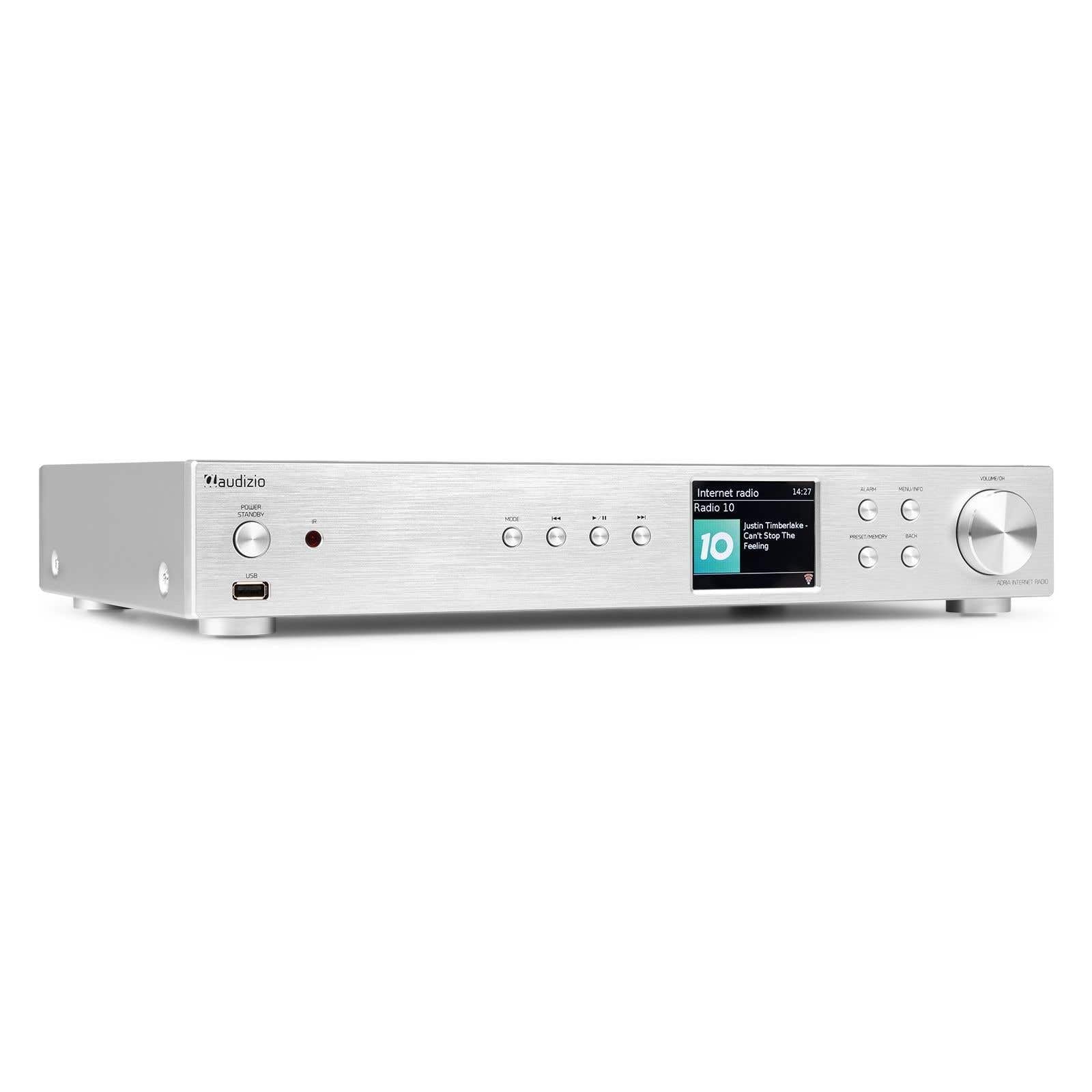
Figure 1.1: Audizio Adria DAB/Internet Radio Tuner with included remote control and antenna.
2. Коопсуздук маалыматы
- Колдонуудан мурун бардык нускамаларды кунт коюп окуп чыгыңыз.
- Keep the unit away from water, moisture, and direct heat sources.
- Вентиляция тешиктерин жаап албаңыз. Аба агымы туура болушу үчүн аппараттын айланасында жетиштүү мейкиндикти камсыз кылыңыз.
- Аппарат менен кошо берилген кубат адаптерин гана колдонуңуз.
- Агрегатты өзүңүз оңдоого же өзгөртүүгө аракет кылбаңыз. Бардык тейлөөлөрдү квалификациялуу кызматкерлерге тапшырыңыз.
- Dispose of batteries responsibly. The remote control uses 1 AAA battery.
3. Пакеттин мазмуну
Пакетте бардык буюмдар бар экенин текшериңиз:
- Audizio Adria DAB/Internet Radio Tuner Unit
- Remote Control (requires 1x AAA battery, included)
- Кубаттуу адаптер
- DAB/FM антеннасы
- User Manual
4. Продукт бүтүп калдыview
4.1 алдыңкы панели

4.1-сүрөт: Алдыңкы панелдин башкаруу элементтери жана дисплейи
- Power / Standby Button: Агрегатты күйгүзөт же өчүрөт.
- USB порт: USB сактагыч түзмөктөрүнөн медиа ойнотуу үчүн.
- Режим баскычы: Switches between Internet Radio, DAB+, FM, Bluetooth, and Media Player modes.
- Ойнотуу/тындыруу баскычы: Медиа режимдеринде ойнотууну башкарат.
- Өткөрүп жиберүү/Түздөө баскычтары: Navigates tracks or tunes radio frequencies.
- Дисплей экраны: Станция жөнүндө маалыматты, менюларды жана жөндөөлөрдү көрсөтөт.
- Ойготкуч баскычы: Ойготкуч жөндөөлөргө жетет.
- Menu/Info Button: Enters menu or displays information.
- Preset/Memory Button: Saves or recalls favorite stations.
- Артка баскычы: Мурунку менюга же экранга кайтат.
- Volume / OK Knob: Rotates to adjust volume or navigate menus; presses to confirm selections.
4.2 Арткы панель

Сүрөт 4.2: Арткы панелдик байланыштар
- Кубат киргизүү: Берилген кубат адаптерин бул жерге туташтырыңыз.
- DAB/FM антенна киргизүүсү: Connect the included DAB/FM antenna.
- Analog Output (RCA): а туташуу ampRCA кабелдерин колдонгон көтөргүч же активдүү динамиктер.
- AUX киргизүү: Тышкы аудио булактарын 3.5 мм уяча аркылуу туташтырыңыз.
- USB кубаттоочу порт: Тышкы түзмөктөрдү кубаттоо үчүн.
- Оптикалык санарип чыгуу: а туташуу amplifier or DAC with an optical cable.
- Коаксиалдык санариптик чыгаруу: а туташуу amplifier or DAC with a coaxial cable.
5. Орнотуу
5.1 Connecting Power and Antennas
- Connect the supplied DAB/FM antenna to the DAB/FM Antenna Input on the rear panel. Extend the antenna fully for best reception.
- Connect the power adapter to the Power Input on the rear panel, then plug it into a wall outlet.
5.2 Аудио системага туташуу
Choose one of the following methods to connect the Adria tuner to your ampкөтөргүч же активдүү динамиктер:
- Analog Output (RCA): Use RCA cables to connect the Analog Output ports on the Adria to the corresponding input on your ampөмүрлүү.
- Оптикалык санарип чыгуу: Use an optical cable to connect the Optical Digital Output to an optical input on your ampкөтөргүч же DAC.
- Коаксиалдык санариптик чыгаруу: Use a coaxial cable to connect the Coaxial Digital Output to a coaxial input on your ampкөтөргүч же DAC.
5.3 Алгачкы күйгүзүү жана тармакты орнотуу
- Press the Power/Standby button on the front panel or remote control to turn on the unit.
- The display will show the Audizio logo, then guide you through the initial setup wizard.
- Follow the on-screen prompts to select your language, time zone, and connect to your Wi-Fi network. You will need your Wi-Fi network name (SSID) and password.
- Use the Volume/OK knob to navigate menus and confirm selections.
6. Иштөө нускамалары
6.1 Режимди тандоо
басыңыз Mode button on the front panel or remote control to cycle through available modes: Internet Radio, DAB+, FM, Bluetooth, and Media Player (USB).
6.2 Интернет радиосу
Figure 6.1: Internet Radio Mode Display
- Интернет радио режимин тандаңыз.
- Use the Volume/OK knob to browse stations by location, genre, or search.
- Press the Volume/OK knob to select a station.
- Станцияны алдын ала коюлган катары сактоо үчүн, баскычын басып, кармап туруңуз Алдын ала коюлган/эс button. Select a preset number and confirm.
- Алдын ала коюлган орнотууну кайра чакырып алуу үчүн, баскычын басыңыз Алдын ала коюлган/эс button briefly, then select the desired preset.
6.3 DAB/DAB+ радиосу

Figure 6.2: DAB Radio Mode Display
- Select DAB+ mode. The unit will automatically scan for available stations on first use.
- Use the Volume/OK knob to scroll through the list of stations.
- Press the Volume/OK knob to select a station.
- Saving and recalling presets works the same as for Internet Radio.
6.4 FM радиосу
In FM mode, use the Skip/Tune buttons to manually tune frequencies or press and hold to auto-scan. Saving and recalling presets works the same as for Internet Radio.
6.5 Bluetooth байланышы
- Select Bluetooth mode. The unit will enter pairing mode automatically.
- On your smartphone, tablet, or other Bluetooth device, search for available devices and select "Audizio Adria".
- Once paired, you can stream audio from your device to the tuner.
6.6 Spotify Connect
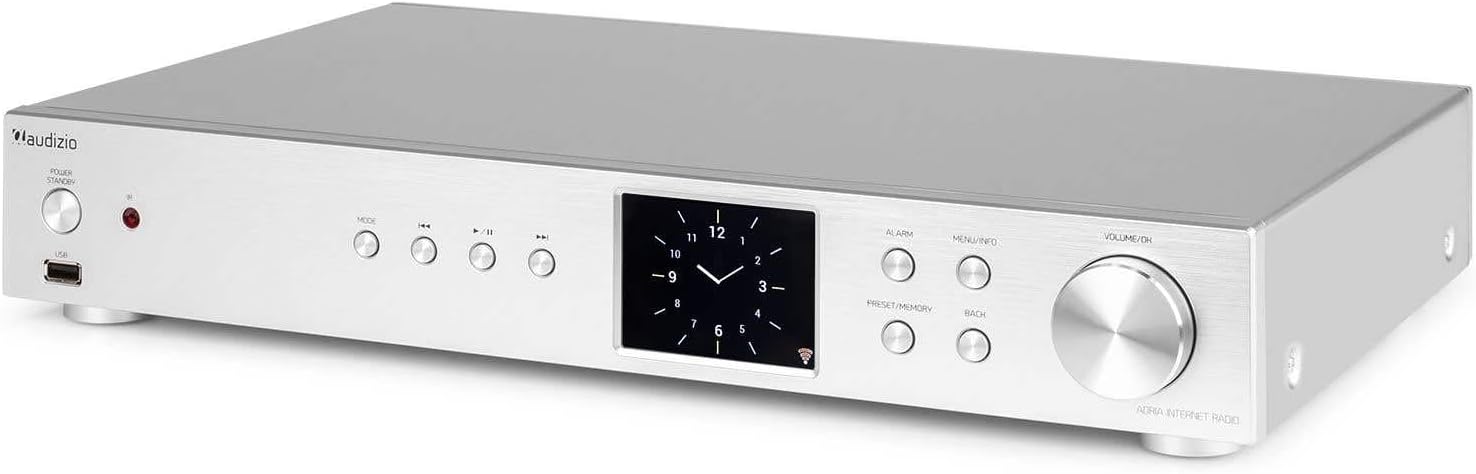
Figure 6.3: Spotify Connect Display
To use Spotify Connect:
- Ensure your Audizio Adria is connected to the same Wi-Fi network as your smartphone or tablet running the Spotify app.
- Түзмөгүңүздөгү Spotify колдонмосун ачып, ыр ойнотуңуз.
- Tap the "Devices Available" icon (usually a speaker or computer icon) at the bottom of the screen.
- Select "Audizio Adria" from the list of available devices. The music will now play through your tuner.
6.7 Ойготкуч функциясы

Figure 6.4: Clock and Alarm Display
басыңыз Ойготкуч button to access and set up alarms. You can configure alarm time, source (buzzer, Internet Radio, DAB, FM), and frequency (daily, once, weekends, weekdays).
7. Алыстан башкаруу

7.1-сүрөт: Алыстан башкаруунун схемасы
The remote control provides full functionality for operating your Audizio Adria tuner. Ensure the included AAA battery is correctly inserted. Point the remote control directly at the unit's front panel for optimal response.
- СНУЗЕ: Ойготкучтун үнүн убактылуу өчүрөт.
- Кубат баскычы: Агрегатты күйгүзөт же өчүрөт.
- Чабыттоо баскычтары (өйдө, ылдый, солго, оңго, ОК): Менюда навигация жана тандоо үчүн.
- VOL +/-: Үн көлөмүн тууралайт.
- РЕЖИМ: Киргизүү режимдери аркылуу циклдерди өткөрөт.
- МЕНЮ: Негизги менюга кирет.
- Back: Мурунку экранга кайтат.
- МААЛЫМАТ: Displays detailed information about the current station or track.
- СКАН: Радио станцияларын издөөнү баштайт.
- EQ: Accesses equalizer settings.
- Сандык баскычтоп (0-9): For direct input or selecting presets.
- ОРНОТУУ: Saves or recalls favorite stations.
8. Техникалык тейлөө
To ensure the longevity and optimal performance of your Audizio Adria tuner, follow these maintenance guidelines:
- Тазалоо: Use a soft, dry cloth to clean the unit's exterior. Do not use abrasive cleaners, waxes, or solvents.
- Вентиляция: Ensure that the ventilation openings are not blocked. Dust accumulation can be removed with a soft brush or vacuum cleaner.
- Сактагыч: Агрегатты узак убакытка сактасаңыз, аны кубаттан ажыратып, салкын, кургак жерде сактаңыз.
- Антеннага кам көрүү: Handle the antenna gently to avoid damage.
9. Кыйынчылыктарды
If you encounter issues with your Audizio Adria tuner, consult the following table for common problems and solutions:
| Көйгөй | Мүмкүн себеп | Чечим |
|---|---|---|
| Күч жок | Электр кабели туташкан эмес; розетка туура эмес. | Электр кабелинин туташуусун текшерүү; башка розеткага аракет кылып көрүңүз. |
| Үн жок | Volume too low; incorrect audio output selected; amplifier/speakers off or disconnected. | Increase volume; check audio cable connections; ensure amplifier/speakers are on and set to correct input. |
| Wi-Fi'га туташпай жатат | Туура эмес сырсөз; алсыз сигнал; роутердеги көйгөй. | Wi-Fi сырсөзүн текшериңиз; түзмөктү роутерге жакындатыңыз; роутерди өчүрүп-күйгүзүңүз. |
| DAB/FM кабыл алуу начар | Антенна узартылган эмес; начар сигнал аймак. | Fully extend and reposition the antenna; consider an external antenna if available. |
| Bluetooth жупташтыруу ишке ашпай калды | Түзмөк жупташтыруу режиминде эмес; аппарат өтө алыс; кийлигишүү. | Ensure both devices are in pairing mode; move devices closer; turn off other Bluetooth devices. |
10. Техникалык шарттар
| Өзгөчөлүк | Спецификация |
|---|---|
| Бренд | Аудизио |
| Модель номери | Адриа |
| Түс | Silver |
| Дисплей өлчөмү | 3.2 дюйм |
| Байланыш технологиясы | Optical, Coaxial, Bluetooth |
| Өзгөчөлүктөр | Bluetooth, Internet Radio, DAB+, FM, Spotify Connect |
| Колдоого алынган радио тилкелери | DAB, DAB+, FM |
| Power Source | Электр зымдары |
| Продукциянын өлчөмдөрү (L x W x Y) | 43.4 x 7.5 x 31 см |
| Элемент Салмагы | 3.2 килограмм |
| Камтылган компоненттер | Алыстан башкаруу |
| Шайкеш түзмөктөр | Смартфон, планшет, ноутбук |
11. Кепилдик маалыматы
This product is covered by a manufacturer's warranty. Please refer to the warranty card included in your package or contact your retailer for specific terms and conditions. Keep your proof of purchase for warranty claims.
12. Колдоо
For technical assistance, troubleshooting beyond this manual, or service inquiries, please contact Audizio customer support or your local dealer. Contact information can typically be found on the manufacturer's webсайт же сатып алуу документтери.