
Keychron Q6P-P1
Keychron Q6 Pro Mechanical Keyboard User Manual
Model: Q6P-P1
Introduction
The Keychron Q6 Pro is a full-metal, QMK/VIA compatible, Bluetooth wireless and Type-C wired custom mechanical keyboard featuring a 100% full-size layout. Crafted with high-quality 6063 aluminum, it incorporates a double-gasket design, durable PBT keycaps, and screw-in stabilizers to provide an exceptional typing experience. This manual provides comprehensive instructions for setting up, operating, maintaining, and troubleshooting your Keychron Q6 Pro keyboard.
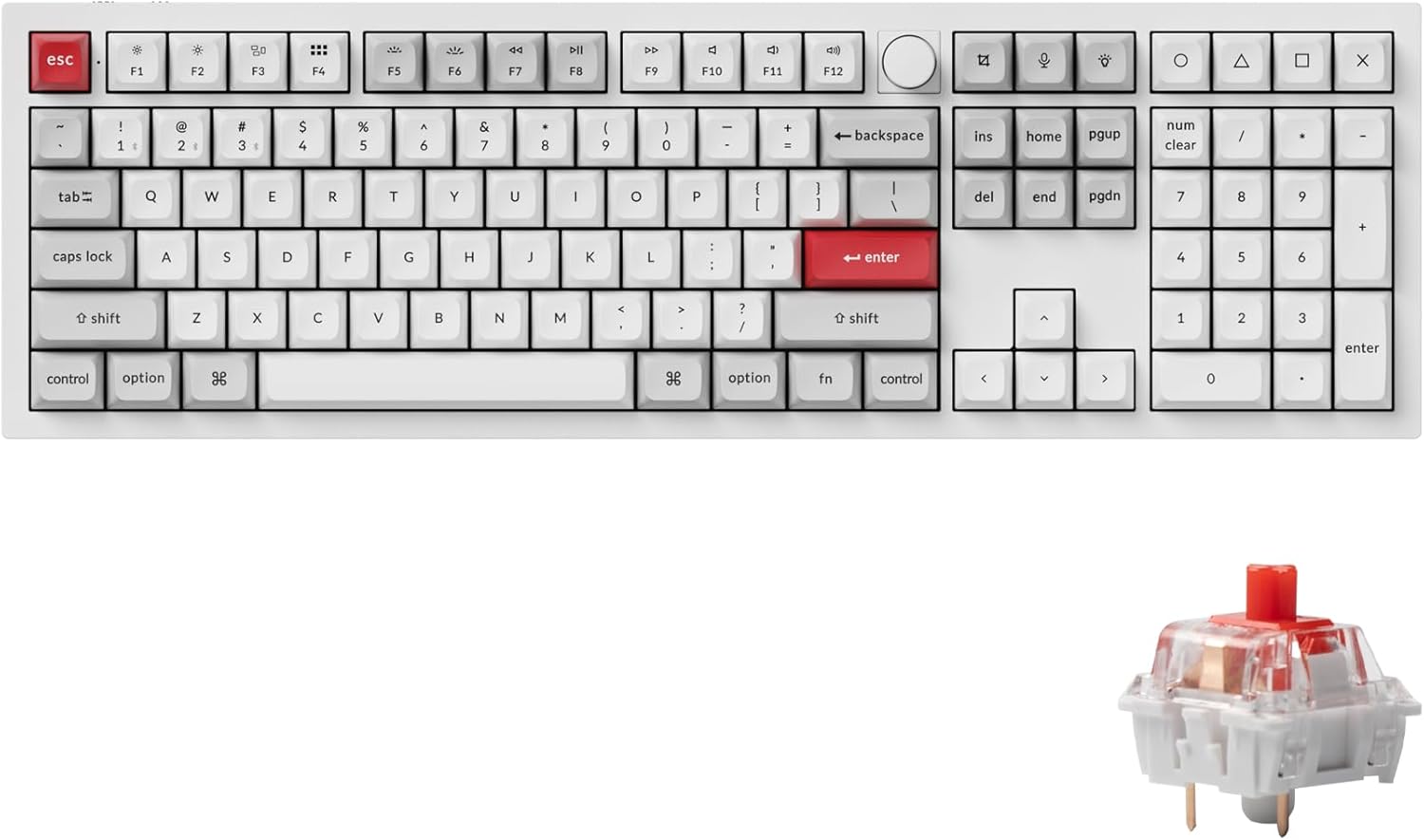
Image: Keychron Q6 Pro Full-Size Mechanical Keyboard with KSA Double-Shot PBT Keycaps and Red Switches.
Кутуда эмне бар
Upon unboxing your Keychron Q6 Pro, please verify that all the following components are included:
Баскычтоптун компоненттери
- 1x Толугу менен чогултулган клавиатура
- 1x Алюминий куту
- 1x PC Plate
- 1x Үндү жутуучу көбүк
- 1x Case Foam
- 16x Gaskets (12 Installed, 4 in box)
- 8 комплект x Стабилизаторлор
- 1 комплект x баскычтоп капкактары (Кош атуучу KSA PBT)
- 1 set x Switches (Keychron K Pro Red Switch)
Cables & Tools
- 1x Type-C - Type-C кабели
- 1x Type-A to Type-C адаптер
- 1x Которгуч тарткыч
- 1x Баскыч капкагын тарткыч
- 1x Screwdriver
- 1x Hex ачкычы

Image: Diagram showing all components included in the Keychron Q6 Pro Fully Assembled Version package.
Жайгашуу
- Баскычтопту таңгактан чыгаруу: Баскычтопту жана бардык аксессуарларды таңгактан кылдаттык менен чыгарып алыңыз.
- Connect to Power/Device:
- Зымдуу режим: Connect the keyboard to your computer using the provided Type-C to Type-C cable or Type-A to Type-C adapter. The keyboard will automatically switch to wired mode and begin charging.
- Wireless (Bluetooth) Mode:
- Ensure the mode switch on the back of the keyboard is set to "BT" (Bluetooth).
- Компьютериңизде же түзмөгүңүздө Bluetooth'ду иштетиңиз.
- Press and hold the "Fn" key and one of the Bluetooth keys (e.g., "Fn" + "1" for Device 1) for 4 seconds until the key starts blinking rapidly. This indicates pairing mode.
- On your device's Bluetooth settings, select "Keychron Q6 Pro" from the list of available devices to pair.
- The key will stop blinking and remain solid once successfully paired. The keyboard can connect to up to 3 devices via Bluetooth.
- Операциондук системаны которуу: Locate the OS switch on the back of the keyboard. Set it to "Mac" for macOS devices or "Win" for Windows/Linux devices to ensure correct key mapping.
- Баштапкы төлөм: For optimal battery life, it is recommended to fully charge the keyboard before its first wireless use. The charging indicator light will show charging status.

Image: The Keychron Q6 Pro keyboard highlighting its dual connectivity options: Bluetooth 5.1 and Type-C wired.
Иштөө нускамалары
Негизги функциялар жана макет
The Keychron Q6 Pro features a full-size layout with dedicated function keys, a numeric keypad, and a programmable knob.
Сүрөт: үстүнкү view of the Keychron Q6 Pro keyboard, illustrating its full-size layout with a knob.
QMK/VIA Software Customization
The Q6 Pro is fully programmable with QMK/VIA firmware, allowing you to remap any key, create custom macros, shortcuts, and key combinations. This provides extensive personalization for your typing and gaming needs.
- VIA программасын жүктөп алыңыз: Расмий Keychronга барыңыз website to download the latest VIA software compatible with your operating system.
- Download Keymap JSON: Download the specific keymap JSON file for the Keychron Q6 Pro from the Keychron webсайт.
- Load Keymap in VIA:
- Open the VIA application.
- Go to the "Settings" tab and enable "Show Design tab".
- Drag and drop the downloaded Q6 Pro keymap JSON file into the "Design" tab within VIA. This will load the keyboard's layout for customization.
- Remap Keys and Create Macros: Use the intuitive interface in VIA to reassign key functions, set up complex macros, and adjust lighting effects. Changes are applied in real-time.
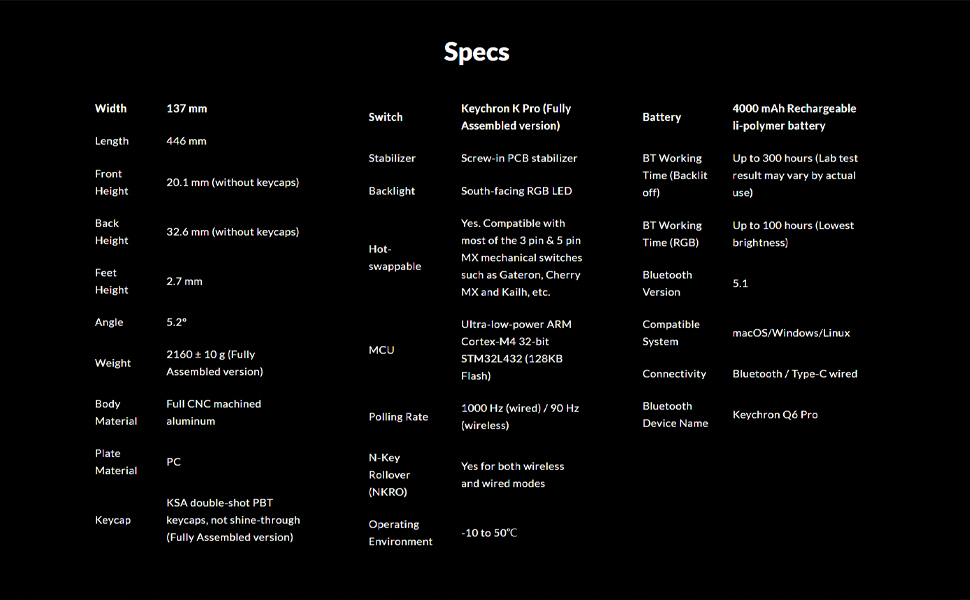
Image: Screenshot of the QMK/VIA software interface, demonstrating its capabilities for programming the Keychron Q6 Pro keyboard.
Ыкчам алмаштыруучу которгучтар
The Keychron Q6 Pro features hot-swappable sockets, allowing you to easily change mechanical switches without soldering. This provides flexibility to customize your typing feel.
- Шайкештик: The keyboard is compatible with most 3-pin and 5-pin MX style mechanical switches (e.g., Cherry, Gateron, Kailh, Panda).
- Которгучтарды алып салуу: Use the provided switch puller tool. Gently grip the switch from the top and bottom, then pull straight up to remove it from the PCB.
- Которгучтарды орнотуу: Жаңы өчүргүчтүн төөнөгүчтөрүн платадагы тешиктер менен тегиздеңиз. Өчүргүч ордуна чыкылдаганча бекем басыңыз. Төөнөгүчтөрдүн ийилбегенин текшериңиз.

Сүрөт: Жакын план view demonstrating the hot-swappable switch feature of the Keychron Q6 Pro, with switches being removed and installed.
RGB жарыктандыруу
The Q6 Pro features south-facing RGB LED backlighting with 22 types of pre-set lighting effects. You can further customize the RGB hue, saturation, brightness, effect speed, and modes through the QMK/VIA software.
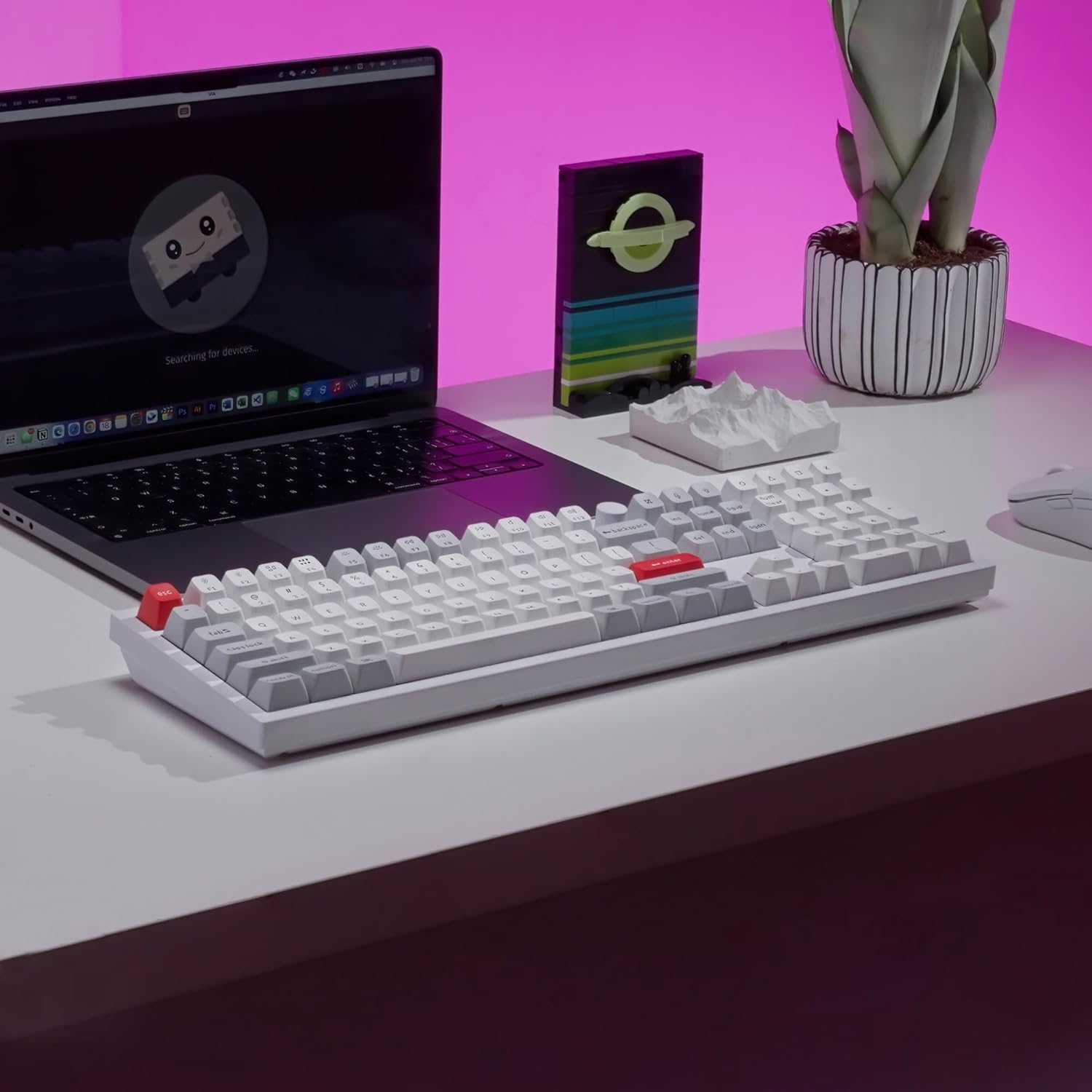
Image: The Keychron Q6 Pro keyboard illuminated with its vibrant South-Facing RGB backlighting.
Техникалык тейлөө
- Клавиатураны тазалоо: Баскыч капкактарын алып салуу үчүн клавиатура тарткычын колдонуңуз. Аларды жумшак чүпүрөк менен тазалоо dampжумшак самын жана суу менен бүттү. Кайра жабыштыруудан мурун алар толугу менен кургатылганын текшериңиз.
- Ишти тазалоо: Wipe the aluminum case with a soft, dry, or slightly damp кездеме. Абразивдүү тазалагычтардан же эриткичтерден качыңыз.
- Switch Lubrication (Optional): For advanced users, switches can be lubricated to enhance smoothness and sound. This requires disassembling the switch.
- Программалык камсыздоонун жаңыртуулары: Periodically check the Keychron official webоптималдуу иштешин жана жаңы функцияларга жетүүнү камсыз кылуу үчүн микропрограммаларды жаңыртуу үчүн сайт.

Image: Close-up of keycaps being removed from the keyboard, illustrating the process for cleaning or replacement.
Проблемаларды чечүү
| Көйгөй | Мүмкүн себеп | Чечим |
|---|---|---|
| Баскычтоп жооп бербей жатат (зымдуу) | Loose cable connection, incorrect OS switch setting. | Ensure USB-C cable is securely connected. Check the OS switch on the back of the keyboard (Mac/Win). Try a different USB port or cable. |
| Баскычтоп туташпай жатат (Bluetooth) | Keyboard not in pairing mode, Bluetooth off on device, interference, low battery. | Ensure keyboard is in "BT" mode. Press Fn + (1/2/3) for 4 seconds to enter pairing mode. Check device's Bluetooth settings. Charge the keyboard. Move closer to the device. |
| Ачкычтар катталбайт же эки жолу терилбейт | Faulty switch, debris under keycap, bent switch pin. | Remove keycap and switch. Check for debris and clean. Inspect switch pins for bends; straighten carefully if bent. Replace faulty switch if necessary. |
| RGB жарыгы иштебейт же туура эмес | Software setting, firmware issue. | Adjust RGB settings via QMK/VIA software. Ensure keyboard firmware is up to date. |
| Programmable knob not working | VIA software configuration, physical damage. | Verify knob functions are correctly mapped in VIA. Ensure the knob is securely attached. |
Техникалык шарттар
| Өзгөчөлүк | Деталь |
|---|---|
| Модел | Keychron Q6 Pro (Q6P-P1) |
| Dimensions (Width x Length) | 137 мм x 446 мм |
| Height (Front / Back without keycap) | 20.1 мм / 32.6 мм |
| Feet Height | 2.7 мм |
| Терүү бурчу | 5.2° |
| Салмагы | 2160 ± 10 g (Fully Assembled version) |
| Дене материалы | Full CNC machined aluminum |
| Пластина материалы | PC |
| Баскыч капкактары | KSA double-shot PBT (not shine-through) |
| Которгучтар | Keychron K Pro Red (Fully Assembled version) |
| Стабилизаторлор | PCB-mounted screw-in stabilizers |
| Арткы жарык | Түштүктү караган RGB LED |
| Ыкчам алмаштырылуучу | Yes, compatible with most 3-pin & 5-pin MX mechanical switches |
| MCU | Ultra-low-power ARM Cortex-M4 32-bit STM32L432 (128KB Flash) |
| Добуш берүү көрсөткүчү | 1000 Hz (wired) / 90 Hz (wireless) |
| N-Key Rollover (NKRO) | Yes (both wireless and wired modes) |
| Иштөө чөйрөсү | -10…50°С |
| Батарея | 4000 mAh Rechargeable Li-polymer battery |
| Bluetooth Working Time (Backlit off) | Up to 300 hours (Lab test result may vary) |
| Bluetooth Working Time (RGB Lowest brightness) | 100 саатка чейин |
| Bluetooth версиясы | 5.1 |
| Шайкеш система | macOS, Windows, Linux |
| Байланыш | Bluetooth / Type-C wired |
| Bluetooth түзмөгүнүн аталышы | Keychron Q6 Pro |

Image: Detailed technical specifications for the Keychron Q6 Pro keyboard.
Кепилдик жана колдоо
Keychron products are designed for durability and performance. For detailed warranty information, please refer to the official Keychron webсайтка же продуктуңузга кошулган кепилдик картасы.
- Кайтаруу саясаты: This product is eligible for a refund or replacement within 30 days of purchase, subject to the retailer's return policy.
- Колдонуучу колдонмолору: Additional user guides and manuals in PDF format are available for download:
- Онлайн колдоо: For further assistance, troubleshooting tips, firmware updates, and software downloads, please visit the official Keychron support page.
Ask a question about this manual
Ask about setup, troubleshooting, compatibility, parts, safety, or missing instructions. Manuals+ will review the question and use this page’s manual context to help answer it.