Продукт бүттүview
This user manual provides detailed instructions for the Generic Desktop Microphone, Model 080-08-1682. This stylish cardioid condenser microphone offers easy, convenient functionality for various audio recording and communication needs.

Figure 1: Generic Desktop Microphone (Stone White)
Негизги өзгөчөлүктөрү:
- Cardioid condenser mic for clear audio capture.
- Integrated volume control and mute function.
- Includes a 6-foot USB-C to USB-A cable for versatile connectivity.
- Compatible with both Mac and PC operating systems.
- Features an aux port for headphone connection, enabling real-time audio monitoring.
- Comes with an adjustable stand for hands-free use and optimal positioning.
- Sensitivity: -33dB +/- 3dB.
Орнотуу колдонмосу
Follow these steps to set up your Desktop Microphone:
- Микрофонду таңгактан чыгаруу: Carefully remove the microphone, adjustable stand, and USB-C to USB-A cable from the packaging.
- Стендди чогултуу: The microphone comes with an adjustable stand. Attach the microphone securely to the stand. The stand allows for hands-free operation and easy positioning on your desk.
- Компьютерге туташуу: Use the included 6-foot USB-C to USB-A cable.
- Insert the USB-C end of the cable into the port on the microphone.
- Insert the USB-A end of the cable into an available USB port on your Mac or PC.
The microphone is plug-and-play compatible and should be automatically recognized by your operating system.
- Наушниктерди туташтыруу (кошумча): For real-time audio monitoring, connect your headphones to the aux port located on the microphone.
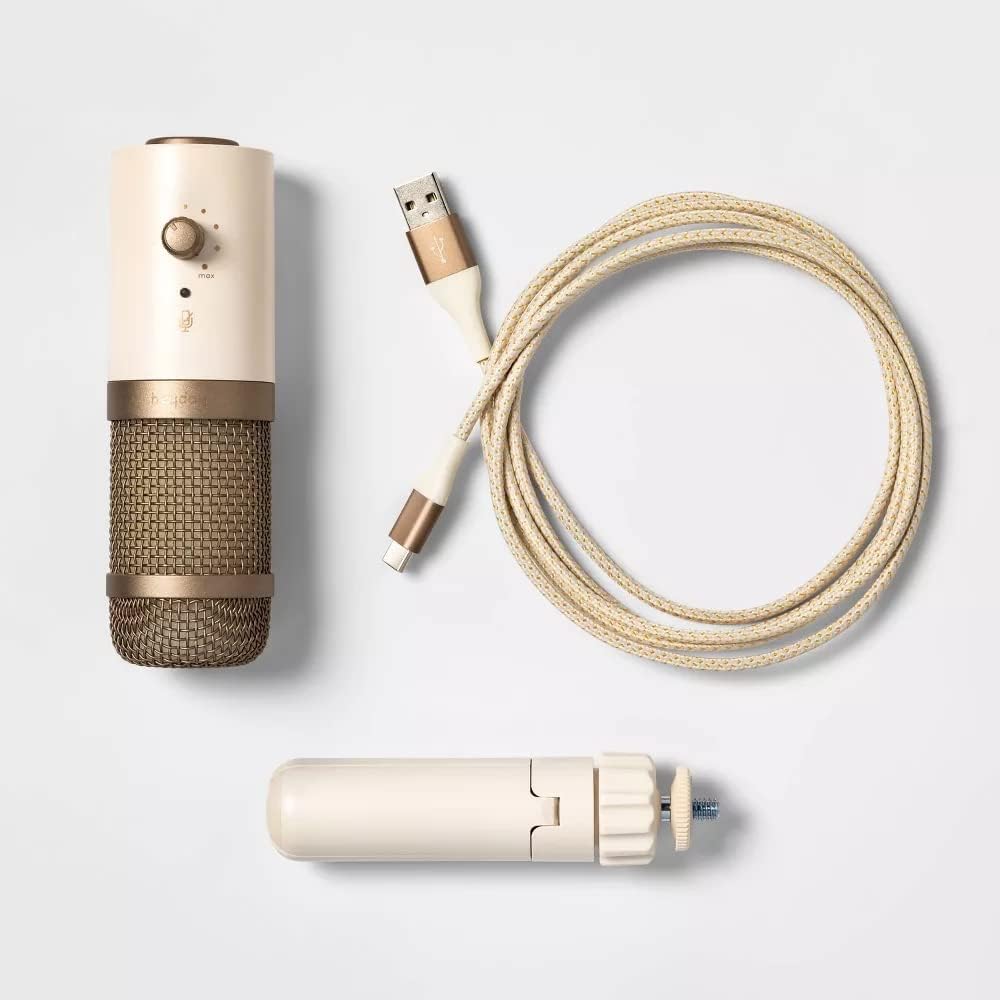
Figure 2: Microphone with included accessories
Иштөө нускамалары
Once connected, your Desktop Microphone is ready for use. Here are the basic operating functions:
- Үндү көзөмөлдөө: Use the volume knob on the microphone to adjust the output level of your audio. Turn clockwise to increase volume, counter-clockwise to decrease.
- Үнсүз функция: Press the mute button to instantly silence the microphone. Press it again to unmute. An indicator light may show the mute status (refer to microphone for specific light behavior).
- Колдонуу: The cardioid pickup pattern primarily captures sound from directly in front of the microphone, reducing background noise. Position the microphone appropriately for your voice or sound source. This microphone is ideal for:
- Audio and video calls
- Online meetings
- Үн жаздыруу
- Подкастинг
Техникалык тейлөө
To ensure the longevity and optimal performance of your Desktop Microphone, follow these maintenance guidelines:
- Тазалоо: Use a soft, dry cloth to wipe down the exterior of the microphone. Do not use liquid cleaners or abrasive materials, as they may damage the finish or internal components.
- Сактагыч: Колдонулбаган учурда микрофонду күн тийбеген жана өтө температурадан алыс, салкын, кургак жерде сактаңыз.
- Колдонуу: Avoid dropping the microphone or subjecting it to strong impacts, which can damage the internal condenser element.
Проблемаларды чечүү
If you encounter issues with your Desktop Microphone, refer to the following common troubleshooting steps:
| Көйгөй | Мүмкүн себеп | Чечим |
|---|---|---|
| No sound output from microphone. | Microphone not properly connected or muted. Incorrect input device selected. |
|
| Low or distorted audio. | Volume too low, microphone too far, or interference. |
|
| Headphones not working with aux port. | Headphones not fully plugged in or faulty. |
|
Техникалык шарттар
| Өзгөчөлүк | Деталь |
|---|---|
| Бренд | Жалпы |
| Модель номери | 080-08-1682 |
| Байланыш технологиясы | USB |
| Микрофон форма фактору | Mini, Desktop |
| Полярдык үлгү | Бир багыттуу (Кардиоид) |
| Сезимталдуулук | -33дБ +/- 3дБ |
| Жыштык диапазону | 100 Гц - 10 кГц |
| Ызы-чуунун катышы | 33 дБ |
| Аппараттык платформа | PC, Mac |
| Power Source | Электр зымдары (USB) |
| Камтылган компоненттер | Microphone, Adjustable Stand, USB-C to USB-A Cable |
| Элемент Салмагы | 11.6 унция |
| Пакеттин өлчөмдөрү | 7.44 x 4.8 x 2.28 дюйм |
| Түс | Stone White, Metallic Gold |
| UPC | 191907665734 |
Кепилдик жана колдоо
For warranty information and customer support, please refer to the product packaging or contact the manufacturer directly. Keep your purchase receipt for warranty claims.
Өндүрүүчү: Target Brands
For further assistance, you may visit the product's official support page or contact their customer service.


