
1. Киришүү
The TAXNELE THC30A is a digital electronic timer switch designed for automated control of various electrical equipment. It features daily and weekly programming capabilities, allowing for up to 20 ON/OFF settings. This device is suitable for DIN rail mounting and includes a 3V Lithium battery for power reserve, ensuring time and program data are maintained during power interruptions.
2. Продукциянын өзгөчөлүктөрү
- Программалануучу башкаруу: Up to 20 ON/OFF settings per day or week.
- Кол менен жокко чыгаруу: Allows for temporary manual control (ON/AUTO/OFF).
- Өчүрүү эстутуму: Built-in 3V Lithium battery (CR2032) maintains timing, display, and program data for up to 3 years during power outages.
- Жогорку тактык: Industrial-grade chip for accurate timing.
- LCD дисплей: Clear digital display for easy programming and monitoring.
- DIN темир жол орнотуу: Designed for easy installation on standard DIN rails.
- Кеңири колдонуу: Suitable for street lights, neon lamps, advertising signs, production equipment, broadcast devices, and other power control applications.

Сүрөт 2.1: The THC30A timer features a power-off memory function, supported by an internal CR2032 lithium battery, which retains settings and time for extended periods without external power.
3. Коопсуздук маалыматы
Сураныч, орнотуудан жана иштетүүдөн мурун бардык коопсуздук нускамаларын окуп, түшүнүңүз. Бул нускамаларды аткарбоо электр шокуна, өрткө же олуттуу жаракатка алып келиши мүмкүн.
- Always disconnect power at the circuit breaker or fuse box before installing or servicing the timer switch.
- Орнотуу квалификациялуу электрик же билимдүү адам тарабынан жүргүзүлүшү керек.
- Voltage and current ratings of the timer match your application requirements.
- Do not exceed the maximum load capacity of 30A or 5000W.
- нымдуу же г колдонбоңузamp эгерде мындай шарттар үчүн атайын бааланбаса, чөйрөлөр.
- Балдарды электр шаймандарынан алыс кармаңыз.
4. Орнотуу
4.1 Электр өткөргүч схемасы
The THC30A timer is designed for easy wiring. Connect the input power (Live 'L' and Neutral 'N') to the 'IN' terminals and the load (e.g., light, appliance) to the 'OUT' terminals. Ensure correct polarity.

Сүрөт 4.1: Simplified wiring diagram for the THC30A timer, illustrating connections for input power (IN) and output to the load (OUT).
4.2 Баштапкы күйгүзүү жана баштапкы абалга келтирүү
Баштапкы күйгүзүлгөндө же узакка созулган кубаттан кийинtage, the LCD display may be blank. The internal battery will charge, and the display should activate. If the display is erratic or unresponsive, press the RESET button using a pointed object (e.g., a pen tip) to clear all settings and restore default values.
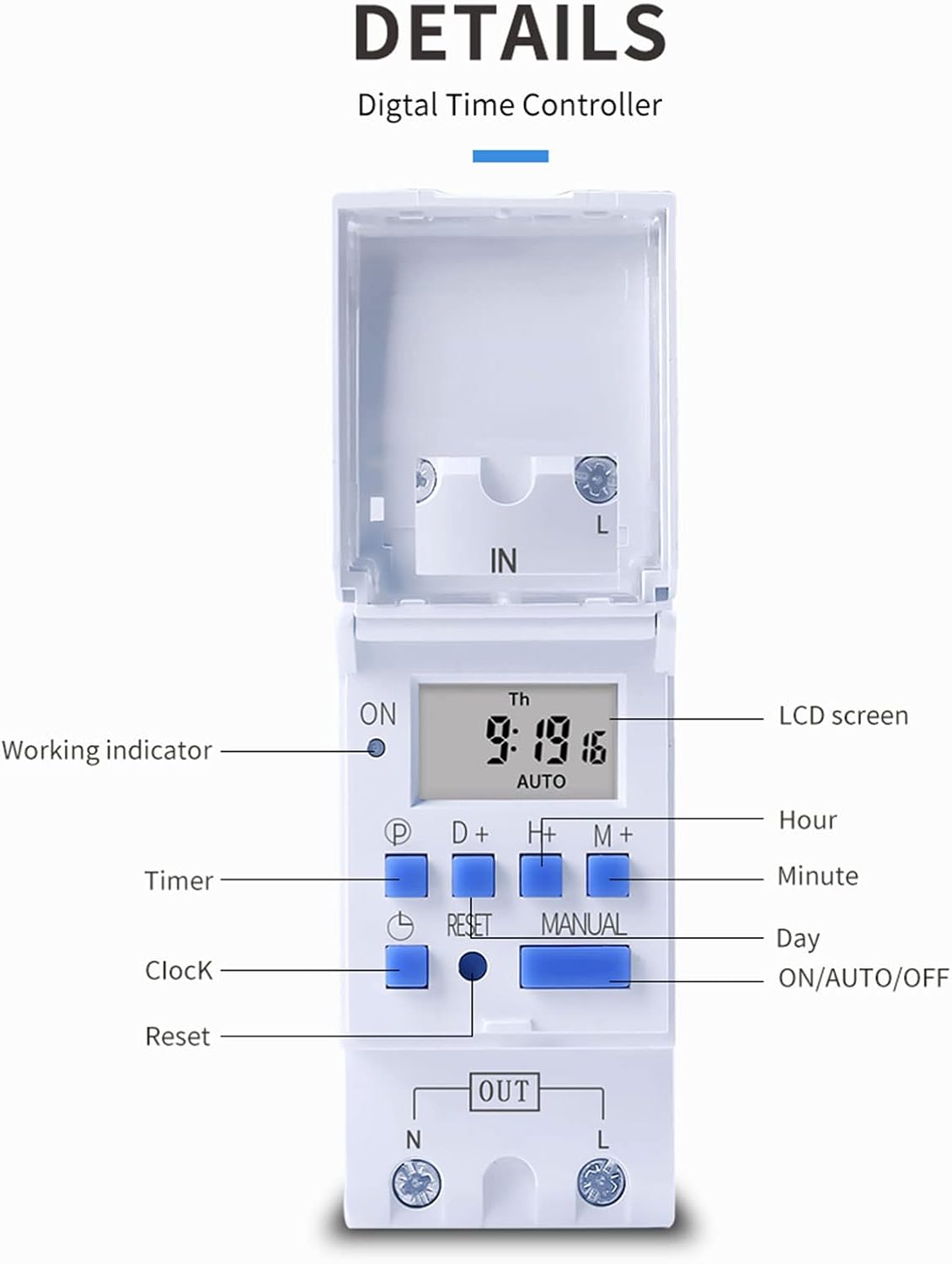
Сүрөт 4.2: Деталдаштырылган view of the THC30A timer's LCD screen, control buttons (P, D+, H+, M+, RESET, MANUAL), and working indicator.
4.3 Учурдагы убакытты орнотуу
- басыңыз СААТ button (P) and hold it.
- Кармап жатканда СААТ, басыңыз D+ to set the current day of the week (MON, TUE, WED, THU, FRI, SAT, SUN).
- Кармап жатканда СААТ, басыңыз H+ учурдагы саатты орнотуу үчүн (0-23).
- Кармап жатканда СААТ, басыңыз M+ учурдагы мүнөттү коюу үчүн (0-59).
- бошотуңуз СААТ орнотууларды сактоо үчүн баскыч.
5. Иштөө нускамалары
5.1 Программалоо КҮЙГҮЗҮҮ/ӨЧҮРҮҮ убакыттары
The THC30A allows for up to 20 ON/OFF program settings. Each program consists of an ON time and an OFF time.
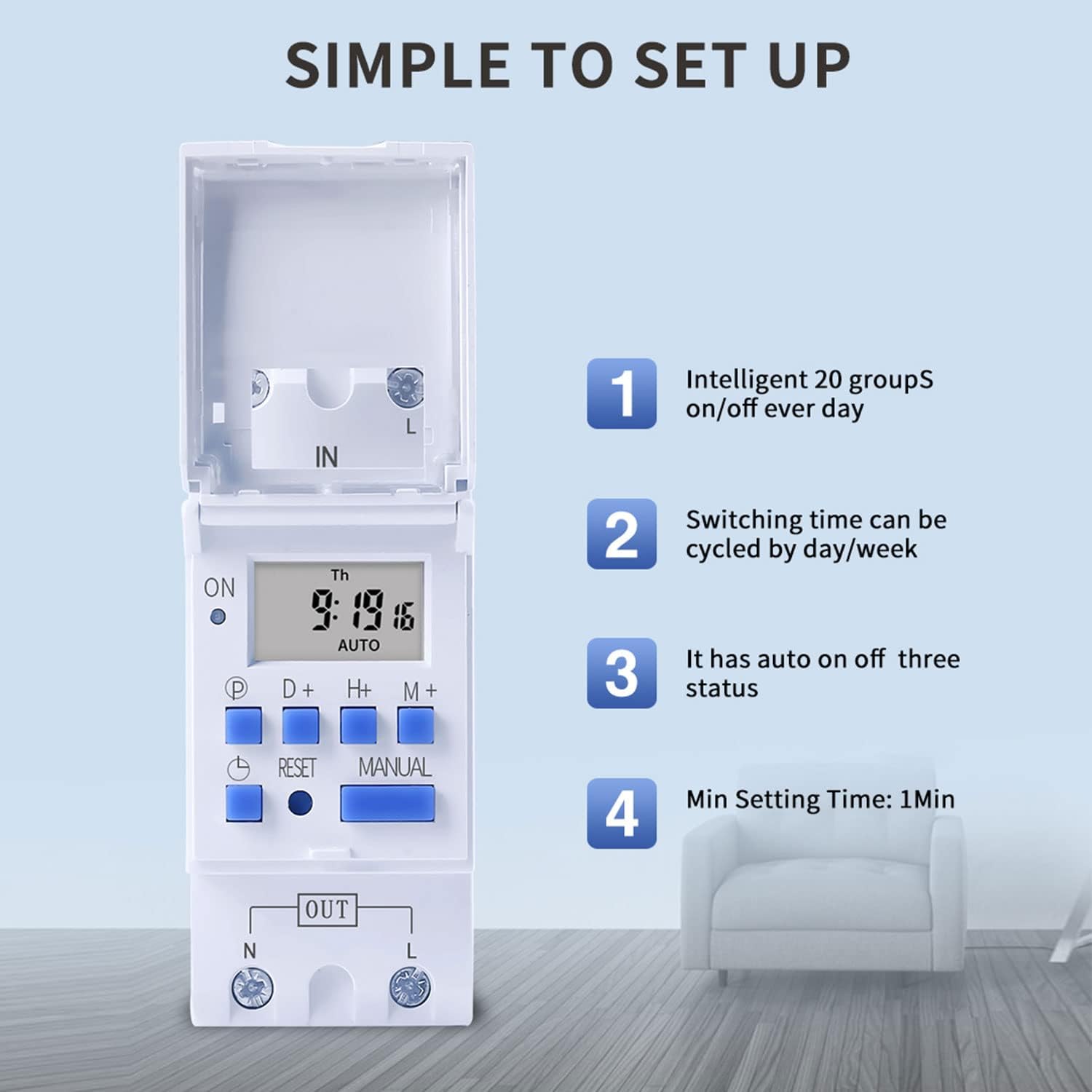
Сүрөт 5.1: The THC30A timer's programming interface, highlighting its capacity for 20 ON/OFF settings, daily/weekly cycling, auto ON/OFF status, and a minimum setting time of 1 minute.
- басыңыз P button (Program) once. The display will show '1 ON'.
- Басыңыз D+ to select the day(s) for this ON setting. You can choose a single day, a block of days (e.g., MON-FRI), or all 7 days.
- Басыңыз H+ to set the desired hour for the '1 ON' time.
- Басыңыз M+ to set the desired minute for the '1 ON' time.
- Басыңыз P кайрадан. Дисплейде '1 OFF' көрсөтүлөт.
- Repeat steps 2-4 to set the day(s), hour, and minute for the '1 OFF' time.
- Басууну улантыңыз P "2 КҮЙҮК", "2 ӨЧҮК" режимдерин "20 КҮЙҮК", "20 ӨЧҮК" режимдерине чейин алмаштыруу үчүн, ар бир программаны зарылчылыкка жараша коюңуз.
- Бардык керектүү программаларды орноткондон кийин, баскычын басыңыз СААТ button (P) to exit programming mode and return to the current time display.
5.2 Кол менен жокко чыгаруу
The КОЛ button allows you to override the programmed settings temporarily.
- Басыңыз КОЛ once: Switches from AUTO to ON (output is continuously ON).
- Басыңыз КОЛ again: Switches from ON to OFF (output is continuously OFF).
- Басыңыз КОЛ a third time: Switches from OFF to AUTO (timer resumes programmed operation).
6. Техникалык тейлөө
6.1 Батареяны алмаштыруу
The THC30A timer includes a built-in CR2032 lithium battery for power-off memory. This battery typically lasts for several years. If the display becomes dim or the time/settings are lost frequently during power outages, the battery may need replacement. Consult a qualified technician for battery replacement.
6.2 Тазалоо
Wipe the timer's exterior with a soft, dry cloth. Do not use abrasive cleaners or solvents, as they may damage the casing же дисплей.
7. Кыйынчылыктарды
- Дисплей бош: Check power supply. If power is present, the internal battery might be fully discharged; allow time for it to charge. If still blank, press the RESET баскычы.
- Таймер программалангандай күйбөй/өчпөй жатат:
- Таймердин күйүп турганын текшериңиз АВТО mode (not ON or OFF via manual override).
- Учурдагы убакыт жана күн туура коюлганын текшериңиз.
- Check that the programmed ON/OFF times and days are correct and active.
- Confirm wiring connections are secure and correct.
- Load not receiving power: Check the load device (e.g., bulb, motor) for functionality. Verify input power to the timer. Ensure the timer is in an ON state (either programmed ON or manually ON).
- Жөндөөлөр өчүрүлгөндөн кийин жоголотtage: The internal battery may be depleted. Consider replacing the CR2032 battery.
8. Техникалык шарттар

Сүрөт 8.1: Dimensions of the TAXNELE THC30A Digital Programmable Timer Switch.
| Өзгөчөлүк | Спецификация |
|---|---|
| Модел | THC30A |
| Type | Digital LCD Power Timer |
| Материал | Пластик |
| Учурдагы рейтинг | 30A |
| Power Rating | 5000 Вт |
| Тtage Параметрлер | 12V DC/AC, 24V DC/AC, 48V DC/AC, 110V AC, 220V AC, 230V AC (model dependent) |
| Убакыт катасы | ≤2 seconds/day |
| Дисплей | LCD |
| Programming Interval | 1 minute to 168 hours (weekly cycle) |
| ON/OFF Орнотуулары | 20 күйгүзүү/өчүрүү программалары |
| Иштөө температурасы | -20 градустан 50 градуска чейин |
| Өлчөмдөрү (L x W x Y) | х 86mm 36 х 65 (3.38 х 1.41 х 2.56 дюйм) |
| Power Reserve | 3V Lithium battery (CR2032) for data retention |
9. Кепилдик маалыматы
TAXNELE products are manufactured to high-quality standards. This product is covered by a limited warranty against defects in materials and workmanship for a period specified by the retailer at the time of purchase. Please retain your proof of purchase for warranty claims. The warranty does not cover damage caused by improper installation, misuse, unauthorized modification, or natural disasters.
10. Колдоо
For technical assistance, troubleshooting, or further inquiries regarding your TAXNELE THC30A Digital Programmable Timer Switch, please contact your retailer or the TAXNELE customer support channel provided with your purchase. When contacting support, please have your product model number (THC30A) and purchase information ready.