
1. Киришүү
This manual provides instructions for the CHONCHOW Gaming Keyboard and Mouse Combo. This wired peripheral set is designed for use with various gaming consoles and computers, offering RGB backlighting and ergonomic features for an enhanced user experience.
2. Пакеттин мазмуну
- CHONCHOW Gaming Keyboard
- CHONCHOW Gaming Mouse
- Колдонуучунун Колдонмосу (бул документ)
3. Орнотуу
The CHONCHOW Gaming Keyboard and Mouse Combo features a plug-and-play design, requiring no additional drivers or software installation for basic functionality.
- Компьютериңизден же оюн консолуңуздан жеткиликтүү USB портун табыңыз.
- Connect the USB cable from the CHONCHOW Gaming Keyboard to the USB port.
- Connect the USB cable from the CHONCHOW Gaming Mouse to another available USB port.
- The devices should be automatically recognized by your system.

Figure 3.1: CHONCHOW Gaming Mouse with USB Plug & Play Connectivity. The image shows the gaming mouse connected via a USB cable, highlighting its simple plug-and-play setup.
Шайкештик: This combo is compatible with Windows XP, Vista, Win7, Win8, Win10, MAC OS, Linux, Xbox, and PS4 operating systems.
4. Иштөө нускамалары
4.1 Клавиатуранын иштеши
The keyboard features 104 keys, including a number pad and 12 multimedia function keys. It also supports 19 anti-ghosting keys for accurate input during gaming.

Figure 4.1.1: CHONCHOW Gaming Keyboard with Rainbow RGB Backlighting. The keyboard displays a vibrant rainbow backlighting effect across its keys.
Баскычтоптун арткы жарыгын башкаруу:
- Арткы жарыкты өчүрүү/күйгүзүү: басыңыз FN ачкыч + Лампочка сүрөтчөсүнүн баскычы (usually near CTRL or ALT) to turn the backlight on/off or cycle through modes.
- Change Color Settings: The keyboard offers 10 different color settings. Press FN + "=" or "-" to adjust the color's speed or direction.
- Жарыктыкты жөндөө: Басыңыз FN + PG UP or PG DN арткы жарыктын жарыктыгын тууралоо үчүн.
- Change Light Direction: Колдонуу FN + Сол жебе or Оңго жебе to change the direction of the lighting effect.

Figure 4.1.2: CHONCHOW RGB Keyboard Lighting Modes. This image illustrates various RGB lighting patterns and effects available on the keyboard.
4.2 Чычкан менен иштөө
The gaming mouse features an ergonomic design with a 7-color RGB breathing backlight and an anti-skid scroll wheel.
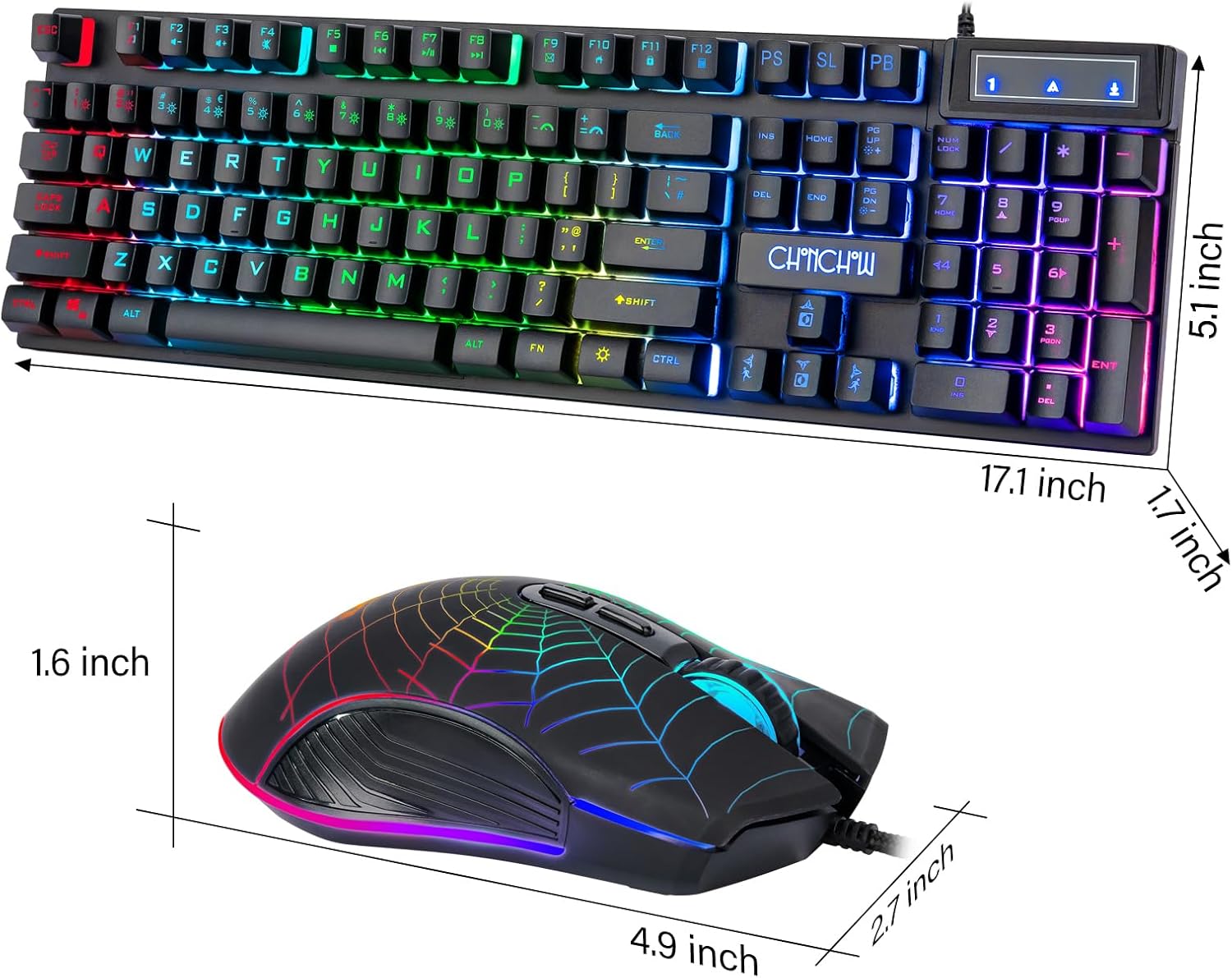
Figure 4.2.1: CHONCHOW Gaming Mouse with 7-Color Breathing Backlight. The image shows the gaming mouse with its distinct spiderweb design and glowing multi-color backlight.
Mouse DPI Adjustment:
The mouse supports 4 levels of DPI adjustment for varying cursor sensitivity:
- 1200 DPI
- 1800 DPI
- 2400 DPI
- 3600 DPI
Press the DPI button (usually located behind the scroll wheel) to cycle through these settings. The illumination of the mouse can also be completely turned off if desired.
5. Өзгөчөлүктөрү
- Туруктуу курулуш: Crafted with premium ABS material and advanced keycap craftsmanship, ensuring characters and symbols do not wear off easily.
- Сууга чыдамдуу клавиатура: Designed to withstand minor spills.
- Мультимедиа ачкычтары: 12 dedicated multimedia function keys for quick access to media controls.
- Арбактарга каршы: 19 anti-ghosting keys provide accurate and responsive input during intense gaming sessions.
- Ыңгайлаштырылган RGB жарыктандыруусу: Keyboard features 10 different color settings with adjustable speed, brightness, and direction.
- Эргономикалык дизайн: Both keyboard and mouse are ergonomically designed for comfortable use over extended periods. The keyboard includes adjustable stands for height customization.
- High-Precision Mouse: 7-color RGB breathing backlight mouse with 4 adjustable DPI levels (1200/1800/2400/3600) for precise control.
- Plug & Play: USB wired connection for instant setup without driver installation.

Figure 5.1: CHONCHOW Keyboard Features. This image highlights the 1.8m USB waterproof cable, two hidden brackets for adjusting keyboard height, and a non-slip rubber pad design.
6. Кыйынчылыктарды
- Түзмөк жооп бербейт:
- Ensure both the keyboard and mouse USB cables are securely connected to your computer or console.
- Түзмөктөрдү ар кандай USB портторуна туташтырып көрүңүз.
- Компьютериңизди же консолуңузду өчүрүп күйгүзүңүз.
- Арткы жарык иштебейт:
- Басыңыз FN + Лампочка сүрөтчөсүнүн баскычы арткы жарыктын күйүп турганын текшерүү үчүн.
- жардамы менен жарыктыгын тууралаңыз FN + PG UP/DN.
- Чычкан курсорунун кыймылындагы көйгөйлөр:
- Чычкан сенсорунун таза жана тоскоолдуксуз экенин текшериңиз.
- Чычкандын DPI баскычын колдонуп, DPI жөндөөлөрүн тууралаңыз.
- Test the mouse on a different surface.
7. Техникалык шарттар
| Бренд | Чончоу |
| Модел | Оюн клавиатурасы жана чычкан айкалышы |
| Байланыш технологиясы | USB (Зымдуу) |
| Keyboard Description | Gaming, 104 Keys, Number Pad, Multimedia Keys, 19 Anti-Ghosting Keys |
| Баскычтоптун арткы жарыгы | RGB (10 color settings, adjustable speed, brightness, direction) |
| Mouse Backlighting | 7-Color RGB Breathing Backlight |
| Чычкандын DPI жөндөөлөрү | 1200 / 1800 / 2400 / 3600 |
| Шайкеш түзмөктөр | Gaming Console (PS4, PS5, Xbox One), PC (Windows XP/Vista/7/8/10, MAC OS, Linux) |
| Материал | Aluminum, ABS Plastic |
| Элемент Салмагы | 2.01 фунт |
| Пакеттин өлчөмдөрү | 17.63 x 8.27 x 1.93 дюйм |
8. Техникалык тейлөө
- Тазалоо: Клавиатура менен чычкандын беттерин тазалоо үчүн жумшак, кургак чүпүрөктү колдонуңуз. Тереңирээк тазалоо үчүн, бир азamp кездемени колдонсо болот, бул түзмөккө суюктуктун кирбешин камсыз кылат.
- Сактагыч: Түзмөктөрдү күн нурунан жана экстремалдык температурадан алыс салкын, кургак жерде сактаңыз.
- Кабельге кам көрүү: Зыян келтирбөө үчүн USB кабелдерин кескин ийип же ашыкча тартуудан алыс болуңуз.
9. Кепилдик жана колдоо
For any issues or questions regarding your CHONCHOW Gaming Keyboard and Mouse Combo, please contact CHONCHOW customer support. Refer to the product packaging or the CHONCHOW official website for contact information. We are committed to providing the best service and will respond to inquiries within 12 hours.