1. Коопсуздук маалыматы
- Do not expose the device to water or excessive moisture. This product is not waterproof.
- Avoid extreme temperatures. Operate and store the device in a moderate environment.
- Аппаратты өзүңүз ажыратпаңыз же оңдоого аракет кылбаңыз. Бардык тейлөөлөрдү квалификациялуу кызматкерлерге тапшырыңыз.
- Аппаратты жылуулук булактарынан, тике күн нурларынан жана күйүүчү материалдардан алыс кармаңыз.
- Use only the provided USB Type-C charging cable for charging.
2. Продукт бүтүп калдыview
The TRENBADER Retro Wood Bluetooth Radio (Model Artlink) combines vintage aesthetics with modern audio technology. It features built-in speakers, a subwoofer, and supports wireless streaming via Bluetooth, as well as AM/FM radio tuning and an auxiliary input.
2.1 Негизги өзгөчөлүктөрү
- Retro wood design with elegant brass knobs.
- Bluetooth 5.4 for wireless audio streaming up to 33 feet.
- Integrated AM/FM radio tuner with rotary dial.
- Built-in speakers with a 3W full-range speaker for clear mid-range bass.
- Auxiliary (AUX) input for wired connections.
- USB Type-C заряддоо порту.
- Interchangeable faceplate design (one wooden, one colored).
- Колсуз байланыш үчүн орнотулган микрофон.
2.2 Пакеттин мазмуну
- 1 x TRENBADER Retro Wood Bluetooth Radio (Model Artlink)
- 1 x USB Type-C заряддоо кабели
- 1 x External Antenna Wire
- 1 x Replacement Faceplate (colored)
- 1 x Faceplate Removal Tool
2.3 Башкаруу каражаттары жана порттор
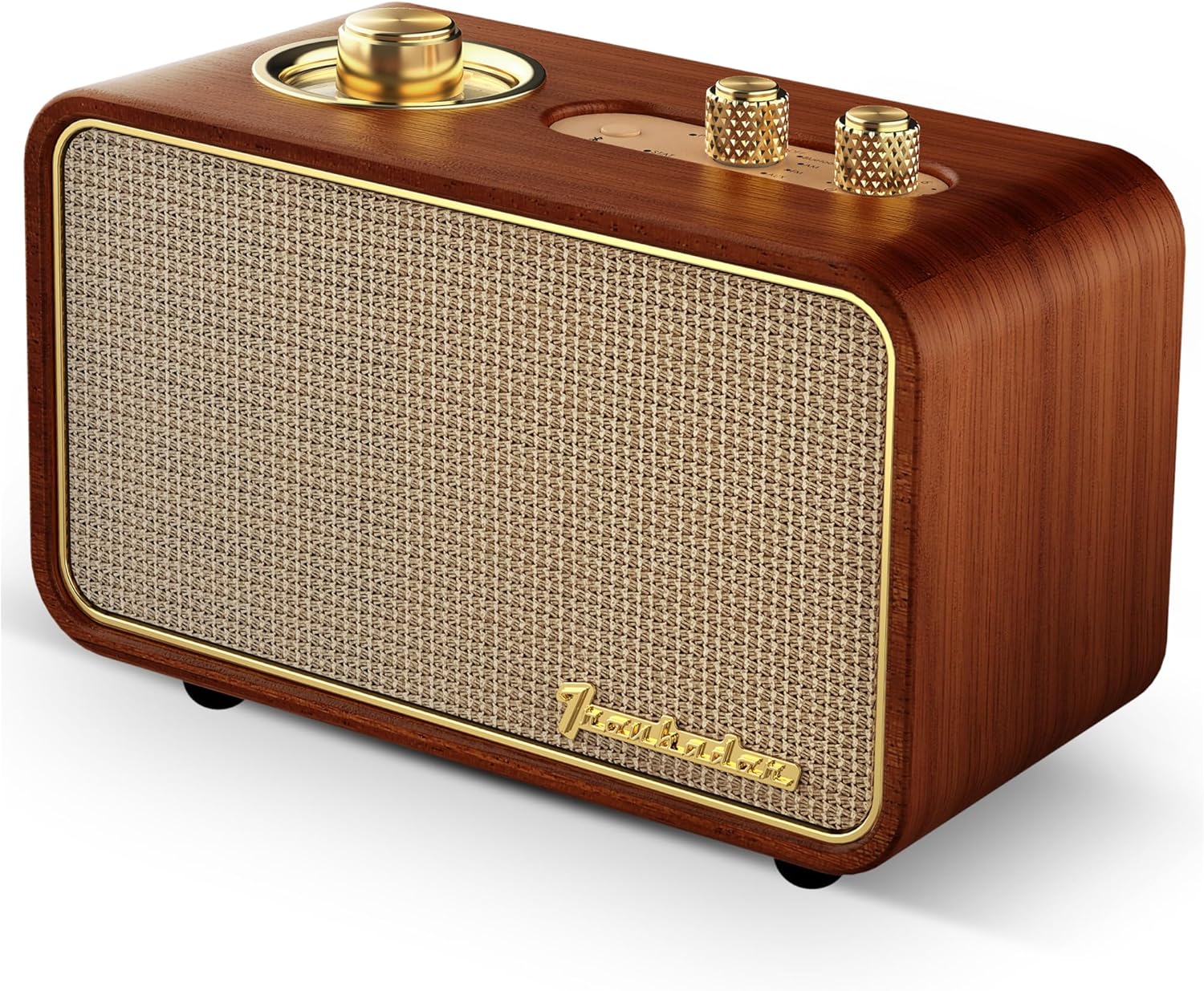
Сүрөт: алдыңкы жана үстү view of the TRENBADER Retro Wood Bluetooth Radio, highlighting the main speaker grille and control knobs.
- Rotary Tuning Dial: Located on the top left, used for AM/FM radio frequency selection.
- Булак баскычы: Selects input mode (OFF, Bluetooth, AM, FM, AUX).
- Үн баскычы: Аудио чыгаруу деңгээлин тууралайт.
- Bluetooth жупташтыруу баскычы: Bluetooth жупташтыруу режимин баштайт.

Image: Close-up of the top panel showing the rotary tuning dial, source selector, volume knob, and Bluetooth button.

Сүрөт: Арткы view of the radio, indicating the AUX port (also used for antenna) and the USB Type-C charging port.
- USB Type-C порту: Ички батареяны заряддоо үчүн.
- AUX/Antenna Port: 3.5mm jack for auxiliary audio input or connecting the external FM antenna.
3. Орнотуу
3.1 Аппаратты заряддоо
- Connect the provided USB Type-C cable to the charging port on the back of the radio.
- USB кабелинин экинчи учун туура келген USB кубат адаптерине (кошумча эмес) же компьютердин USB портуна туташтырыңыз.
- The charging indicator light will illuminate. The device is fully charged when the light changes color or turns off (refer to specific LED behavior in future updates if available).
3.2 Connecting the FM Antenna
For improved FM radio reception, connect the included external antenna wire to the AUX/Antenna port on the back of the radio.
3.3 Changing the Faceplate
The radio comes with an interchangeable faceplate design. To change the faceplate:
- Locate the faceplate removal tool (resembles a guitar pick) in the packaging.
- Carefully insert the tool into the small gap between the faceplate and the wooden frame.
- Gently pry the faceplate off.
- Align the desired new faceplate with the slots and press firmly until it clicks into place.

Image: Illustration demonstrating the interchangeable faceplate feature, showing the original wood faceplate and an alternative colorful design.
4. Иштөө нускамалары
4.1 Күйгүзүү/өчүрүү
To power on the device, rotate the Source knob from the 'OFF' position to any desired mode (Bluetooth, AM, FM, or AUX). To power off, rotate the Source knob back to the 'OFF' position.
4.2 Режимди тандоо
айлантыңыз Булак knob on the top panel to select your desired audio source:
- Bluetooth: For wireless connection to a smartphone, tablet, or laptop.
- БАР: үчүн Amplitude Modulation radio stations.
- FM: For Frequency Modulation radio stations.
- AUX: For wired connection via a 3.5mm audio cable.
4.3 Bluetooth жупташтыруу
- Turn on the radio and set the Source knob to 'Bluetooth'. The Bluetooth indicator light will flash, indicating it's in pairing mode.
- Мобилдик түзмөгүңүздө (смартфон, планшет ж.б.) Bluetooth жөндөөлөрүнө өтүңүз.
- Издөө available devices and select "Trenbader Artlink Pure" from the list.
- Once connected, the Bluetooth indicator light on the radio will become solid.
4.4 AM/FM радиону тюнинг
- Set the Source knob to 'AM' or 'FM'.
- айлантыңыз Rotary Tuning Dial to scan for radio stations. The dial will illuminate to show the frequency.
- Adjust the position of the external antenna wire for optimal reception.
4.5 Көмөкчү киргизүү (AUX)
- Set the Source knob to 'AUX'.
- Connect one end of a 3.5mm audio cable (not included) to the AUX/Antenna port on the back of the radio.
- Аудио кабелдин экинчи учун тышкы аспабыңыздын гарнитура уячасына же аудио чыгышына туташтырыңыз.
- Тышкы түзмөгүңүздөн аудио ойнотуңуз.
4.6 Үндү башкаруу
айлантыңыз Көлөм knob on the top panel clockwise to increase the volume and counter-clockwise to decrease it.
4.7 Орнотулган микрофонду колдонуу
When connected via Bluetooth, the built-in microphone allows for hands-free communication during calls or online meetings. Ensure your connected device's audio output is set to the radio for microphone functionality.
5. Техникалык тейлөө
- Тазалоо: Радионун сыртын тазалоо үчүн жумшак, кургак чүпүрөктү колдонуңуз. Суюк тазалоочу каражаттарды же абразивдүү материалдарды колдонбоңуз.
- Сактагыч: Радиону көпкө чейин колдонбогон учурда, аны салкын, кургак жерде, күн нуру түз тийген жерден жана өтө жогорку температурадан алыс сактаңыз.
- Батареяга кам көрүү: Батареянын иштөө мөөнөтүн узартуу үчүн, батареяны тез-тез толук зарядсыздандырбаңыз. Түзмөктү активдүү колдонулбаса дагы, үзгүлтүксүз кубаттап туруңуз.
6. Кыйынчылыктарды
6.1 Күч жок
- Ensure the Source knob is not in the 'OFF' position.
- Check if the battery is charged. Connect the radio to a power source using the USB Type-C cable.
6.2 Үн жок
- Increase the volume using the Volume knob.
- Ensure the correct source (Bluetooth, AM, FM, AUX) is selected.
- If using Bluetooth, ensure the device is properly paired and connected.
- If using AUX, ensure the audio cable is securely connected to both the radio and the external device.
6.3 Bluetooth Connected, but Sound is Quiet or Low Volume
If your Bluetooth speaker is connected but the sound is quiet or lacks sufficient volume, you may need to adjust the device type setting on your connected smartphone or tablet. Follow these steps:
- ачыңыз Орнотуулар app on your device and tap on Bluetooth.
- Bluetooth күйгүзүлгөнүн текшериңиз.
- Locate "Trenbader Artlink Pure" in your list of connected devices.
- Tap the 'Information' icon (usually an 'i' in a circle) next to "Trenbader Artlink Pure".
- Тандоо Түзмөк түрү жана тандаңыз Баяндамачы from the options. This setting helps optimize audio output for speakers.

Image: Visual guide showing the steps on a mobile device to adjust Bluetooth device type settings for optimal volume.
6.4 Радио кабыл алуусу начар
- Ensure the external antenna wire is properly connected to the AUX/Antenna port.
- Adjust the position and orientation of the antenna wire for better signal.
- Try relocating the radio to an area with better signal reception.
6.5 Bluetooth Disconnection
- Ensure your device is within the 33-foot Bluetooth range.
- Check for obstacles between the radio and your connected device.
- Turn the radio off and on again, then re-attempt pairing.
- If the issue persists, 'Forget This Device' in your phone's Bluetooth settings and re-pair.
7. Техникалык шарттар
| Өзгөчөлүк | Спецификация |
|---|---|
| Бренд | TRENBADER |
| Модель аты | Artlink |
| Материал | Жыгач |
| Продукциянын өлчөмдөрү | 2.58"D x 5.11"W x 3.58"H |
| Элемент Салмагы | 1.06 фунт |
| Динамик түрү | Sub-woofer/Tweeter |
| Динамиктин максималдуу чыгаруу күчү | 3 Ватт |
| Байланыш технологиясы | USB, зымсыз |
| Зымсыз байланыш технологиясы | Bluetooth |
| Bluetooth версиясы | 5.4 |
| Bluetooth диапазону | 33 Фут |
| Power Source | Батарея менен иштейт |
| Башкаруу ыкмасы | Rotary Knobs, Button |
| Ички/тышкы колдонуу | Ички, сырткы |
| Сууга туруктуулук деңгээли | Сууга чыдамдуу эмес |
8. Кепилдик жана колдоо
This product comes with a Full Warranty. For specific warranty terms and conditions, please refer to the documentation included with your purchase or contact TRENBADER customer support.
For technical assistance or further inquiries, please visit the official TRENBADER webсайтка же кардарларды тейлөө бөлүмүнө кайрылыңыз.