
VAIO VJPF11C11N
VAIO Pro PF (VJPF11C11N) Notebook PC User Manual
1. Киришүү
This manual provides essential information for setting up, operating, maintaining, and troubleshooting your VAIO Pro PF (Model: VJPF11C11N) notebook PC. Please read this manual thoroughly before using your device to ensure proper and safe operation.
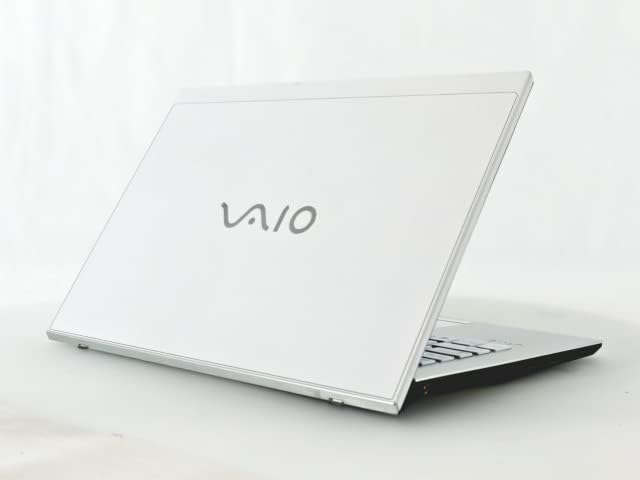
Figure 1: VAIO Pro PF Notebook PC
The VAIO Pro PF is a lightweight and compact mobile notebook designed for productivity. It features an 11.6-inch Full HD display, an Intel 8th Generation Core i5-8250U processor, 8GB of RAM, and a 256GB SSD, running on Windows 11 Pro. The device also includes a backlit keyboard for comfortable typing in various lighting conditions.
2. Орнотуу
2.1 Пакеттен чыгаруу
Бардык компоненттерди таңгактан кылдаттык менен алып салыңыз. Төмөнкү нерселердин бар экенин текшериңиз:
- VAIO Pro PF Notebook PC
- AC адаптер жана электр шнуры
- Документтер (бул колдонмо, кепилдик маалыматы)
2.2 Кубатка туташуу
Before initial use, connect the AC adapter to the laptop's power input port and then plug the power cord into a wall outlet. Allow the battery to charge fully.
2.3 Баштапкы күйгүзүү жана Windows орнотуу
Press the power button to turn on the laptop. Follow the on-screen instructions to complete the initial Windows 11 Pro setup, including language selection, network connection, and user account creation.
3. Operating Your VAIO Pro PF
3.1 Баскычтоп жана сенсордук такта
The VAIO Pro PF features a full-sized keyboard with a backlight for improved visibility. The touchpad located below the keyboard supports multi-touch gestures for navigation.

2-сүрөт: Баскычтоп жана сенсордук тактанын жайгашуусу
3.2 Тышкы түзмөктөрдү туташтыруу
Сиздин ноутбук тышкы түзүлүштөрдү туташтыруу үчүн ар кандай порттор менен жабдылган:
- USB 3.0 порттору (x3): Тышкы катуу дисктер, чычкандар же баскычтоптор сыяктуу USB түзмөктөрүн туташтыруу үчүн.
- HDMI порту: For connecting to external displays or projectors with HDMI input.
- D-SUB15 (VGA) Port: For connecting to older external displays or projectors with VGA input.
- Wired LAN Port: For connecting to a wired network using an Ethernet cable.
- Гарнитура уячасы: Наушниктерди же тышкы динамиктерди туташтыруу үчүн.
3.3 Зымсыз байланыш
The VAIO Pro PF supports both Wi-Fi and Bluetooth connectivity:
- Wi-Fi (802.11n): To connect to a wireless network, go to Windows Settings > Network & Internet > Wi-Fi, turn Wi-Fi on, and select your desired network.
- Bluetooth: To connect Bluetooth devices, go to Windows Settings > Bluetooth & devices, turn Bluetooth on, and pair your device.
3.4 колдонуу Web Камера
интеграцияланган web camera can be used for video calls and conferences. Access it through applications like Camera, Microsoft Teams, or Zoom.
4. Техникалык тейлөө
4.1 Ноутбукту тазалоо
To clean the exterior of your laptop, use a soft, lint-free cloth slightly dampened with water or a mild, non-abrasive cleaning solution. Avoid spraying liquids directly onto the device. For the screen, use a specialized screen cleaner.
4.2 Программалык камсыздоо жаңыртуулары
Regularly check for and install Windows updates to ensure your system has the latest security patches and performance improvements. Go to Windows Settings > Windows Update.
4.3 Батареяга кам көрүү
Батареянын иштөө мөөнөтүн узартуу үчүн, экстремалдык температурадан жана батареяны бат-баттан толук кубаттап турбаңыз. Узак мөөнөттүү сактоо үчүн, батареяны болжол менен 50-70% га чейин заряддаңыз.
5. Кыйынчылыктарды
This section addresses common issues you might encounter with your VAIO Pro PF.
| Көйгөй | Чечим |
|---|---|
| Ноутбук күйбөйт. | Ensure the AC adapter is securely connected and the power outlet is functional. Try holding the power button for 10-15 seconds. |
| Wi-Fi туташуу маселелери. | Check if Wi-Fi is enabled in Windows Settings. Restart your router and the laptop. Ensure you are within range of the Wi-Fi network. |
| Keyboard backlight is not working. | Check if the backlight function key (often Fn + F key) is enabled. Adjust brightness settings if available. |
| Тышкы дисплей табылган жок. | Ensure the cable is securely connected to both the laptop and the display. Use Windows display settings to detect or extend displays. Try a different cable or port if available. |
6. Техникалык шарттар
| Өзгөчөлүк | Деталь |
|---|---|
| Модель аты | VAIO Pro PF (VJPF11C11N) |
| Бренд | VAIO (Manufacturer: SONY) |
| Дисплей өлчөмү | 11.6 дюйм |
| Резолюция | 1920x1080 pixels (Full HD) |
| CPU | Intel Core i5-8250U (8th Gen, 4 Cores, 8 Threads, 1.6 GHz base, up to 3.4 GHz) |
| RAM | 8 ГБ DDR4 SDRAM |
| Сактагыч | 256 ГБ SSD (катуу абалдагы диск) |
| Операция системасы | Windows 11 Pro (64-бит) |
| Графика | Интеграцияланган Intel Graphics |
| Зымсыз байланыш | Wi-Fi (802.11n), Bluetooth |
| Порттар | 3x USB 3.0, 1x HDMI, 1x D-SUB15 (VGA), 1x Wired LAN, 1x Headphone Jack |
| Web Камера | Интеграцияланган |
| Баскычтоп | Арткы жарык клавиатура |
| Салмагы | Approx. 0.87 kg (870 g) |
| Биринчи жеткиликтүү күн | 10-май, 2023-жыл |
7. Кепилдик жана колдоо
For information regarding your product's warranty, please refer to the warranty card included with your purchase or visit the official VAIO support website. For technical assistance, driver downloads, or further inquiries, please contact VAIO customer support through their official channels.
Ask a question about this manual
Ask about setup, troubleshooting, compatibility, parts, safety, or missing instructions. Manuals+ will review the question and use this page’s manual context to help answer it.