
Introduction
This manual provides essential instructions for the installation, operation, maintenance, and troubleshooting of your HIKSEMI Hikvision Wave SATA 3.0 512GB Solid State Drive. Please read this manual thoroughly before using the product to ensure proper functionality and longevity.
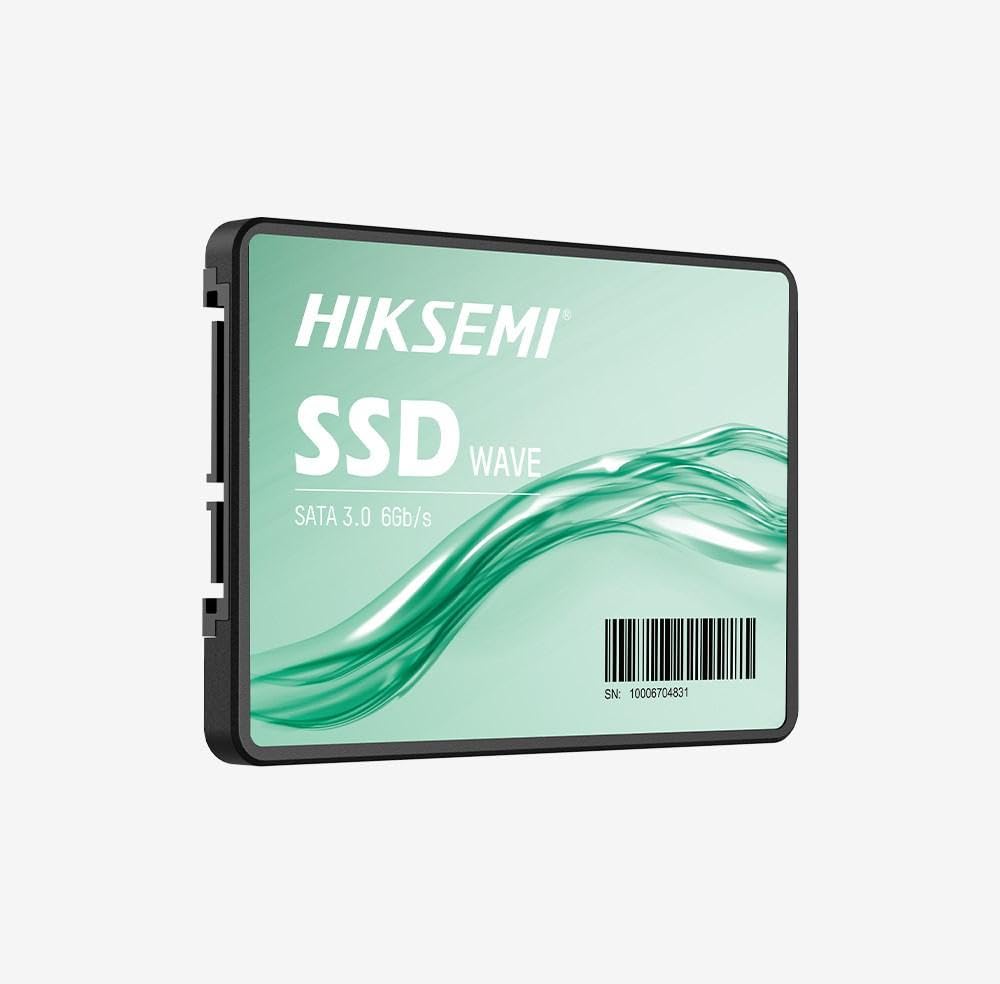
Image: HIKSEMI Hikvision Wave SATA 3.0 512GB Solid State Drive. This image displays the compact 2.5-inch form factor of the SSD, highlighting its sleek design and standard SATA interface connectors.
Коопсуздук маалыматы
Унааңыздын бузулушуна же өзүңүзгө жаракат алуу коркунучуна жол бербөө үчүн төмөнкү коопсуздук чараларын сактаңыз:
- Always handle the SSD by its edges to avoid touching the circuit board or connectors.
- Ensure your computer is powered off and unplugged before installation.
- Discharge static electricity by touching a grounded metal object before handling the SSD.
- Do not expose the SSD to moisture, extreme temperatures, or strong magnetic fields.
- Do not attempt to disassemble or modify the SSD. This will void the warranty.
Пакеттин мазмуну
Пакетте бардык буюмдар бар экенин текшериңиз:
- HIKSEMI Hikvision Wave SATA 3.0 512GB Solid State Drive (HS-SSD-WAVE-S-512G)
- Ыкчам баштоо колдонмосу (эгер камтылган болсо)
Note: SATA data and power cables are typically not included and must be purchased separately if not already present in your system.
Орнотуу жана орнотуу
1. Physical Installation (Desktop PC)
- Системаңызды даярдаңыз: Компьютериңизди өчүрүп, шнурду сууруп алыңыз. Компьютердин корпусун ачыңыз.
- Диск уясын табыңыз: Find an available 2.5-inch drive bay. If only 3.5-inch bays are available, you may need a 2.5-inch to 3.5-inch adapter bracket (not included).
- SSD орнотуу: SSDди бурамалар менен диск уясына бекитиңиз.
- Кабелдерди туташтыруу:
- Connect one end of a SATA data cable to the SSD and the other end to an available SATA port on your motherboard.
- SATA кубат кабелин кубат булагыңыздан (PSU) SSDге туташтырыңыз.
- Ишти жабуу: Reassemble your computer case and reconnect the power cord.
2. Physical Installation (Laptop)
- Prepare your laptop: Power off your laptop, unplug the power adapter, and remove the battery (if removable). Consult your laptop's manual for specific instructions on accessing the drive bay.
- Remove old drive (if applicable): Carefully remove the existing hard drive or SSD.
- Install the SSD: Insert the HIKSEMI Wave SSD into the drive bay. Secure it with any screws or brackets that held the previous drive.
- Кайра чогултуу: Close the drive bay cover, reinsert the battery, and reconnect the power adapter.
3. Initializing and Formatting the SSD (Windows)
- Компьютериңизди күйгүзүңүз: Компьютериңизди күйгүзүңүз.
- Дискти башкарууну ачуу: Right-click on the Start button (Windows 10/11) or search for "Disk Management" (Windows 7/8). Select "Disk Management".
- Initialize the disk: A "Initialize Disk" window should appear automatically for new drives. Select GPT (GUID Partition Table) for drives larger than 2TB or for UEFI-based systems, or MBR (Master Boot Record) for older systems or drives 2TB or smaller. Click "OK".
- Create a new simple volume: Locate your new SSD (it will likely show as "Unallocated Space"). Right-click on the unallocated space and select "New Simple Volume...".
- Follow the wizard: Follow the on-screen prompts to assign a drive letter, choose a file system (NTFS is recommended for Windows), and perform a quick format.
- Сиздин SSD азыр колдонууга даяр.
SSDди иштетүү
Once installed and formatted, your HIKSEMI Wave SSD functions like any other storage drive. You can use it for:
- Операциялык системаны орнотуу: Install your operating system (Windows, macOS, Linux) for faster boot times and overall system responsiveness.
- Колдонмонун сактагычы: Install frequently used applications and games to benefit from quicker loading times.
- Маалыматтарды сактоо: Store documents, photos, videos, and other files.
The SSD utilizes the SATA 3.0 interface, providing theoretical transfer speeds up to 6 Gbps. Actual performance may vary based on your system hardware, software, and workload.
Техникалык тейлөө
SSDs require less maintenance than traditional hard drives, but a few practices can help ensure optimal performance and longevity:
- TRIM иштетүү: Ensure your operating system has TRIM enabled. TRIM helps the SSD manage deleted data blocks efficiently, maintaining performance over time. Modern operating systems (Windows 7+, macOS 10.6.8+, most Linux distributions) typically enable TRIM by default.
- Дефрагментациядан качыңыз: Do not defragment an SSD. Defragmentation is unnecessary for SSDs and can reduce their lifespan by increasing write cycles.
- Программалык камсыздоонун жаңыртуулары: Periodically check the HIKSEMI official website for firmware updates for your specific SSD model. Firmware updates can improve performance, stability, and compatibility. Follow the manufacturer's instructions carefully when performing updates.
- Бош мейкиндикти сактоо: While not strictly necessary, keeping some free space (e.g., 10-15%) on your SSD can help maintain performance, especially for drives with smaller capacities.
- Маалыматтын камдык көчүрмөсү: Маанилүү маалыматтардын камдык көчүрмөсүн башка сактагыч түзмөгүнө үзгүлтүксүз сактап туруңуз. SSD дисктери ишенимдүү болгону менен, эч бир сактагыч түзмөгү бузулуудан корголгон эмес.
Проблемаларды чечүү
If you encounter issues with your HIKSEMI Wave SSD, refer to the following common troubleshooting steps:
- SSD аныкталган жок:
- Бардык SATA дайындарын жана электр кабелдик байланыштарын текшериңиз. Алардын коопсуз отурушун камсыз кылыңыз.
- Try a different SATA port on your motherboard and a different SATA power connector from your PSU.
- Verify that the SATA controller mode in your system's BIOS/UEFI is set to AHCI (Advanced Host Controller Interface).
- Check Disk Management (Windows) or Disk Utility (macOS) to see if the drive is detected but uninitialized/unformatted.
- Жай аткаруу:
- Ensure TRIM is enabled (as described in the Maintenance section).
- Verify that the SSD is connected to a SATA 3.0 (6 Gbps) port on your motherboard, not an older SATA 2.0 (3 Gbps) port.
- Системалык ресурстарды талап кылган фондо процесстерди текшериңиз.
- Ensure your system drivers (especially chipset drivers) are up to date.
- Operating System Errors/Crashes:
- Дискти текшерүү утилитасын иштетүү (мисалы,
chkdskin Windows) to scan for file система каталары. - Consider reinstalling the operating system if issues persist after checking hardware connections and drivers.
- Дискти текшерүү утилитасын иштетүү (мисалы,
Техникалык шарттар
| Өзгөчөлүк | Спецификация |
|---|---|
| Модель номери | HS-SSD-WAVE-S-512G |
| Санариптик сактоо сыйымдуулугу | 512 ГБ |
| Катуу диск интерфейси | Serial ATA (SATA 3.0) |
| Форма фактору | 2.5 дюйм |
| Окуу ылдамдыгы (макс) | секундасына 560 мегабайт |
| Жазуу ылдамдыгы (макс.) | секундасына 490 мегабайт |
| Шайкеш түзмөктөр | Иш такта, ноутбук |
| Өзгөчө өзгөчөлүк | Жеңил |
| Элемент Салмагы | 0.02 килограмм |
| Өндүрүүчү | Hangzhou Hikvision Digital Technology Co., Ltd. |
Кепилдик маалымат
The HIKSEMI Hikvision Wave SATA 3.0 512GB Solid State Drive comes with a 3 жылдык Чектелген Кепилдик from the date of purchase. This warranty covers defects in materials and workmanship under normal use. It does not cover damage caused by misuse, accident, modification, unauthorized repair, or improper installation.
Кепилдик дооматтары үчүн сатып алганыңыздын далилин сактап коюңуз.
Кардарларды колдоо
For technical assistance, warranty claims, or further inquiries, please visit the official HIKSEMI support website or contact their customer service department. Refer to the product packaging or the official webакыркы байланыш маалыматы үчүн сайт.
Online resources may include FAQs, driver downloads, and firmware updates.
Жок кылуу маалыматы
This product contains electronic components and should not be disposed of with household waste. Please follow local regulations for the proper disposal of electronic waste. Recycling helps protect the environment and human health.