
Introduction
The TP-Link Deco 7 Elite BE85 Mesh System utilizes the latest Wi-Fi 7 technology to provide unparalleled speed and efficiency for your whole home network. This system features tri-band channels, 8 high-performance antennas, and 2 internal cooling fans to ensure reliable connections and maximum performance. It supports both wireless and wired backhaul simultaneously and offers flexible support for fiber and copper connections with 10 Gbps speeds. With additional 2.5 Gbps ports and a USB 3.0 port, the Deco BE85 is designed to future-proof your home network.

Image: The TP-Link Deco 7 Elite BE85 Mesh System, highlighting its powerful Wi-Fi 7 capabilities.
Орнотуу колдонмосу
Setting up your Deco BE85 Mesh System is designed to be straightforward using the dedicated Deco app. Follow these steps for a quick and efficient installation:
- Prepare Your Network: Power off your existing modem and disconnect any old routers. If your modem has a backup battery, remove it.
- Негизги деко блогун туташтыруу: Connect one of the Deco units to your modem using an Ethernet cable. This unit will become your main Deco.
- Күйгүзүү: Power on your modem and the main Deco unit. Wait for the Deco's LED to pulse blue, indicating it's ready for setup.
- Deco колдонмосун жүктөп алыңыз: Download the free TP-Link Deco app from the App Store (iOS) or Google Play Store (Android).
- Колдонмодогу нускамаларды аткарыңыз: Open the Deco app and follow the on-screen instructions to configure your main Deco unit. The app will guide you through creating your network name (SSID) and password.
- Add Satellite Units: Once the main Deco is set up, place your satellite Deco units in desired locations to extend coverage. Power them on and use the Deco app to add them to your mesh network. For optimal performance, consider using wired backhaul for satellite units if possible.
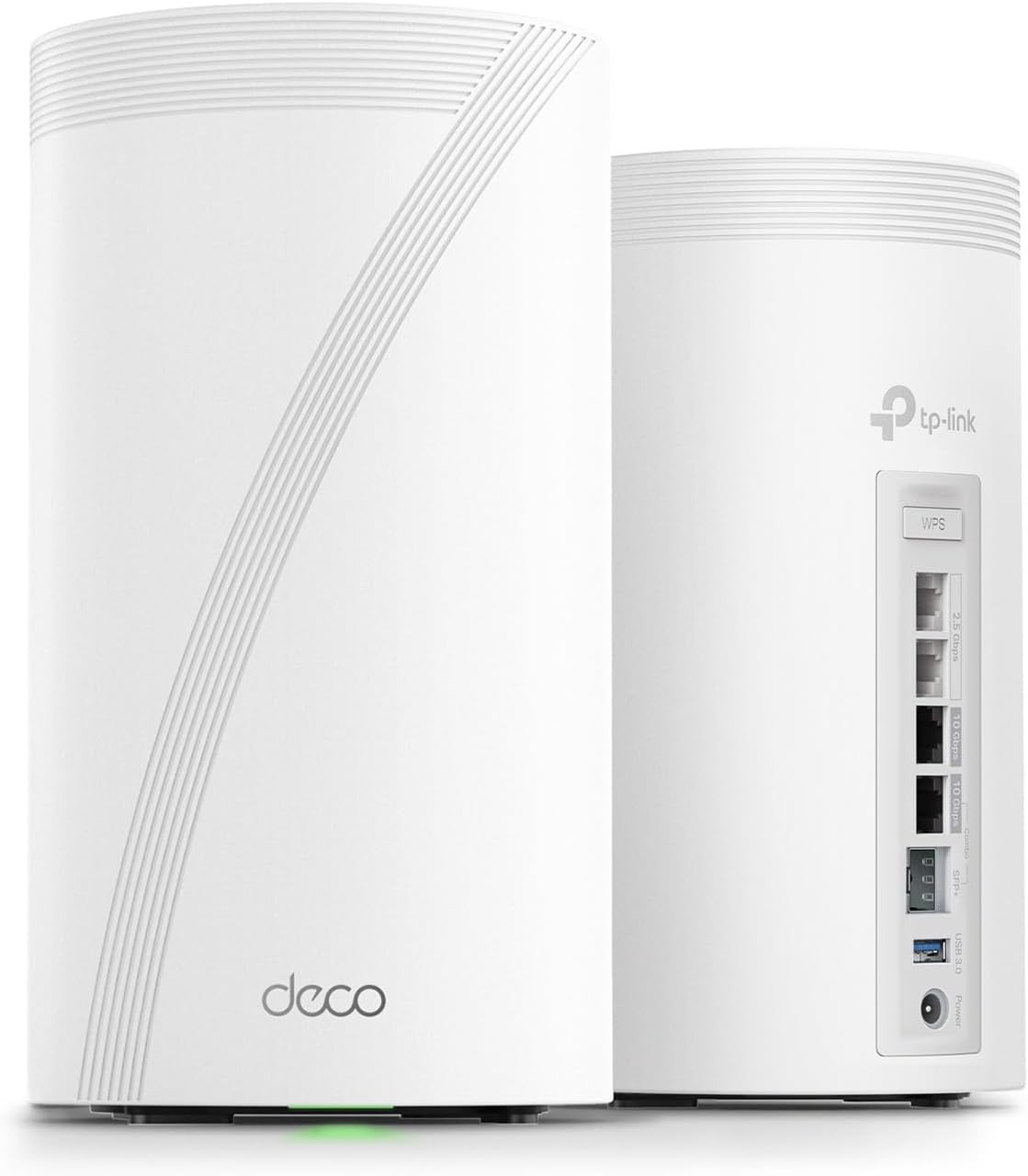
Image: The Deco BE85 units along with their power adapters and Ethernet cable, ready for setup.
LED абалынын көрсөткүчтөрү
- Катуу сары: Деко башталууда.
- Көк түстүү: Deco орнотууга даяр.
- Катуу жашыл: Deco онлайн режиминде жана туура иштеп жатат.
Расмий орнотуу видеосу
Video: An official TP-Link video demonstrating the setup process for the Deco BE85 Mesh System.
Operating Your Deco BE85 System
The Deco BE85 system is engineered for high-performance and seamless connectivity. Here's how to maximize your experience:
Негизги өзгөчөлүктөрү:
- Ultimate BE22000 Tri-Band Wi-Fi 7 ылдамдыгы: Experience speeds of 11520 Mbps on the 6GHz band, 8640 Mbps on the 5GHz band, and 1376 Mbps on the 2.4GHz band. This allows connection for over 200 devices without performance degradation.
- AI менен башкарылган үзгүлтүксүз роуминг: The Deco Mesh creates a unified network with a single network name. AI-Roaming technology ensures seamless streaming and the fastest possible speeds as you move throughout your home.
- Бир убактагы зымсыз плюс зымдуу Backhaul: Leverage TP-Link's technology to connect to both wireless and wired backhaul simultaneously, enhancing speed and coverage.
- Pro-Grade Dual 10G WAN/LAN порттору: Equipped with one RJ45 port and one SFPplus Fiber/RJ45 Ethernet combo port, offering flexible support for fiber and copper connections at 10 Gbps. Two additional 2.5G ports and a USB 3.0 port provide further connectivity options.

Сүрөт: бүттүview of Deco BE85's key features including Wi-Fi 7 speeds, 10G connectivity, and AI roaming.
Deco колдонмосу менен тармагыңызды башкаруу
Deco колдонмосу сиздин тор тармагыңызды ар тараптуу көзөмөлдөөнү камсыз кылат:
- Түзмөктү башкаруу: View connected devices, assign names, and prioritize traffic.
- Тармак диагностикасы: Monitor network health and identify potential issues.
- Коноктор тармагы: Easily set up a separate network for guests.
- Үн менен башкаруу: Ыңгайлуу үн буйруктары үчүн Amazon Alexa же Google Assistant менен интеграциялаңыз.

Image: A smartphone displaying the intuitive Deco app interface for network management.
Техникалык тейлөө
To ensure your Deco BE85 system continues to perform optimally, consider the following maintenance tips:
- Программалык камсыздоонун жаңыртуулары: Enable automatic nightly firmware updates through the Deco app to ensure your system has the latest features and security enhancements. This helps prevent potential issues with outdated software.
- Вентиляция: The Deco units can generate some heat during operation. Ensure they are placed in well-ventilated areas to prevent overheating and maintain stable performance. Avoid enclosing them in tight spaces.
- Regular Network Optimization: Utilize the network optimization tool within the Deco app periodically. This tool can help identify and mitigate interference, suggesting minor adjustments to unit placement for improved signal quality.
- Тазалык: Keep the Deco units free from dust and debris, especially around ventilation areas, to ensure proper airflow.
Жалпы көйгөйлөрдү чечүү
If you encounter issues with your Deco BE85 system, the following tips may help:
- Device Disconnections/App Display Issues: If devices are connected but not showing in the Deco app, or if there are frequent disconnections, ensure the Deco app is updated. Sometimes, a slight delay in the app's display can occur. For persistent issues, a network restart or re-adding the device might be necessary.
- Printer Connectivity: Printers can sometimes be problematic after a network change. It is recommended to turn off all printers before setting up the Deco system. Once the Deco network is fully operational, turn the printers back on. This often resolves connectivity issues.
- Optimizing 6GHz Band Connectivity: If your 6GHz-compatible devices are not connecting to the 6GHz band, check the 'Fast Roaming' setting under 'Advanced' in the Deco app. Enabling Fast Roaming can improve 6GHz connectivity for newer devices. Be aware that this might affect older 2.4GHz devices, potentially requiring them to be updated or Fast Roaming to be disabled if they experience connection issues.
- Wired Backhaul for Optimal Speed: For the most consistent and fastest speeds, especially for satellite units, utilize wired Ethernet backhaul. Connecting Deco units via Ethernet cables ensures maximum throughput and stability, particularly in larger homes or areas with many obstacles.
- AT&T Modem Passthrough Configuration: If using an AT&T modem in passthrough mode, you may need to configure the router's MAC address on the AT&T status page (usually 192.168.1.254). Navigate to Firewall > IP Passthrough, set Allocation Mode to Passthrough, and enter the MAC address of your main Deco unit.
- Unidentified Devices: If the Deco app shows unidentified devices (e.g., switches appearing as 'Android'), you can manually edit their names within the app by referencing their MAC addresses.
- Тармакты оптималдаштыруу: Regularly run the network optimization tool in the Deco app. This feature can detect interference and suggest minor adjustments to the placement of your Deco units to improve signal quality and overall network performance.
Продукт спецификациялары
| Өзгөчөлүк | Деталь |
|---|---|
| Модель аты | Deco BE85 (2-пакет) |
| Бренд | TP-Link |
| Продукциянын өлчөмдөрү | 5.04 x 5.04 x 9.29 дюйм |
| Элемент Салмагы | 6.53 фунт |
| Зымсыз байланыш стандарты | 802.11.be (Wi-Fi 7), 802.11ac, 802.11ax, 802.11g, 802.11n |
| Жыштык тилкесинин классы | Tri-Band |
| Байланыш технологиясы | Ethernet, USB, Wi-Fi |
| Порттар | 2x 10G WAN/LAN ports (1x RJ45, 1x SFPplus Fiber/RJ45 Combo), 2x 2.5G ports, 1x USB A 3.0 port |
| Өзгөчө өзгөчөлүк | Access Point Mode, QoS, AI-Roaming, HomeShield, VPN Clients and Server Supported |
| Шайкеш түзмөктөр | Смартфон, планшет жана башка Wi-Fi иштетилген түзмөктөр |
| Сунушталган Колдонуулар | Үй |
| Камтылган компоненттер | 2x Deco BE85 units, 1 RJ45 Ethernet cable, 2 Power adapters, Quick Installation Guide |

Сүрөт: Жакын план view of the Deco BE85's rear panel, showing the various high-speed WAN/LAN ports and USB 3.0 port.
Кепилдик жана колдоо
TP-Link is committed to providing reliable products and excellent customer support.
TP-Link HomeShield Security
The Deco BE85 includes TP-Link HomeShield, a premium security service designed to protect your home network and IoT devices. Free features include:
- Негизги тармактык коопсуздук (коопсуздукту сканерлөө, IoT түзмөктү идентификациялоо)
- Негизги ата-энелик көзөмөл
- Кызматтын сапаты (QoS)
- Негизги жумалык/айлык отчеттор
For advanced features like Web Protection, Intrusion Prevention, and Antivirus Protection, a HomeShield premium subscription service is available.
VPN Clients and Server Support
The Deco BE85 supports VPN clients and servers, allowing devices in your home network to access remote VPN servers without individual software installations. It can run both VPN and ordinary internet connections simultaneously for enhanced security and flexibility.
Кардарларды колдоо
For further assistance or warranty inquiries, please contact TP-Link support:
- Телефон: (866) 225-8139
- Продукт колдоо Webсайт: myproducts.tp-link.com/us
- Электрондук почта: support.USA@tp-link.com

Image: TP-Link customer support contact details including phone, webсайт жана электрондук почта.